-
-
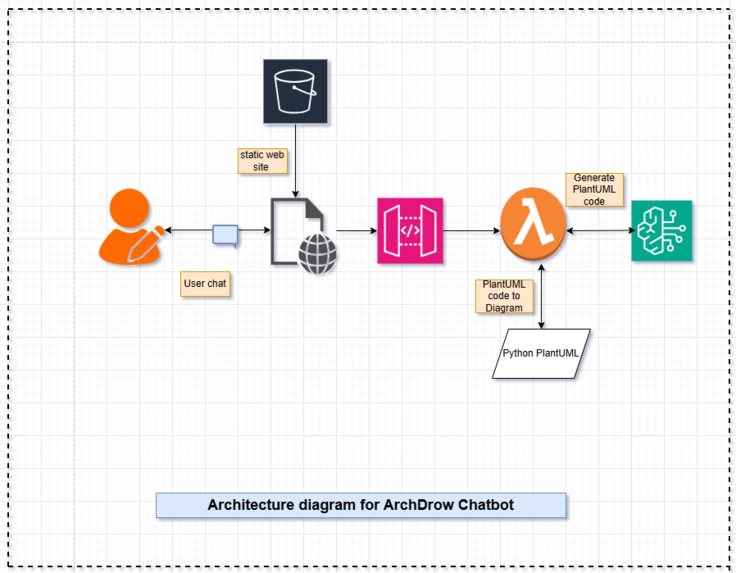
Architecture diagram for ArchDrow Chatbot
-
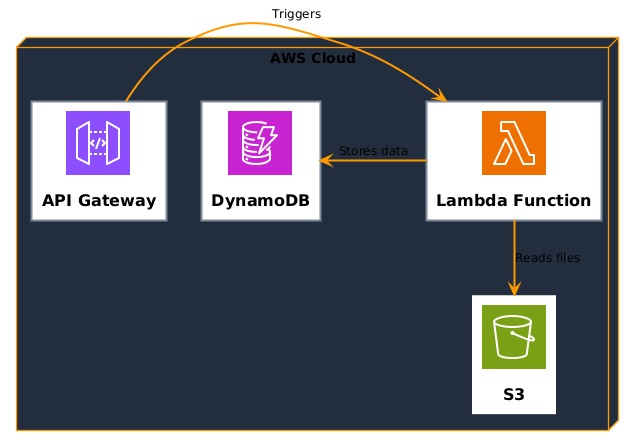
Generated_aws_arc_diagram1
-
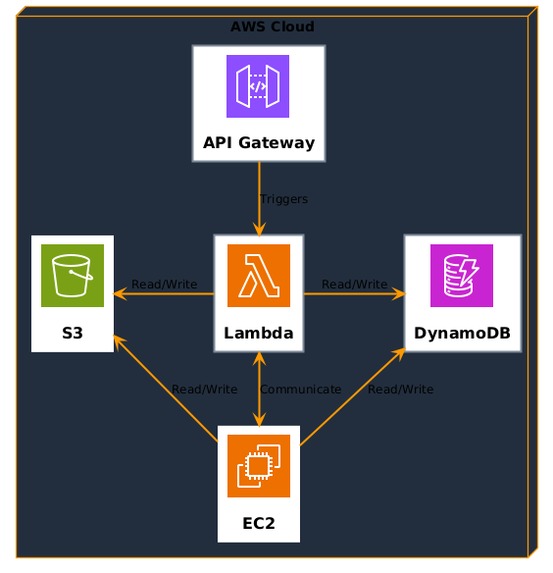
Generated_aws_arc_diagram2
-
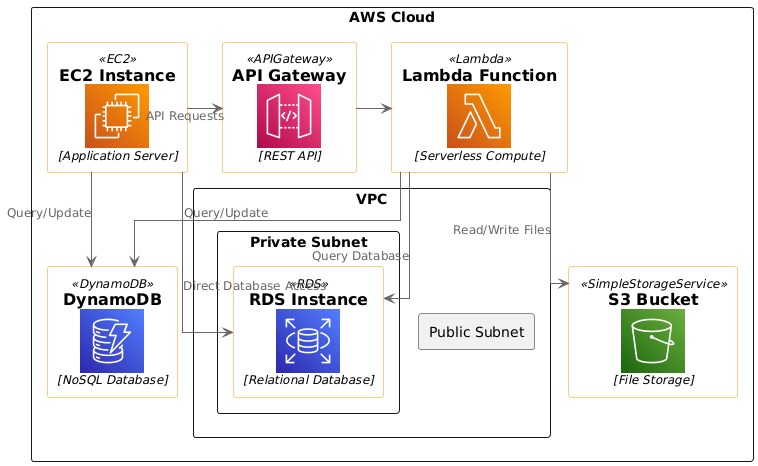
Generated_aws_arc_diagram3
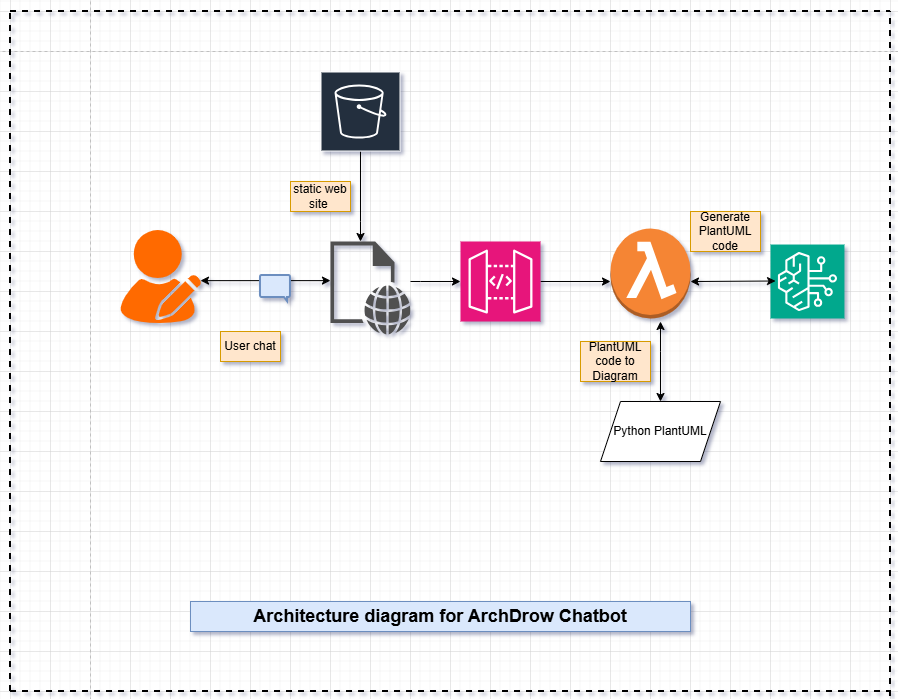
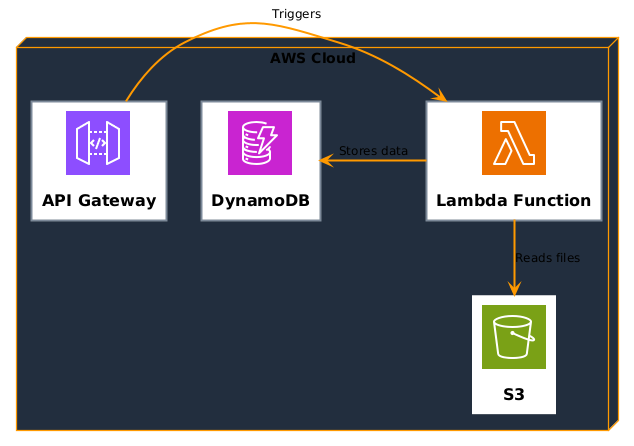
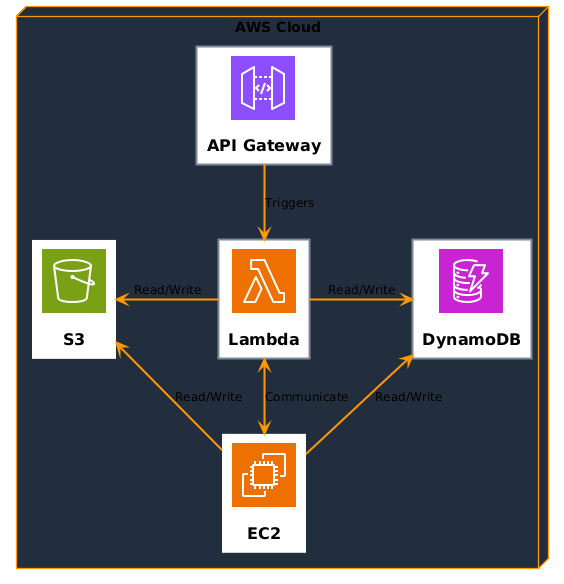
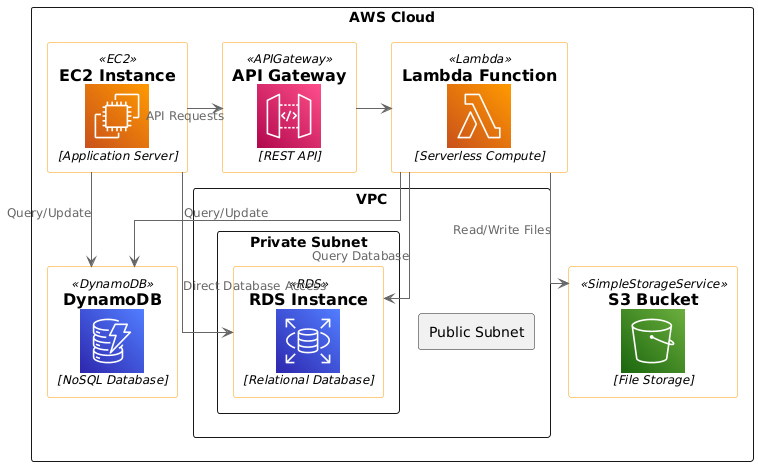
ArchDraw chatbot to automatically generate AWS architecture diagrams can be incredibly useful in multiple technical and business scenarios—especially when working with teams, clients, or cloud infrastructure that evolves quickly.
Why is it useful?
1. Faster Cloud Design & Prototyping No need to manually draw VPCs, EC2s, subnets, load balancers, etc. You describe your architecture in plain English, and the chatbot (like ChatGPT or AWS Q) turns it into a visual diagram.Useful in early-stage planning or brainstorming.
2. Consistency and Standardization Automatically generated diagrams can follow AWS Well-Architected best practices (e.g., secure, multi-AZ, scalable).Reduces human errors in manually drawing diagrams.
3. Saves Time for DevOps / Architects A chatbot can turn existing code (like Terraform or CloudFormation) into a visual map of your resources. Ideal for auditing, presentations, and documentation.
4. Collaboration & Documentation Non-technical stakeholders (e.g., project managers) can understand system design more easily via visuals. Great for onboarding new engineers quickly.
5. Dynamic Updates You can regenerate diagrams as infrastructure changes, making your docs always current.
When should you use automated architecture diagram generation?
When starting a new AWS project and want a visual map When documenting existing infrastructure (from Terraform, etc.) When preparing client presentations When explaining architecture to new team members When comparing two architectures (e.g., monolith vs. microservices)
Example Use Case:
A web app uses API Gateway → Lambda → calls Amazon Bedrock to generate text/image from user prompt → stores results in DynamoDB → optionally logs prompt/output to S3.
** PlantUML Diagram with Amazon Bedrock** @startuml bedrock-architecture
``` === AWS Icons for PlantUML === !includeurl https://raw.githubusercontent.com/awslabs/aws-icons-for-plantuml/v14.0/LATEST/AWSCommon.puml !includeurl https://raw.githubusercontent.com/awslabs/aws-icons-for-plantuml/v14.0/LATEST/ApplicationIntegration/APIGateway.puml !includeurl https://raw.githubusercontent.com/awslabs/aws-icons-for-plantuml/v14.0/LATEST/Compute/Lambda.puml !includeurl https://raw.githubusercontent.com/awslabs/aws-icons-for-plantuml/v14.0/LATEST/MachineLearning/Bedrock.puml !includeurl https://raw.githubusercontent.com/awslabs/aws-icons-for-plantuml/v14.0/LATEST/Database/DynamoDB.puml !includeurl https://raw.githubusercontent.com/awslabs/aws-icons-for-plantuml/v14.0/LATEST/Storage/S3.puml
Generative AI App with Amazon Bedrock
' === Core Services === AWSAPIGateway(api, "Amazon API Gateway", "REST API for client access") AWSLambda(lambda, "Lambda Function", "Processes prompts and calls Bedrock") AWSBedrock(bedrock, "Amazon Bedrock", "Generates response using FMs") AWSDynamoDB(dynamo, "DynamoDB", "Stores user inputs and outputs") AWSS3(s3, "S3 Bucket", "Logs prompts and responses (optional)")
' === Flow === api --> lambda : HTTP request (prompt) lambda --> bedrock : Invoke Bedrock model (text/image/etc.) bedrock --> lambda : AI-generated response lambda --> dynamo : Store result lambda --> s3 : (Optional) Log full interaction
@enduml ```
** Save & Generate ** Save the code as: diagrams/bedrock-app.puml Result: output/bedrock-app.png
Amazon Bedrock Architecture (Serverless AI)
This architecture uses Amazon Bedrock to build a Generative AI backend for a web or mobile app.
Services Involved:
- API Gateway: Accepts user prompts via HTTP (REST).
- Lambda Function: Parses the prompt and interacts with Bedrock.
- Amazon Bedrock: Hosts foundation models like Claude, Titan, and others.
- DynamoDB: Stores user prompts, model outputs, and metadata.
- Amazon S3 (optional): Stores logs or large responses (e.g., images/audio).
Flow
- User sends a request → API Gateway
- Lambda triggers → forwards prompt to Bedrock
- Bedrock generates a result (text/image/etc.)
- Lambda stores result in DynamoDB
- Optionally logs full interaction to S3
Diagram

How we built it
Challenges we ran into
- We've already checked that the Claude Sonnet 4 model does generate valid PlantUML code, but you're still facing issues accessing the model or integrating it in AWS account.
- We’re using Amazon Nova models via Amazon Bedrock, here are some targeted checks and get proper PlantUML code output and ensure smooth access but AWS icons are different.
Accomplishments that we're proud of
In Automated AWS Architecture Diagram Generation
Accelerated Design & Planning Cycles "Reduced architecture design time by 60% by automating visual diagram creation from text or Terraform scripts." Teams no longer start from scratch when mapping infrastructure. Quickly iterate on ideas without needing Visio, Lucidchart, etc.
Improved Cross-Team Collaboration "Enabled non-technical stakeholders to understand cloud architecture through clear, AI-generated visuals." Diagrams help bridge the gap between developers, security teams, and business owners. Promotes better decisions and fewer misunderstandings.
Kept Infrastructure Documentation Up-To-Date
"Achieved near real-time infrastructure documentation by auto-generating diagrams from source-of-truth code (Terraform/CloudFormation)." Reduced drift between deployed infrastructure and documentation. Improved compliance and audit readiness.
Enhanced Onboarding & Knowledge Sharing "Cut cloud onboarding time by 40% with interactive, visual walkthroughs of AWS systems generated by our chatbot." New hires can visually explore how systems work. Fewer repetitive questions for senior engineers.
Aligned with AWS Well-Architected Best Practices "Auto-generated architecture diagrams reflect secure, scalable, and resilient patterns aligned with AWS Well-Architected Framework." Reinforces good design by default. Visual cues highlight bottlenecks, SPOFs, or security flaws.
Integrated with DevOps / CI Pipelines "Enabled automated diagram generation during CI/CD pipelines for architecture-as-code validation." Developers see visual diffs between infrastructure changes. Helpful in PR reviews and deployment approvals.
Supported Dynamic & Customizable Diagrams "Built support for customizable outputs – from high-level overviews to subnet-level network maps – tailored for different audiences." One version for execs, another for ops teams. Saves time making multiple diagram versions.
Multi-Cloud or Hybrid Cloud Awareness (if applicable) "Extended diagram generation to support hybrid AWS + Azure + on-prem environments." Valuable for enterprises in cloud transition. Shows maturity beyond basic cloud usage.
Saved $$$ on Tooling or Manual Work "Reduced reliance on third-party diagramming tools, saving $X annually, while increasing team productivity." Leaner stack. Less time drawing boxes and more time building.
Positive User/Team Feedback
"Received 90% positive feedback from users citing clarity, speed, and ease of understanding cloud topologies." Reinforces user value and adoption. Great for internal reporting or product marketing.
What we learned
From Automating AWS Architecture Diagram Generation
Clarity Beats Complexity Diagrams are only useful if they’re easy to understand. Even with full infrastructure detail available (VPCs, subnets, route tables), we learned that simplifying views for different audiences (execs vs engineers) makes diagrams far more effective.
Human Input Still Matters Automation is powerful, but it needs guidance. We learned that contextual inputs (naming, business purpose, user flows) from humans are critical for accurate and meaningful diagram generation — especially in large-scale systems.
- Architecture is Not Just Technical — It’s Communication
Automatically generated visuals became a shared language across developers, ops, and stakeholders. We underestimated how much this would improve collaboration and reduce misalignment.
Infrastructure as Code = Diagram as a Service By tapping into Terraform or CloudFormation, we learned that diagrams could be kept up-to-date continuously, not just created once and forgotten. This led to better documentation and reduced technical debt.
- Standardization Drives Trust Using AWS-verified icons, consistent layouts, and naming patterns helped the team trust and use the diagrams more confidently.
What's next for ArchDraw
Next Steps After Automating AWS Architecture Diagrams
Add Architecture Drift Detection Goal: Detect if your live infrastructure differs from your source-of-truth (IaC). Compare live AWS state (via AWS SDKs) vs. code (Terraform/CfN) vs. diagram. Alert or flag when something’s changed outside expected workflows.
Support Multiple Diagram Views Goal: Make diagrams more usable for different audiences. High-level overview (for execs/stakeholders) Security-focused view (e.g., IAM, VPC flow) Cost-focused view (tagged with usage/cost) Developer-focused view (API flows, Lambda triggers)
3.Enable Team Self-Service Goal: Let any developer or PM easily generate architecture diagrams on demand. Provide a chatbot, CLI tool, or Slack bot that generates up-to-date diagrams from keywords or IaC files. This democratizes access and reduces dependencies on architects.
Connect to Live AWS Environment Goal: Visualize actual AWS resources in real-time. Use APIs or tools like CloudMapper, Perspective (AWS), or custom scripts to visualize live infrastructure. Can be used for audits, security reviews, or incident response.
Add Annotations & Business Context Goal: Go beyond just tech — add purpose. Annotate diagrams with app names, business domains, SLAs, owners. Helps with accountability and understanding value streams.
Built With
- api
- bedrock
- lambda
- python
- s3


Log in or sign up for Devpost to join the conversation.