-
-
Am I Covered?
-
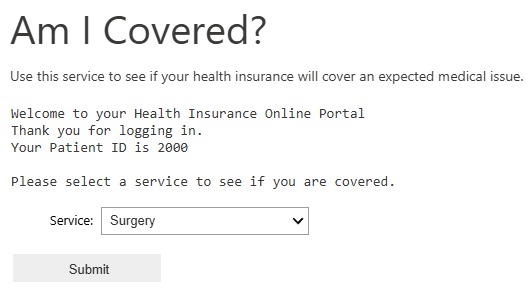
Sample Portal Screen - Fabric Notebook
-

Sample Response - OpenAI

Inspiration
Have you ever wondered why you cannot get a reliable answer from a hospital or health insurance company when you simply want to know if a medical issue is covered by your insurance? It’s because the information that determines your insurance coverage is not aggregated into a single accessible location for the provider to appropriately determine coverage. That’s where Microsoft Fabric comes in! By combining all the data from an infinite number of sources into a single platform, it simplifies the data accessibility and retrieval processes. Add in some powerful AI features and making sense of all the data becomes even easier.
What it does
Am I Covered? is an MVP (minimum viable product) that demonstrates how health related data can be gathered and queried to answer questions about health insurance coverage. Since different health providers all deliver their own data in different ways, the mechanisms to grab the data from different sources and combine it into a common platform is needed. Am I Covered? shows that multiple data sources can be accessed, queried, and combined to generate answers to health insurance related questions. Specifically, it answers if a certain medical issue is covered by insurance. It does this through a series of steps:
• Take input from the user – the user submits a request about a medical issue to see if insurance will cover it.
• Data about the medical issue is aggregated – this can come from an infinite number of sources. For demo purposes, data in Am I Covered? comes from text files, delta tables, and a mirrored AzureDB.
• Data is queried – SQL queries are used to determine more information that is required to answer the question if the medical issue will be covered. Am I Covered? gathers the cost of the procedure, the deductible amount in the person’s health insurance plan, previously paid invoices during the plan year, and the service type (inpatient or outpatient) based on the location of where the procedure will be administered.
• AI is used to determine coverage – the information is formed into a question and OpenAI services are used to provide an answer.
How we built it
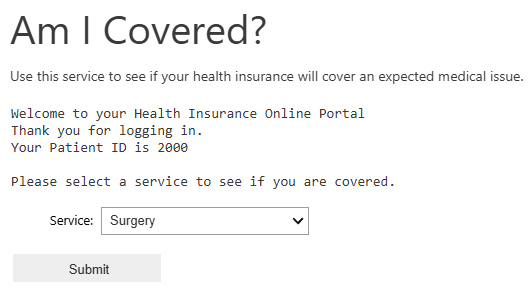
A Fabric capacity was first built in the Azure portal with SKU F64, the minimum SKU needed to use OpenAI services. Once the capacity was ready, a new Workspace was created in Fabric. From there an Environment with prerequisite libraries was built, a Lakehouse was added, and a Notebook was added. Within the Lakehouse, text files were used to generate some delta tables and a mirrored AzureDB was added as an additional data source. The Notebook environment was changed to the new default and a basic user input screen was created using widget code. The user submits the input based off the form and SQL queries from the multiple data sources are run against it to determine the deductible, service cost, service location, service type, and previously paid invoices. The information is then formed into a question and submitted to an OpenAI chat completion to receive an answer. The answer demonstrates it is possible to determine insurance coverage if all of the information needed is accessible.
Challenges we ran into
The biggest challenge was determining correct permissions for things like mirroring the AzureDB and generating an OpenAI API Key. I accidentally skipped over the part of the Welcome description to the hackathon that provided a link to register for an API Key. Instead I worked through the normal process to generate a key and there was a learning curve involved. Nothing a few tutorials and web searches couldn’t fix.
Accomplishments that we're proud of
Prior to joining the hackathon I knew absolutely nothing about Fabric. I enjoyed the Getting Started with Fabric modules and learning about all of the various concepts. It’s always fun to take a new concept and use it to create real life solutions.
What we learned
The big one: how Fabric works! More specifically: Workspaces, Notebooks, Lakehouses, Data Pipelines, Data Flows, Data Activators, and Real-Time Intelligence. Even more specifically: Fabric administration and capacity settings, OpenAI API keys and chat completion syntax, mirroring AzureDB in Fabric, and Notebook Apache Spark syntax.
What's next for Am I Covered?
While the MVP demonstrates the feasibility of how to query large amounts of information from numerous data sources to answer questions about health insurance coverage, it is a far cry from an actual solution. A better system will need to pull data from provider APIs and use shortcuts to gain access to databases hosted in completely separate environments, such as AWS servers.
Of course, users would not run a Notebook to submit requests either. A better system would be hosted from a health insurance company portal, where a user logs in and is able to look up the same services offered at many different locations to price compare. By comparing prices, it would help reduce overall costs of services because people will choose the most cost effective option and other providers will reduce costs to remain competitive.
The system could also be smart enough to foresee additional services/procedures that may come up during a procedure so users are aware of additional costs that may arise. For instance, if someone goes in for a surgery procedure, the system can look up the same procedure from other past patients and include add-on costs in the answer that may have been needed for some people. Service codes are generally used in health insurance claims so many additional costs can be determined by accumulating all of the past service codes and providing the routine basic costs of the procedure along with a list of possible unexpected add-on costs.
Once the user has the procedure and location determined, the question can then be asked: Am I Covered?
It might take some time before all of the information can be gathered. In this case, the user submits the question, and their query enters a queue for answering. The user is told they will be notified once the results are ready. A Data Activator can be used to trigger events such as a Data Pipeline to gather the appropriate information for the question at hand. Once the answer is ready, the user is notified, and the answer is made available to view in the portal.


Log in or sign up for Devpost to join the conversation.