-
-
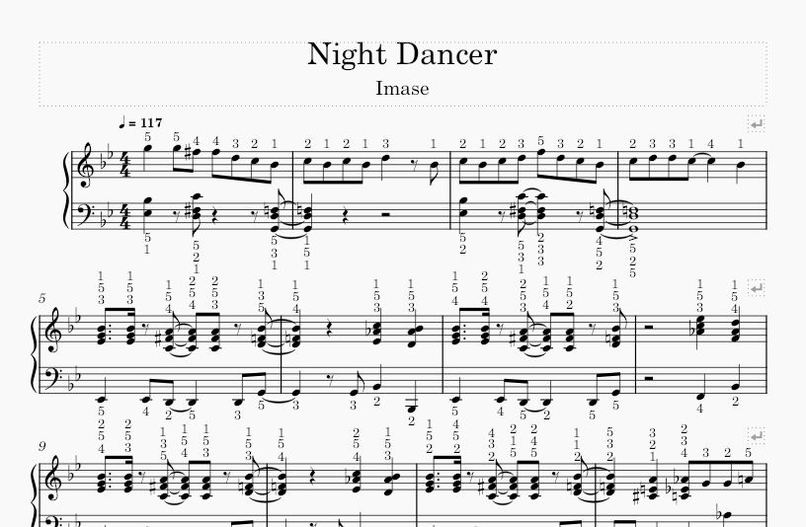
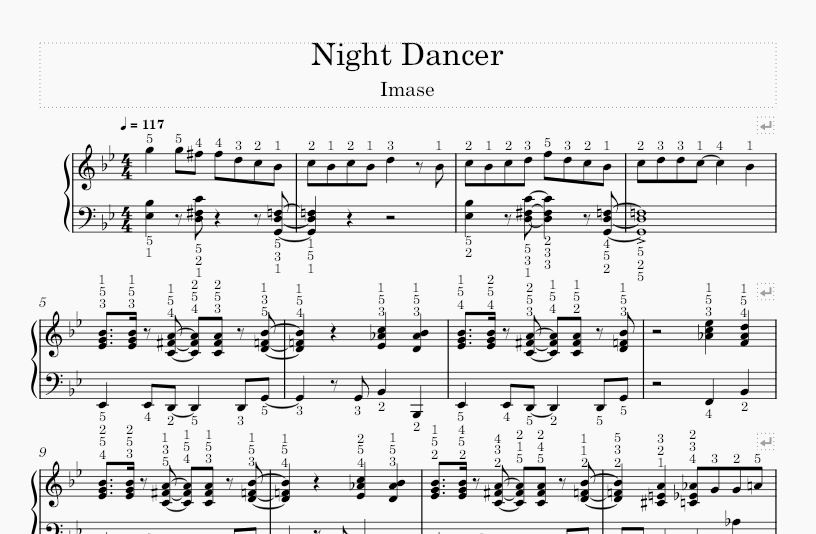
EduPiano's annotated sheet music output.
-
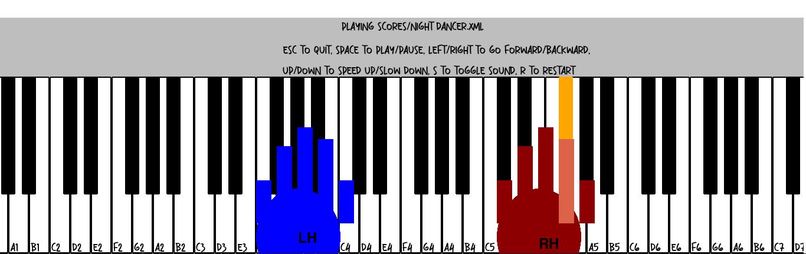
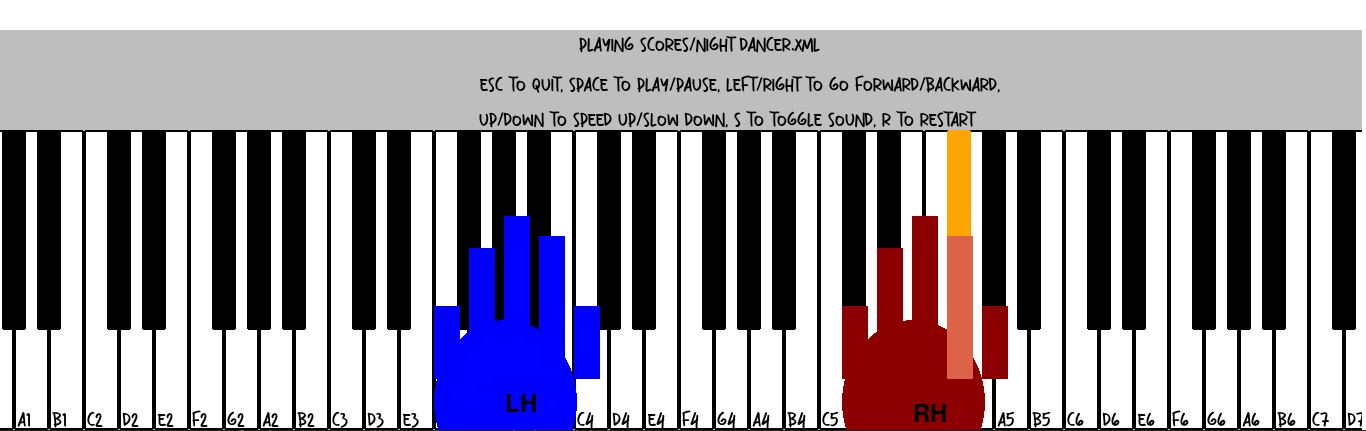
EduPiano's 2D piano keyboard display output.
-
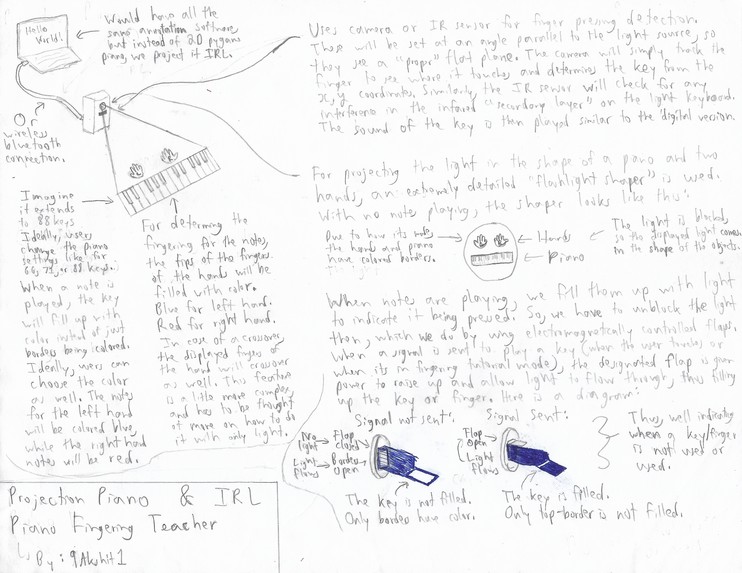
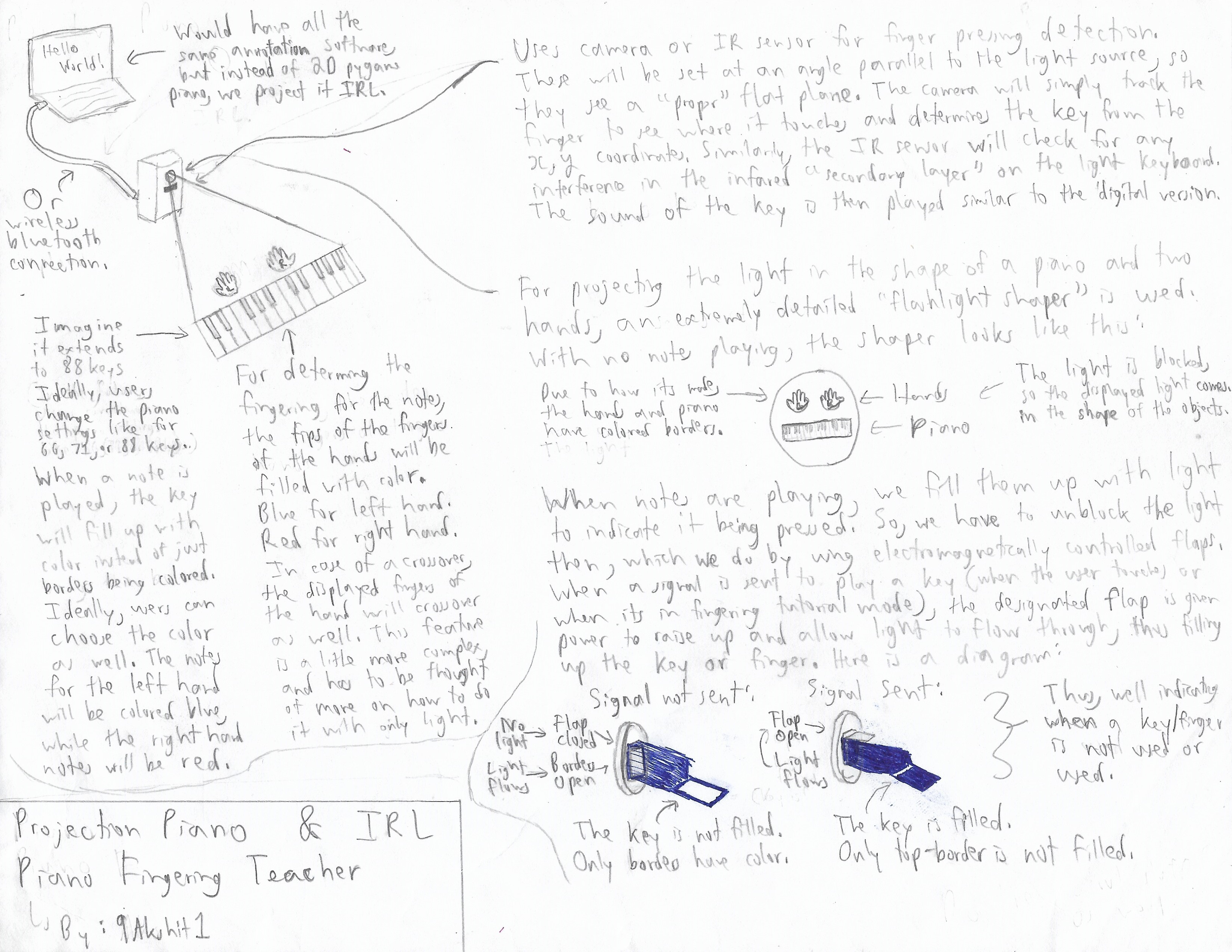
My Projection Piano Design with Detailed Explanations.
-
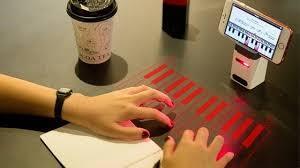
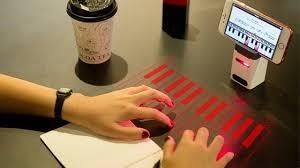
What the Projection Piano could look like. (https://www.kickstarter.com/projects/ikeybo/ikeybo-worlds-most-advanced-projection-keyboard-an)
-

Batman Signal Flashlight Cutout (just to show what a flashlight cutout/shaped looks like for easier understanding).
-
 GIF
GIF
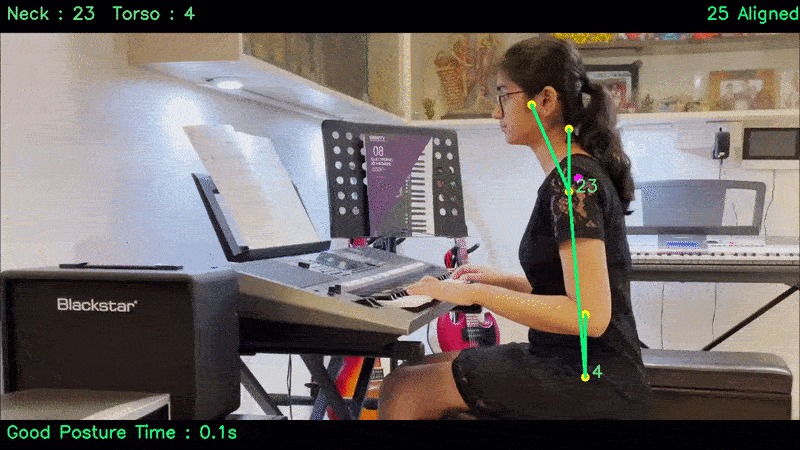
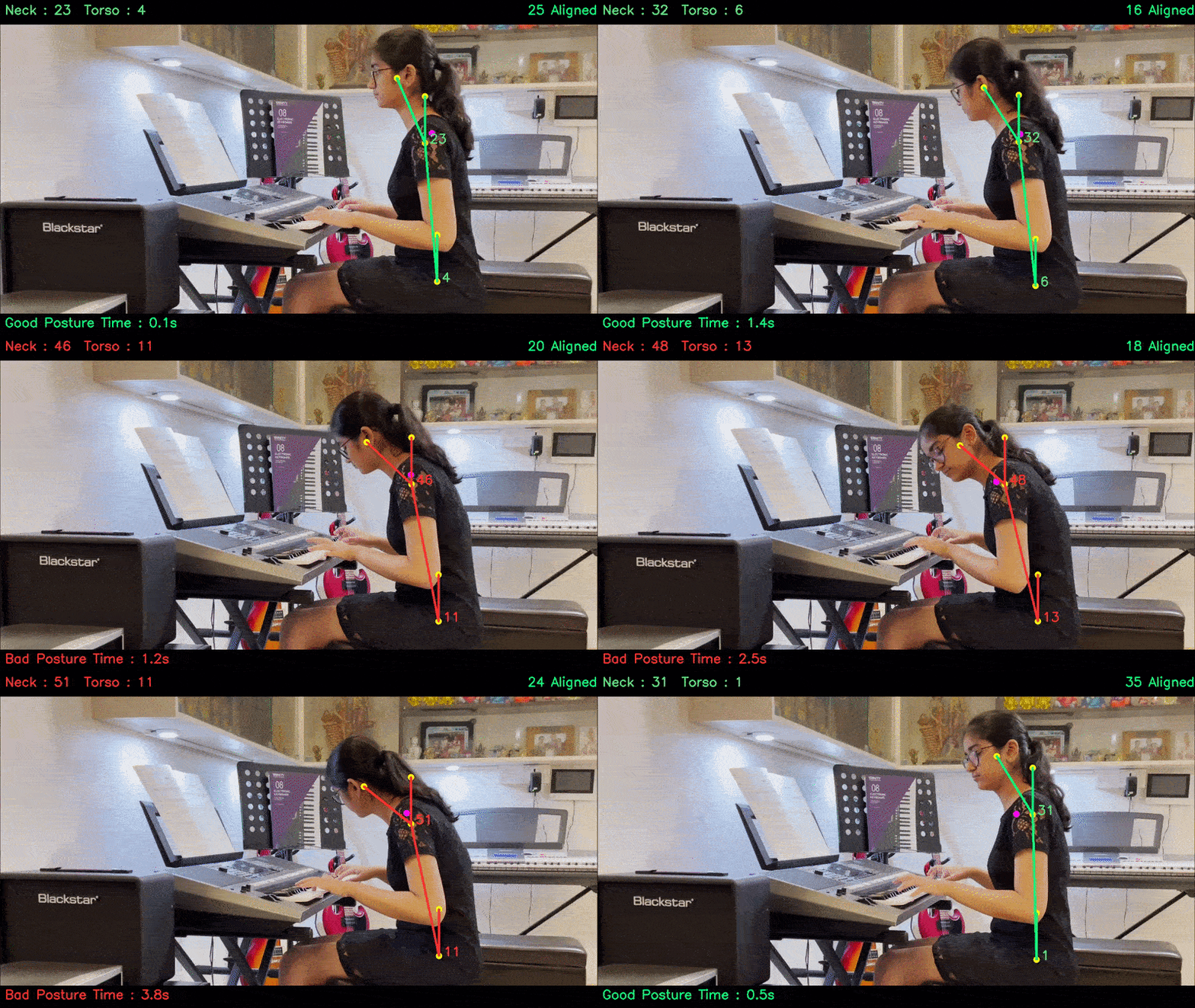
Piano Posture Detection, but mine would correct the user. (https://learnopencv.com/building-a-body-posture-analysis-system-using-mediapipe/)

Inspiration
During these two weeks, I was preparing for my piano exam (fun fact: I finished it today). While learning my music pieces for the exam, I struggled to find the most comfortable finger positions on the piano. Similarly, every pianist has wished for a tool that generates piano fingerings and guides the user step by step (since we don't always have a piano teacher around). So, I took on the challenge of creating one, aiming to make it as accurate as possible by considering different user-specific parameters. Thus, the creation of EduPiano. Please enjoy!
What Issue does it address
EduPiano addresses the issue of poor teaching, and lack of resources for teaching students. It essentially acts as a second teacher for aspiring pianists by goign step by step with them and having infinite patience. The projection piano (which is in development right now), can repalce a physical piano for students in poorer areas. As this proejct grows to other instruments (helping every musician all over the world), gains other features like posture detection (actlign like there is a real piano teacher beside the student), a musical theory website or downloaded theory (so it can speak or display it to the students), and correcting a student's overall playing (listening to them and helping their dynamics, timbre, rhythm, etc...). In the future, this project has the potential to impact musicians aroudn the globe, helping poorer areas develop musical talent!
What it does
EduPiano generates the "best" finger positions for a music piece based on the user's hand size, the song's sheet music, and other parameters, annotating them directly onto the sheet music. It then uses a 2D keyboard in Pygame to show the fingering and hand positions. Finally, as an additional side project, I designed a physical tool for the user to set up for projecting light on your piano/keyboard. It will point out the keys to press and the fingers to use, teaching the user step-by-step how to play the music piece. While it may not be 100% accurate, it provides a solid foundation for users to build on. I believe that future developments like adding more instruments will make it an invaluable tool for musicians.
How I built it
I built the entire project using Python and its libraries. For reading and annotating the sheet music with fingerings, I used the music21 library and some fingering-generating algorithms. The sheet music is read and annotated by controlling the elements of the .XML file and adding new elements like fingerings (this is done in the "annotate.py" file). The fingering algorithms assess how suitable or comfortable a finger arrangement would be for a group of notes, considering variables like movement velocity (handled in the "Hand.py" file & class).
The 2D keyboard and sound elements are relatively simple but tedious. The keyboard is built using Pygame, with shapes representing the keys, hands, and fingers. For the sound, I manually recorded all the notes to play notes and chords. While that sounds simple, it is almost impossible to play a bunch of notes at the same time and for the correct duration. The best way I found was to use Fast Fourier Transform to process the .wav files and add onto them with the other notes' .wav files. I utilized different "threads" of sound playing at the same time. Even still, in the end, I wasn't able to achieve a fully synchronized sound for the correct duration (partly since the human is sensitive to discrepancies). All of this is in the "keyboard.py" file.
Since I was already using Pygame, I decided to make a GUI on Pygame. Luckily I was able to do this quickly, but it came out basic, and not very appealing to the eyes. I wish I had more time to develop it better so that there would be more user freedom. Specifically, I wanted to allow the user to upload .XML files, .PIG files, and .MIDI files, but the only one that worked was .XMl and it was the first one I found. In hindsight, I should've built the GUI on a domain or website, because it would've been easier to upload and share the output files.
Finally, I designed a projection piano/keyboard that displays light in the form of a piano (or even on an actual piano) and goes through the notes step by step. The flashlight cutouts (visualize a flashlight with a specially shaped cap to create Batman's (ex:) bat signal. An image is provided in the gallery), with a piano and two hands' cutouts, project the piano keys and finger positions. As the piece progresses, specific keys and fingers light up to teach the user how to play in real life. I wasn't able to finish this part, as I'm still deciding on how to show which keys are pressed and which fingers are used. My options are to have individual light sources for each key and finger or use controllable "flaps" in the flashlight shaper to highlight the keys and fingers. So, in the code, instead of updating on Pygame, it would control the light sources or flaps to display the output. This is explained and shown by a self-drawn/written diagram in the image gallery.
Challenges I ran into
Fingering Generation
- Creating a class for each note was tedious and time-consuming, especially since I started this project only a week ago and was under tight time constraints.
- I also had to physically check fingerings on my piano, noting which were realistic (like avoiding the ring finger crossing over the middle finger). I even considered using machine learning, but found it too complex for the time available. In future versions, I plan to incorporate 3D simulation data and machine learning.
- Annotating and reading the sheet music .XML files was challenging due to the difficulty of understanding the format and the scarcity of tutorials.
2D Keyboard Construction
- While the keyboard itself wasn't hard to build, creating the hands and fingers was tricky. I'm not very experienced with Pygame, so when trying to rotate the fingers for realistic movement, I struggled and still don't fully understand why it didn't work.
- I'm also not satisfied with the graphics, as they are just rectangles and the program is slow. The slowness comes from the sequential playing of notes and the need to maintain the correct duration for each note. (I sometimes wish I could've used C++ or Java for better performance.)
- Running and listening to the program was also frustrating, as I had to re-run the annotating file every time (since they shared uncopiable information), which took about 30 seconds depending on the piece's length. This isn't a major problem but becomes annoying with constant repetition, especially under time pressure.
Music/Sound Playing
- I manually recorded every note and modified them using soundwave software. While I could've downloaded them online, I didn't have the budget and wanted the "full" experience (a decision I now regret).
- The main challenge arose with chords. I tried various methods to construct chords: summing up recorded waveforms, using sinewaves to generate notes, and more. The first two methods were somewhat successful but not perfect, and I couldn't find good tutorials, making it very difficult.
Accomplishments that I'm proud of
Although I'm not fully satisfied with the 2D keyboard graphics and sound effects, I believe I created a relatively usable tool for pianists. I tested it on one of my new pieces, and about 83% of the note fingerings were correct (except for some crossovers). Overall, I'm proud of the decent accuracy achieved. With more time, I could refine the project and possibly publish it. I'm also proud of developing a nearly complete design for the piano project. The main challenges will likely involve creating numerous precise, electromagnetically controlled 'flaps' and ensuring the product is cost-effective. However, if I can overcome these hurdles, I believe it could become a viable product for pianists. Additionally, it could potentially be adapted for other instruments, similar to EduPiano's software.
What I learned
As with every project, I learned more about different Python libraries and how to manipulate them to fit my needs. I also discovered that it's possible to generate sound using sinewaves, something I knew theoretically but hadn't tried to code before. I gained a deeper understanding of Pygame, which will help in future projects. I also realized that there are many solutions to a problem, and proper planning and research can significantly improve efficiency and decision-making.
What's next for EduPiano
One of my ideas for this project was to create a Piano Posture Fixer, but I ran out of time. Using existing posture computer vision Python programs, it would analyze the user's piano posture, suggest corrections, and explain the benefits. This feature would be extremely useful for beginners who tend to slouch, bend their fingers, or sit too comfortably. Correcting posture—like straightening your back, maintaining the right distance, and curving your fingers—can immediately improve control over the volume and articulation (staccato and legato) of the notes. In the future, I plan to expand this project to support multiple instruments, like the saxophone, trumpet, flute, percussion, strings, etc. I would apply the same fingering generation, 2D to 3D simulation, and music features to these instruments. To make it organized, I would develop it into a proper app or website with music theory resources and a platform to connect with other players and find future band members or teachers. This would transform the project from a one-week hackathon speedrun into a functional and notable app.


Log in or sign up for Devpost to join the conversation.