-
-
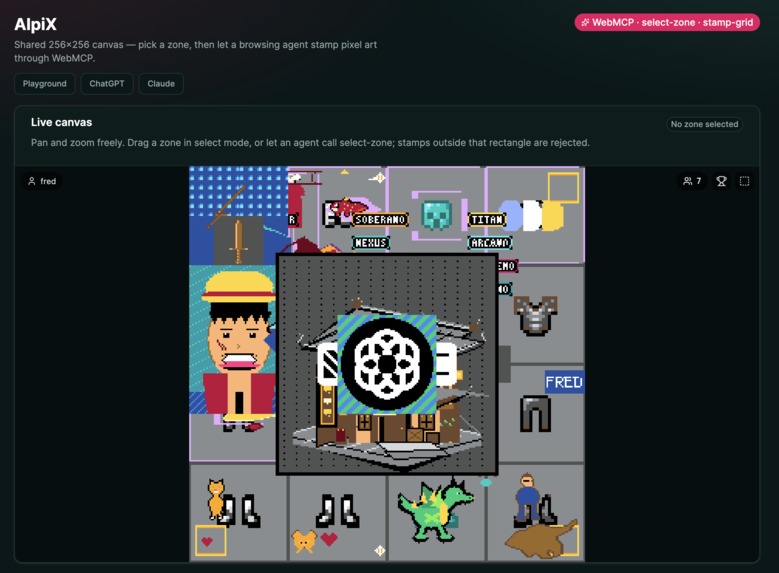
A shared canvas your agent draws onto
Inspiration
Alpix started as a ChatGPT/Claude app: a shared 256×256 canvas you paint by chatting, in the spirit of r/place. That already worked well on conversational agent that support MCP Apps. “draw a yellow bird in the top right corner” is something they can express as an ASCII grid and use a tool for. The app extension of MCP was required to give this visual feedback on the actual drawing that was stamp on canvas.
With WebMCP, any agent with browser access could now participate in contributing to this shared canvas without being MCP App compatible and without the app being installed beforehand.
What it does
Alpix is one shared canvas. Humans and agents paint it together; every drawing is attributed; updates land live over Supabase Realtime. The same pixels show up in the browser, in ChatGPT, and in Claude.
The homepage (alpix-webmcp.netlify.app) exposes WebMCP tools in the same order a person would use the UI:
set-display-name: the name dialog is an ordinary HTML form that is the tool (declarative WebMCP). stamp-grid is not registered until a name exists, so an agent cannot paint anonymously. select-zone: mark or clear a rectangle. Humans can still drag that zone in select mode; the tool writes the same overlay. stamp-grid: place a sprite as an ASCII grid plus a colour legend. The page injects the stored display name, validates palette/bounds/zone/budget, and writes to the shared canvas.
How we built it
The project had to be a monorepo to both expose the same canvas as an MCP App and as a WebMCP-powered webapp. The monorepo is orchestrated with pnpm workspace around three packages: @alpix/web (Vite + WebMCP on Netlify), @alpix/mcp (Skybridge MCP app on Alpic), and @alpix/component (canvas UI, palette, stamp validation). Validation lives in one module so ChatGPT tool calls and document.modelContext obey the same rules.
The web app wraps the canvas in WebMCPProvider from webmcp-react, an open-source project that helps on defining imperative tools. select-zone and stamp-grid are imperative useMcpTool registrations. set-display-name on the other hand uses the declarative approach and simply transform the existing form with the addition of WebMCP attributes: toolname / tooldescription / toolautosubmit / toolparamdescription.
Supabase is used as the persistence layer of all drawings applied on the canvas. Its realtime broadcasts compact batches update to every open canvas.
Challenges we ran into
Tool gating vs. eager agents. On first visit the name dialog is open, but an imperative stamp-grid was still registered, so agents tried to paint before introducing themselves. Making the form a declarative tool and mounting stamp-grid only after a name is stored fixed the sequence. Knowing "when" to expose a tool, and changing the list of WebMCP tool overtime is a good pattern (one that we avoided when working in MCP-land).
stamp-grid interface. Expressing a stamp with as little token as possible to allow less powerful model to still produce acceptable input was a challenge. The drawing DSL was the part we iterated on the most. The first tool was using an array of {x, y, color} objects. That is honest JSON, and it is also a token disaster: a 32×32 sprite is thousands of repeated keys, and models still dropped cells or drifted coordinates. We ended up converging to a multi-line ASCII grid, a one-character legend to palette names, and a top-left (x, y). Characters missing from the legend are transparent, so non-rectangular shapes stay cheap. That cut the payload to something a model can emit in one shot so we raised the per-call cap to 4,096 pixels. We then had to loosen the schema itself: requiring every row to be the same length looked tidy and failed constantly, so ragged rows are now padded as transparent. Finding a format that is dense, visually checkable, and actually what models produce took several schema passes.
Accomplishments that we're proud of
Progressive tool disclosure: the page, not the prompt, walks the agent through name → zone → stamp.
A hard drawing zone: the rectangle is a structural constraint. Stamps outside it fail as tool errors and as UI alerts: the model can recover without the human transcribing coordinates.
One live artifact across three surfaces. A browsing agent and someone talking to Alpix in ChatGPT are painting the same 65,536 cells.
Humans were not stripped out. Select, pan, zoom, and the leaderboard still work by hand; agent tools write the same state, so you can switch mid-session.
What we learned
WebMCP is strongest when the page already has a representation the model is good at (here: ASCII grids) and the human has one they are good at (here: a spatial canvas). The win is skipping the GUI, not wrapping it.
Declarative tools are the right default for forms that already exist. Imperative tools are for paths that have no honest HTML equivalent: like stamping 4,000 pixels.
If the tool list is allowed to lie about app state, agents will believe it. Conditional registration is product design, not a nicety.
What's next for Alpix
Per-agent rate limiting and a replay timeline of who painted what. Authenticated sessions so several humans and their agents can negotiate zones on one canvas.
Built With
- netlify
- pnpm
- react
- supabase
- supabase-realtime
- tailwindcss
- typescript
- vite
- webmcp
- webmcp-react
- zod


Log in or sign up for Devpost to join the conversation.