-
-
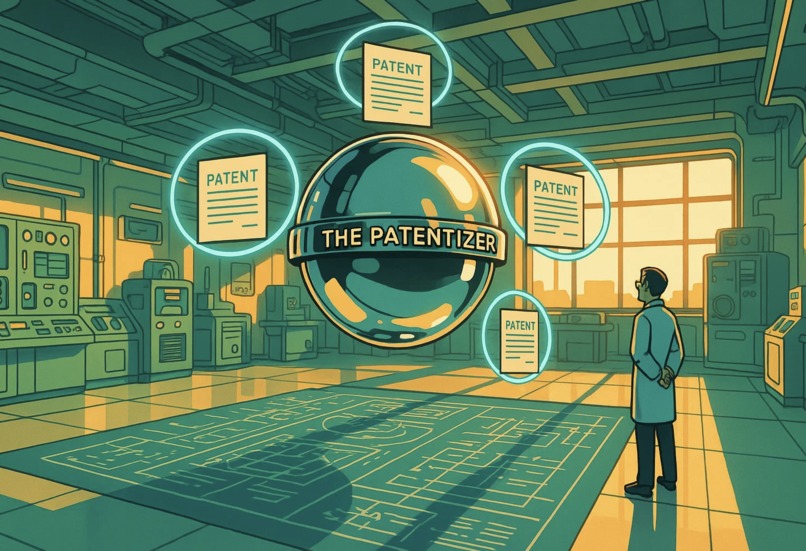
THE PATENTIZER!
-
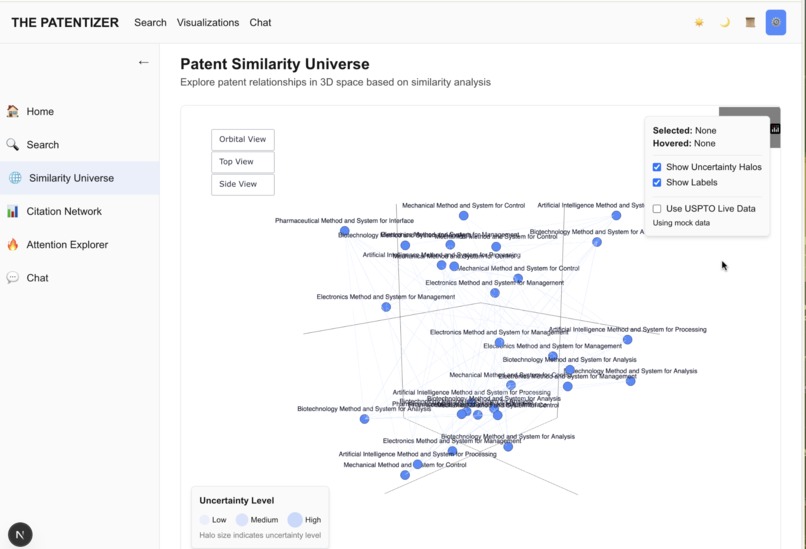
Similarity Universe
DEV NOTE 🙋🏼♂️: Hi everyone! My name is Chris Dukes, and below is my entry for the Perplexity Hackathon with a final submission deadline date of May 28, 2025. I will likely be making small, iterative changes between now and the finished deadline, so please excuse any updates until that time! I entered this Hackathon as a way of showcasing everything I've learned over my exposure to generative AI. I'm not an engineer by trade; nor do I have a formal degree in computer science. I'm simply a curious tinkerer who at one point, understood ChatGPT as only a nifty magic trick that could do some cool things with very limited context. This was back in September 2024. Through October until now, I've dedicated all of my free time to studying generative AI as an industry, as I'm a firm believer in its potential. I think of it as the next "PC", and companies are just now starting to jump on board buying a "new PC" and putting it in the office and everyone's looking like "what is this thing?" 😅. With that, I present the culmination of months of study, research, testing, retesting, to put together a project in order to show, with the right resources, that ANYONE can master generative AI 🤖. Enjoy! - Chris Dukes
THE PATENTIZER
A next-generation legal tech platform that applies diffusion model mathematics to the patent landscape.







Table of Contents
- Overview
- Features
- Installation
- Usage
- Architecture
- API Documentation
- Contributing
- Testing
- Deployment
- Project Status
- License
Overview
THE PATENTIZER is a cutting-edge legal tech platform built for the Perplexity Hackathon. It combines diffusion model mathematics with patent analysis to deliver unprecedented insights through interactive visualizations and AI-powered reasoning.
Key innovations include:
- Diffusion-based patent similarity with uncertainty quantification
- Multi-modal fusion of patent text and diagrams
- Real-time USPTO scraping with live patent data
- Perplexity Sonar API integration for advanced legal reasoning
- Interactive 3D visualizations with uncertainty halos
Features
Core Capabilities
- Interactive 3D Patent Universe: Explore patent relationships in a 3D visualization with orbital navigation and uncertainty halos
- Citation Network Analysis: Interactive graph visualization for legal precedent mapping
- Cross-Modal Attention Explorer: Visualize text-diagram relationships in patents
- Advanced Search Filters: Refine patent searches by domain, assignee, year ranges, and more
- AI-Powered Chat Interface: Engage with patent data using natural language through Perplexity Sonar
- Streaming Responses: Real-time streaming via Server-Sent Events for responsive experience
Technical Features
- Dual Interface: Both Panel dashboard and modern React/Next.js frontend
- Theme System: Consistent light/dark/sepia themes across interfaces
- API Layer: FastAPI-based REST and WebSocket endpoints
- USPTO API Integration: Secure credential handling and data retrieval
- Responsive Design: Optimized for desktop, tablet, and mobile devices
Installation
Prerequisites
- Python 3.11+
- Node.js 18+ (for React frontend)
- Git
Backend Setup
Clone the repository:
git clone https://github.com/clduab11/the-patentizer.git
cd the-patentizer
Create and activate a virtual environment:
python -m venv venv
source venv/bin/activate  # On Windows: venv\Scripts\activate
Install Python dependencies:
pip install -r requirements.txtSet up environment variables: Create a
.envfile with required API keys:PERPLEXITY_API_KEY=your_api_key_here USPTO_API_KEY=your_uspto_key_here
Frontend Setup
Navigate to the React frontend directory:
cd patentizer-reactInstall Node.js dependencies:
npm install
Usage
Panel Dashboard
Start the Panel dashboard:
python dashboard_app.pyThe dashboard will be available at http://localhost:5006
Use the dashboard to:
- Search for patents by number or keywords
- Visualize patent similarity in 3D space
- Explore citation networks
- Analyze cross-modal attention between text and diagrams
- Chat with the AI assistant for legal insights
React Frontend
Start the API server:
python api_server.pyThe API server will run at http://localhost:8000
Launch the React development server:
cd patentizer-react
npm run dev
The React frontend will be available at http://localhost:3000
Interact with key features:
- Navigate using the sidebar menu
- Search for patents with advanced filters
- Explore 3D visualizations and citation networks
- Toggle between light/dark/sepia themes
Automated Demo
Run the automated demo script to showcase visualization capabilities:
python demo_automation.py
The script will:
- Input sample patent numbers (11000000, 10000000, 9000000)
- Generate visualizations automatically
- Demonstrate key system features
Architecture
THE PATENTIZER follows a layered architecture:
- Frontend:
- Panel-based dashboard for immediate use
- React/Next.js frontend as the strategic direction
- API Layer: FastAPI-based REST and WebSocket endpoints
- Core Processing: AI-driven analysis modules
- Diffusion-based similarity
- Multi-modal fusion
- Legal reasoning
- Data Pipeline: ETL processes for patent data
- External Integrations: USPTO for patent data and Sonar for legal insights
For detailed architecture information, see patentizer_architecture.md.
API Documentation
The API provides endpoints for patent data retrieval, analysis, visualization, and AI chat:
- Analysis Endpoints:
/api/v1/analysis/similarity,/api/v1/analysis/legal-reasoning - Visualization Endpoints:
/api/v1/visualization/similarity-universe,/api/v1/visualization/citation-network,/api/v1/visualization/attention-explorer - Chat Endpoint:
/api/v1/chat,/api/v1/chat/stream - Dashboard Endpoints:
/api/v1/dashboard/metrics,/api/v1/dashboard/recent-patents
For complete API documentation, see api_docs.md.
React Frontend Architecture
Our React frontend is built with a modern component architecture and state management approach:
DataSourceContext Provider System
- Centralized data source management
- Configurable API endpoints and data origins
- Consistent data access patterns across components
- Context-based state sharing with optimized re-renders
Visualization Components
- AttentionExplorer: Visualizes cross-modal attention between patent text and diagrams
- SimilarityUniverse: 3D interactive visualization of patent relationships with uncertainty halos
- CitationNetwork: Force-directed graph visualization of legal precedent and citation relationships
State Management
- Context-based providers for global state (theme, data sources)
- Custom hooks for component-specific logic
- Optimized rendering with React Query for data fetching and caching
- Separation of UI state from business logic
Theme System
- Comprehensive light/dark/sepia modes with CSS variables
- Dynamic theme switching with persistent preferences
- Consistent styling across all components and pages
- Optimized for accessibility and user experience
Contributing
Development Environment Setup
- Follow the installation instructions above
- Review developer_guide.md for detailed development guidelines
Development Workflow
- Setup: Use Python 3.11+ in a virtual environment and Node.js 18+ for React
- Testing:
- Add backend tests in the
/tests/directory - Add React tests in the
/__tests__/directory
- Add backend tests in the
- Documentation: Update documentation for API and component changes
- Style:
- Follow PEP 8 for Python code
- Follow ESLint guidelines for JavaScript/TypeScript
For more details on contributing, see developer_guide.md.
Testing
Backend Testing
# Run all tests with coverage
python run_tests.py

# Run tests with specific options
python run_tests.py --no-verbose  # Without verbose output
python run_tests.py --no-coverage  # Without coverage reporting
python run_tests.py --no-html  # Without HTML coverage report

# Run specific tests
pytest tests/test_uspto_scraper.py  # Run specific test file
pytest tests/test_uspto_scraper.py::TestClass::test_function  # Run specific test function
Frontend Testing
# Navigate to React directory
cd patentizer-react

# Run all tests
npm test

# Run tests with coverage
npm run test:coverage

# Run tests in watch mode
npm run test:watch
Deployment
Docker Deployment
# Build and run all services
docker-compose up --build

# Run specific services
docker-compose up backend frontend
Kubernetes Deployment
Kubernetes manifests are available in the /kubernetes directory:
backend-deployment.yaml: Backend deployment configurationfrontend-deployment.yaml: Frontend deployment configuration
For CI/CD details, see docs/ci_cd.md.
Project Status
The project currently offers dual interfaces:
- Panel Dashboard: Stable with all features implemented
- React Frontend: In active development with core features complete
For feature parity status, see docs/feature_parity_matrix.md.
React Frontend Status
The React frontend implementation currently includes:
- Modern project structure with Next.js and React
- Theme system with light/dark/sepia modes
- API client with React Query for data fetching
- Core visualization components
- Patent search and detail views
- Responsive design for all device sizes
- Testing suite with Jest and React Testing Library
License
**: This project is licensed under a proprietary license that is active ONLY FOLLOWING the hackathon's judgment and completion. Licensing requirements are currently fluid as required and necessary by the hackathon's rules for entries and submissions. See the LICENSE.md file for details.
Author: Chris Dukes
Hackathon Entry: Perplexity Hackathon (May 2025)
Built With
- chatgpt
- claude
- gemini
- generative-ai
- mcp
- openai
- perplexity
- perplexity-pro
- python-package-index
- roo-code
- visual-studio-code

Log in or sign up for Devpost to join the conversation.