-
-
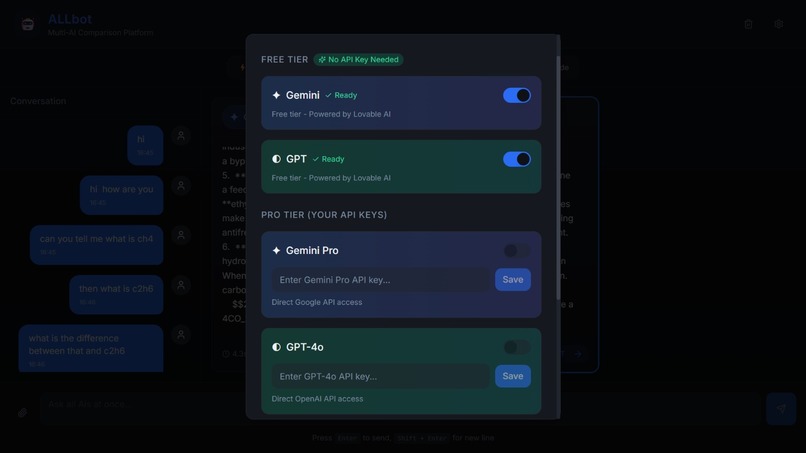
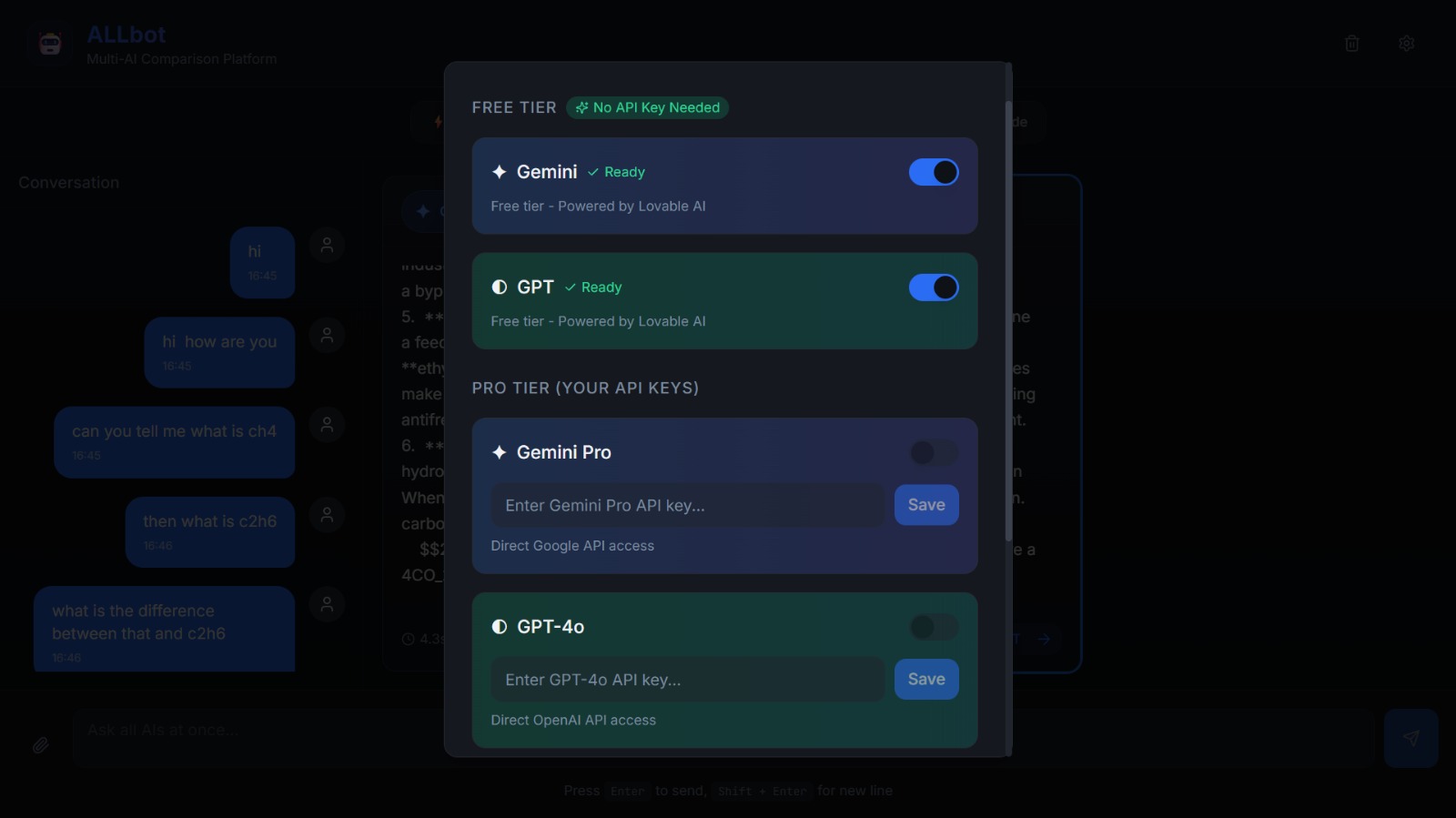
models free and paid options
-
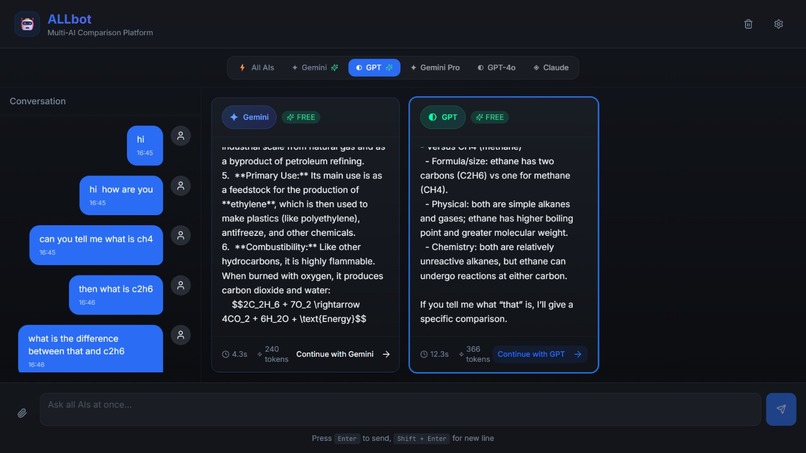
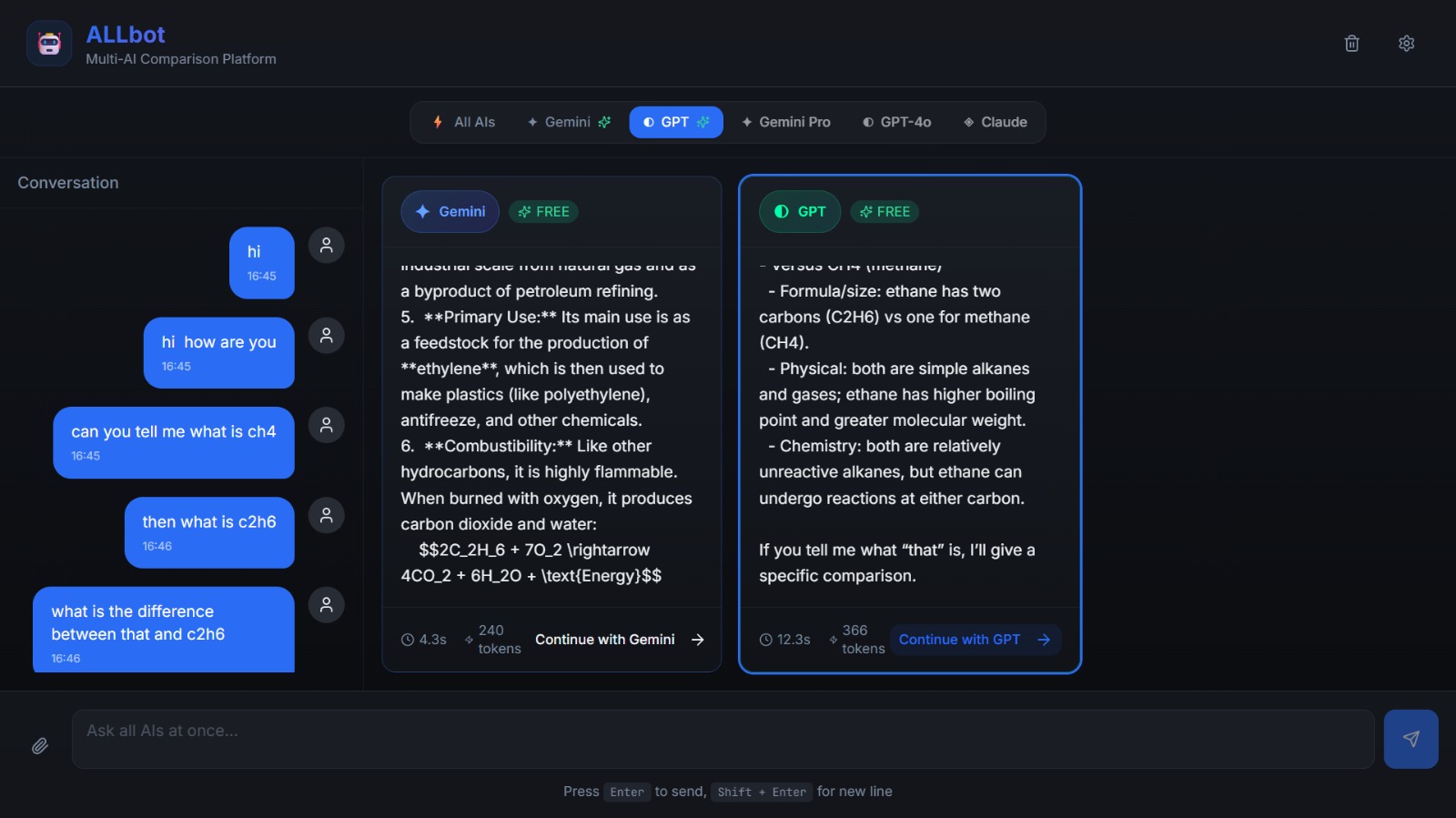
front page
Inspiration
The inspiration for ALLbot came from a common frustration among AI users: which AI should I use for this task?I found myself constantly switching between ChatGPT, Claude, and Gemini, manually copying the same prompt into each interface, then juggling multiple browser tabs to compare responses. It was inefficient and broke my workflow.Each AI has unique strengths—some excel at creative writing, others at code generation, some provide concise answers while others give comprehensive explanations. Why choose when you can use them ALL?That's when ALLbot was born: a unified platform where one prompt reaches multiple AI models simultaneously, enabling instant cross-validation, quality comparison, and informed decision-making about which AI to trust for your specific needs.
What it does
ALLbot is a multi-AI comparison platform that allows users to:Core Features
Simultaneous Multi-AI Querying: Send one prompt to Google Gemini, OpenAI GPT, Claude, and other AI models at once Side-by-Side Comparison: View all AI responses in real-time, streaming simultaneously in parallel panels Performance Metrics: Track response time and token usage for each AI model Multimodal Support: Upload documents (PDF, DOCX, TXT) and images (PNG, JPG, WEBP) that all AIs can process File Preview: Click on uploaded files to preview them before sending to AIs Selective Continuation: After comparing responses, choose a specific AI to continue the conversation with Dynamic Layout: Resizable AI panels that automatically rearrange without overlapping API Key Management: Securely store and manage API keys for multiple AI providers Cost Tracking: Monitor token usage and estimated costs across all models User Workflow
User enters API keys for desired AI providers User types a prompt or uploads a file ALLbot sends the input to all active AIs simultaneously Responses stream in real-time across parallel panels User compares quality, speed, and accuracy User selects the best AI to continue with or keeps querying all
How we built it
Technology StackFrontend:
React.js for component-based UI CSS Grid + Flexbox for dynamic responsive layout ResizeObserver API for panel resizing React Context for global state management LocalStorage with Web Crypto API for secure key storage Backend:
Node.js/Express server API abstraction layer for unified AI provider interface Streaming endpoints using Server-Sent Events (SSE) Token counting utilities File processing middleware (image encoding, document parsing)
Challenges we ran into
Multi-AI Comparison Platform - ALLbot 💡 Inspiration The inspiration for ALLbot came from a common frustration among AI users: which AI should I use for this task? I found myself constantly switching between ChatGPT, Claude, and Gemini, manually copying the same prompt into each interface, then juggling multiple browser tabs to compare responses. It was inefficient and broke my workflow. Each AI has unique strengths—some excel at creative writing, others at code generation, some provide concise answers while others give comprehensive explanations. Why choose when you can use them ALL? That's when ALLbot was born: a unified platform where one prompt reaches multiple AI models simultaneously, enabling instant cross-validation, quality comparison, and informed decision-making about which AI to trust for your specific needs. 🤖 What it does ALLbot is a multi-AI comparison platform that allows users to: Core Features
Simultaneous Multi-AI Querying: Send one prompt to Google Gemini, OpenAI GPT, Claude, and other AI models at once Side-by-Side Comparison: View all AI responses in real-time, streaming simultaneously in parallel panels Performance Metrics: Track response time and token usage for each AI model Multimodal Support: Upload documents (PDF, DOCX, TXT) and images (PNG, JPG, WEBP) that all AIs can process File Preview: Click on uploaded files to preview them before sending to AIs Selective Continuation: After comparing responses, choose a specific AI to continue the conversation with Dynamic Layout: Resizable AI panels that automatically rearrange without overlapping API Key Management: Securely store and manage API keys for multiple AI providers Cost Tracking: Monitor token usage and estimated costs across all models
User Workflow
User enters API keys for desired AI providers User types a prompt or uploads a file ALLbot sends the input to all active AIs simultaneously Responses stream in real-time across parallel panels User compares quality, speed, and accuracy User selects the best AI to continue with or keeps querying all
🔨 How we built it Technology Stack Frontend:
React.js for component-based UI CSS Grid + Flexbox for dynamic responsive layout ResizeObserver API for panel resizing React Context for global state management LocalStorage with Web Crypto API for secure key storage
Backend:
Node.js/Express server API abstraction layer for unified AI provider interface Streaming endpoints using Server-Sent Events (SSE) Token counting utilities File processing middleware (image encoding, document parsing)
Architecture ┌─────────────────────────────────────┐ │ User Interface │ │ (Single Input, Multiple Outputs) │ └──────────────┬──────────────────────┘ │ ┌──────────────▼──────────────────────┐ │ API Abstraction Layer │ │ (Unified Interface for All AIs) │ └──────────────┬──────────────────────┘ │ ┌────────┼────────┐ ▼ ▼ ▼ ┌─────┐ ┌─────┐ ┌─────┐ │Gemini│ │OpenAI│ │Claude│ └─────┘ └─────┘ └─────┘ Key Implementation Details
- API Service Abstraction Created a unified interface to handle different API structures: javascriptclass AIProvider { constructor(apiKey, model) { this.apiKey = apiKey; this.model = model; }
async streamResponse(prompt, onChunk, onComplete) { // Provider-specific implementation }
calculateTokens(text) { return Math.ceil(text.length / 4); } }
- Simultaneous Dispatching Used Promise-based concurrent requests: javascriptconst sendToAllAIs = async (prompt, activeProviders) => { const promises = activeProviders.map(provider => provider.streamResponse(prompt, handleChunk, handleComplete) );
await Promise.allSettled(promises); };
- Dynamic Grid System Implemented auto-arranging layout that prevents overlap: javascriptconst gridConfig = { minPanelWidth: 300, gap: 16, calculateColumns: (containerWidth, panelCount) => { return Math.floor(containerWidth / (minPanelWidth + gap)); } };
- File Handling Pipeline
File upload → Type validation → Preview generation → Base64 encoding → Multi-AI dispatch
🚧 Challenges we ran into Challenge 1: API Response Format Inconsistency Problem: OpenAI, Claude, and Gemini all return responses in completely different JSON structures. Solution: Built adapter classes for each provider to normalize responses into a common format, making the UI rendering provider-agnostic. Challenge 2: Streaming Synchronization Problem: AIs respond at vastly different speeds. Gemini might finish in 2 seconds while GPT-4 takes 15 seconds. Solution: Implemented individual loading states, progress indicators, and a "streaming complete" tracker for each panel. Users can see partial responses immediately without waiting for slower AIs. Challenge 3: Panel Layout Without Overlap Problem: When users resize one panel, others would overlap or misalign. Solution: Created a custom collision detection algorithm with automatic repositioning. Panels "flow" intelligently—shifting right or wrapping to the next row while maintaining aspect ratios. Challenge 4: Rate Limiting & Cost Control Problem: Sending to multiple APIs simultaneously could quickly exhaust rate limits and incur unexpected costs. Solution:
Pre-request cost estimation display User-configurable budget limits Request queuing system Response caching for repeated prompts
Challenge 5: Secure API Key Storage Problem: Need client-side API keys for direct calls, but can't store them in plain text. Solution: Implemented encryption using Web Crypto API before localStorage, with session-based decryption. Also provided option for server-side proxy mode where keys never leave the backend. Challenge 6: Mobile Responsiveness Problem: Side-by-side comparison is impossible on small screens. Solution: Created adaptive layouts—horizontal tabs on mobile, grid view on tablet, full parallel view on desktop. Added swipe gestures for mobile navigation.
Accomplishments that we're proud of
✅ free tier : for users who dont have an api or money ✅ Seamless Real-Time Streaming: All AI responses stream simultaneously without blocking or lag ✅ Zero-Overlap Dynamic Layout: Panels resize and rearrange fluidly without ever overlapping ✅ Unified Multimodal Support: Single interface to send images/documents to any AI that supports them ✅ Sub-100ms Dispatch Time: Optimized prompt distribution to all AIs happens nearly instantaneously ✅ Secure Key Management: Enterprise-grade encryption for API key storage ✅ Responsive Across All Devices: Beautiful experience from mobile to ultrawide monitors ✅ Accessibility: Full keyboard navigation and screen reader support ✅ Production-Ready Error Handling: Graceful fallbacks for API failures, network issues, and rate limits
What we learned
Technical Learnings API Integration Best Practices
Learned the nuances of OpenAI's, Anthropic's, and Google's API architectures Mastered streaming protocols and chunked transfer encoding Understood token counting algorithms across different tokenizers
Advanced React Patterns
Custom hooks for API state management Optimistic UI updates during streaming Memo-ization strategies for performance with multiple real-time streams
Layout Engineering
CSS Grid advanced techniques (auto-fit, minmax, grid-template-areas) ResizeObserver and IntersectionObserver APIs Smooth animations with CSS transforms and transitions
Security
Web Crypto API for client-side encryption Secure storage patterns for sensitive credentials CORS and CSP configuration for multi-origin API calls
Product & UX Learnings Users want control: The ability to toggle individual AIs on/off and select which to continue with was crucial Performance transparency matters: Showing response time and token usage helps users build trust in the platform Fail gracefully: When one API is down, the others should continue working seamlessly Progressive disclosure: Don't overwhelm users—start simple, reveal complexity as needed
What's next for ALLbot
- More AI Providers
Integrate Mistral AI, Cohere, Perplexity Support for local models (Ollama, LM Studio) Custom endpoint support for enterprise AI deployments
- Advanced Comparison Features
AI Response Scoring (accuracy, creativity, helpfulness) Diff view to highlight differences between responses Voting system to track which AI "wins" for different query types
- Collaboration Tools
Share comparison sessions via link Team workspaces with shared API quotas Comment and annotate AI responses

Log in or sign up for Devpost to join the conversation.