-
-
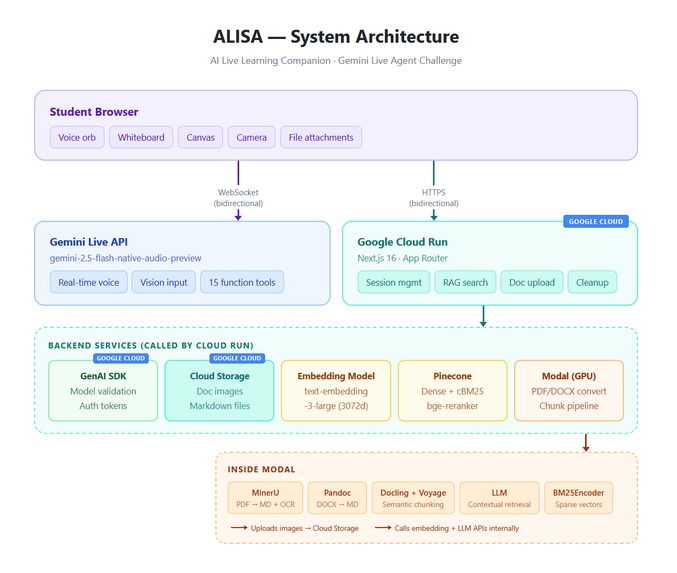
Architecture Diagram
-
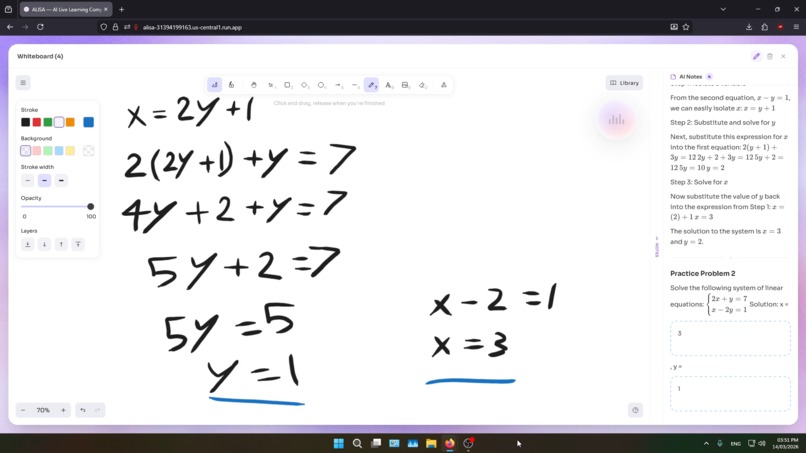
ALISA guiding student step by step
-
-
-
-
Inspiration
Every student has experienced this: you're stuck on a problem at midnight, the textbook isn't making sense, and you wish someone could just explain it to you — walk you through it, draw it out, answer your follow-up questions naturally. Traditional AI chatbots don't cut it. You type a question, read a wall of text, type another question. It's slow, unnatural, and nothing like learning from a real tutor.
We asked: What if an AI tutor could see, hear, and speak — just like a real person sitting across from you?
What it does
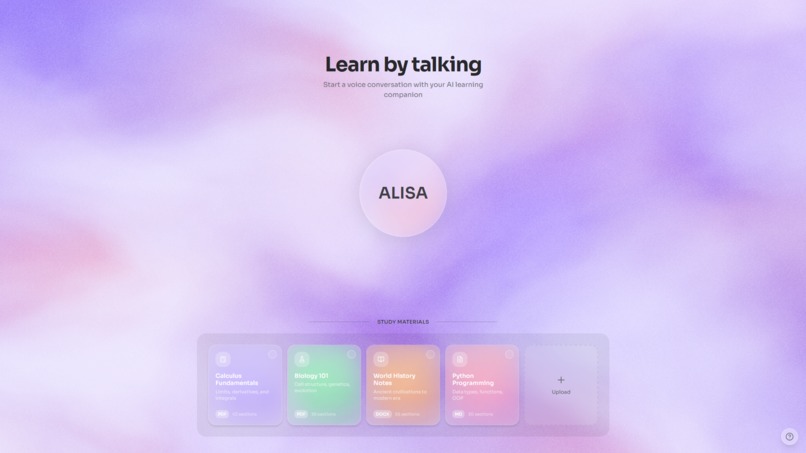
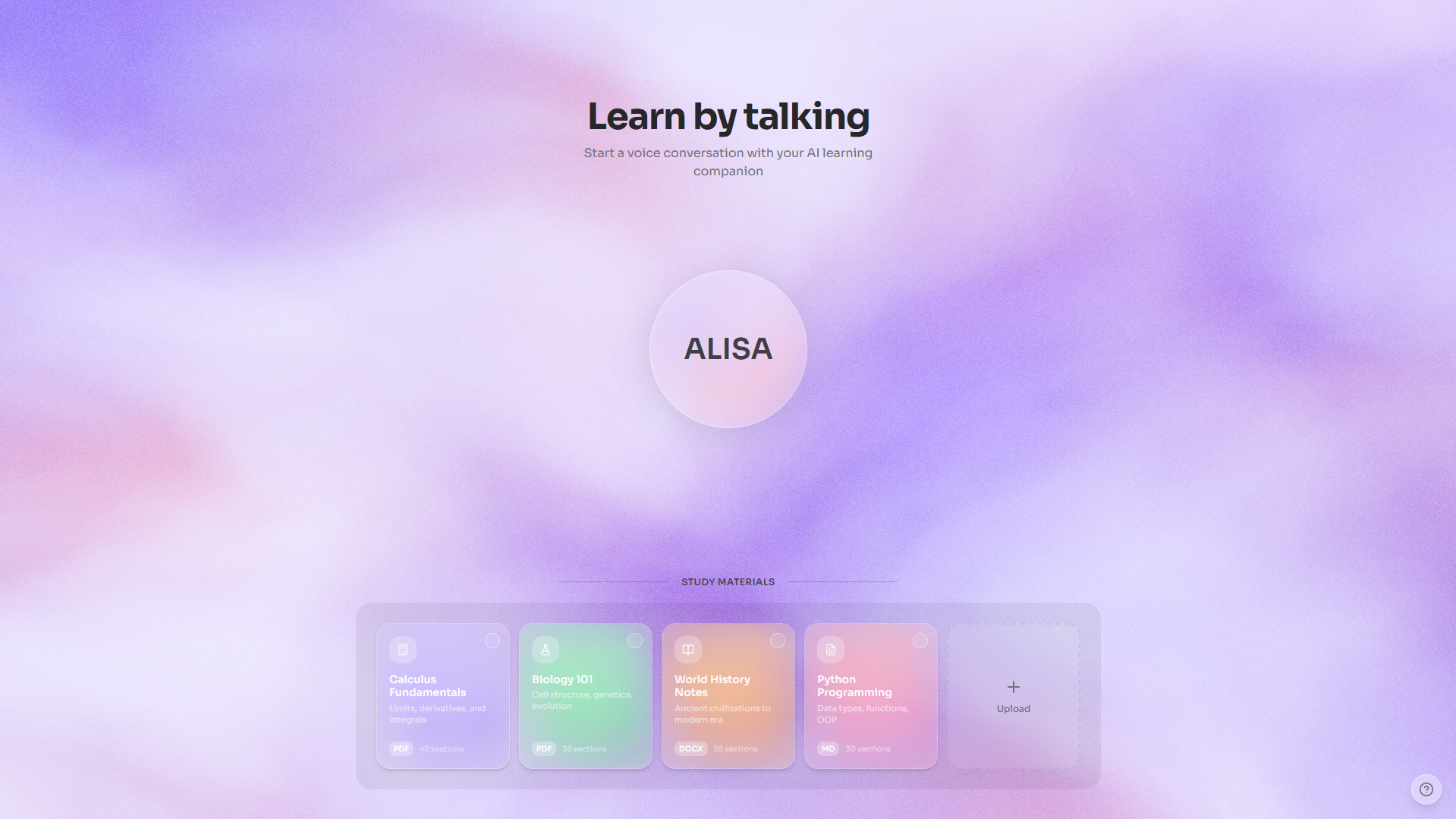
ALISA (Artificial Learning Intelligent... Something Amazing — hey, the backronym is a work in progress) is a real-time, voice-first AI learning companion. Students open the app and simply start talking — no typing, no prompts, no chat boxes. ALISA listens, responds naturally with voice, and teaches using a live interactive whiteboard with rich visual content.
Core Experience:
- Voice-first interaction — Talk naturally, interrupt anytime, ask follow-up questions mid-explanation. ALISA handles barge-in gracefully and maintains conversational context.
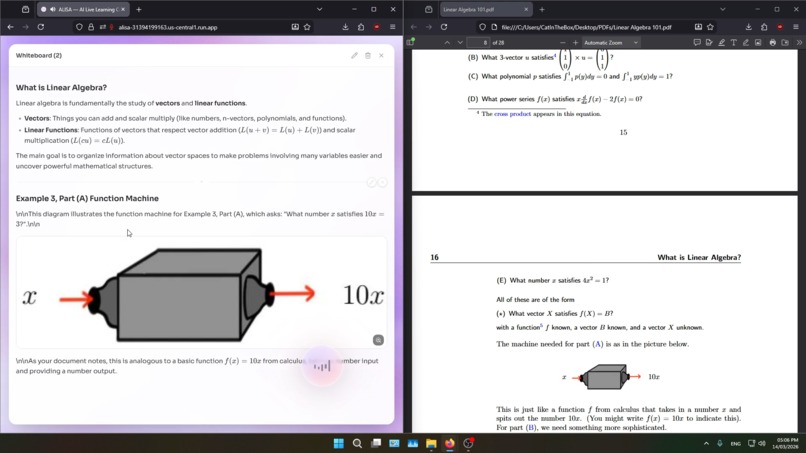
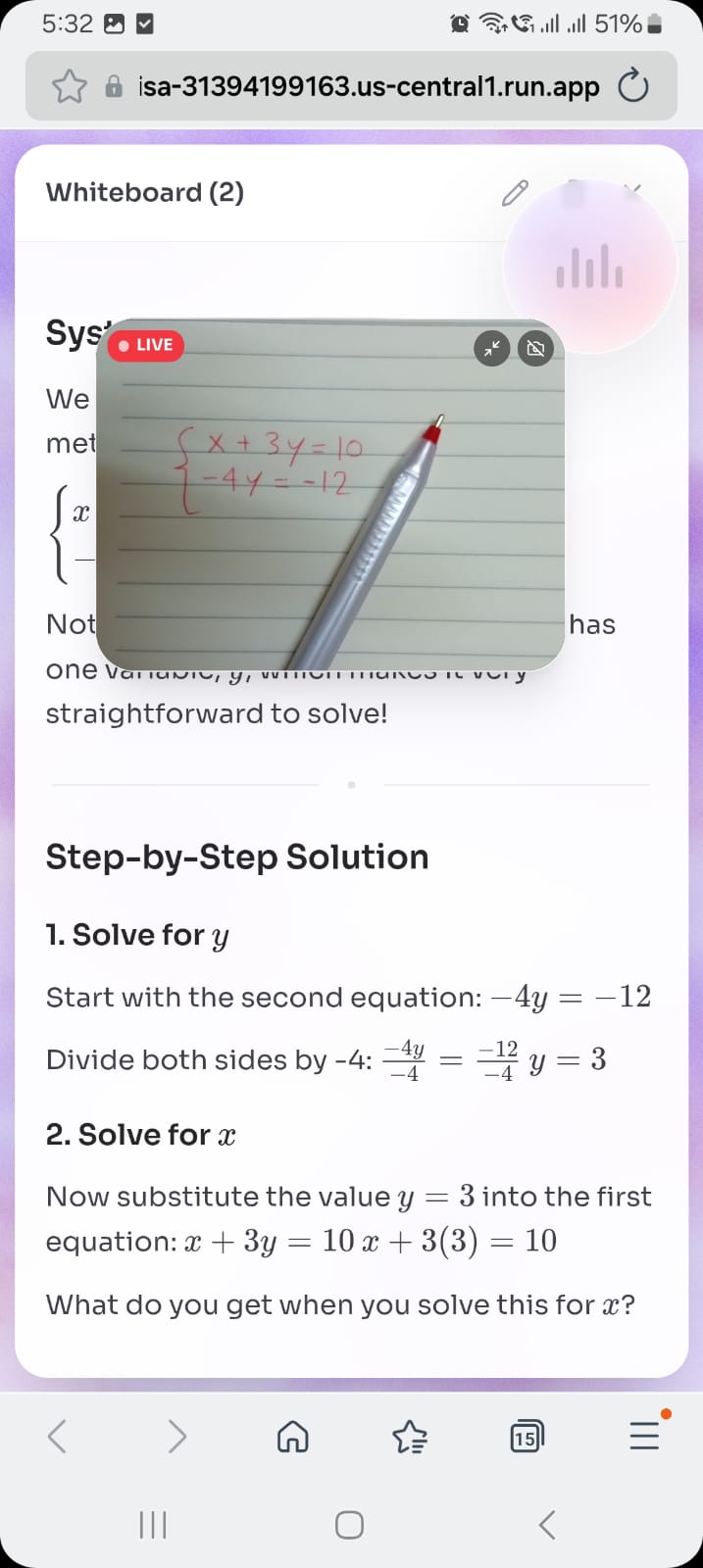
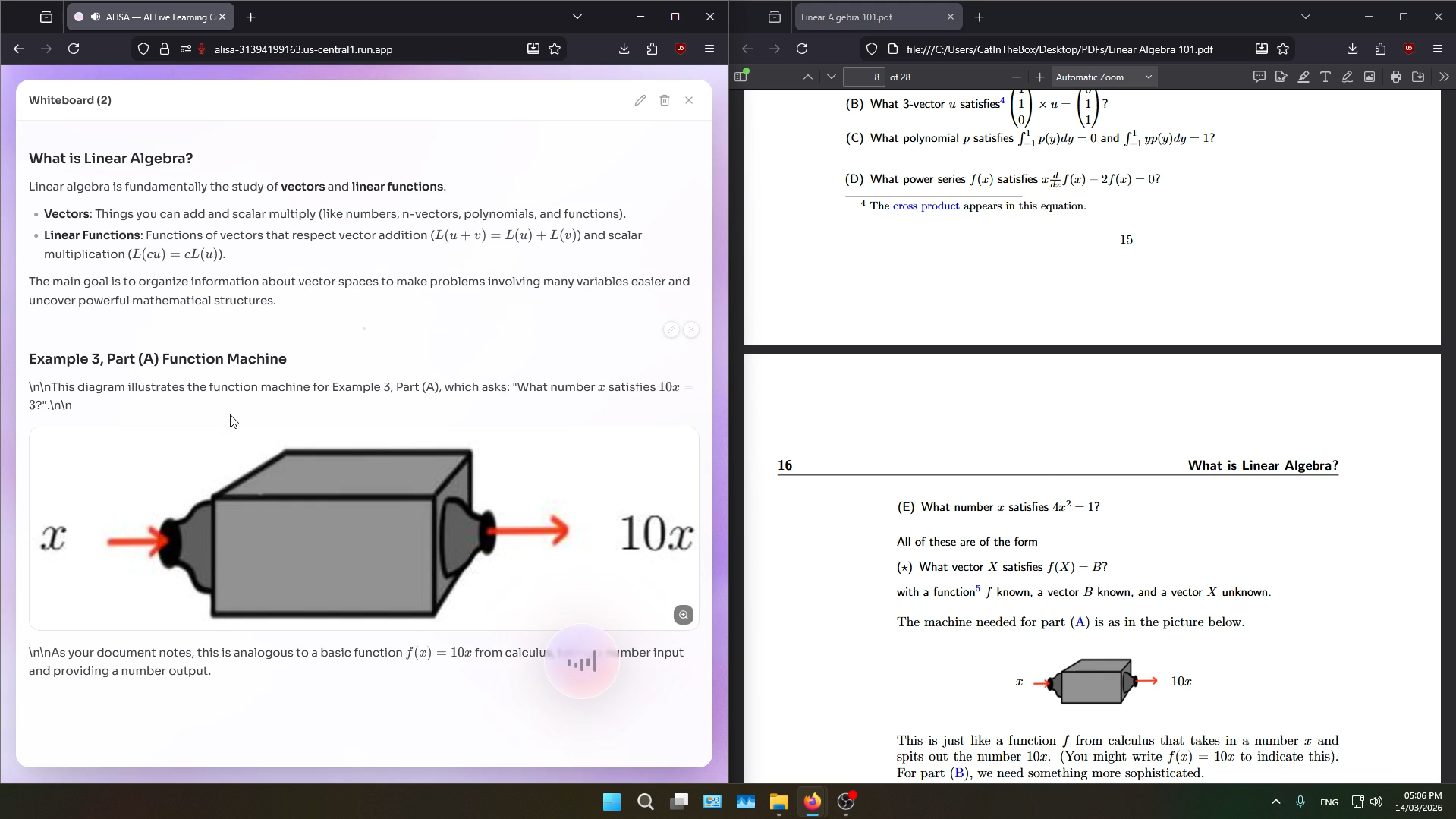
- Live whiteboard — As ALISA explains a concept vocally, she simultaneously writes on a shared whiteboard: LaTeX equations, code blocks, Mermaid diagrams, tables, highlighted text, step-by-step solutions — all rendered live while she speaks, like a real teacher at a chalkboard.
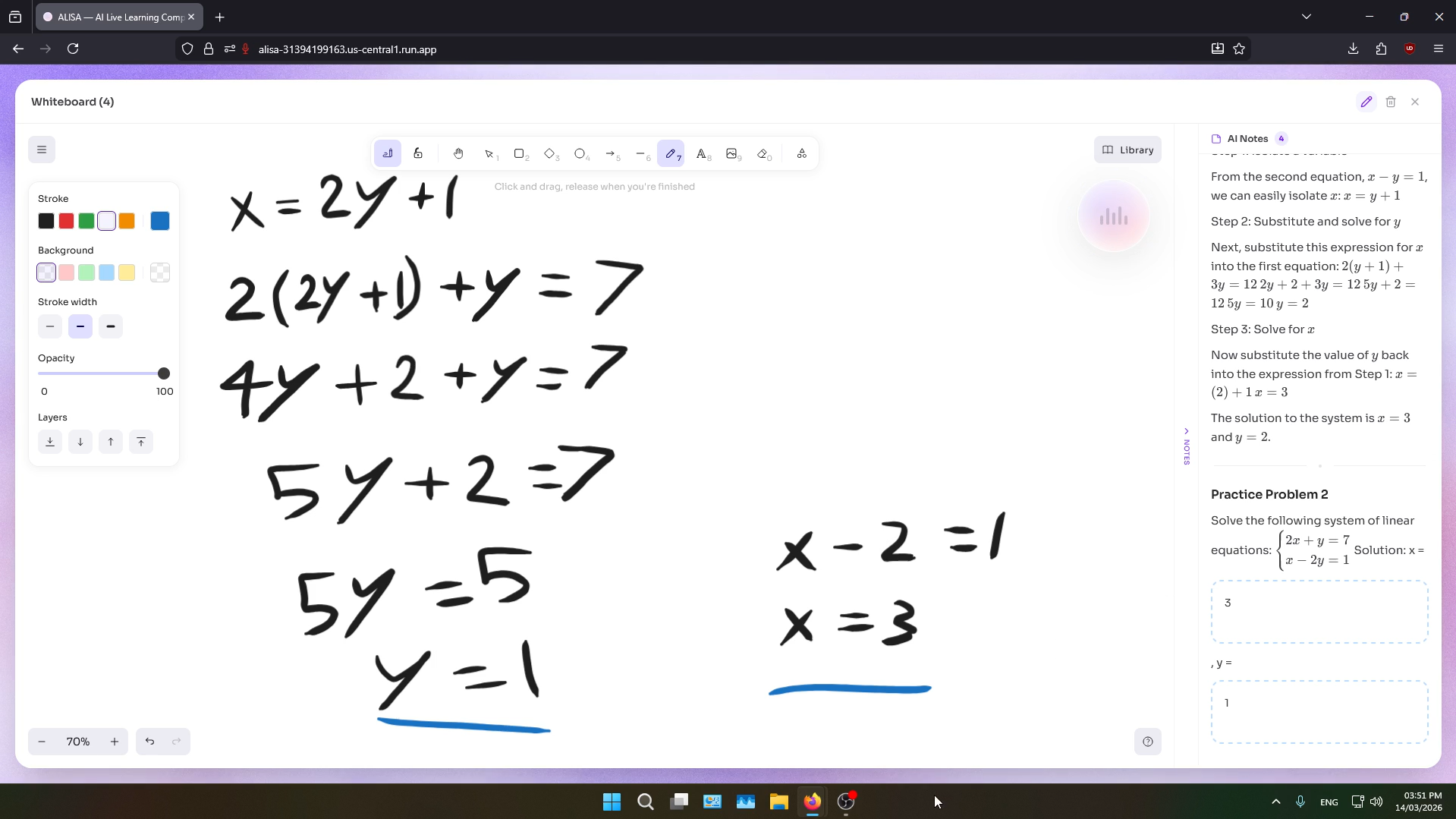
- Interactive exercises — ALISA creates fill-in-the-blank exercises on the whiteboard with input zones. Students type answers directly, then ALISA reads them, grades them, and provides feedback with color-coded highlights (green for correct, red for errors).
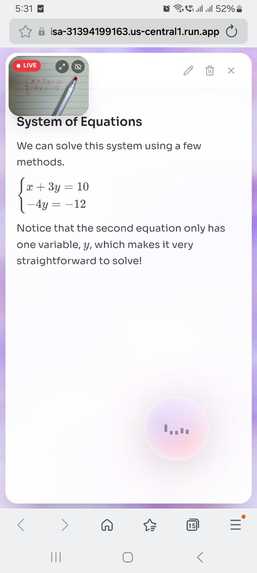
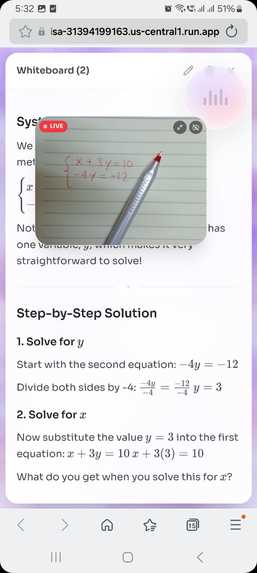
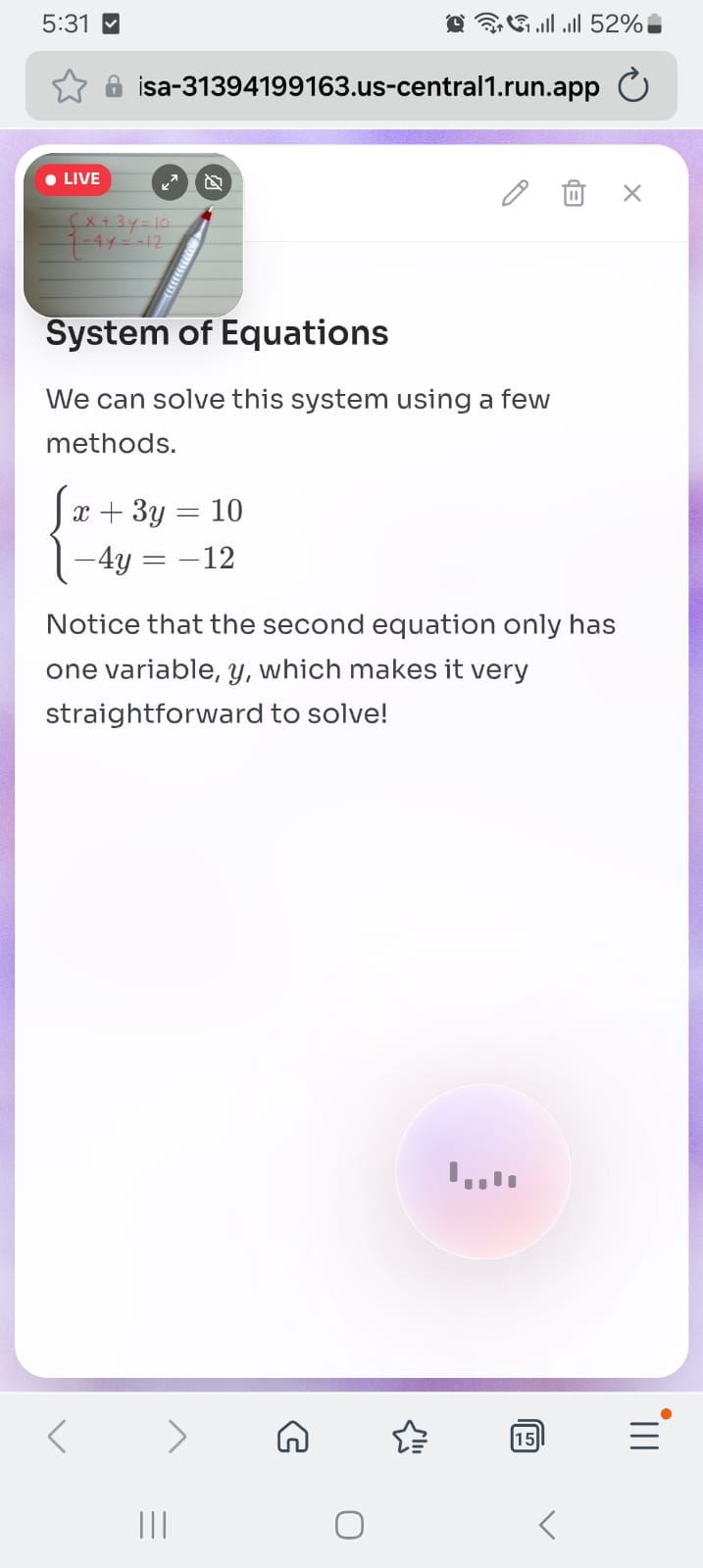
- Live camera — Students toggle their camera to show ALISA handwritten notes, textbook pages, homework problems, or physical diagrams. ALISA sees the live video feed at 1 FPS and responds naturally: "I can see the equation you wrote — looks like there's a sign error in the second line."
- Document RAG — Upload PDFs, DOCX, or text files. ALISA indexes them using a full RAG pipeline (semantic chunking, contextual retrieval, hybrid BM25+dense search, reranking) and grounds her answers in the uploaded material.
- Image sharing — Share photos, screenshots, or handwritten notes. ALISA analyzes them instantly and incorporates them into the tutoring conversation.
- Interactive canvas — An Excalidraw-powered drawing canvas where both ALISA and the student can contribute. ALISA places content blocks, students annotate freely with pens, shapes, and arrows. Canvas snapshots are periodically sent to Gemini so ALISA can see and respond to student drawings.
- Capabilities showcase — When students ask "what can you do?", interactive feature buttons radiate from the voice orb, each tappable to activate that capability directly.
How we built it
Architecture
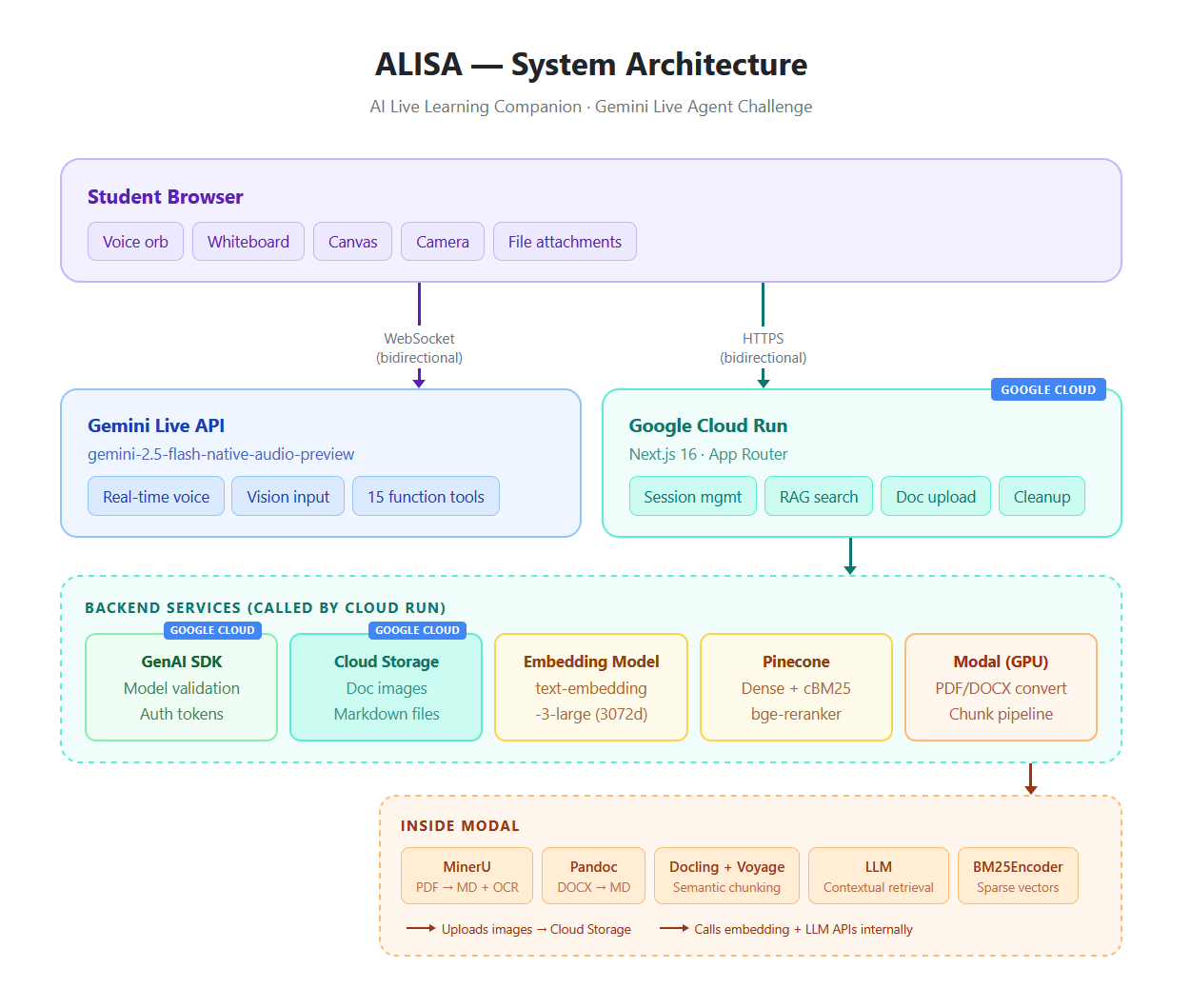
ALISA is a Next.js application deployed on Google Cloud Run, with the Gemini Live API connection going directly from the browser to Google's servers via WebSocket for lowest-latency audio streaming.
Frontend (Next.js on Cloud Run):
- Voice orb UI with real-time mic level visualization and AI state indicators (listening, speaking, thinking)
- Interactive whiteboard: unified markdown renderer with KaTeX math, syntax-highlighted code, Mermaid diagrams, GFM tables, zoomable images, and interactive input zones
- Excalidraw canvas integration for freehand drawing alongside AI content
- Draggable orb with radial action menu when whiteboard is open
- Camera preview PIP (picture-in-picture) with drag-to-reposition
- Responsive design: full desktop layout with side-by-side whiteboard, mobile bottom sheet with tab switching
Gemini Live API (Real-time Voice):
- Native audio model:
gemini-2.5-flash-native-audio-previewvia the official WebSocket protocol - Custom audio engine with AudioWorklet-based mic capture (16kHz PCM), ring buffer playback pipeline (24kHz), jitter buffering, and echo suppression
- 15 function tools (blocking + non-blocking): whiteboard CRUD, knowledge search, input management, camera control, attachment handling, capabilities showcase
- Reliability: audio gating during tool calls, GoAway proactive reconnection, session resumption, ghost turn loop detection, context message queuing with debouncing, VAD tuning for reduced false turn endings
RAG Pipeline (Document Intelligence):
- PDF conversion: MinerU on Modal (GPU-accelerated, with image extraction → Google Cloud Storage)
- DOCX conversion: Pandoc + Mammoth on Modal (preserves tables and images → Google Cloud Storage)
- Two-stage semantic chunking: Docling hierarchical chunking → Voyage AI semantic merging
- Contextual Retrieval: GPT-4o-mini generates context prefixes per chunk (following Anthropic's research)
- Contextual BM25 (cBM25) sparse vectors for hybrid search (70% semantic, 30% keyword) — the LLM-enhanced context prefixes are encoded into the sparse vectors too, not just the raw text. This is the state-of-the-art approach from Anthropic's Contextual Retrieval research, achieving significantly better recall than standard BM25
- Embeddings: OpenAI text-embedding-3-large (3072 dimensions)
- Reranking: Pinecone bge-reranker-v2-m3
- Vector storage: Pinecone (session-scoped namespaces, cleaned up on session end)
Google Cloud Services:
- Cloud Run — Hosts the Next.js application (frontend + API routes)
- Google Cloud Storage — Document and image uploads from the PDF/DOCX conversion pipeline
- Google GenAI SDK (
@google/genai) — Model validation, ephemeral token generation, session configuration
Key Technical Decisions
Client-to-server WebSocket architecture: Audio streams directly from the browser to Gemini's servers, bypassing our backend entirely. This eliminates the latency of proxying audio through Cloud Run and gives the most natural conversational feel. Our backend handles session orchestration, RAG queries, and document processing — not real-time audio.
Non-blocking tool calls: Whiteboard writes, highlights, and UI toggles use Gemini's NON_BLOCKING behavior mode. ALISA writes on the board AND speaks her explanation simultaneously — like a real teacher writing while talking. Blocking tools (knowledge search, reading student inputs) pause the conversation only when the AI needs the result to continue.
Echo suppression: When ALISA speaks, her audio plays through the student's speakers and bounces back into the microphone. Our custom echo suppression checks each mic frame's RMS energy — quiet echo (0.02–0.06) is silently dropped, while real human speech (0.1+) passes through for natural interruption.
Ghost turn loop prevention: The Live API's sendContextUpdate two-step approach can trigger empty model responses, creating a feedback loop. We track whether each turn produced audio — empty turns skip context flushing, breaking the loop.
Technologies Used
- Gemini Live API — Real-time bidirectional voice + vision via WebSocket (
gemini-2.5-flash-native-audio-preview) - Google GenAI SDK (
@google/genai) — Model validation, auth tokens, session config - Google Cloud Run — Application hosting
- Google Cloud Storage — Document/image file storage
- Next.js 16 — Full-stack React framework (App Router, Server Components, API Routes)
- TailwindCSS v4 — Utility-first styling
- shadcn/ui — UI component library
- Excalidraw — Interactive drawing canvas
- KaTeX — LaTeX math rendering
- Mermaid — Diagram rendering (flowcharts, sequence diagrams, mind maps, timelines)
- ReactMarkdown — Unified whiteboard content rendering
- Modal — Serverless GPU compute for PDF/DOCX conversion and semantic chunking
- MinerU — PDF-to-markdown conversion with OCR (supports Arabic, Chinese, Japanese, Korean, Latin, and more)
- Docling + Voyage AI — Two-stage semantic document chunking
- OpenAI — Text embeddings (text-embedding-3-large) and contextual retrieval (GPT-4o-mini)
- Pinecone — Vector database with hybrid dense+sparse search
- Vanta.js + Three.js — Animated fog background
Third-Party Integrations
- OpenAI API — Used for text embeddings (
text-embedding-3-large) and contextual retrieval context generation (GPT-4o-mini). Licensed under OpenAI's usage policies. - Pinecone — Vector database for storing and querying document embeddings. Used under Pinecone's standard terms.
- Modal — Serverless GPU platform hosting the document conversion and chunking pipelines (proprietary, hosted separately). Used under Modal's terms of service.
- Excalidraw — Open-source drawing library (MIT License).
- MinerU — Open-source PDF extraction (AGPL-3.0 License).
- Docling — Open-source document chunking by IBM (MIT License).
Challenges we ran into
Gemini Live API reliability at scale: The Live API is powerful but operates at the edge of what's possible with real-time bidirectional AI. We encountered 1008 policy violations when sending audio during tool calls, stale WebSocket connections after tab backgrounding, and ghost turn loops from context updates. Each required a different mitigation strategy — audio gating, visibility-aware health checks, and turn-level audio tracking respectively. Building a production-grade voice agent required roughly 3x more reliability engineering than the core feature work.
"Speaks twice" after tool calls: After a non-blocking tool response, Gemini would sometimes generate two spoken responses — one from the tool result and one from a context update that arrived during the cooldown. We solved this with post-tool-call cooldown timers and turn-complete deduplication with extended windows after tool calls.
Whiteboard rendering complexity: The whiteboard needs to render LaTeX, code, Mermaid diagrams, HTML tables, images, and interactive input fields — all within a single streaming markdown document. ReactMarkdown's remounting behavior destroyed input focus/state, so we split content at input boundaries and render inputs as stable siblings outside the markdown tree.
Echo from speaker to microphone: Gemini's server-side VAD would detect ALISA's own voice playing through speakers as "user speech" and interrupt herself. Browser echo cancellation helps but isn't perfect. Our frame-level RMS energy check provides a second layer — quiet echo gets dropped, loud human speech passes through.
Accomplishments we're proud of
- State-of-the-art RAG pipeline. Our retrieval system implements the full Contextual Retrieval stack from Anthropic's research: contextual chunk prefixes via GPT-4o-mini, Contextual BM25 (cBM25) sparse vectors where the LLM-generated context is encoded into the sparse index alongside the original text, hybrid dense+sparse search with alpha-weighted scoring, and cross-encoder reranking. This isn't a basic "embed and search" setup — it's a production-grade retrieval system that would hold up outside a hackathon.
- Zero-typing tutoring experience. A student can have a complete learning session — asking questions, receiving visual explanations, completing exercises, getting graded — without ever touching the keyboard. Everything is voice-driven.
- Simultaneous teach-and-write. ALISA talks while writing on the whiteboard in real-time, exactly like a human teacher. This required non-blocking tool calls with precise scheduling — a feature we believe very few Live API projects have implemented.
- 15 function tools working together. The agent orchestrates whiteboard management, knowledge retrieval, exercise grading, attachment handling, camera control, and UI state — all through voice commands with no visible interface friction.
- Session resilience. ALISA handles GoAway signals, network drops, tab backgrounding, and WebSocket staleness with automatic reconnection and session resumption. Students don't lose their session when their WiFi hiccups.
What we learned
- The Gemini Live API with native audio models produces remarkably natural conversation — the voice quality, turn-taking, and interruption handling are genuinely impressive. But building a production-quality agent on top of it requires extensive reliability engineering that isn't covered in any tutorial.
- Non-blocking function calls are transformative for voice UX. The difference between "wait 2 seconds in silence while the whiteboard loads" and "hear the explanation while the board updates" is the difference between a demo and a product.
- Real-time audio is unforgiving. Every millisecond of latency, every dropped frame, every unexpected silence is immediately noticeable. The ring buffer playback pipeline, jitter buffering, and echo suppression were essential — without them, the experience felt broken even though the AI responses were perfect.
- Context window management matters more in live sessions than in chat. A 15-minute tutoring session can easily fill the 128K context window with audio tokens. Session resumption and careful context budgeting (truncating whiteboard serialization, capping search results, limiting system instruction size) keep sessions viable for extended use.
What's next for ALISA
- Multi-language voice tutoring — ALISA's document pipeline already supports 15+ OCR languages including Arabic, Chinese, Japanese, and Korean. Extending the voice experience to these languages is a natural next step.
- Session history and progress tracking — Saving session transcripts, whiteboard content, and exercise results so students can review past sessions and track their learning over time.
- Collaborative sessions — Multiple students joining the same voice session with a shared whiteboard, enabling study groups with an AI facilitator.
- Mobile-native experience — While ALISA is responsive and works on mobile browsers, a native app could leverage device capabilities (haptic feedback, always-on mic, system-level audio routing) for an even smoother experience.
Built With
- audioworklet
- docling
- excalidraw
- gemini-live-api
- google-cloud
- google-cloud-run
- google-genai-sdk
- katex
- mermaid
- mineru
- modal
- next.js
- openai-api
- pinecone
- react
- reactmarkdown
- shadcn/ui
- tailwindcss
- three.js
- typescript
- vanta.js
- voyage-ai
- web-audio-api


Log in or sign up for Devpost to join the conversation.