-
-
Alexa+
Inspiration
Many assistant demos focus on the final answer and hide the work that happened behind it. That makes it difficult to understand which tools were used, what data was accessed, or whether an action changed the outside world. MCP provided a useful alternative because it makes the assistant's capabilities explicit through tools, resources, prompts, schemas, and annotations. I was especially inspired by the idea of an assistant that can say, in effect: “I found the next safe step. Here is what I plan to do. Would you like me to continue?” That principle shaped the product architecture. Read-only operations may be automated when the user enables the safe-read setting, but changing notes or simulated home state always goes through an approval flow.
What it does
Alexa+ MCP Assistant started with a simple question: What would an assistant feel like if it could use tools without taking control away from the person using it? Instead of treating an AI assistant as a black box that silently performs actions, I wanted to build a workbench where every capability is visible, every tool is discoverable, and every state-changing action requires human approval.
The result is a browser-based Alexa+-style assistant built around the
Model Context Protocol. It combines a static GitHub Pages interface with a separately hosted Node.js backend. The backend exposes a real Streamable HTTP MCP server using the official MCP JavaScript SDK, while the frontend acts as an MCP client that discovers tools, resources, and prompts at runtime.
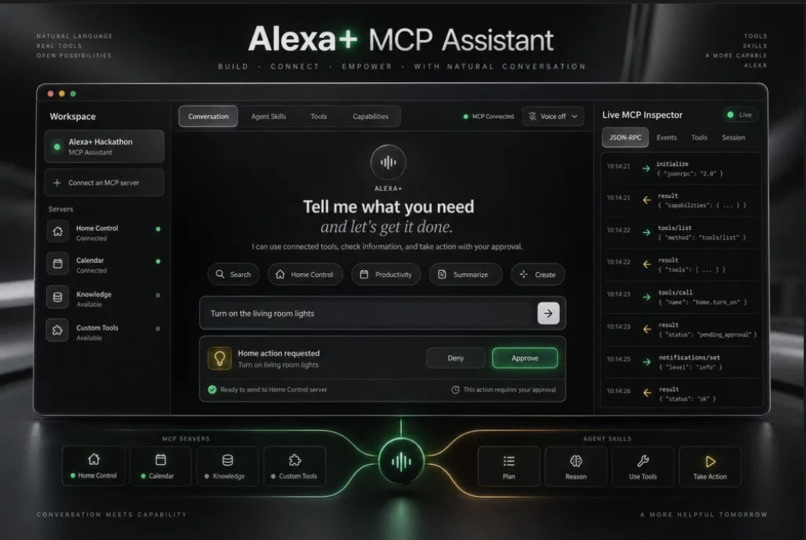
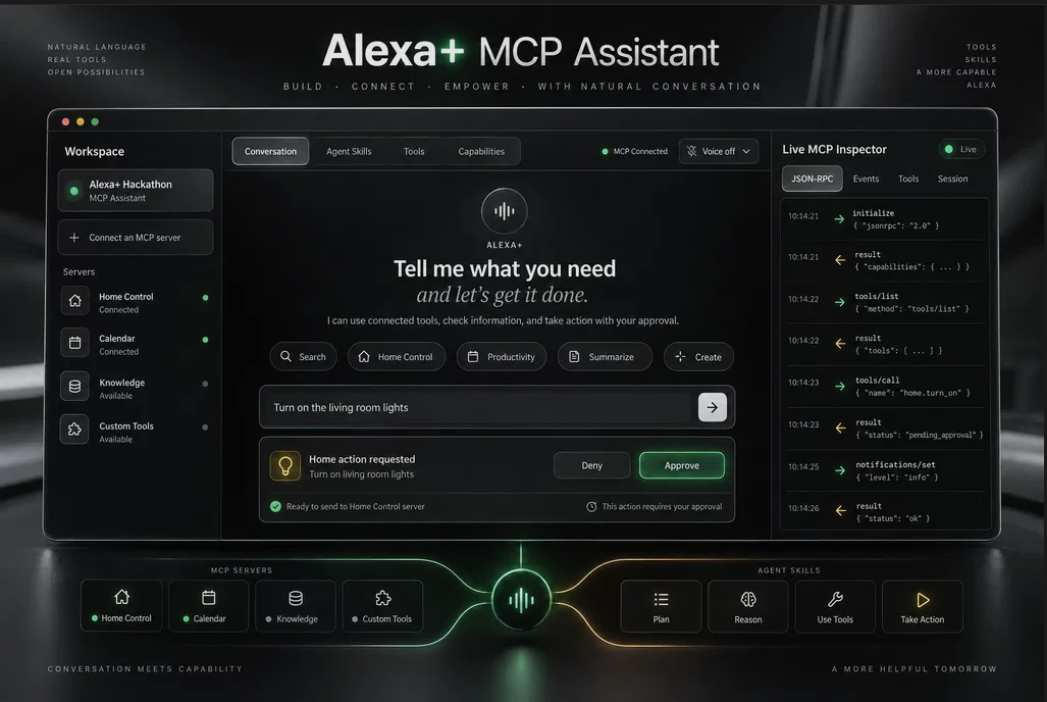
The prototype includes simulated calendar and household state, an in-memory note store, Agent Skills, an optional server-side LLM planner, browser-native speech controls, and a live JSON-RPC inspector. The simulations are intentionally bounded: they demonstrate the interaction model without pretending to access a real calendar, smart home, or personal account.
How we built it
The project has four main layers:
1. The browser workbench — a dark, high-contrast Alexa+-inspired interface for conversation, tool review, Agent Skills, voice controls, and the live inspector.
2. The MCP client — a browser-side Streamable HTTP client that initializes a session, negotiates MCP protocol 2025-11-25, discovers capabilities, validates proposed tool calls against the current schemas, and displays JSON-RPC events.
3. The Node.js backend — an Express server using McpServer and NodeStreamableHTTPServerTransport. It serves /mcp/demo, /health, and the server-side planner routes under /api/agent/*.
4. The simulated integrations and skills — tools for local time, notes, daily planning, calendar-style data, and household state, plus four progressively loaded Agent Skill Markdown files.
The planner receives the current user message, recent conversation, advertised tool schemas, and actual previous tool results. It selects at most one next step. The browser then applies the approval policy before any call is made. This keeps the reasoning loop bounded and makes the decision boundary visible instead of allowing an unrestricted chain of hidden actions.
The production deployment uses GitHub Pages for the public frontend and a managed HTTPS Node service for the MCP backend. The frontend stores only a public backend origin; model credentials remain server-side. This separation reflects a practical deployment constraint: GitHub Pages can serve the interface, but it cannot run a Node process or an MCP transport.
Challenges we ran into
Browser-origin and CORS behavior
The first major challenge was getting a browser-hosted frontend to connect to a Streamable HTTP endpoint without weakening origin checks. The MCP SDK and the browser both validate origins, but they use slightly different representations. I separated the concerns: the Express layer enforces the explicit GitHub Pages Origin allowlist, while the demo transport handles session lifecycle without a deployment-specific host allowlist.
Managed proxy host headers
The managed HTTPS service sits behind a proxy whose internal Cloud Run host can change between deployments. A hardcoded Host allowlist therefore caused valid MCP initialization requests to fail with errors such as Invalid Host header. The final solution was to remove the unstable transport-level host check and retain explicit Origin/CORS validation for the known GitHub Pages origin.
Honest boundaries for simulated data
It would have been easy to make the demo appear more capable than it is. Instead, every simulated result is labelled as simulated, and the UI does not fall back to canned assistant responses when the model or MCP server fails. This makes the prototype less flashy in failure cases, but more trustworthy and easier to evaluate.
Keeping actions human-controlled
Read-only tools and state-changing tools require different policies. Tool annotations such as readOnlyHint and destructiveHint are surfaced in the client, but the client still validates the proposed call against the live tool listing. This creates a defense-in-depth model: the server defines capabilities, the planner proposes a bounded step, and the user remains the final authority for changes.
Accomplishments that we're proud of
Built a working Alexa+-style assistant around the official Model Context Protocol JavaScript SDK and Streamable HTTP transport. Connected a GitHub Pages frontend to a separately hosted HTTPS Node.js backend, creating a complete public prototype rather than a static mockup. Implemented real MCP session initialization, protocol negotiation with MCP 2025-11-25, tool discovery, resource reading, prompt discovery, and JSON-RPC event inspection. Created a human-in-the-loop approval workflow where read-only actions can be automated, while state-changing actions always require explicit user confirmation. Added Agent Skills as readable Markdown instructions that are progressively loaded and surfaced in the interface. Built simulated calendar, household, notes, and local-time tools with clear boundaries so the demo never pretends to access real personal accounts or devices. Kept model credentials server-side and ensured that browser runtime configuration contains only a public HTTPS backend origin. Added a reusable MCP smoke test that validates the real runtime path instead of checking only whether the code imports successfully. Diagnosed and solved difficult browser CORS, Streamable HTTP session, DNS-rebinding, and managed-proxy host-header issues. Delivered a polished browser workbench with conversation UI, voice controls, tool review, Agent Skills, capabilities discovery, and a live MCP inspector.
What we learned
The biggest lesson was that an MCP integration is more than registering a few functions. A reliable implementation needs to account for protocol negotiation, schemas, transport lifecycle, sessions, CORS, browser-origin policy, DNS-rebinding protection, approval semantics, failure reporting, and deployment topology.
I also learned the value of testing the actual protocol path instead of relying only on static checks. The smoke test initializes a real Streamable HTTP session, discovers the tools, invokes representative simulator operations, and reads a resource. That caught issues which would not have appeared from importing the SDK alone.
Another important lesson was architectural: static frontend hosting and stateful backend hosting should be treated as separate deployment concerns. Once that boundary was explicit, the runtime configuration became simple and safe: the browser receives only an HTTPS origin, while server-only credentials stay out of GitHub Pages, the repository, and browser storage.
What's next for Alexa+
The next step would be replacing the in-memory simulators with authenticated connectors for real calendars, notes, and home systems while preserving the same approval contract. I would also add durable per-user sessions, audit history, stronger authentication, richer permission scopes, and a compatibility matrix for the MCP SDK packages used by the server and client.
The prototype provides a foundation for that work while keeping its current behavior safe, testable, and honest.
Built With
- css
- express.js
- html
- http
- node.js
- vanilajs


Log in or sign up for Devpost to join the conversation.