Inspiration
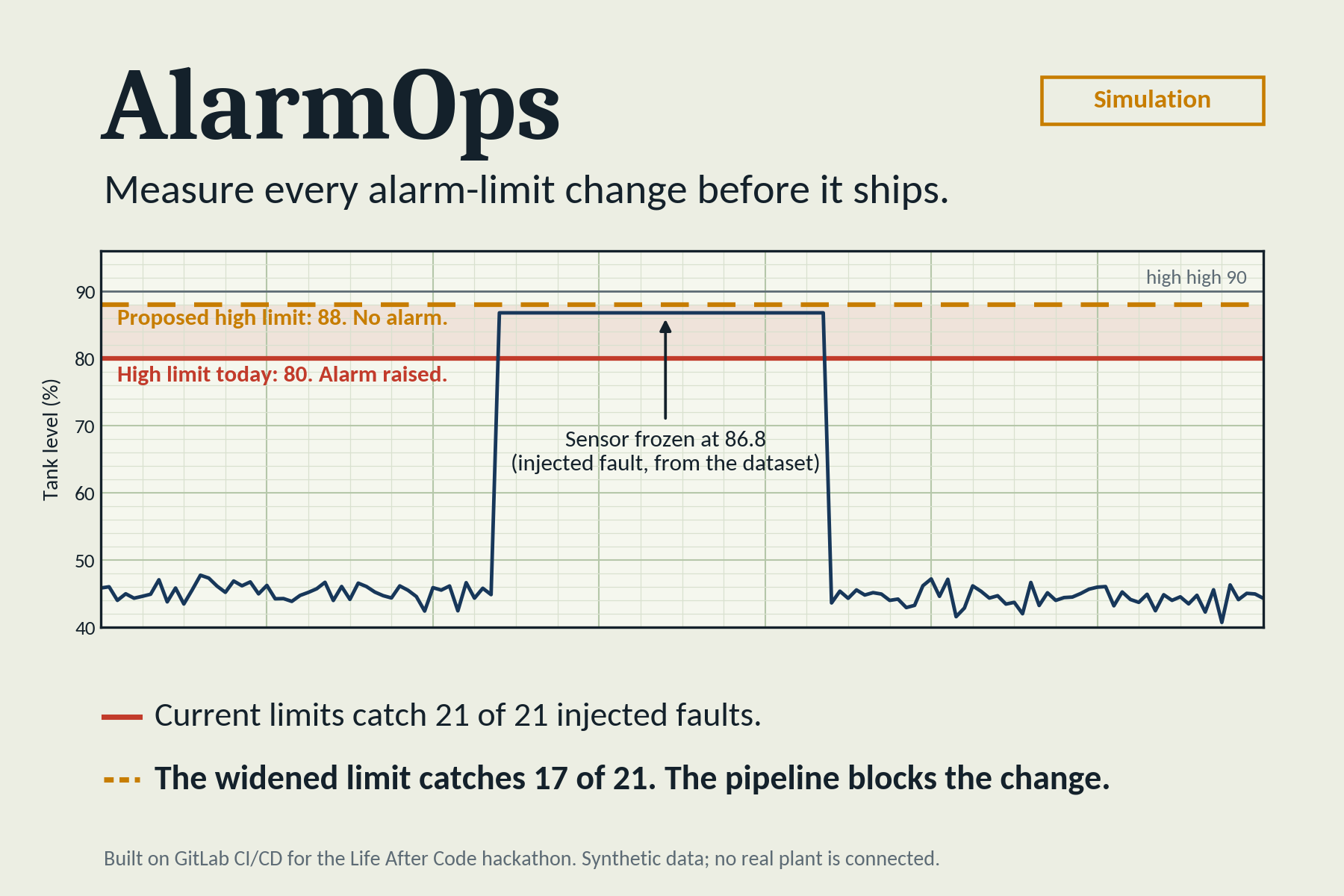
In a plant, an alarm limit is the value at which the control system alerts an operator, such as a high tank level. Those limits get edited over time, and a bad edit is dangerous in both directions: too wide and a real fault raises no alarm, too narrow and operators drown in nuisance alarms. Alarm-management practice expects controlled change, but in reality the review is manual and nobody measures what an edit does to detection. Having worked around PLC, SCADA and DCS systems, I wanted every limit change to be measured before it ships.
What it does
AlarmOps is a GitLab pipeline for alarm-limit changes. On every merge request that edits the alarm rules, it replays a simulated, fault-labelled dataset (spikes, drift and stuck readings) against the old and new limits and reports the change in fault detection and false alarms. A change that loses too much detection is blocked, and the measured result is posted on the merge request. Secret detection blocks hard-coded credentials. A safe change gets a change record and an SBOM, is deployed to a simulated staging release, is validated, and then waits for a human to approve production. A monitor job reads a simulated post-deploy alarm log and reports a diagnosis when the alarm rate drifts. A web page explains the idea and has a "Try it yourself" lab: https://alarmops-7150310775.europe-west1.run.app
Everything is a simulation. No real plant equipment is involved.
How we built it
Python (PyYAML, pytest) for the alarm engine, the replay harness and the gate. GitLab CI/CD with nine stages, GitLab Secret Detection, merge request pipelines, a "Pipelines must succeed" merge check and a manual production job. CycloneDX for the SBOM. Docker and Google Cloud Run for the web page. The dataset is seeded and synthetic: 6,000 samples, 3 tags and 21 labelled faults. I built it solo, with an AI coding assistant (Claude) for code and documentation, and I directed and reviewed the work and ran it locally and on GitLab. On the blocked merge request, GitLab's built-in Duo "Fix CI/CD Pipeline" flow read the failure and explained it.
Challenges we ran into
- Tests that read the live rules file broke valid limit changes, so they now use a frozen baseline copy.
- Windows and Linux line endings changed file hashes, so line endings are pinned and the dataset hash ignores them.
- A fresh Google Cloud project needed an extra permission before Cloud Run could build from source, and Cloud Run reserves the /healthz path.
- The scoring counts a fault as detected only when a new alarm starts, so a fault that begins while a nuisance alarm is already active can be scored as missed.
- I could not confirm the syntax for custom Duo flows in time, so the custom flows are designed but not built.
Accomplishments that we're proud of
- The baseline limits detect 21 of 21 injected faults with 0 false alarms. Widening a tank limit drops detection to 17 of 21 (81.0%) and the pipeline blocks it.
- GitLab's secret detection flags a fake credential as a critical finding and stops the change at the security stage.
- A safe tightening passes every stage, produces a change record and an SBOM, and waits for a human to approve production.
- GitLab's built-in Duo agent explained why the gate failed and suggested restoring the old limits; I chose not to apply it so the change stays blocked.
- 86 automated tests, and a live explainer page with a working lab.
What we learned
Measuring the effect of a configuration change before it ships is far more convincing than reviewing the diff by eye. Keeping tests independent of the file under change control matters, because otherwise valid changes fail for the wrong reason. And stating exactly what ran, and what is only designed, is part of making an automated pipeline trustworthy.
What's next for AlarmOps
- Build the custom Duo flows that are designed in the repository: merge request review, issue triage, pipeline summary and monitoring diagnosis.
- Have the monitor job open a GitLab issue on a schedule, and protect the production environment with required approvers.
- Run the existing deploy_cloud_run job in the pipeline with keyless authentication, instead of deploying by hand.
- Have the monitor job open a GitLab issue on a schedule, and protect the production environment with required approvers.

Log in or sign up for Devpost to join the conversation.