AirCAD — Shape space with your hands
Sketch it in the air. Refine it with real dimensions. Arrange it in 3D. Export it for fabrication.
AirCAD is a browser-based, gesture-first 3D modeling studio. A user can trace a shape in front of a webcam, turn that rough motion into clean geometry, edit exact dimensions in millimetres, arrange multiple solids with one or two hands, and export production-ready STL files—all without uploading a camera frame or installing CAD software.
Repository: github.com/Madhur20/Hacklanta-AirCAD
Platform: Desktop web, optimized for a current Chromium browser
Team: Three-person hackathon team spanning camera/gestures, recognition/application state, and 3D geometry/export
Live deployment: Vercel configuration is included; add the final HTTPS URL only after the deployed-camera verification gate passes
Inspiration
Traditional CAD is precise, but even a simple printable object can demand unfamiliar tools, menus, and careful mouse input. Air drawing is immediate and expressive, but it is too noisy to trust for manufacturing dimensions.
That tension became our core product insight:
Use gestures for intent. Use explicit controls for precision.
AirCAD combines both. Your hand communicates what you want to create and how you want to manipulate it. Validated numeric controls determine the exact geometry. The result feels playful without pretending that webcam motion is a calibrated measuring instrument.
What it does
AirCAD guides the user through a clear four-stage workflow:
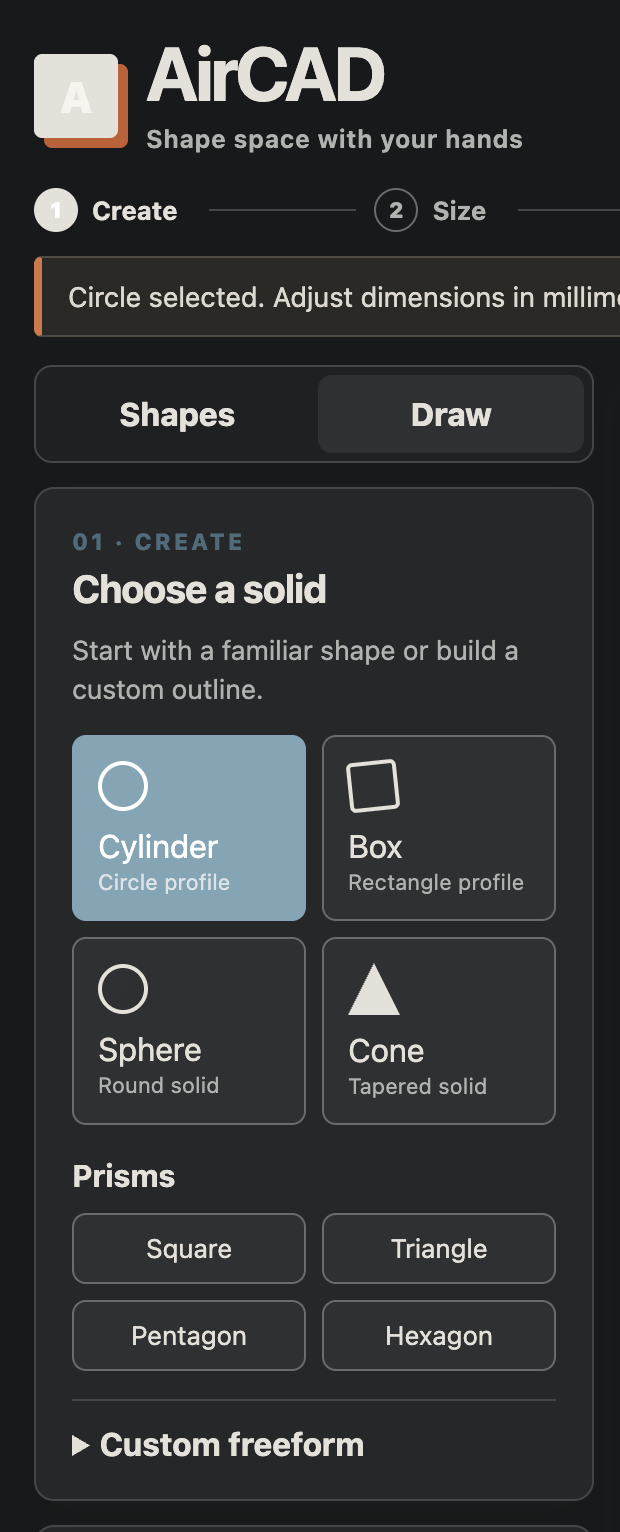
- Create — choose a solid manually or draw a closed outline with a pinched hand.
- Size — enter exact, validated dimensions in millimetres.
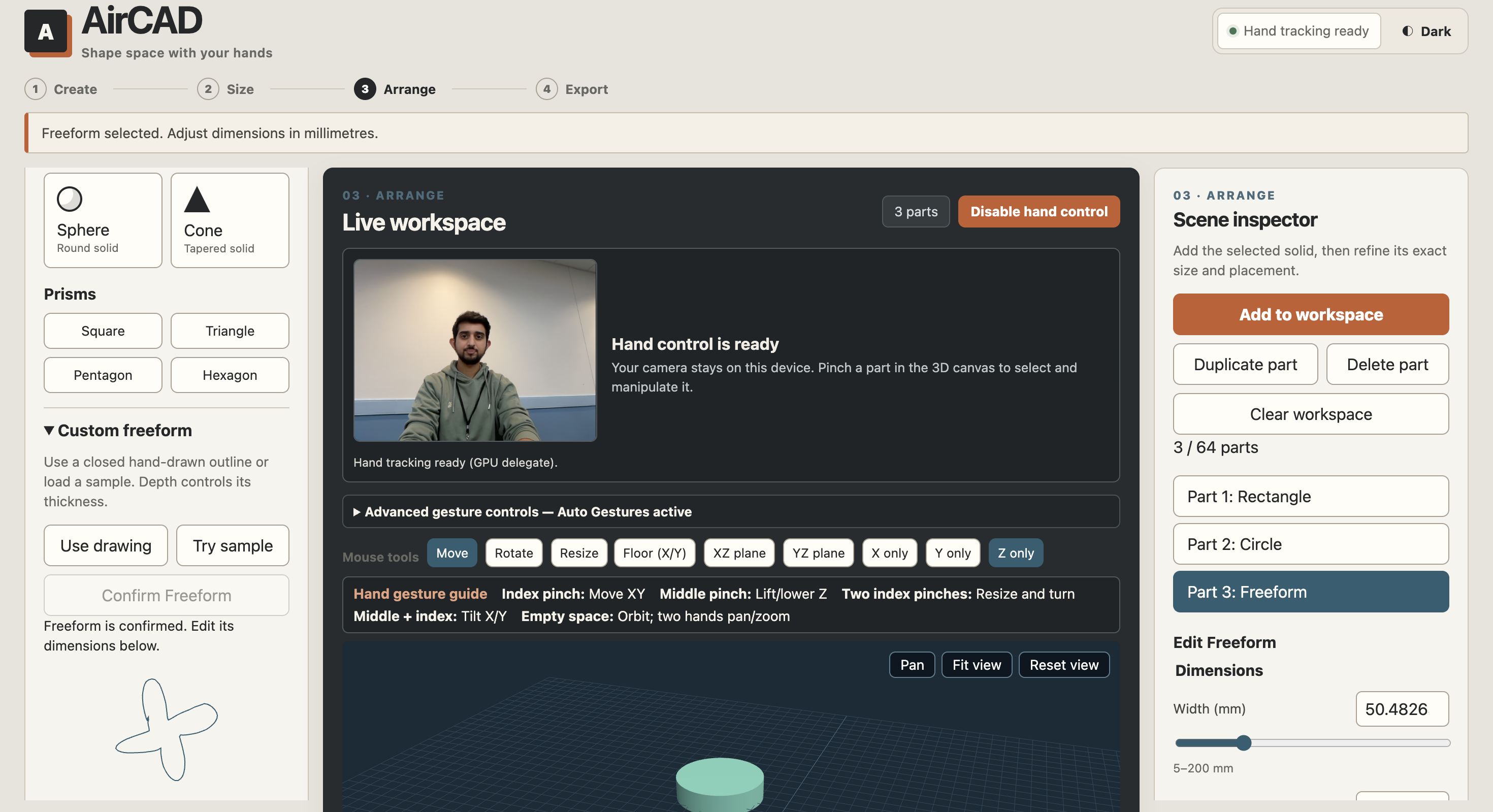
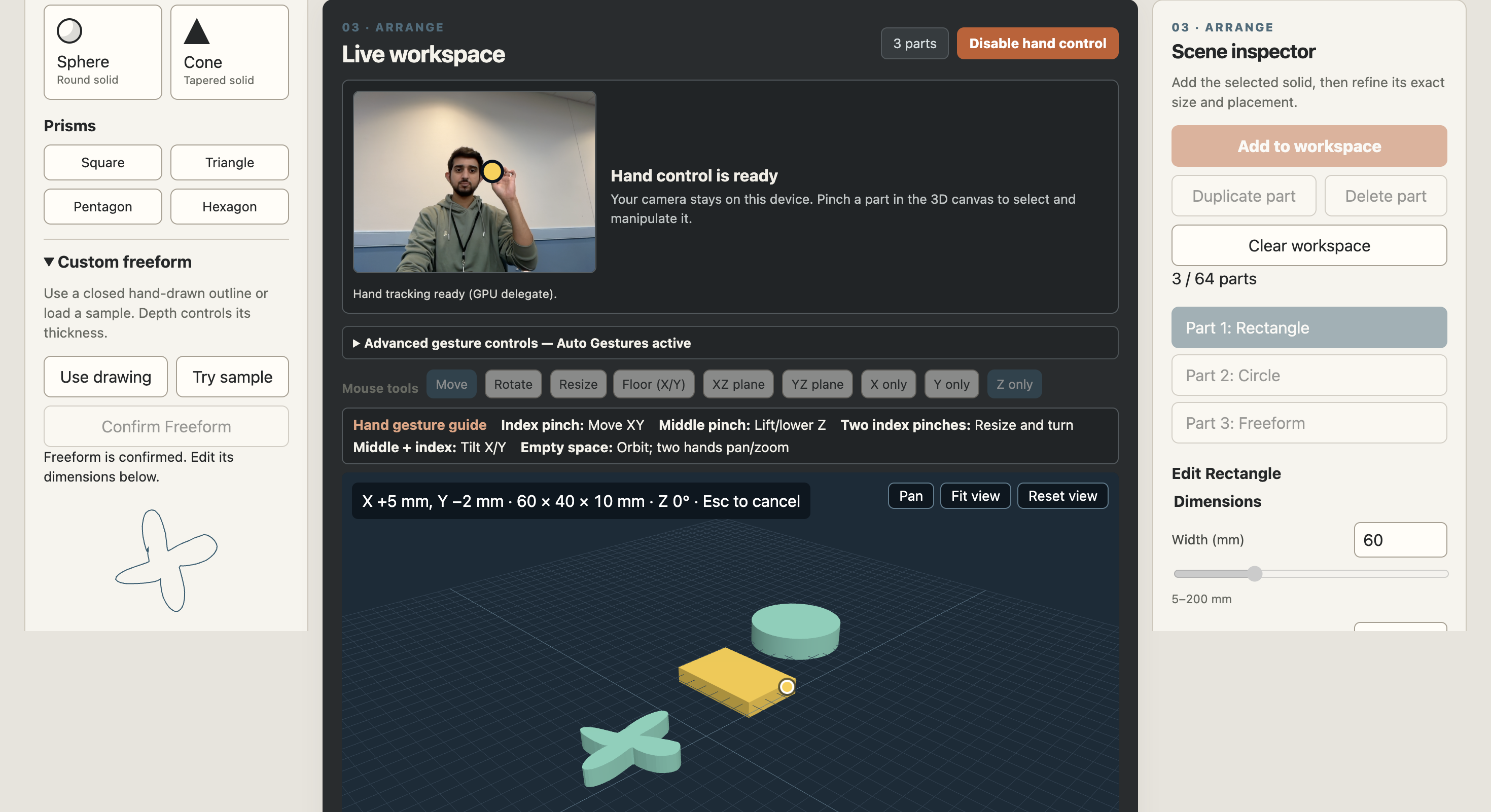
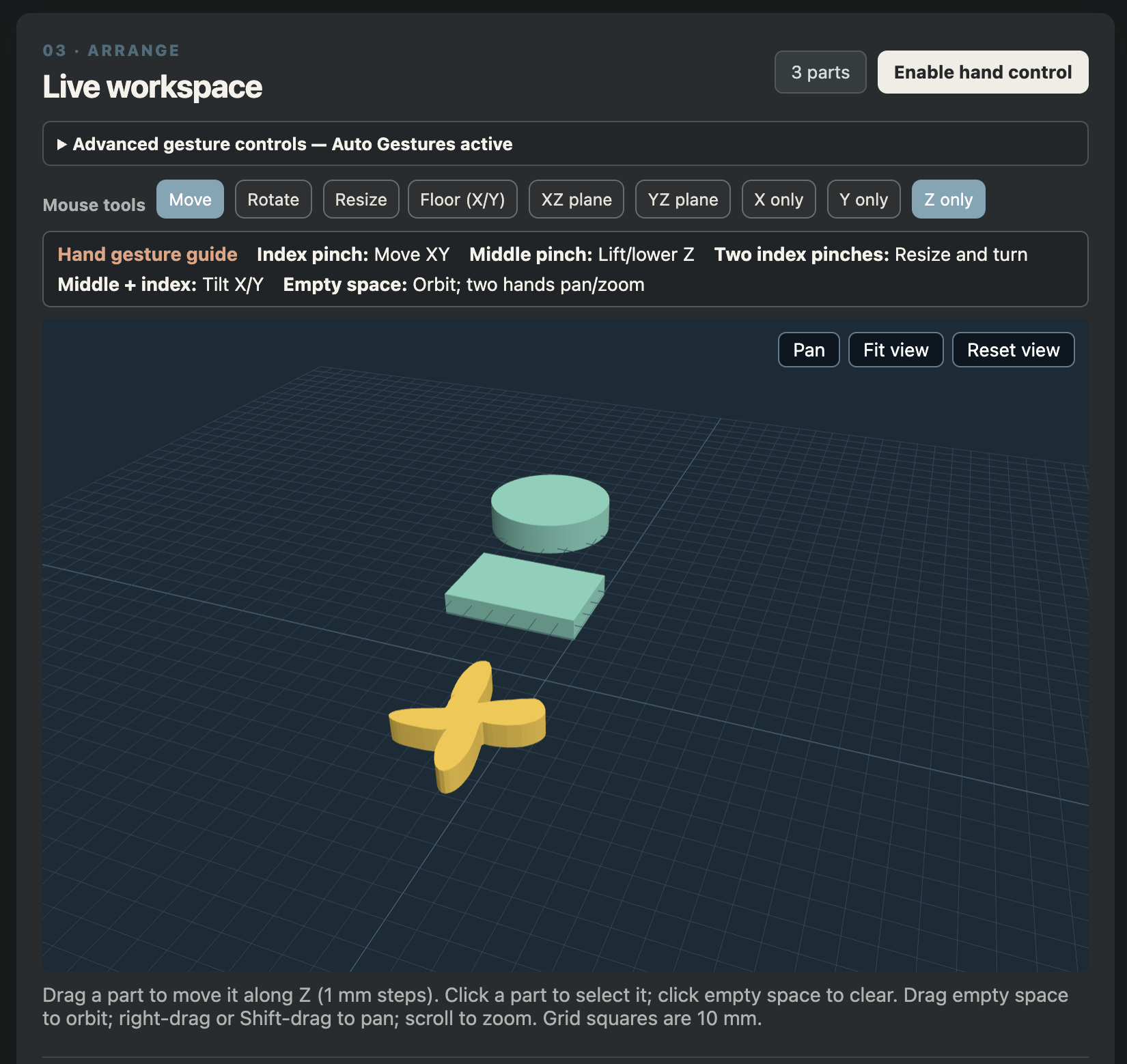
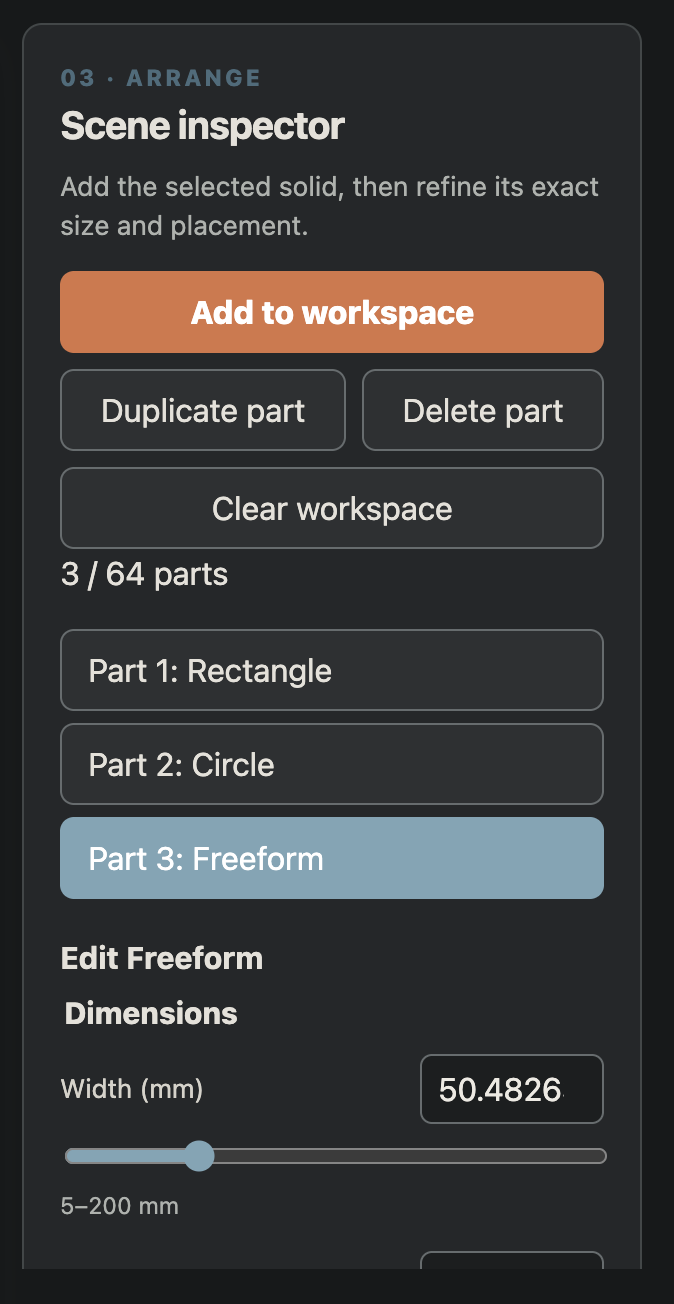
- Arrange — compose multiple parts in a live Three.js workspace using the mouse, exact transform fields, or camera gestures.
- Export — download the selected part or the entire assembly as a binary STL.
Shape creation
The manual shape library supports:
- Cylinder
- Box
- Sphere
- Cone
- Square prism
- Triangle prism
- Pentagon prism
- Hexagon prism
- Validated freeform prism
The camera drawing workflow recognizes circles and rectangles. Irregular closed paths can be explicitly captured as Freeform outlines. If recognition is uncertain, AirCAD asks the user to confirm the intended shape instead of inventing an answer. Every camera-dependent action has a manual or sample-based fallback.
Gesture interaction
AirCAD uses a small, learnable gesture vocabulary:
- Index pinch: move a selected part across the XY work plane.
- Middle pinch: move it along Z.
- Two index pinches: resize proportionally and rotate around Z.
- Mixed index + middle pinch: tilt around X and Y.
- Pinch on empty space: orbit the scene; two-hand empty-space gestures support view pan/zoom.
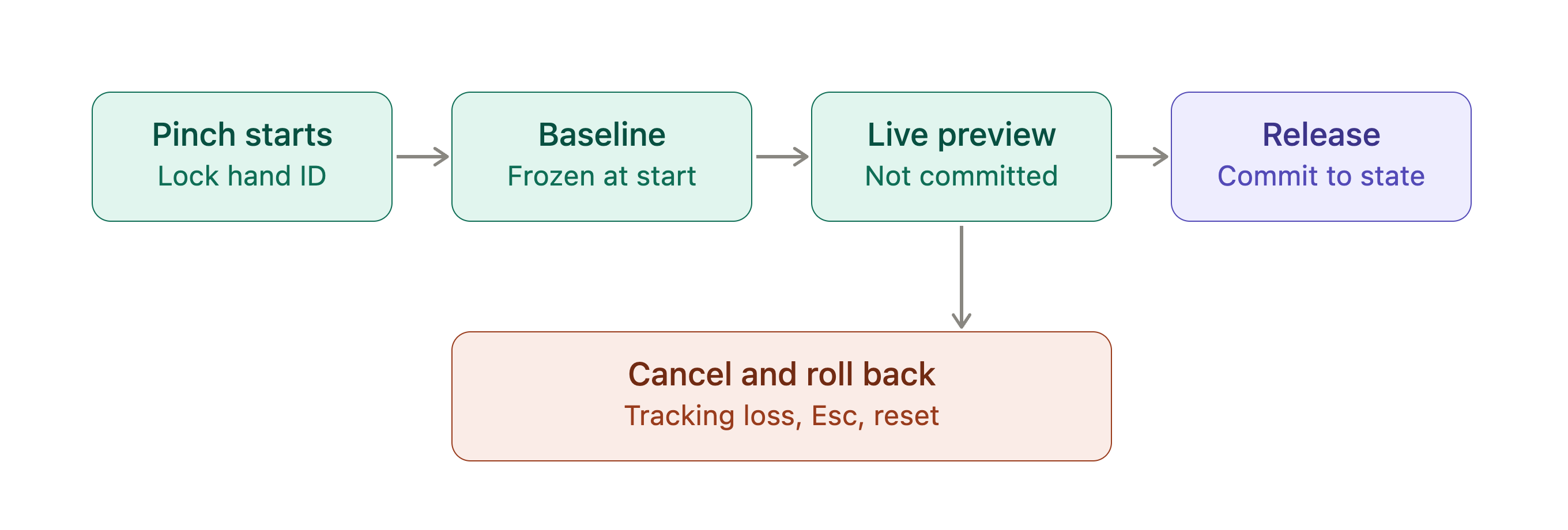
Rotations snap in 5° increments, movement and size updates remain validated, and switching between one- and two-hand interaction rebases from a frozen baseline to avoid jumps. Mouse tools and exact fields always remain available.
Workspace and output
- Add, select, duplicate, delete, stack, overlap, move, rotate, and resize parts.
- See transient manipulation previews without mutating committed workspace state every frame.
- Cancel safely through Escape, tracking loss, camera stop, mode change, reset, or viewport changes.
- Block downloads while a manipulation, invalid draft, or unresolved recognition result is active.
- Export one selected solid or a multi-part assembly.
- Preserve exact committed dimensions and transforms in the downloaded mesh.
Assembly STL files contain separate closed shells. Overlapping parts are intentionally not Boolean-unioned.
Why it is different
Many gesture demos end at a visual effect. AirCAD produces a file that can continue into a real fabrication workflow.
Its differentiators are:
- Natural input without fake precision. Gestures choose intent and apply relative edits; millimetres come from validated controls.
- A real modeling state. Parts have explicit dimensions, position, rotation, selection, revision, and committed/transient lifecycles.
- Fabrication output. Preview and export share the same geometry construction path, reducing disagreement between what the user sees and what the STL contains.
- Resilient fallbacks. The complete manual workflow works without camera permission.
- Privacy by architecture. Camera frames are processed locally and are never uploaded or persisted.
- Honest uncertainty. Ambiguous drawings require confirmation instead of silently becoming the wrong shape.
How we built it
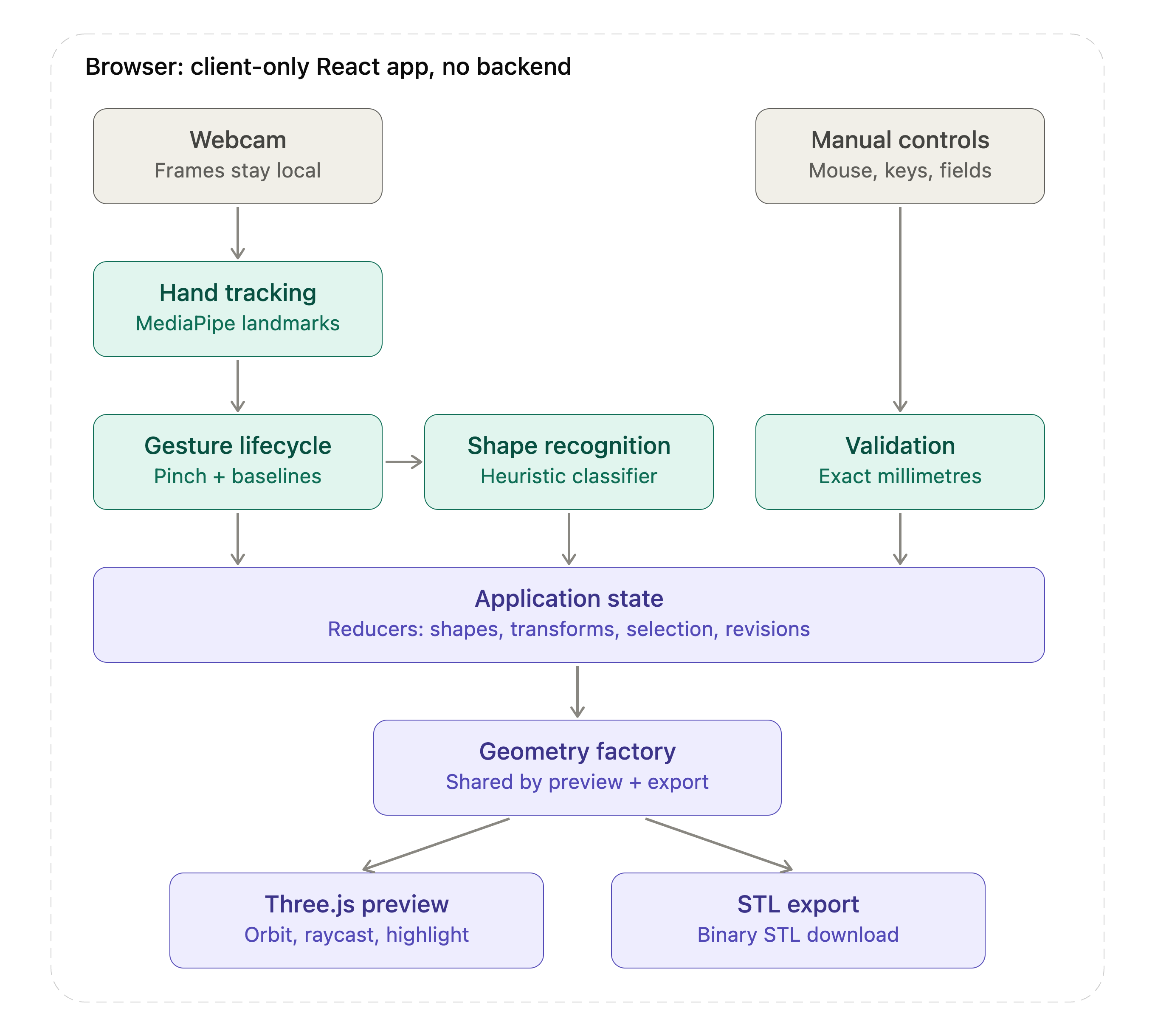
AirCAD is a client-only React application with three carefully separated pipelines:
Webcam → MediaPipe landmarks → gesture lifecycle → immutable hand/stroke events
                                                      ↓
Drawn path → deterministic recognition → validated shape specification
                                                      ↓
Validated shape + transforms → Three.js preview → binary STL export
Camera and hand tracking
MediaPipe Hand Landmarker runs in the browser. We mirror the user-facing video while preserving the correct coordinate transformation for landmark processing. Cursor positions are mapped through the actual contained-video rectangle, including letterboxing offsets, so the pointer stays aligned across camera aspect ratios.
Gesture samples cross an imperative boundary rather than entering React state on every frame. This keeps high-frequency camera input away from the reducer and avoids unnecessary re-renders. Atomic per-frame hand samples carry stable identities, aspect-correct coordinates, pinch type, and lifecycle information.
Recognition
Completed strokes are immutable point sequences. The recognition layer preprocesses them through validation, closure handling, resampling, normalization, and geometric diagnostics. A deterministic heuristic classifier ranks circle and rectangle candidates with conservative confidence gates.
Freeform paths cross a separate validation boundary that checks closure, winding, minimum area, point validity, and self-intersection. Drawing never determines physical scale; the outline supplies proportions, while the user supplies exact width, height, and depth.
Application state and validation
Reducers own draft dimensions, recognition confirmation, workspace revisions, selection, and manipulation lifecycles. Only validated shape and transform objects can reach geometry generation.
Raw text drafts remain editable even when temporarily invalid. The last valid model stays visible, while manipulation and export remain blocked until the user corrects or discards the draft.
3D rendering and STL generation
Three.js renders the live scene with orbit controls, raycasting, work-plane movement, selection highlighting, and responsive camera framing. Geometry includes boxes, cylinders, spheres, cones, regular prisms, and triangulated freeform extrusions.
The preview and STL exporter call the same geometry factory. Coordinates use millimetres throughout the model; exported STL files have unitless coordinates that slicers should interpret as millimetres. Geometry vertices are snapped below print resolution to eliminate floating-point seam noise that can make otherwise closed meshes appear open to slicers.
Deployment
The app builds as static Vite output with no backend. The repository includes Vercel configuration for deterministic installation, production build, SPA fallback routing, safe cache behavior, and HTTPS camera access. MediaPipe WASM and model assets currently use pinned external URLs, so the final deployed demo must verify those requests on the actual event network.
Built with
- React 19
- TypeScript
- Vite
- MediaPipe Tasks Vision / Hand Landmarker
- Three.js
- OrbitControls
- STLExporter and STLLoader
- Vitest
- Web APIs:
getUserMedia, Canvas, WebGL, Blob downloads, ResizeObserver - Vercel static deployment configuration
Challenges we ran into
Keeping hand identity stable
Left/right labels alone are not reliable when hands cross or the detector changes its ordering. We built a continuity tracker that combines spatial evidence with lifecycle rules. Contradictory or ambiguous reassociation cancels the transaction and requires release before rearming, preventing a pinch from silently transferring to the wrong hand.
Making one-hand ↔ two-hand transitions feel continuous
Starting a new transaction every time the hand count changes produces jumps and stale commits. AirCAD keeps one transaction from the first pinch to the final release, then rebases the active segment whenever its participants change. Translation, distance ratio, and wrapped angle are always computed relative to a frozen baseline.
Aligning gestures with two different visual spaces
Camera landmarks live in normalized video coordinates, while the interface uses CSS pixels and the model uses millimetres. Letterboxing, mirroring, camera aspect ratio, canvas size, raycasting, and work-plane projection all had to be handled explicitly. We never treat MediaPipe depth as physical Z distance.
Recognizing real human paths
People retrace corners, pause, overshoot, and close a path with a short crossing edge. We added bounded preprocessing that tolerates a closure retrace without accepting genuine interior self-intersections. Low-confidence paths remain a user decision.
Exporting meshes that slicers trust
Visually correct meshes can still contain microscopic seam mismatches or incorrect face winding. We added exact bounds, edge-orientation, degeneracy, signed-volume, round-trip STL, and slicer checks. Preview and export share their geometry implementation to avoid parallel sources of truth.
Cancellation and stale input
Camera applications produce late asynchronous events. Every manipulation carries a session, interaction identity, part ID, and workspace revision. Tracking loss, reset, mode changes, camera shutdown, viewport changes, and Escape roll back to committed state. Late releases cannot commit after cancellation.
Accomplishments we are proud of
- Built an end-to-end gesture-to-STL workflow with no backend.
- Expanded from basic primitives to a multi-part 3D composition workspace.
- Created a tool-free one/two-hand manipulation vocabulary with 5° rotation snapping.
- Preserved exact numeric editing and mouse controls as first-class alternatives.
- Exported individual parts and complete multi-shell assemblies.
- Verified supported prism/freeform profiles and an assembly in PrusaSlicer without repair warnings.
- Added automated watertightness, face orientation, degeneracy, bounds, and STL round-trip checks, including Sphere and Cone.
- Reached 949 passing automated tests across 50 test files, alongside strict TypeScript and a production Vite build.
- Kept camera processing local and avoided storing or transmitting raw frames.
- Designed a responsive light/dark studio interface with dedicated Draw and Arrange workspaces.
What we learned
The biggest lesson was that gesture interaction is not mainly a coordinate problem—it is a lifecycle problem. A compelling demo depends on ownership, baselines, cancellation, rearming, and clear fallbacks just as much as landmark accuracy.
We also learned that the best gesture interface is hybrid. Hand motion is excellent for selection, spatial intent, and expressive manipulation. Numeric fields are better for dimensions, repeatability, and fabrication. Combining them created a more honest and usable tool than forcing either input method to do everything.
Finally, mesh correctness must be tested structurally. A model looking right in WebGL does not prove that it is closed, consistently wound, correctly scaled, or accepted by a slicer.
Accessibility, privacy, and responsible design
- Manual shape selection, mouse manipulation, keyboard-accessible controls, and exact fields provide alternatives to gestures.
- Camera permission is requested only when the user enables a camera workflow.
- Camera frames stay in the browser and are neither uploaded nor saved.
- The interface communicates uncertainty and recoverable errors instead of hiding them.
- Hand motion is never presented as calibrated physical measurement.
- The app targets a desktop Chromium browser; broader browser, mobile, and assistive-technology validation remain future work.
Current limitations
- Camera interaction depends on lighting, framing, browser permission, and access to the pinned MediaPipe runtime/model assets.
- Draw recognition intentionally supports Circle and Rectangle; Sphere and Cone are explicit manual choices.
- Freeform drawing captures one closed 2D profile and extrudes it—it is not unconstrained 3D sculpting.
- STL does not preserve parametric constraints or unit metadata.
- Assembly export contains separate shells and does not perform Boolean union.
- The final public HTTPS URL and deployed-camera demo-laptop gate must be completed before submission.
What is next
- Complete and record the final Vercel HTTPS camera/network verification.
- Bundle legally redistributable MediaPipe assets for a more offline-resilient demo.
- Add undo/redo and a visible workspace history.
- Add snapping between parts, alignment guides, grouping, and optional Boolean union.
- Explore true two-hand sculpting controls while keeping exact dimensions authoritative.
- Add STEP/3MF output or a parametric representation beyond STL.
- Improve accessibility testing and add mobile/tablet interaction modes.
- Expand recognition only after collecting diverse, consented point-path fixtures—never raw camera recordings.
Local setup
Requirements: Node.js 22.12+ in the supported 22.x line, Node 24.x, or Node 26+.
git clone https://github.com/Madhur20/AirCAD.git
cd AirCAD
npm ci
npm run test
npm run build
npm run dev
Open the Vite URL in a current desktop Chromium browser. Manual modeling requires no camera permission. Camera workflows work on localhost or a deployed HTTPS origin after permission is granted.
To verify the pinned external MediaPipe assets:
npm run assets:check
Recommended 90-second demo
- Open with the problem: “CAD is precise, but communicating a simple idea should not require mastering CAD first.”
- Draw: enable the camera, pinch, trace a rectangle, and release.
- Refine: confirm the shape and enter exact millimetre dimensions.
- Compose: add a Sphere and Cone, then use hand gestures to move, resize, rotate, and stack the parts.
- Show resilience: briefly point out mouse/exact controls and the camera-off manual path.
- Export: download the selected part and assembly STL.
- Close with the insight: “AirCAD lets gestures express intent, while validation supplies the precision fabrication requires.”
Recommended submission media
Capture these before submitting:
- Hero screenshot of the Live Workspace with a multi-part assembly.
- Large Draw workspace with the fingertip path overlay visible.
- Freeform confirmation with Confirm and Redraw actions.
- Two-hand manipulation with cursor/readout visible.
- Light and dark studio views.
- Sphere/Cone dimension editing and the exported model in a slicer.
- A 60–90 second narrated backup video following the demo script above.
Final submission gate
Before copying this page into Devpost:
- Add the verified public HTTPS URL.
- Add the final demo video link and selected screenshots.
- Add every team member’s preferred name and profile through Devpost’s team UI.
- Record the exact deployed commit.
- Verify camera permission and MediaPipe loading on the demo laptop over the deployed URL.
- Download and reopen at least one STL from the deployed build.
- Do not claim offline support or Boolean-unioned assemblies.
AirCAD turns a rough gesture into precise, inspectable, fabrication-ready geometry—without making the user choose between natural interaction and reliable output.
Built With
- javascript
- mediapipe
- node.js
- react
- stlexporter
- three.js
- typescript
- vercel
- vision
- vitest


Log in or sign up for Devpost to join the conversation.