Inspiration
During a recent preparation session for a math test, one of our group members was trying to show their friends how to solve a particular question. Unfortunately, they did not have the resources to set up a whiteboard or the money to afford a tech setup designed for writing and sharing notes online. As a result, to explain their solution, they opened Microsoft Paint and used their mouse in an attempt to explain the 2-page solution.
Needless to say, as lots of frustration went by, the problem was given up on. To address this issue, we created AirBoard. AirBoard is a whiteboard alternative that allows us to easily share our screen and still be able to write as you would write with a traditional marker.
What it does
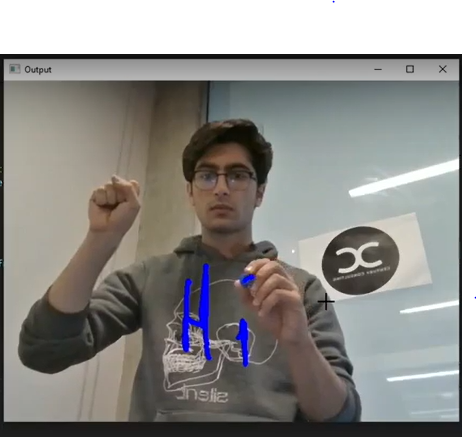
AirBoard is software that turns air into your very own whiteboard. AirBoard uses your webcam to track what you are writing, and translates that onto your virtual whiteboard on the screen.
How we built it
We used MediaPipe to detect hands and TensorFlow to process hand gestures. The user having their non-writing hand in a fist means the whiteboard will be in writing mode, whereas having their hand open means that they are lifting the virtual marker up. We considered multiple other methods of controlling whether the marker is writing or not but decided on this because it is intuitive and requires no special hardware.
To determine where the virtual marker is, we used computer vision with OpenCV and a blob detection algorithm to process the images that came through.
Challenges we ran into
Some of the largest challenges we ran into were having to stay focused for 36 hours and TensorFlow's demand for raw computing power. Being in person for a 36-hour hackathon for the first time in a very long time was very challenging as we have to plan, set and prioritize goals, and create a schedule in order to successfully deliver a working prototype to the judges before the deadline. TensorFlow’s demand for raw computing power was especially challenging to overcome because it forced us to develop efficient algorithms to allow for the below-average computer with a great personality to be able to run our program at a reasonable frame rate.
Accomplishments that we're proud of
In the end, despite the challenges we went through, we are proud to have created a prototype to demo our idea.
What we learned
We learned how to deal with image processing and blob detection algorithms. This was also most of our first time working with Tensorflow, so we also had to learn how the library works to implement it in our project.
What's next for AirBoard
Some of the potential ideas we have for AirBoard are:
- Creating an online collaboration platform using Airboard (having multiple people in a phone call all working on the same whiteboard together)
- Making AirBoard compatible with multiple people in the same room (working on the same whiteboard in real life)


Log in or sign up for Devpost to join the conversation.