AIRA - Auto Incident Response Assistant
Inspiration
Security incident response is often slow and fragmented. Analysts jump between log viewers, terminals, and documentation while trying to establish context and prioritize findings. We wanted a single, VS Code–native workspace that accelerates detection, investigation, and reporting without automating decisions or removing analyst control, which can be dangerous in security environments.
What it does
AIRA (Auto Incident Response Assistant) is a VS Code extension that supports analysts during incident triage using lightweight ML and an evidence-grounded AI assistant.
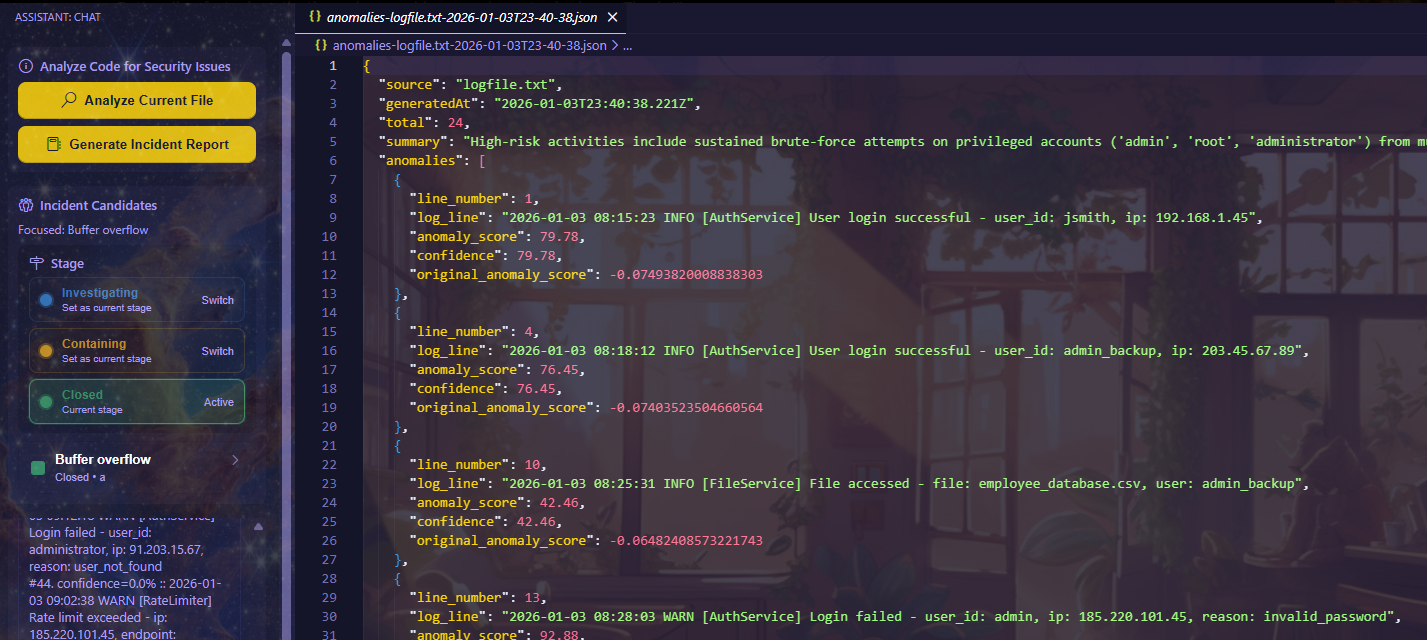
- Provides a VS Code–native incident workspace with stages, chat, and investigation actions.
- Analysts manually control incident stages (e.g., New, Investigating, Closed) to organize and track triage progress.
- Logs are analyzed using Isolation Forest to flag anomalous events.
- Gemini filters, summarizes, and explains anomalies using supporting evidence and confidence scores.
- Full anomaly outputs are preserved as timestamped
anomalies-*.jsonfiles, while top findings are surfaced in the UI for fast review. - Can analyze the active code file and generate a security-focused assessment.
- Generates final incident reports in Markdown, built from incident metadata and analyst chat history.
- Persists incidents, stages, and chat per workspace, with clear loading indicators during analysis.
AIRA is intentionally human-in-the-loop: it surfaces signals and context, but analysts make all final decisions.
How we built it
Frontend
- VS Code extension with a custom webview UI (
extension.js) - Incident list, stage tracking, and analyst chat interface
- Investigation actions:
- Analyze Current File
- Generate Incident Report
- Show All Anomalies
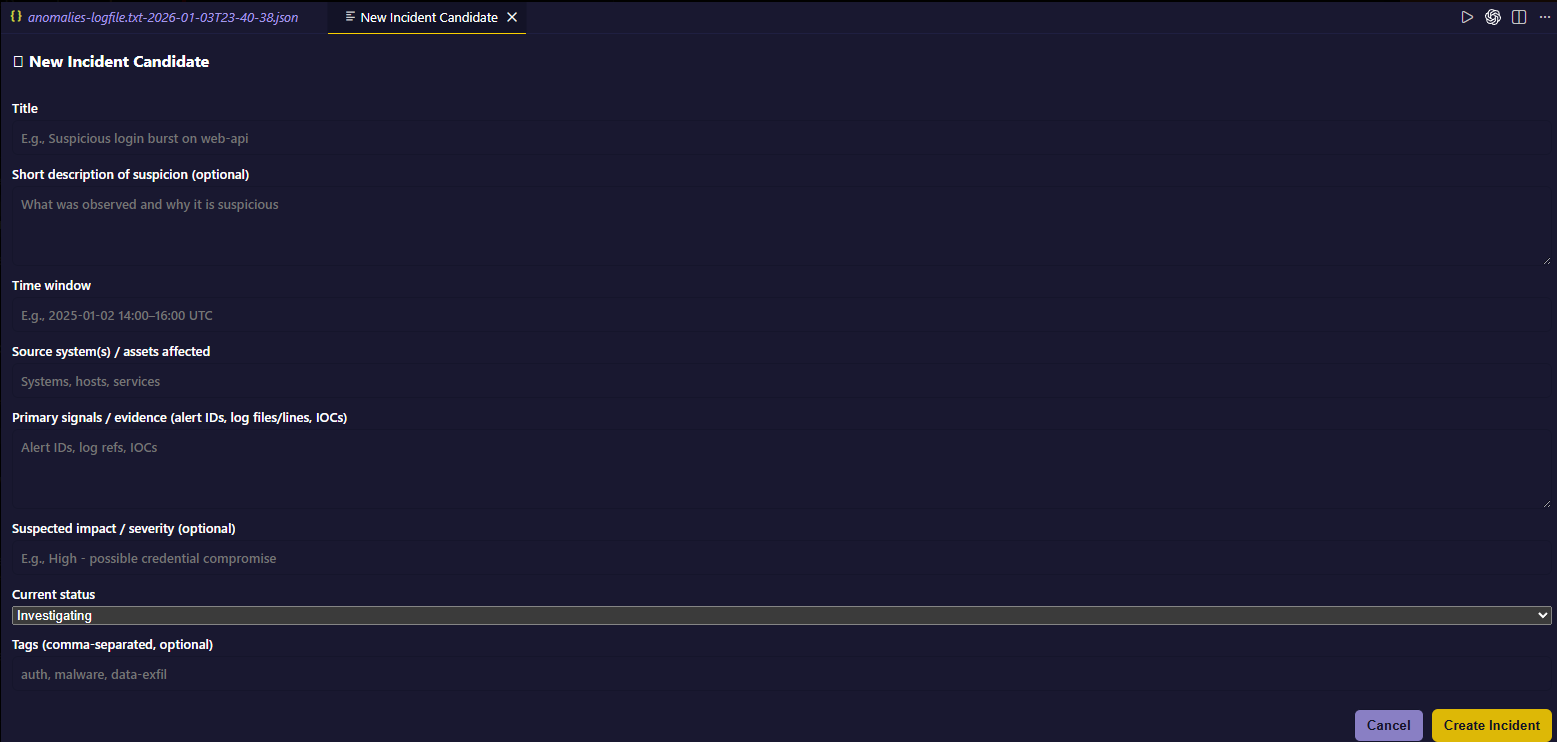
- New Incident Candidate
- Loading placeholders to keep the UI responsive during analysis
Backend
- FastAPI service (
backend/main.py) - ML pipeline (
backend/model.py):- Isolation Forest for anomaly detection
- TF-IDF for lightweight text relevance
- Gemini API for filtering, summarization, and explanation
- Normalized anomaly confidence scores (0–100)
- Full anomaly results saved as timestamped JSON files
- Environment-based configuration via
.env(GENAI_API_KEY)
Data Flow
VS Code Webview → FastAPI backend (localhost:6767) → ML scoring → Gemini summarization
→ Full anomalies saved to workspace JSON
→ Top findings and confidence scores surfaced in chat
Commands / Usage
New Incident Candidate
Command Palette → Auto Incident Response Assistant: New Incident Candidate
Define title, time window, sources, and signals. Incident stages update via sidebar chips.Analyze Current File
Command Palette → Analyze Current File
Generates a security report (report.md) and posts findings to chat.Analyze Logs
Drop or attach a.logor.txtfile in chat.
AIRA flags anomalies, savesanomalies-<name>-<timestamp>.json, and posts a concise summary with confidence scores.Show All Anomalies
Command Palette → Show All Anomalies
Displays the full anomaly list with confidence values and links to saved JSON files.Generate Incident Report
Command Palette → Generate Incident Report (requires Closed stage)
Producesincident_report.mdusing incident metadata and recent chat context.
Challenges we ran into
- Handling LLM failures defensively so investigations don’t break when Gemini returns empty or malformed responses.
- Converting raw anomaly scores into clear, interpretable confidence percentages.
- Safely generating timestamped files within VS Code workspace constraints.
- Persisting incident state across sessions within extension sandbox limitations.
Accomplishments we’re proud of
- A complete end-to-end incident investigation workflow inside VS Code.
- Full preservation of anomaly data alongside concise, confidence-based summaries.
- Clear separation between ML-based signal detection and LLM-based explanation.
- Report generation that reflects real incident context and analyst reasoning, not just raw logs.
What we learned
- Analyst UX matters: top-N summaries and loading indicators reduce cognitive load without hiding data.
- LLM integrations must be constrained and defensive to remain trustworthy.
- Simple, well-applied ML combined with clear presentation can meaningfully speed up incident response.
What’s next for AIRA
- Cache ML models in the backend to reduce repeated analysis latency.
- Optional fast/async modes that skip LLM filtering when speed is critical.
- Stronger guardrails and retries around Gemini calls with clearer UI error states.
- Additional log parsers and connectors for broader security coverage.


Log in or sign up for Devpost to join the conversation.