Inspiration
I spent 2021 learning how to fly and getting my Private Pilot license. One of the tasks that I always struggled with was radio communication with air traffic control. Pilots communicate with air traffic control on both the ground and in the air to hear important directions. This communication is done via radio, which sometimes makes the communication difficult to understand due to quick talking and low quality audio. It's easy for a pilot to miss key information when communicating over radio with ATC (Air traffic control).
Miscommunication between pilots and ATC is a major safety risk, as lack of coordination at airports can be a deadly and fatal problem. The Tenerife Airport Disaster, the deadliest accident in aviation history, resulting in the deaths of 583 people, didn't even take place in the air. It took place on the ground when two planes collided on the runway. This risk of collision is still very pertinent today. In January of 2023, two planes nearly collided at JFK airport on the ground during takeoff, which surely would have been one of the worst aviation disasters in recent time.
What it does
We built a companion app for pilots to use in the cockpit in order to improve the pilot's ability to receive, parse, and understand instructions from ATC while on the ground.
How it works
1. Automatic transcription of ATC audio using AI We listen to ATC audio instructions and transcribe the audio into text
2. Key term extraction and semantic interpretation of aviation terms Using the transcribed audio in text format, we can extract key aviation terms and meaning in order to make sense of the instructions given to the pilot. We extract terms like starting position, taxiway instructions, runway takeoff instructions.
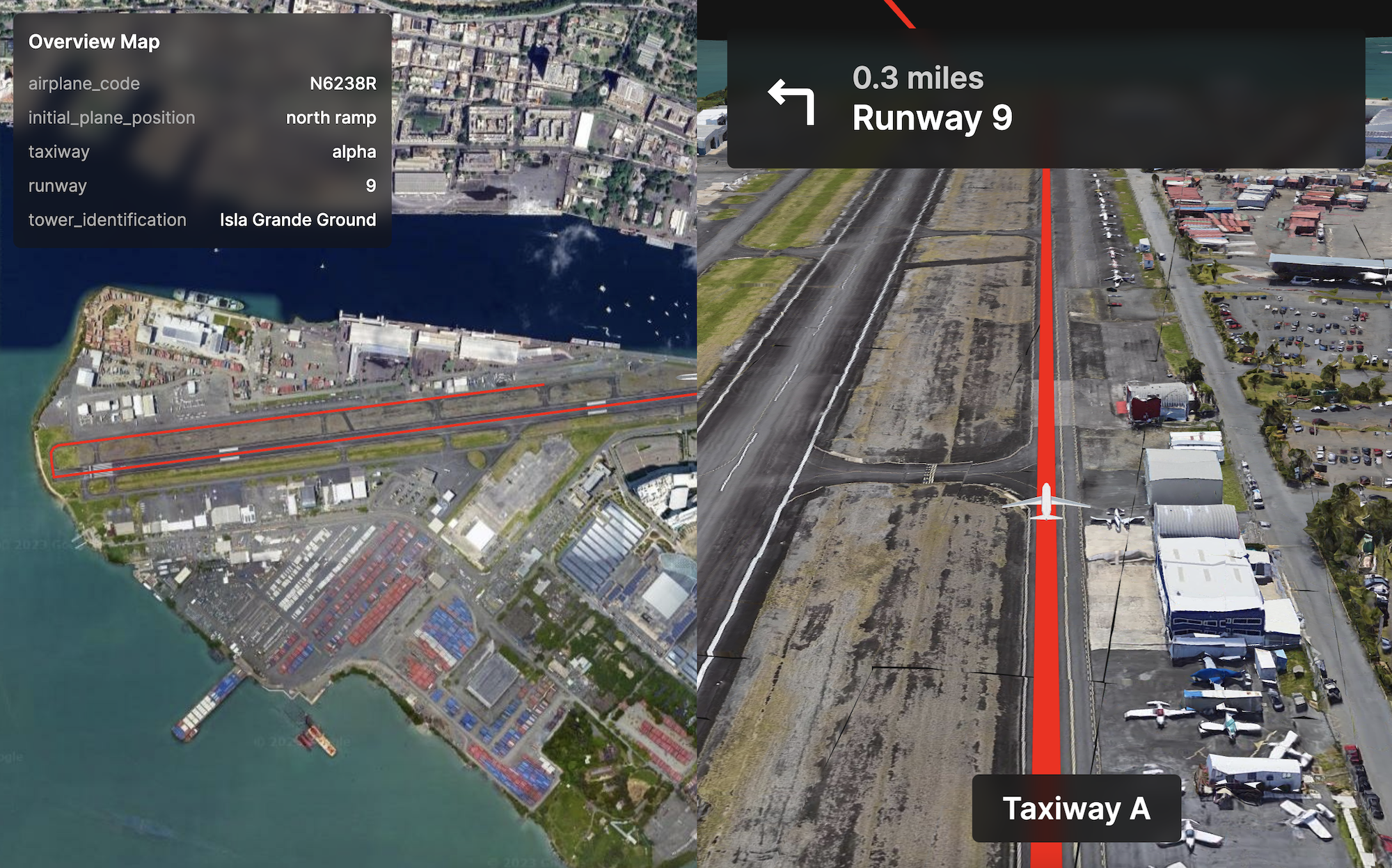
3. Information Visualization Our companion app provides a usable information visualization of the required instructions to complete from ATC. We are able to visualize the path and route the pilot is supposed to take across the complicated airport from starting position to takeoff position.
The visualization provides a top-down overview of the required route and a turn-by-turn immersive view, similar to what you would see in Google Maps mobile app.
How we built it
This companion app is designed to be use on an iPad inside of an airplane cockpit. The app is a front-end web app built with React. For the maps technology, we used Google Maps 3D Photorealistic Imagery inside of deck.gl.
The ATC app simulates a device that can be sitting inside the ATC tower. The app is also a front-end only app build in Noodl and compiled into React. It records audio using javascript, transcribes the audio using AssemblyAI APIs, and parses the text using OpenAI's GPT-4 with function calls.
We created a sample map of Isla Grande Airport in San Juan, Puerto Rico. Using Dijstrka's algorithm, we are able to route from point A->B on a network graph.
Challenges we ran into
Interpreting the audio to parse the semantic aviation terms was a little bit of a challenge.
Accomplishments that we're proud of
We're proud of creating a project that can help save lives and make aviation a safer environment
Why Sustainability Category?
We chose the sustainability category because our project aims to create a safer environment for all humans involved in aviation.
How to test it out
This app consists of two components:
- The cockpit companion for the pilot: https://atc-map.vercel.app/?code=n6238r
- The ATC app: https://atc.sandbox.noodl.app/
In order to test out the app, use two computers. Open the cockpit companion on one computer and then the ATC app on the other computer.
The ATC app will listen to the voice commands via microphone. The cockpit companion app will then parse and visualize the commands.
You can try speaking this into the ATC app for an example: "Flight November 6238 Romeo, this is Isla Grande Ground. Take runway 9er from north ramp; taxi via alpha taxiway flying river transition to ceiba standby for squak"
Built With
- deck.gl
- google-maps
- openai
- react


Log in or sign up for Devpost to join the conversation.