-
-
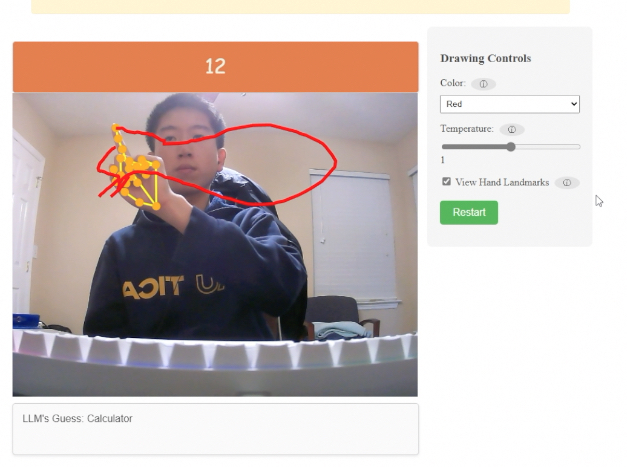
Gameplay
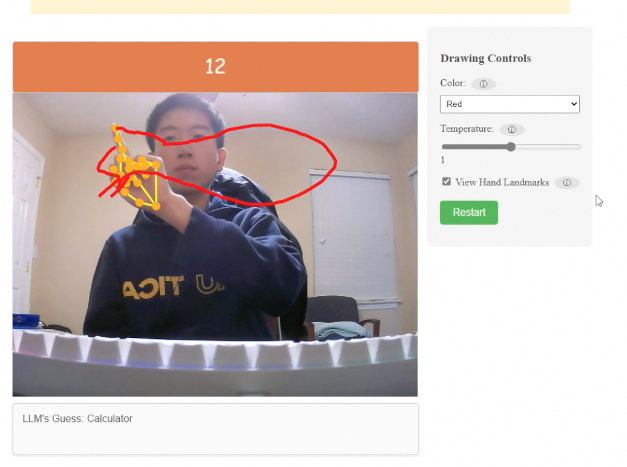
Inspiration
Inspired by Google's Quick Draw and Teachable Machine, I envisioned a project that merged the fun of doodle recognition with a more intuitive and interactive drawing method. My initial idea was to use Teachable Machine to analyze a user's pose while they played Quick Draw. However, I eventually landed on a more creative concept: recreating Quick Draw with a twist – drawing in the air instead of on a screen. Realizing the complexity of training a custom model for this task, I leveraged MediaPipe's pre-trained computer vision models to track hand movements and gestures, forming the foundation of "Air Draw."
What it does
Air Draw is a fun, interactive game inspired by Quick Draw, but with a novel twist: you draw in the air using hand gestures! To play, simply face your webcam, raise your right hand with your index finger pointing up, and start drawing in the air. Air Draw uses advanced computer vision to detect when your hand is in the "pointing up" gesture. When it is, the app will start drawing a line that follows the tip of your index finger. Every two seconds, a Large Language Model (LLM) will analyze your doodle and try to guess what you're drawing. Your goal is to get the LLM to guess correctly within 20 seconds!
How I built it
Air Draw is built as a front-end web application using Node.js for package management and Vite for efficient development workflows and bundling. The core logic is implemented in JavaScript, which handles the AI-based drawing detection, user interaction, and communication with external APIs.
I used MediaPipe's GestureRecognizer to track hand gestures from the webcam feed. OpenAI's LLM API interprets the drawings. The UI is built with HTML and CSS.
Challenges I ran into
- Idea Refinement: Narrowing down many ideas to a feasible set for a hackathon was tough.
- API Key Management: I had issues initially securing my API key, leading to a Git mishap that I had to resolve.
- Camera and Drawing Synchronization: Aligning the camera feed with real-time drawing was challenging.
- Using LLM API: I wanted to train my own model to recognize the doodles, but I didn't have enough time so I used an LLM API instead.
Accomplishments that I'm proud of
- Successfully integrated MediaPipe's models with OpenAI's LLM API.
- Developed a fully functional game within the hackathon timeframe.
What I learned
- Using OpenAI's API and open-source computer vision models (MediaPipe).
- Hackathon strategy: prioritizing features and managing scope.
- I learned how to properly manage and secure API keys.
- Front-end development with HTML, CSS, and JavaScript.
What's next for Air Draw
- Add more LLM customization options.
- Improve drawing precision and responsiveness.
- Allow gesture-based color changing and erasing.
- Train a custom model on the Quick Draw dataset for doodle recognition.
- Interface Air Draw on top of Quick Draw.
Built With
- css
- html
- javascript
- llm
- mediapipe
- node.js
- openai-api
- vite


Log in or sign up for Devpost to join the conversation.