Inspiration
Here is how the project began. I am a student preparing for a skills competition, and my teacher asked our team to develop an IoT cloud platform.
When I first received the assignment, I felt completely overwhelmed. At the time, I did not understand concepts such as concurrency, race conditions, asynchronous tasks, message queues, or role-based access control. I also had no idea how to connect devices, backend services, databases, AI models, and frontend interfaces into one complete system.
By chance, I learned about GPT and Codex on X. I installed them on my computer and started experimenting with them.
At first, I only asked GPT basic questions, such as how MQTT messages should be designed, how device states should be stored, and why an API might receive duplicate requests. Later, I began using Codex in the actual development process, asking it to read code, analyze errors, design modules, and implement features.
They dramatically accelerated both my learning and my development process.
Previously, I might spend hours searching for the cause of an error and still fail to understand what had gone wrong. With GPT, I could first learn the principles behind the issue, while Codex could inspect the wider project, modify the relevant code, and help verify the result.
That experience became the inspiration for this project:
With the support of AI, a student who initially knew almost nothing about IoT cloud platform development could gradually build a real, working AIoT system.
This project is not only an IoT platform. It is also a complete experiment in learning and building collaboratively with AI.
Features
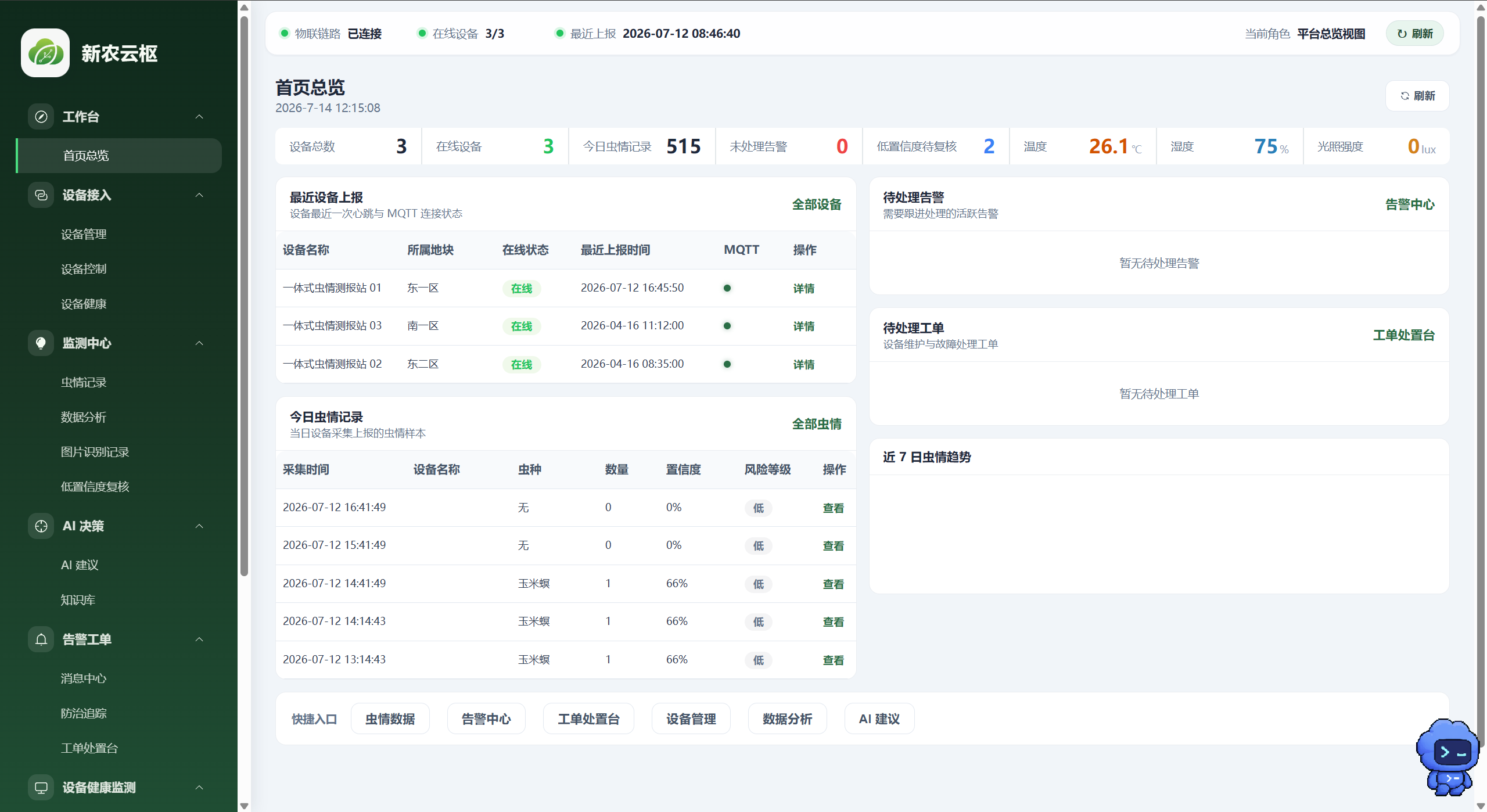
The platform is designed for smart agricultural pest monitoring. It integrates IoT device connectivity, computer vision, alert handling, device maintenance, and AI-generated recommendations into a single system.
| Capability | Description |
|---|---|
| IoT Connectivity | Subscribes to pest data, environmental sensor readings, device status, and video stream addresses through MQTT, while also supporting downstream commands and remote configuration |
| Pest Monitoring and Alerts | Supports pest record CRUD operations, daily summaries, alert rule configuration, and a complete alert-handling workflow |
| Computer Vision | Integrates ONNX Runtime in the backend through onnxruntime-node to run pest recognition models on uploaded images |
| Low-Confidence Review | Sends low-confidence recognition results to a review center, where they can be confirmed, corrected, or returned to the training pool |
| Training Data Feedback Loop | Feeds difficult samples, misclassified samples, and newly discovered pest samples back into the dataset for future model improvement |
| AI Recommendations | Connects to Ollama or another configurable large language model and uses BullMQ to process recommendation tasks asynchronously |
| Demo Mode | Supports a Fake Ollama mode so the complete AI recommendation workflow can be demonstrated even when no local model service is available |
| Device Control | Supports 18 categories of remote commands, including pest-attracting lamps, heating, lighting, vibration, cleaning, and motor direction control |
| Video and Snapshots | Provides camera stream proxying and remote snapshot capabilities for observing devices in the field |
| Device Health | Evaluates device health based on online status, sensor anomalies, actuator feedback, and communication quality |
| Maintenance Work Orders | Automatically or manually creates work orders and supports assignment, processing, closure, and recovery confirmation |
| Knowledge Base | Supports PDF upload, text chunking, retrieval, and retrieval-quality testing to provide domain knowledge for AI recommendations |
| Mini Program API | Provides aggregated APIs for the homepage, alerts, recognition uploads, device status, and client configuration |
| Unified API Gateway | Provides English aliases for selected services, including /api/auth/*, /api/vision/*, and /api/ai-alias/* |
| Five-Role RBAC | Supports administrators, farmers, plant protection personnel, hardware engineers, and AI training specialists, with permissions assigned according to responsibilities |
The platform is not simply a dashboard for viewing device data. It forms a complete operational loop:
Device data collection → cloud ingestion → AI recognition → low-confidence human review → pest alerting → AI recommendation generation → user action → result recording → training data feedback
Through this workflow, the system continuously accumulates real-world data and creates a foundation for future model improvement.
How It Was Built
At the beginning of the project, I mainly used Claude Code with an Opus model.
It helped me write some of the initial code, but as the project grew, I found it difficult to understand how the whole system fit together. A feature might appear to work, yet I did not understand why it worked. When something failed, I could not determine whether the problem came from the frontend, backend, database, or device communication layer.
Later, I started using Codex throughout the development process.
Codex did more than generate code. More importantly, it could inspect the existing project structure, analyze dependencies between modules, and propose more complete implementation plans.
For example, when I asked it to add device anomaly handling, it did not merely create an error notification page. It also suggested adding:
- device health evaluation;
- anomaly event records;
- automatic work-order creation;
- work-order assignment and processing;
- maintenance result archiving;
- device recovery confirmation.
As a result, a simple alert feature evolved into a complete device maintenance workflow.
The same thing happened with computer vision. What began as a basic process of uploading an image and returning a recognition result gradually expanded into:
model inference, confidence evaluation, human review, training data feedback, annotation task management, and model version iteration.
For the frontend, Codex helped me build the administration dashboard, role-based pages, data charts, and device control interfaces. For the backend, it assisted with APIs, database models, MQTT communication, asynchronous jobs, model inference, and access control.
However, I did not simply copy everything generated by AI.
After completing each module, I continued asking GPT questions such as:
- Why should this code be written this way?
- What problems might occur in this API?
- What happens when multiple requests arrive at the same time?
- How should duplicated device messages be handled?
- Could one role access data belonging to another role?
- How should failed AI recommendation tasks be retried?
Through continuous questioning, modification, and verification, I gradually moved from “asking AI to write code for me” to “working with AI to analyze and solve problems.”
Challenges
1. Limited Experience in System Development
At first, I did not understand why an IoT platform needed message queues, access control, state synchronization, and failure recovery.
For example, a device may resend data because of network instability. Multiple users may attempt to control the same device at the same time. AI inference may take several seconds, and a large language model service may temporarily become unavailable.
Without handling these situations, the platform might work during a demonstration but would not be reliable in real-world use.
With GPT's help, I gradually learned about idempotency, task retries, timeout handling, permission validation, and state machines, and applied some of these concepts to the project.
2. Hardware–Software Integration
An IoT system includes more than webpages and databases. It must communicate with physical devices.
A device may go offline, a sensor may return an abnormal value, or a command may fail to execute. Therefore, the platform cannot assume that a command has succeeded immediately after it is sent.
To solve this, I designed a command lifecycle that tracks whether a command is pending, sent, successfully executed, failed, or timed out.
3. Deploying an AI Model in a Real Application
Training a model does not automatically make it usable in a production system.
The platform must handle model loading, image preprocessing, ONNX inference, output parsing, confidence filtering, and error handling. It must also record which model version was used for each recognition result.
I eventually integrated ONNX Runtime into the backend and designed a human review and training-data feedback process for low-confidence results.
4. Slow Large Language Model Responses
Generating AI recommendations can take a relatively long time. If the application waits for the model directly inside a normal HTTP request, the request may become blocked or time out.
To address this, I used BullMQ to move AI recommendation generation into asynchronous background jobs. The system first returns a task status, then processes the model request separately and stores the result.
When Ollama is not installed in the demonstration environment, the platform can switch to Fake Ollama mode so the complete workflow can still be demonstrated.
5. Limitations of the Windows Environment
In my development environment, GPT on Windows could not perform every interface operation in the same way that Computer Use can in some Mac environments.
Sometimes an error appeared in a browser page, terminal window, or visual development tool, so I had to take a screenshot and send it to GPT.
Fortunately, GPT's image understanding was extremely useful. It could interpret page layouts, error messages, terminal logs, and code shown in screenshots, then identify the module most likely responsible for the problem.
This screenshot–analysis–modification–verification workflow became an important part of my development process.
6. AI-Generated Code Is Not Always Correct
AI can improve development efficiency, but not every generated solution works immediately.
Sometimes it misunderstands the project structure. Sometimes it selects an incompatible dependency version. In other cases, fixing one issue may accidentally affect another module.
As a result, I developed a more disciplined workflow:
Clarify the requirement first, ask AI to analyze it, modify only a limited scope of code, run tests, and inspect logs instead of repeatedly generating new code without verification.
Accomplishments That I Am Proud Of
What I am most proud of is not one particularly complex page. It is the fact that I completed an end-to-end system, from device connectivity to a complete operational workflow.
Before starting this project, I did not even understand what concurrency, asynchronous jobs, or RBAC meant. Now, I can understand and implement MQTT device connectivity, ONNX model inference, task queues, role-based permissions, human review workflows, and device maintenance work orders.
My main achievements include:
- establishing data relationships among devices, sensors, pest records, alerts, recognition results, work orders, and user roles;
- implementing MQTT uplink data ingestion and downstream device control;
- integrating an ONNX pest recognition model into a Node.js backend;
- creating a human review workflow for low-confidence recognition results;
- designing a feedback loop from reviewed samples to training tasks;
- using BullMQ to process time-consuming AI recommendation jobs;
- implementing permission isolation for five user roles;
- connecting device anomalies, work-order handling, and recovery confirmation into a complete workflow;
- providing unified APIs for both the web administration system and the mini program;
- building a demonstration mode that can operate without real devices or live AI models.
More importantly, this project showed me that the value of AI for students is not that it removes the need to learn. Its value is that it lowers the barrier to entering a complex field.
In the past, I might have abandoned a project simply because I did not know where to begin. Now, I can ask AI to break the problem into smaller parts, then understand, implement, and verify each part step by step.
AI did not complete the entire project for me. It made it possible for me to complete the project.
What I Learned
1. Do Not Ask AI to Build the Entire Project at Once
When the requirements are vague, an AI-generated project may appear feature-rich, but its modules often lack a unified design.
A more effective approach is to define the users, devices, business process, and core data first, then divide the system into smaller modules and build them incrementally.
2. Ask AI to Explain Before Asking It to Modify
If I ask AI to modify code that I do not understand, it may solve the immediate problem, but I will still be unable to handle a similar issue later.
I now ask about the cause of the error, the related concepts, and the possible solutions before asking AI to change the code.
3. AI Is Most Valuable When It Contributes New Ideas
In this project, AI's greatest contribution was not faster typing. It proposed ideas I had not considered, such as low-confidence review, training data feedback, device health scoring, automatic work orders, and asynchronous job processing.
These ideas helped transform the project from something that could merely be demonstrated into a system with complete business logic.
4. Human Verification Must Remain Part of the Process
Neither code nor pest recognition results should be accepted blindly.
Code must be tested and verified through logs. Low-confidence recognition results require human review. AI-generated pest-control recommendations should be treated as references and evaluated by qualified personnel according to real conditions.
5. More Features Do Not Automatically Mean a Better Project
The value of a system is not determined by the number of menu items it contains. It is determined by whether it solves a complete problem.
For that reason, I focused on connecting features into end-to-end workflows instead of simply adding isolated pages.
6. AI Lowers the Barrier, but It Does Not Remove Responsibility
AI can help generate code and analyze problems, but I am still responsible for deciding which solution to use, how to verify it, and whether it meets the actual requirements.
Using AI does not mean avoiding learning. It requires learning how to ask precise questions, evaluate whether an answer is reasonable, and take responsibility for the final product.
Future Directions for the IoT Cloud Platform
1. Moving from Connected Devices to Intelligent Devices
Traditional IoT platforms mainly focus on uploading data, remotely controlling devices, and displaying status information.
Future platforms should support stronger edge intelligence. Recognition, anomaly detection, and some control decisions can be performed locally, allowing devices to continue operating even when the network is temporarily unavailable.
For pest monitoring devices, the edge system could perform pest recognition, counting, and anomaly detection locally, then upload only structured results and selected images. This would reduce bandwidth consumption and cloud computing pressure.
2. Building a Cloud–Edge–Device Architecture
The system can evolve into a three-layer architecture:
- the device layer handles sensor acquisition and actuator control;
- the edge layer performs real-time recognition, data filtering, and local decision-making;
- the cloud layer handles long-term storage, cross-region analysis, model training, and centralized management.
This architecture would improve real-time performance, reliability, and computing efficiency.
3. Evolving from One-Time Recognition to Continuous Learning
A visual recognition model is usually fixed after deployment, but real environments change continuously. Pest posture, lighting, backgrounds, seasons, and camera conditions may all vary.
The platform could use human-reviewed results to collect difficult samples continuously, automatically create annotation tasks, train new models, evaluate them, and release improved versions.
In this way, the platform would no longer simply call a model. It would become the data infrastructure that allows the model to keep improving.
4. Introducing Digital Twins
The platform could create a digital twin for every physical device, mapping its structure, sensor state, operating parameters, fault records, and maintenance history into a virtual representation.
Users could inspect the current device state, simulate control strategies, and predict component failures through the digital interface.
5. Strengthening Device Security and Access Control
As remote control capabilities increase, IoT security becomes more important.
Future versions should add device identity authentication, encrypted communication, command signing, operation auditing, key rotation, and abnormal access detection to prevent device impersonation, command tampering, and unauthorized control.
6. Using Time-Series Data for Predictive Maintenance
Devices continuously produce temperature, voltage, current, communication quality, and actuator usage data.
By analyzing these time-series signals, the platform could detect abnormal trends before a failure occurs and create a maintenance work order in advance. This would shift maintenance from reactive repair to preventive maintenance.
7. Using Large Language Models as the Main Interface
In the future, users may not need to navigate through multiple layers of menus. They could directly ask questions such as:
- Which devices have been going offline frequently?
- Which pest species increased the fastest during the past week?
- Why is the heating module on Device 3 abnormal?
- Based on the current pest activity and weather, which risks require the most attention?
A large language model could translate these natural-language questions into database queries, device diagnostics, or statistical analyses, then return the results in a form that is easier to understand.
8. Supporting Cross-Regional Pest Analysis
When pest monitoring devices from multiple regions connect to the same platform, the system can combine time, location, pest species, weather, and crop information to analyze migration patterns and outbreak risks.
Future versions could also provide map heatmaps, time-series forecasting, and regional correlation analysis to help plant protection personnel prepare interventions earlier.
9. Improving Platform Openness
The platform could provide more standardized APIs, webhooks, and device access protocols so that sensors, cameras, agricultural equipment, and third-party applications from different manufacturers can connect to it.
Through open interfaces, the project could grow from a single-purpose application into an extensible agricultural IoT platform.
Conclusion
This project began with a competition assignment that initially felt impossible to complete.
With the help of GPT and Codex, I gradually moved from being a student who knew very little about IoT cloud platforms to building device connectivity, computer vision, asynchronous tasks, access control, and complete operational workflows.
The system still has many areas that can be improved, but it has already proven something important to me:
AI can help experienced developers work faster, but it can also help ordinary students cross technical barriers and turn ideas that once existed only in their imagination into real products.
I hope to continue improving the platform so that it can become more than a competition demonstration and eventually serve real smart agriculture and pest monitoring scenarios.


Log in or sign up for Devpost to join the conversation.