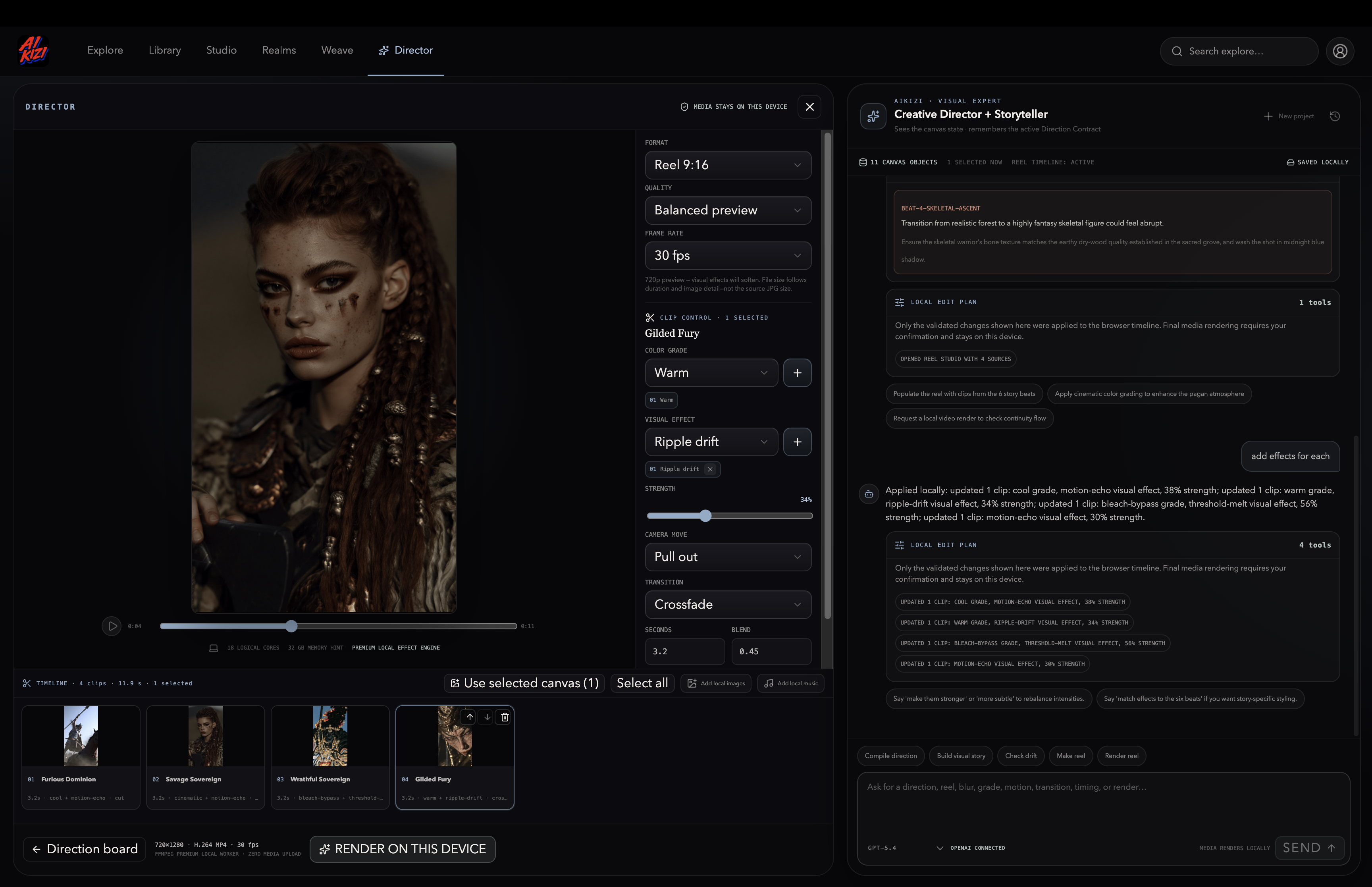
AIKIZI Director
Inspiration
Over the past year, I built AIKIZI, a visual intelligence platform where every image is decoded into structured meaning: emotion, material, framing, palette, lighting, and more.
I generate a lot of images, and over time I ended up with more than 15,000 deeply searchable visual references.
The problem that pushed me to build Director was simple.
My Studio page could already turn an image into an AI-generated video. It worked, and it was powerful, but every clip consumed credits because the generation was outsourced to an expensive model.
When you make reels regularly, those five-second clips add up quickly.
And half the time, I did not even need newly generated motion. I just needed a camera movement, a colour grade, an effect, a transition, or some music.
Familiar motion, not synthesised motion.
The laptop sitting on my desk can render 1080p video faster than real time. Most creators already own powerful hardware, but there was no tool that treated the browser as a render engine and my own image library as the creative brain.
So I built one.
Zero credits per clip, because your own chip does the work.
What it does
AIKIZI Director is a creative-direction and pre-production studio available at aikizi.com/director.
It lets you:
- Search a decoded corpus of more than 15,000 images and place references on a canvas.
- Choose exactly what to inherit from each reference, including emotion, material, world, framing, palette, silhouette, or lighting.
- Compile those choices into an editable Direction Contract.
- Expand the contract into a multi-beat visual story with continuity checking.
- Animate the story inside Reel Studio using dropdown controls or natural-language chat.
- Add colour grades, camera movements, transitions, captions, music, and structural visual effects such as interval pixel sorting, glitch bursts, and halftone reveals.
- Render an H.264 MP4 entirely on your own device with FFmpeg compiled to WebAssembly. Nothing uploads. Nothing gets billed. A 5 or 10 second clip costs you exactly zero credits, and it works even on a phone
A Visual Expert chat panel sits beside the canvas. Model-planned actions are validated against the current canvas, timeline, and clip IDs before being applied transactionally.
Invalid or impossible requests are never presented as successfully completed edits.
How I built it
I designed, implemented, tested, debugged, and documented Director with the help of GPT-5.6, from the Direction Contract schemas and the executable chat-to-canvas action protocol to the FFmpeg pipeline and the 100-plus test suite.
The dated Git history and Codex sessions record the development process.
The stack is:
- TypeScript
- React
- Vite
- Cloudflare
- FFmpeg compiled to WebAssembly
A shared timeline compiler drives the live canvas preview, displayed durations, transitions, and FFmpeg offsets. This keeps the editor preview and the final rendered video aligned.
Structural effects are generated frame by frame inside the browser.
For example, the pixel-sorting effect uses typed arrays and real interval-based sorting across actual pixel runs. It is not simply a shader approximation.
The generated frames are then passed to ffmpeg.wasm as image sequences and encoded into the final video.
Challenges I ran into
WebAssembly memory limits
Running multiple simultaneous 1080p streams inside ffmpeg.wasm often ended with an opaque Aborted() error.
I rebuilt the compositor around single-stream frame sequences and integer-aligned, oversampled camera movement.
Making the effects real
My first pixel-sorting effect looked honestly embarrassing next to my offline reference render.
Fixing it took several rounds of experimentation:
- Threshold-driven interval sorting across the full frame
- Per-frame morphology so the streaks actually move
- Better timing and direction controls
- Testing with real rendered frames instead of trusting the preview alone
I eventually introduced a simple rule:
No visual change ships without rendered frames that a human has looked at.
Trusting a model with the timeline
Allowing an LLM to edit real projects requires discipline.
Every proposed action is schema-validated, applied transactionally, and checked against the current project state.
When a request cannot be completed exactly, the interface shows the substitution instead of pretending the original request succeeded.
Accomplishments I am proud of
I built:
- A working video render engine inside the browser
- A decoded image corpus that powers creative direction, not just search
- A chat system that provably edits the project instead of only describing changes
- A 100-plus test suite covering schemas, timeline operations, rendering logic, and security headers
- A reel-production pipeline where the marginal cost of creating one more clip is effectively nothing
What I learned
Rendered evidence beats claimed success, both for models and for me.
I stopped accepting “done” without a frame I could actually inspect. Once I made that change, the quality improved dramatically.
I also learned that the browser in 2026 is no longer just a place to display creative work.
It can be a legitimate filmmaking tool.
What is next
Next, I want to add:
- Video-clip editing
- Beat-synchronised music
- More advanced timeline controls
- A system that allows other creators and developers to write their own effects
The goal is to open up the engine so more people can build effects that render privately on their own devices, using hardware they already own.
Built With
- cloudflare-workers
- codex
- ffmpeg
- gpt-5.6
- html5
- openai
- pnpm
- react
- typescript
- vite
- vitest
- webassembly
- x264

Log in or sign up for Devpost to join the conversation.