-
-
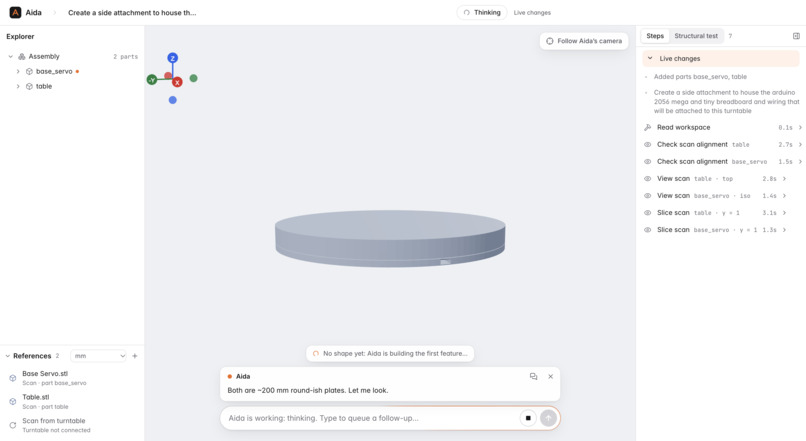
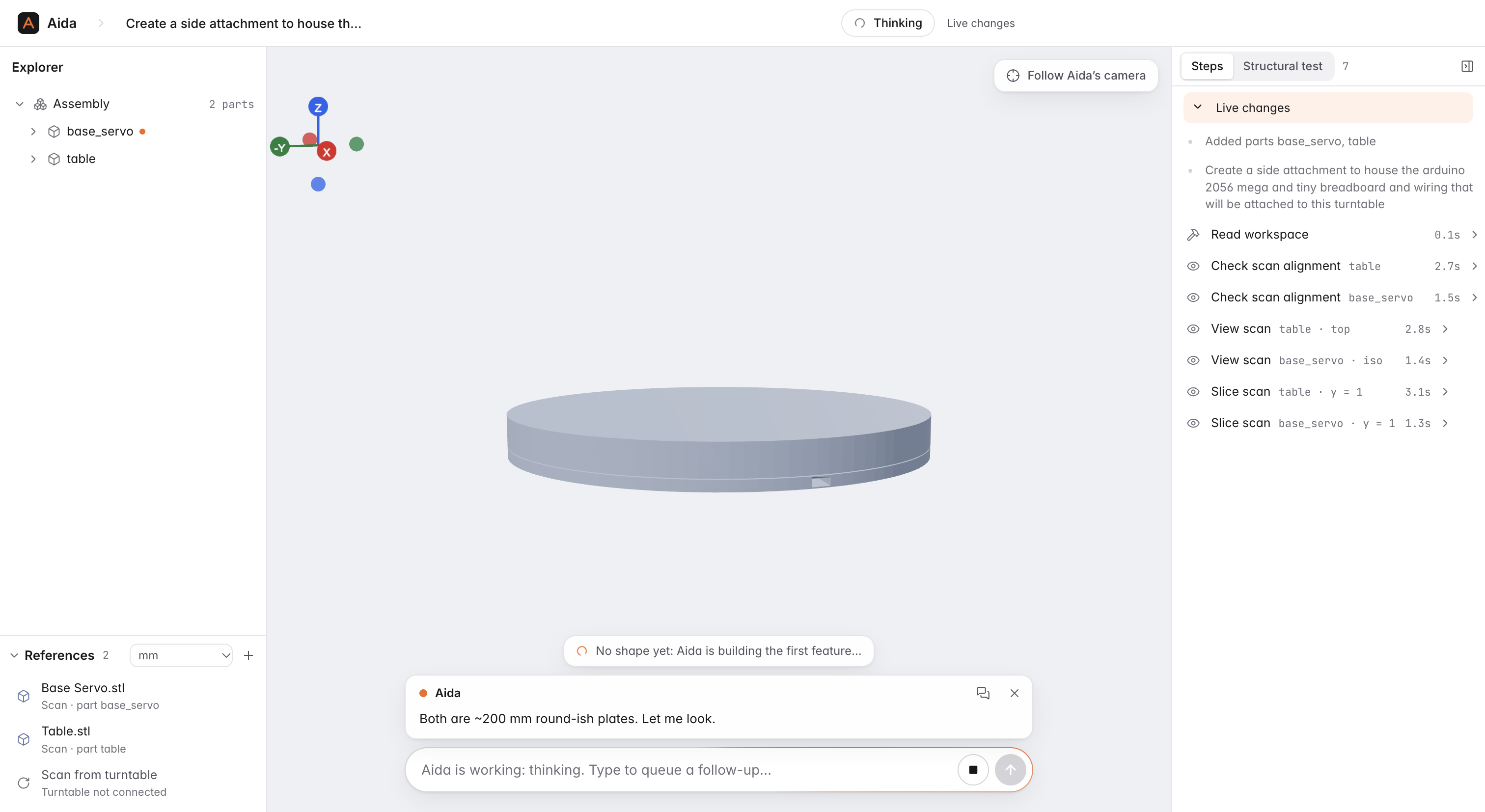
Initial imported mesh of the original Aida 1.0 hardware.
-
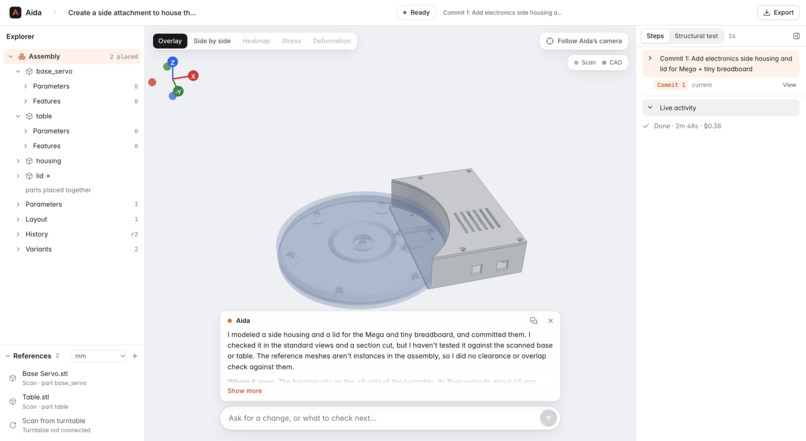
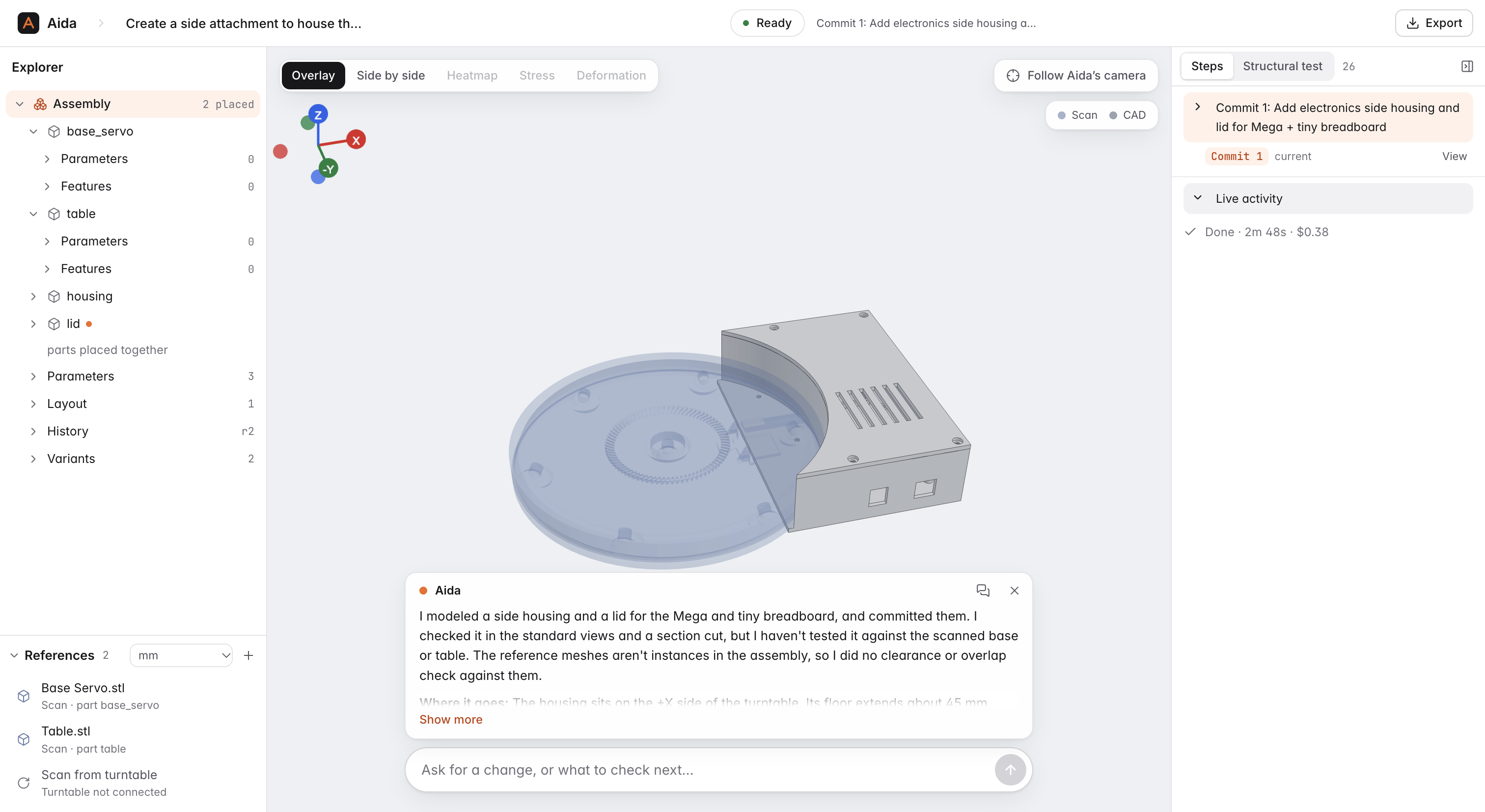
Aida 2.0 built hardware, built completely with the first version of Aida - electronics enclosure
-
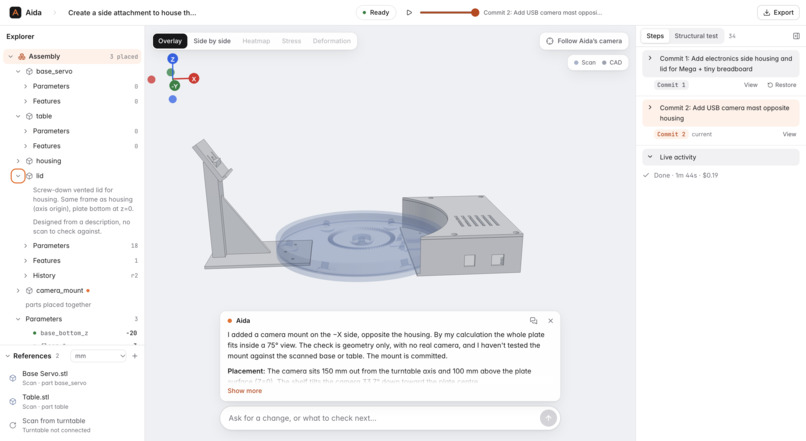
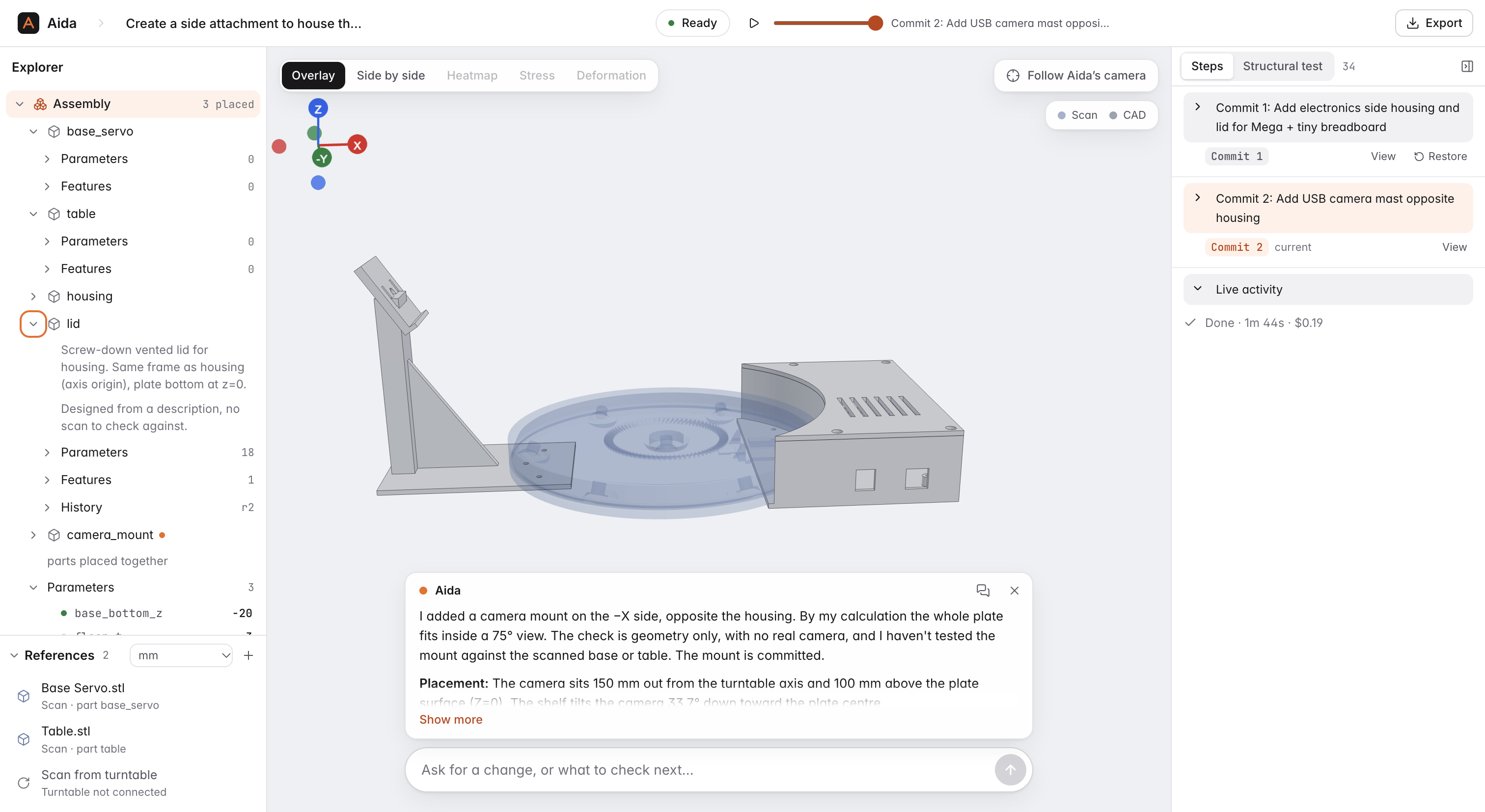
Aida 2.0 built hardware, built completely with the first version of Aida - camera mount
-
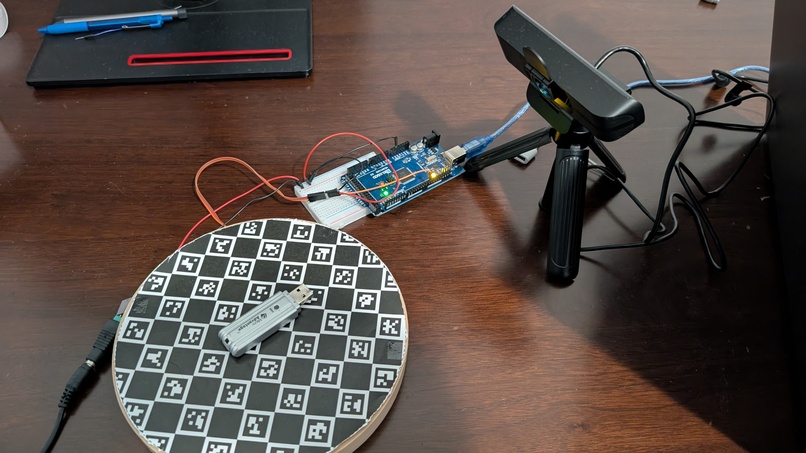
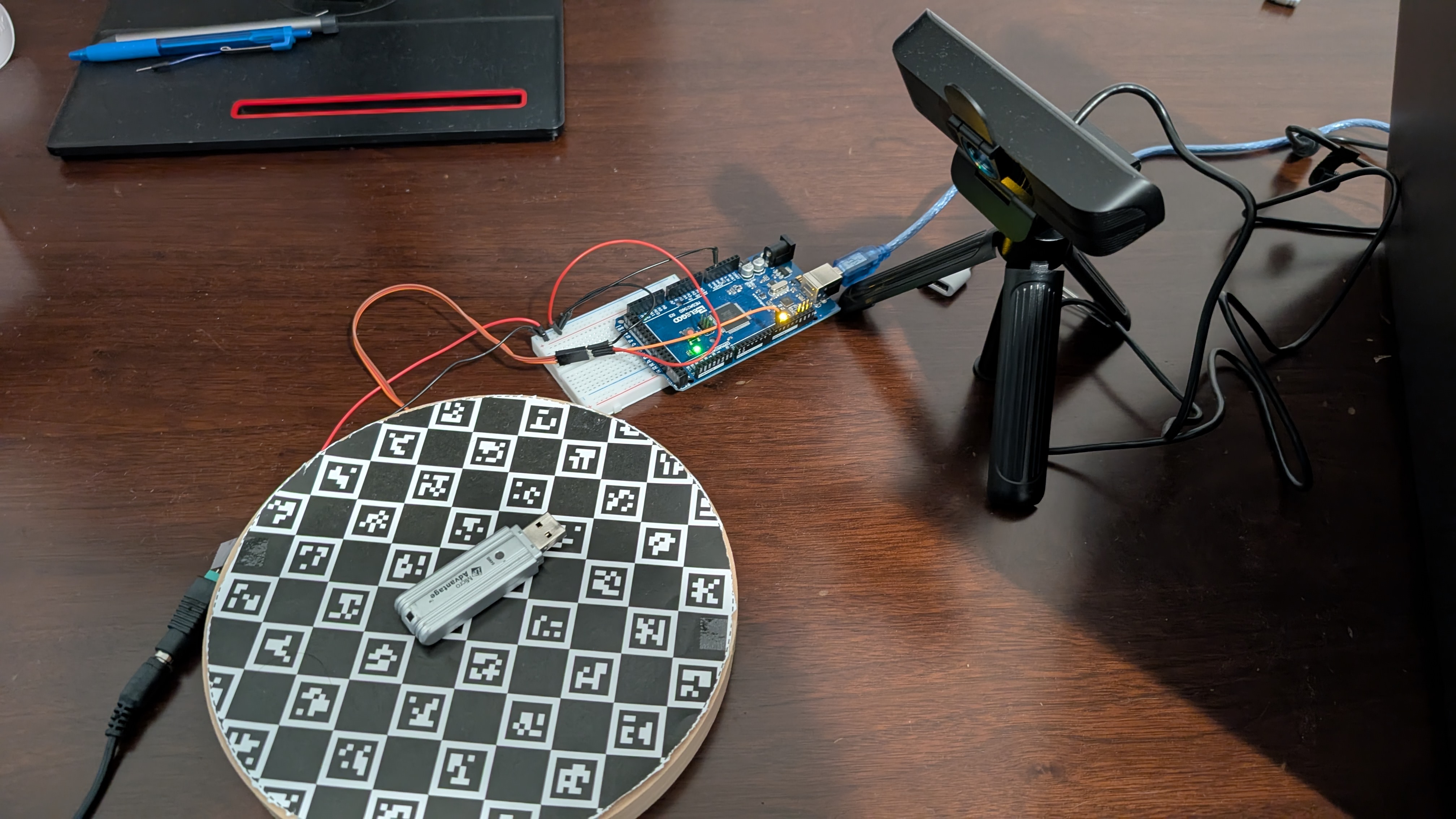
Physical Setup
Aida: AI Design Assistant
Turn real objects into verified, parametric CAD in minutes, on < $50 of hardware.
Inspiration
Over the last year, AI coding agents made it possible for almost anyone to build software. Making physical things has not caught up. Getting started takes specialized equipment, complex software and engineering knowledge, and most people do not have the time or money to get all three.
A 3D printer costs less than $200 now, and a lot of people own one. Most of them print other people's files, because the step between "I have a broken part in my hand" and "I have a model I can print" is CAD, and CAD takes months to learn.
Existing 3D scanners do not solve this. They are expensive, they need careful calibration, and they give you a mesh: a shell of triangles you cannot resize, thicken, or fix a hole in. To change a dimension you still need CAD skills.
We wanted the whole path, from a physical object to an editable, dimensioned, printable model, to work for someone who has never opened a CAD program, on hardware that costs about as much as 2 spools of filament.
What it does
Aida (AI Design Assistant) is an agentic design assistant. It drives a low-cost motorized turntable and camera, scans a real object, and turns it into a verified, parametric CAD model in minutes.
- Place the object on the turntable and ask Aida to scan it. A webcam photographs it from four sides while a servo turns the table. Each photo is verified to the correct angle before it is kept.
- Aida builds a mesh at real-world scale. The photos are segmented, reconstructed into a 3D mesh, and scaled to millimeters. No ruler or caliper measurement is needed.
- Claude rebuilds the mesh as editable CAD. It slices the mesh at any angle, fits geometric shapes to the cross sections, and builds a parametric model one feature at a time (extrusions, holes, fillets, revolves and lofts). After every change it compares its CAD to the scan and shows a deviation heatmap (red where material is missing, blue where there is extra).
- You edit it and design around it in plain English. Change the scanned part ("Make the wall 2 mm thicker." "Add a 5 mm hole for a screw.") or use it as a reference to build new parts that fit it: "Design a mounting bracket for this Arduino." "Make a case for this camera with a cutout for the lens." A workspace holds several parts, so the scan and everything you build around it stay together, with commits you can go back to.
- It checks that the part will hold. Ask "will this bracket hold 200 N?" If Aida does not know the material or load, it asks you with clickable answers. It then runs a stress simulation, shows the result, and if the part is too weak it thickens it and tests again.
- Download and print. STEP for CAD tools, STL for your slicer, or the Python model itself.
How we built it
Custom agentic harness: Perceive, Act, Verify (Claude Agent SDK, Claude Sonnet 5.5)
We disabled all of the SDK's built-in shell, file and web tools and gave Claude only tools we wrote, served over MCP. The CAD kernel is build123d (OpenCascade) running as a persistent MCP server. The harness streams every step to the UI, supports interrupting a turn, reports cost per turn, and records each session so it can be replayed.
- Perceive. Claude renders the mesh from any direction, zooms, and slices it along any plane. Tools return real images: labelled four-view sheets with a millimeter grid and scale bar, shaded cross sections, and overlays of the CAD on the scan. Each cross section is fitted with circles, rectangles, slots or line and arc profiles, with the error of each fit reported. Aida can also sweep along an axis to find where the profile changes.
- Act. Claude writes the part as a parametric model: named dimensions plus feature blocks. Each dimension records whether it was measured, estimated or assumed, and the evidence for it. Claude can also drive the turntable to rescan or photograph a feature it cannot see clearly in the mesh, and it asks the user when it is missing information such as a material or a load.
- Verify. Every edit rebuilds the model from scratch, validates the solid, and measures deviation against the scan in both directions. Claude is told whether the deviation got better or worse, and failed builds roll back automatically. Exports are blocked until the solid passes validation. For strength, Netgen meshes the CAD into quadratic tetrahedra and NGSolve solves linear elasticity, which agrees with beam theory to about 1% on a test cantilever. If a part misses a safety factor of 2, Claude changes a dimension and retests, up to five runs.
Scanning pipeline (Python, OpenCV, SciPy, trimesh, ComfyUI)
- Board-guided SAM 3.1 segmentation. ChArUco detection gives the camera pose in every photo. We project the known board pattern into the image, find where the object breaks it, and give that box to SAM 3.1 for a full-resolution mask. We packaged this as a custom ComfyUI node extension.
- Pixal3D image-to-mesh. Runs locally in ComfyUI from up to four views, producing meshes of up to 500,000 triangles. The full preset adds 2048 PBR textures; the fast preset skips texturing.
- Metric scale with no ruler. A least-squares fit projects the generated mesh into every calibrated view and solves scale and orientation against the observed outlines. Fits with more than 2.5% relative error are rejected or flagged as approximate.
Turntable (Arduino, C++)
An FS90R continuous-rotation micro servo, driven by an Arduino in short timed bursts. The servo has no encoder and no home switch. The webcam is the position sensor: it reads the printed board in each frame, and the controller drives in coarse and then fine pulses until three settled readings agree within 1 degree.
App
FastAPI backend streaming events over SSE, and a React, TypeScript, Tailwind and react-three-fiber frontend designed in Figma first. The 3D viewer follows the agent: when it slices the mesh you see the slice plane, and when it renders a view the camera flies there. We used Claude Code throughout development, including driving Figma through its MCP server to design the UI before writing it.
Who it is for
Community: people who own a home 3D printer, or have access to one at a library or makerspace, but cannot do CAD. This includes hobbyists, older adults, and people with disabilities who need a replacement or adapted part for something they already own, and who get stuck at the modeling step.
The problem: replacement parts for everyday objects (knobs, clips, battery covers, brackets, mounts, mobility-aid adapters) are often discontinued, sold only as part of a larger assembly, or cost far more than the plastic they are made of. The owner already has a printer that could make them, but has no model with the right dimensions. Free model sites rarely have the exact part, and modeling it by hand takes skill most owners do not have.
How we will measure impact:
| What we measure | How | Target |
|---|---|---|
| Time from object to printable file | Logged per session (the app already records turns, time and API cost) | Under 20 minutes, versus hours for a beginner in CAD |
| Dimensional accuracy | Caliper the original and the print on 3 to 5 key dimensions | Within 1 mm on features that matter for fit |
| First-print fit rate | Share of parts that fit on the first print | Most parts fit without a reprint |
| User independence | Sessions finished without help or another CAD tool | Most sessions |
| Measured versus assumed dimensions | Parameter sources in each design report | Rising share of "measured" over time |
Pilot plan: put a rig in a campus makerspace or a local public library with a printer, log every session, and survey users before and after on whether they could have made the part on their own.
Responsible design: Aida never quietly invents a dimension, and its report lists which values were measured and which were assumed. The stress simulation states its limits (no layer anisotropy, no fatigue). Scans that do not match the photos are flagged as approximate.
Built for the real world: cheap hardware, almost no calibration
Most scanners depend on precise motors, encoders, rigid mounts, and a calibration step a technician has to repeat whenever anything moves. We designed Aida so the hardware can be cheap and loosely assembled.
| Part | Approximate cost |
|---|---|
| FS90R continuous-rotation micro servo | About $5 |
| Arduino board (we used a Mega 2560; the firmware uses one PWM pin and serial) | About $10 to $25 |
| USB webcam, 720p | About $20 |
| ChArUco board printed on paper | Cents |
| Turntable disc and camera mount | Cardboard, wood or a printed part |
- No extrinsic calibration. The camera's position and angle relative to the table are never measured or entered. Every photo recovers the camera pose from the printed board, so the camera can be mounted roughly.
- Self-tuning motor control. The controller finds the servo's direction, adapts to its speed under load, steps out of its dead zone if fine pulses stall, and saves what it learned per device.
- Automatic zero. On startup the server reads the board and sets zero. There is no homing routine.
- One-time lens setup. The only calibration is about a minute of holding the printed board in front of the webcam (12 to 20 photos), guided by the setup page, once per webcam model and resolution.
Why that matters for manufacturing: a unit is off-the-shelf parts plus a sheet of paper, with no per-unit alignment step at the factory and no technician on site. Assembly tolerances can be loose because the software measures the actual setup each time. That makes it practical to build many units and ship them to schools, libraries and makerspaces.
Built to run as a deployed system:
- Hardware failures stop the scan with a specific error, such as a stalled motor or a lost view of the board, so bad data never reaches the mesh.
- One controller per turntable with exclusive locks; overlapping requests are rejected cleanly.
- Mesh generation runs locally, so photos of a user's belongings do not leave the machine. Only the agent conversation uses the Claude API.
- Session replays help with support and debugging in the field.
- Simulations run in isolated worker processes with time and size limits.
- About 300 automated tests cover the turntable controller, serial protocol, calibration, metric fitting, CAD sessions and FEA.
Challenges we ran into
- Cheap servos are imprecise. The FS90R drifts at neutral, has a dead zone, and changes speed with load. Timing alone could not hit an angle, which is why we closed the loop with the camera.
- Segmenting an object sitting on a checkerboard. Standard background removal treated the board and the object as one foreground, until we used the board pattern itself to locate the object.
- Real-world scale from a generative model. Pixal3D outputs a mesh with no units, and a single view was not enough to size it reliably. Fitting all four calibrated views together fixed that.
- Keeping the agent honest. Early runs produced CAD that looked right but was off by millimeters. Automatic comparison after every edit, and requiring a source for every dimension, fixed most of it.
- Windows hardware quirks. Serial resets, webcam backends and USB device ordering each needed their own fixes.
Accomplishments that we're proud of
- The full loop runs on real hardware: physical object, verified photos, metric mesh, editable CAD, strength test, printable file.
- Aida helped build itself. We had it scan its own Arduino, breadboard and camera, then design and fit the mounting brackets that now hold the rig together. The rig in our demo is Aida 2.0.
- A turntable built from a $5 servo and a sheet of paper that lands within 1 degree.
- An agent that shows its evidence: you can watch every slice and measurement it took and see where each dimension came from.
Why parametric CAD and not a mesh
Meshes, NeRFs and Gaussian splats describe surfaces. You cannot easily change a dimension, add a screw hole, or run reliable FEA on them. Parametric CAD gives clean geometric features with named dimensions that can be edited, simulated and manufactured.
What we learned
- Giving Claude images of its own output, plus numeric comparison tools, improved accuracy more than any prompt change we tried.
- Restricting the agent to a small set of purpose-built tools made it more reliable.
- With good software feedback, hardware can be much cheaper. Most of our hardware problems were solved in code.
What's next for Aida
- Run the makerspace and library pilot and publish the measurements above.
- More views and close-up captures for small details such as threads, snap fits and hidden inner geometry.
- Assemblies: scan two mating parts and model them to fit each other.
- Print-aware checks: layer orientation, overhangs and tolerances for the user's printer.
- A kit: a printable turntable base, wiring guide and one-click installer.


Log in or sign up for Devpost to join the conversation.