-
-

AI Clasroom
-
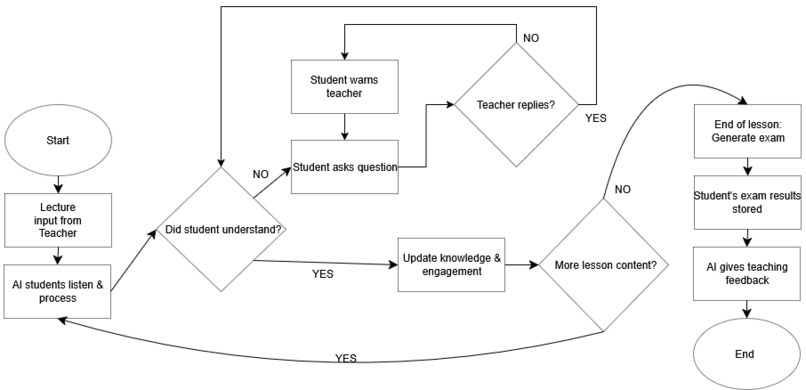
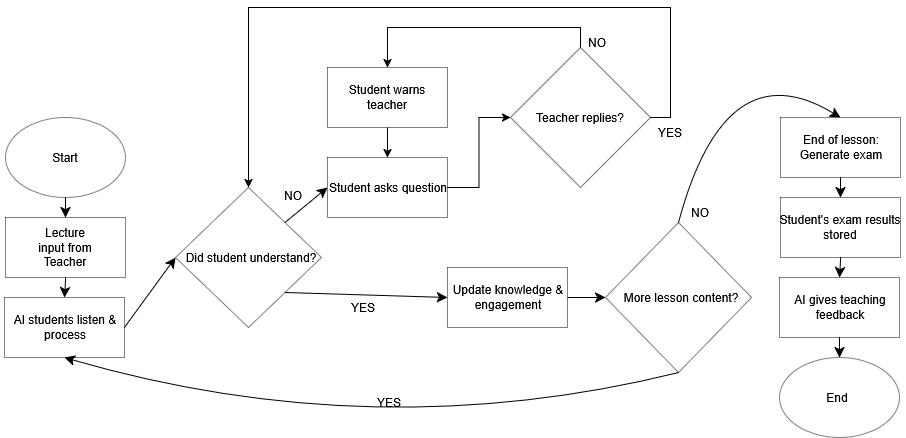
Flowchart
-
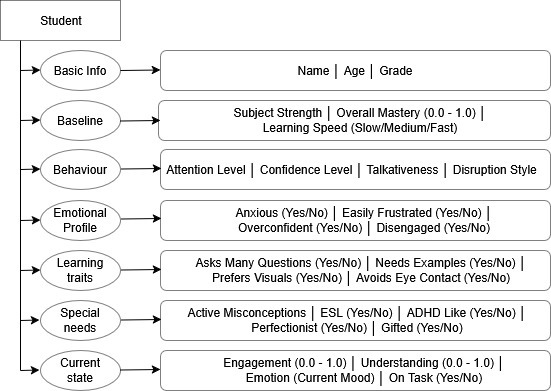
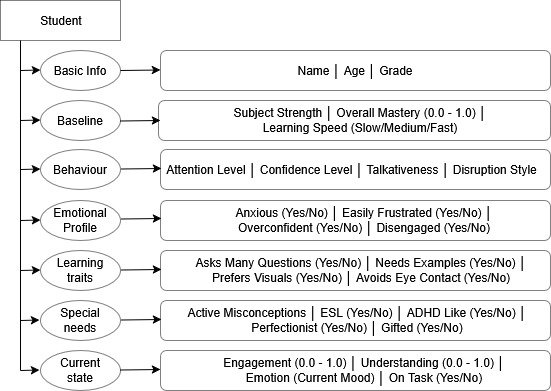
Student JSON File can be set up with these characteristics
-
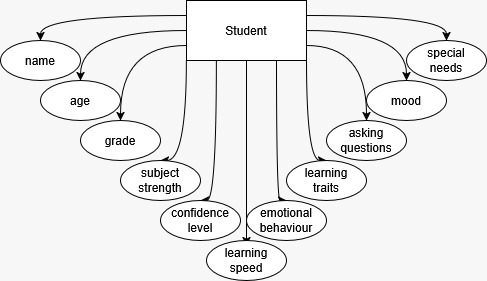
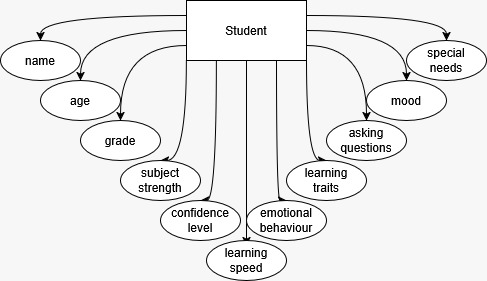
Students have such characteristics
-
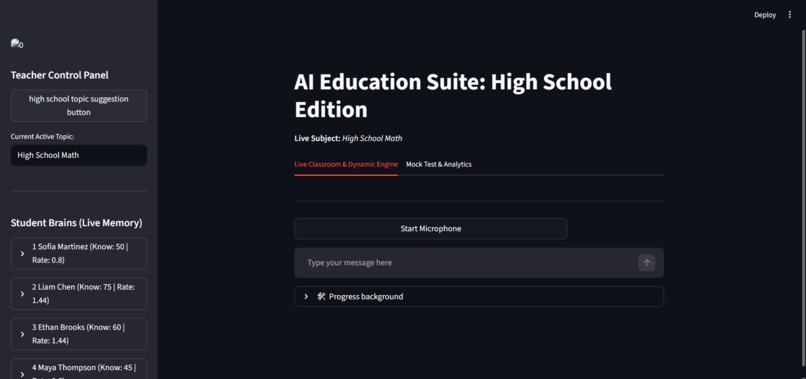
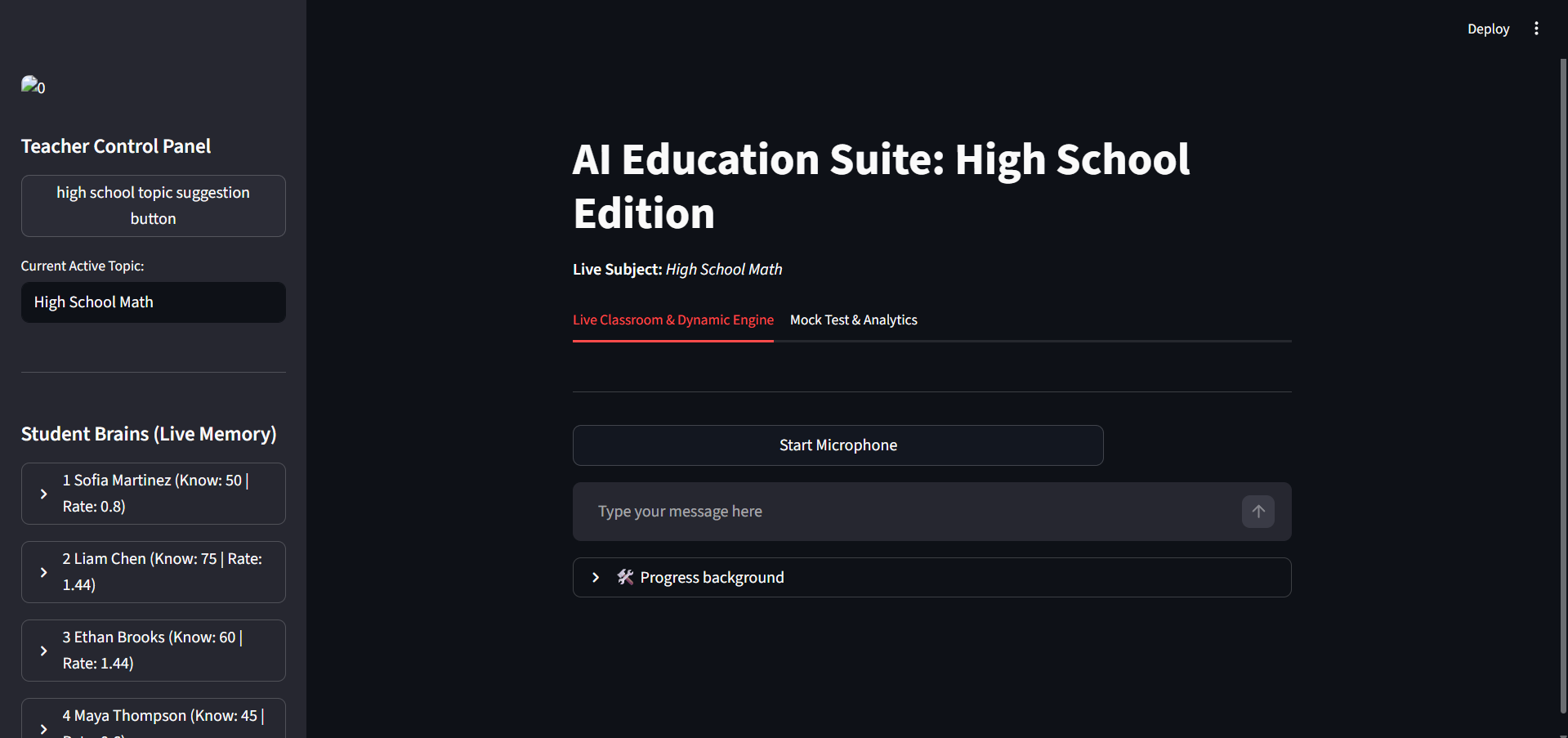
Main Page screenshot
-
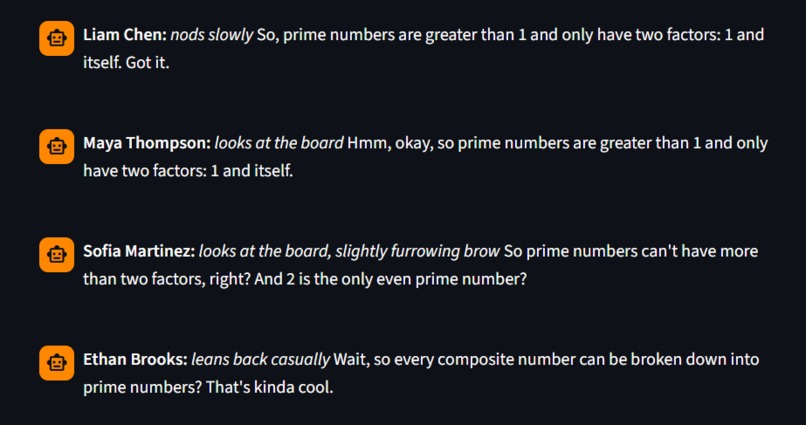
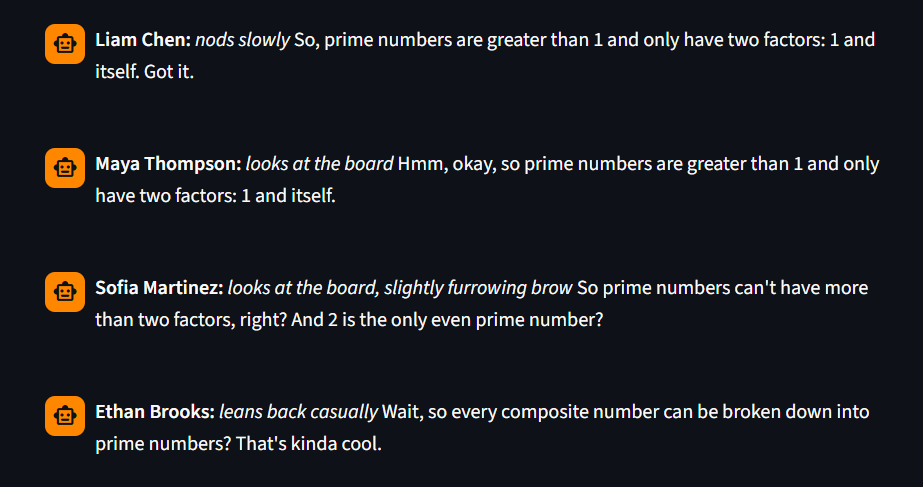
Students can react, put a gesture and ask questions

ClassPilot: Technical Architecture and Implementation Details
Team WATT
Abstract: This document provides a comprehensive technical breakdown of ClassPilot, a real-time, AI-powered virtual classroom environment developed by Team WATT. The system utilizes Azure OpenAI and Azure Cognitive Services to create a responsive ecosystem of autonomous AI students. This report details the user interface, real-time audio processing, external state management, cognitive swarm logic, and the contextual evaluation engine.
1. System Overview
ClassPilot is built on a Python-based Streamlit framework. It moves beyond traditional chatbot interfaces by deploying an architecture where multiple LLM agents (representing students) interact not only with the user (the teacher) but also react to the environment and each other. Not only student avatars (AI-s) can ask questions from the teacher (real person), even teacher can ask questions from students, that they will answer, to simulate a real-life interactive classroom. The core objective is to simulate realistic classroom dynamics, including distractions, learning curves, and emotional fluctuations. In this project student avatars, AI students are referred to as students and the user is referred to as the teacher.
1.1 Importance
This tool can help teachers in lots of ways:
- Lets fresh teachers train on AI students and get evaluation of their teaching
- Helps teachers test out new Teaching Methods
- Lowers workload of teachers, by evaluating how well the study material is written.
- Lowers workload of teachers, by generating exam questions based on study material they have
- Provide insights on possible improvements for teachers and highlighting strengths and weaknesses of teachers
It is very important to provide a realistic sandbox for teachers to try out new teaching strategies in a safe but very realistic sandbox.
2. Module Breakdown
2.1. Page Configuration & CSS Styling
The application initializes with a wide-layout Streamlit configuration. Custom CSS is injected via st.markdown to visually differentiate the components of the digital classroom:
- Message Bubbles: distinct styles for
student-msgandteacher-msg. - Debug & Brain Boxes: UI elements (
brain-box,debug-box) designed to give the user real-time transparency into the hidden cognitive states (e.g., pending questions, learned facts) of the AI agents.
2.2. Azure API Integrations
The system relies on Microsoft Azure for its core intelligence:
- Azure OpenAI: Handles the complex prompt engineering and JSON-formatted properties (characteristics) of the student agents (name, age, grade, subject strength, learning speed, confidence level, emotional behavior, learning traits, asking questions, mood, special needs).
- Azure Speech SDK: Manages the real-time Speech-to-Text (STT) capabilities, utilizing a specific region and subscription key defined in a
.envfile.
2.3. Real-Time Mic Streaming (listen_to_mic)
Continuous audio recognition in a synchronous framework like Streamlit poses thread-blocking challenges. Team WATT engineered a robust workaround:
- Silence Timeout:
EndSilenceTimeoutMsis set to 1500ms, ensuring the microphone cuts off automatically and swiftly after the teacher finishes a sentence. - Contextual Grammar: A
PhraseListGrammaris injected with specific keywords (e.g., student names like "Sofia", "Liam") to drastically reduce phonetic hallucinations and improve STT accuracy. - Background Threading: The
recognize_once_async().get()method is pushed to a backgroundthreading.Thread. Awhileloop updates a Streamlitst.empty()placeholder, creating a "live listening" UI effect without freezing the main thread.
2.4. External JSON Database Loader & State Initialization
Student personas are loaded from an external students.json file. If the file is missing, the system generates a default classroom with four distinct archetypes: an ESL student (Sofia), an anxious high-achiever (Liam), an overconfident student (Ethan), and a distracted student (Maya).
During session initialization, each student is mapped into a dynamic dictionary that tracks their Cognitive State:
- Knowledge & Base Rate: Calculated from their JSON file describing student's characteristics (e.g., fast learners get a 1.2 multiplier).
- Emotion Level: A randomized value (1-10) that affects their real-time learning capacity, i.e. moody students are less prone to learn.
- Memory Slots: Keys like
pending_question,questions_asked, andlearned_factsare initialized to track long-term interactions outside the LLM's standard context window.
2.5. Sidebar & Teacher Control Panel
The sidebar serves as the control center. It allows the teacher to:
- Autogenerate a lesson topic using a lightweight LLM call.
- Monitor the "Student Brains". This specific UI expander reveals the internal variables of each agent, showing their current emotional state, what questions they are waiting to have answered, and the specific facts they have successfully memorized.
2.6. The Cognitive Tracking Engine (Main Classroom Loop)
The core innovation of ClassPilot lies in how it handles the teacher's input and generates student responses. When the teacher speaks, the system does not simply prompt the LLM; it executes a complex state-machine workflow. If the study was successful the student avatar will update it's state and properties. If students have non-clarities or if something was left out by the teacher, students can ask their questions to enhance their knowledge
A. Peer Awareness (Anti-Echo Mechanism)
To prevent all four students from answering simultaneously with the same phrase, the list of students is shuffled (random.shuffle). As each student generates a response, their output is appended to a turn_events list. This list is fed into the prompt of the next student, accompanied by a strict rule to avoid repetition. For future works, hands up could be implemented, so students who are confident, will raise a hand, and teacher can choose which student to ask. Currently, teacher can ask questions from the entire class or from a specific student to check their understanding.
B. Self-Awareness & Memory Injection
The system retrieves the student's own last message (my_last_msg) and their pending_question. This allows the agent to recognize if the teacher ignored their previous inquiry. If the question of a student was addressed by the teacher, then they will learn, if not they will warn the teacher that they feel ignored and learning will not improve. Additionally, if the teacher answers a question of the student, others will learn from that answer.
C. The Prompt Architecture
The system instruction enforces six strict behavioral rules:
- Gestures: Mandatory physical actions enclosed in asterisks (e.g.,
*nods*,*listens carefully*,*spins a pen*, etc.). - Collective Address: Students must recognize group terms like "Class" or "Everyone".
- Redirection: Students must drop pending questions if the teacher apologizes and changes the subject.
- Ignored Trigger: If a student's previous question is skipped, they must complain.
- Untaught Topic: Students object if tested on concepts not present in the chat history, i.e. they can only answer questions related to the topic of the class (and prior knowledge specified in the json file)
- Silent Gestures: If a peer has already spoken, the student outputs only a physical gesture to maintain classroom order.
D. State Extraction (JSON Parsing)
The LLM is forced to return a JSON object. The system parses this object to update the student's knowledge level, modify their pending_question status, and append any learned_fact directly into their persistent memory. If they understand well, they will perform better on the Mock Test (see later).
2.7. Contextual Mock Test & Analytics
Mock test:
Mock Test - is a test generated by the model based on the topics covered on the class (basically transcript of the class), that can be administered to the student in order to evaluate how well did students understand the topic, and eventually to evaluate how effective was the teaching process by a teacher. After sudents take the test, results of the tests are used to evaluate how effective was the teaching session, provide critical insights on strength, weaknesses and areas for improvement.
Located in Tab 2, this module evaluates both the students and the teacher.
- Exam Generation: The LLM reads the exact live transcript and generates a 5-question exam based strictly on what was spoken, ensuring zero hallucinations.
- Student Grading: The AI students take the exam. Their prompts instruct them to intentionally fail or succeed based on their dynamically calculated
knowledgescore (out of 100). - AI Coach Feedback: Finally, a "Master Coach" prompt analyzes the transcript and the students' test results to provide the user with actionable, professional critique on their engagement strategies and instructional clarity.
3. Conclusion
ClassPilot by Team WATT successfully demonstrates a highly complex, multi-agent environment. By combining dynamic state variables, strict JSON-enforced prompting, and real-time audio processing, it provides a highly realistic, interactive training ground for educators. Our team truly believes, that this tool can be useful for teachers testin out new methods, fresh teachers lacking experience in working with kids and teaching or just simply to offload the work volume on teachers, who can use it to evaluate how well their study material is, come up with exam questions by providing the study material. There are a lot of ways our tool can be used by teachers. Thank you for your attention!


Log in or sign up for Devpost to join the conversation.