Inspiration
Manga creation often gets messy across steps: brainstorming, character/world settings, storyboarding (name), and visual production. Notes are scattered, decisions get lost, and creators end up redoing work. MangaForge AI was built to connect these steps in one place, using Gemini 3 like an “editor” that helps creators move faster while keeping ideas consistent.
What it does
MangaForge AI supports an end-to-end manga workflow:
- Brainstorm story ideas and characters with an editor-style assistant
- Summarize sessions and extract new plot points, characters, and world settings into structured notes
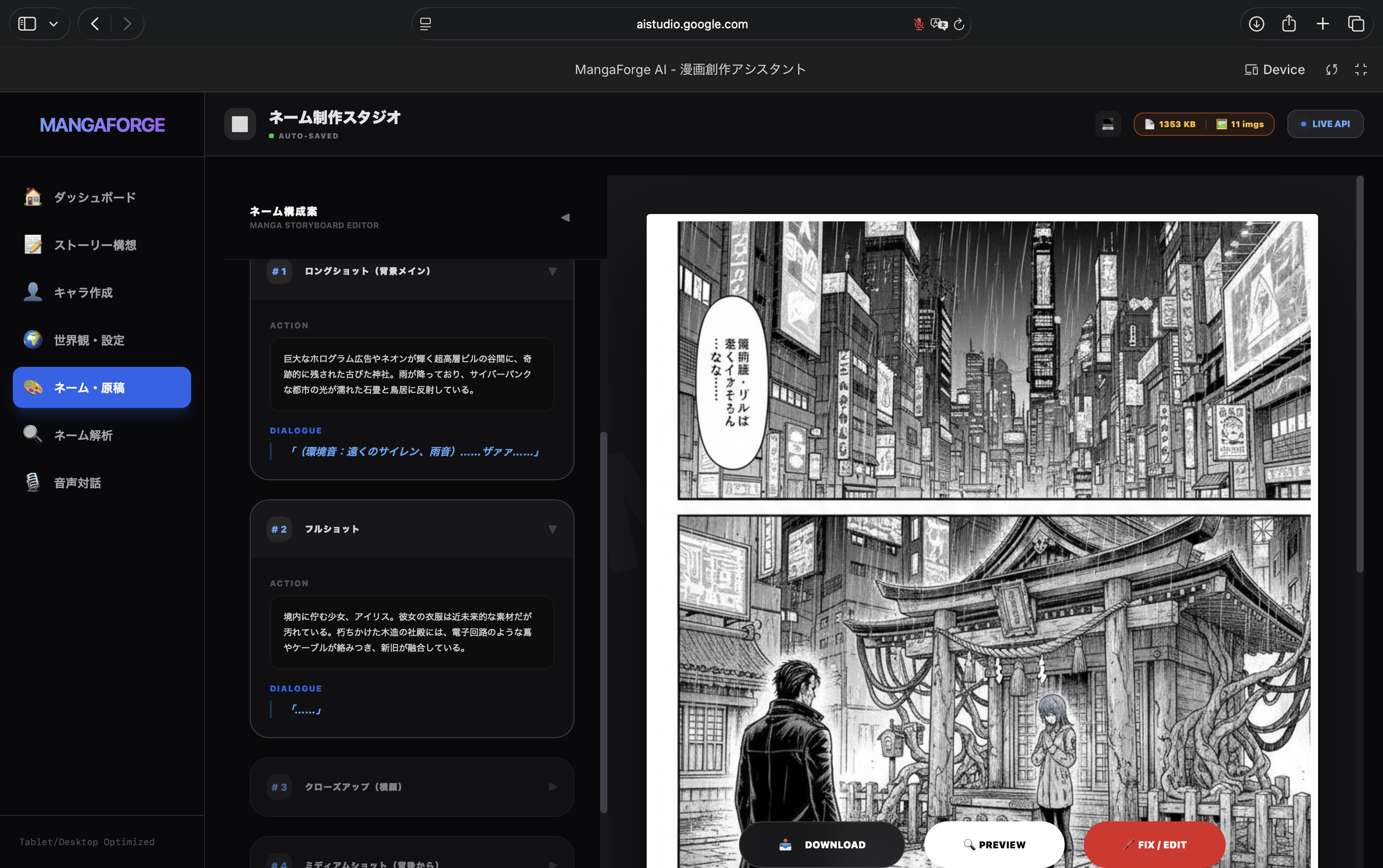
- Generate a one-page storyboard (name) as structured JSON (4–6 panels) that can be edited and rendered in the UI
- Detect ambiguous Japanese terms (e.g., homonyms) that often cause prompt meaning drift before image generation
- Generate a single manga page image following key Japanese manga conventions (right-to-left flow, clear gutters, panel composition)
How we built it
- Gemini 3 Pro for deeper reasoning tasks like storyboard (name) generation
- Gemini 3 Flash for fast summarization and structured extraction during live sessions
- Gemini 3 Image for manga page image generation To make outputs reliable, we enforced JSON schema / structured responses for storyboards and summaries, so the app can consume the model output directly instead of relying on fragile free-form text. We also implemented local persistence and export so creators can revisit and reuse decisions across sessions.
Challenges we ran into
- Mobile stability (iPhone): real-time voice/live updates can cause heavy UI updates and frequent storage writes, which may lead to crashes on constrained devices.
- Meaning drift in image prompts: ambiguous Japanese words can lead to visuals that don’t match the creator’s intent, so we added an ambiguity detection step before image generation.
Accomplishments that we're proud of
- Structured storyboard generation (JSON) that is immediately usable in the UI
- Automated extraction of “new settings / characters / world details” from conversations
- An ambiguity check that reduces prompt misunderstanding before image generation
- A working prototype that demonstrates an end-to-end manga workflow using Gemini 3
What we learned
We learned that the key to building creator tools is not only generating content, but also keeping it structured, editable, and consistent. We also learned that mobile-first performance requires reducing memory churn and minimizing high-frequency writes during live interactions.
What's next for MangaForge AI - 漫画創作アシスタント
- Improve iPhone stability (reduce large in-memory image strings, debounce storage writes, optimize UI updates)
- Strengthen Google Drive backup/share options
- Expand storyboard editing (panel reorder/add, templates, export improvements)TypeScript, React, Google AI Studio (Apps/Build), Gemini API (@google/genai), IndexedDB (local persistence), Google Drive API (optional backup/share), Responsive UI (mobile/desktop optimization), JSON Schema for structured outputs
Built With
- for
- gemini-api-(@google/genai)
- google-ai-studio-(apps/build)
- google-drive-api-(optional-backup/share)
- indexeddb-(local-persistence)
- json
- react
- responsive-ui-(mobile/desktop-optimization)
- schema
- structured
- typescript

Log in or sign up for Devpost to join the conversation.