-
-
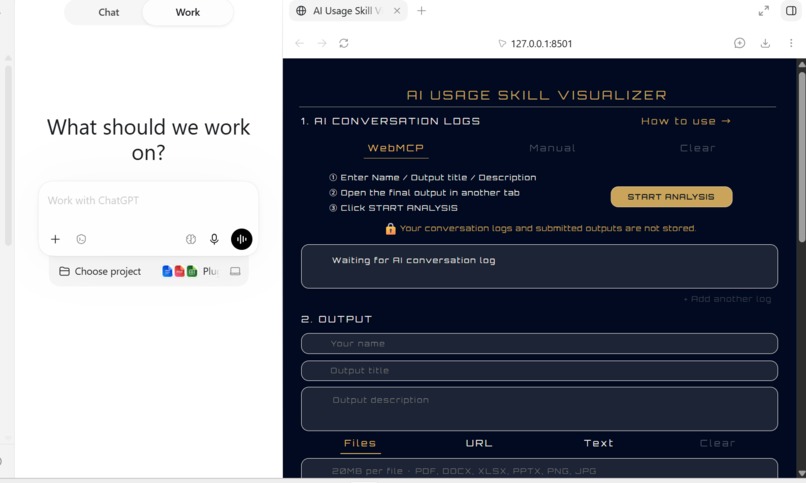
AI Usage Skill Visualizer — WebMCP Challenge Edition
-
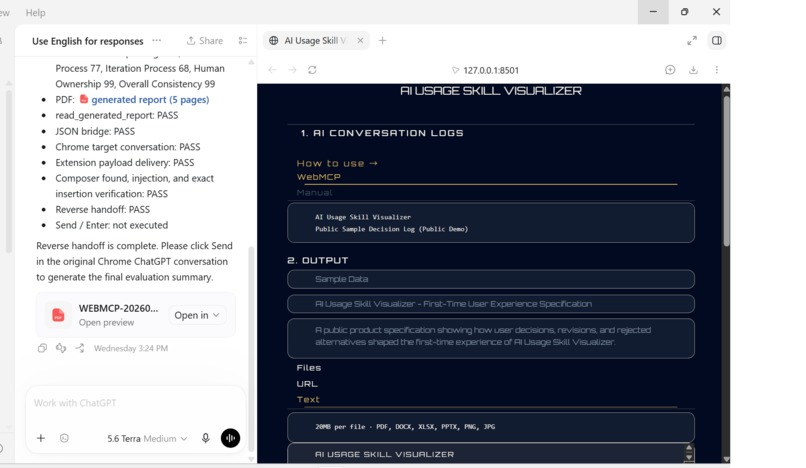
WebMCP E2E workflow completed with PDF generation and reverse handoff
-
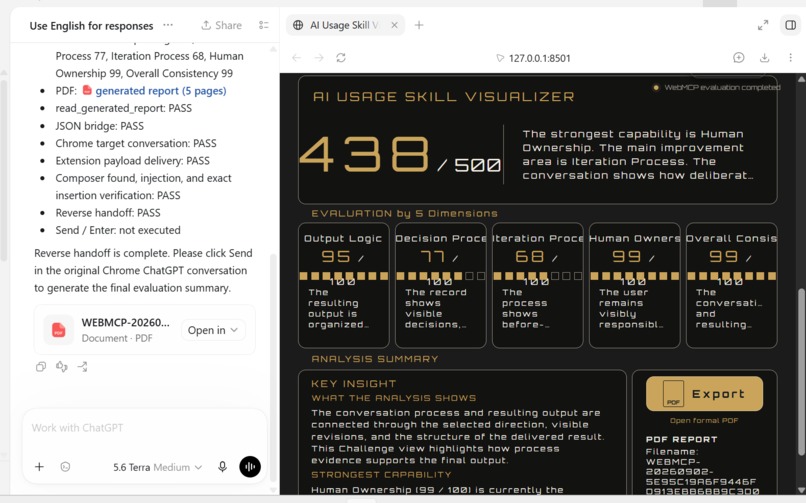
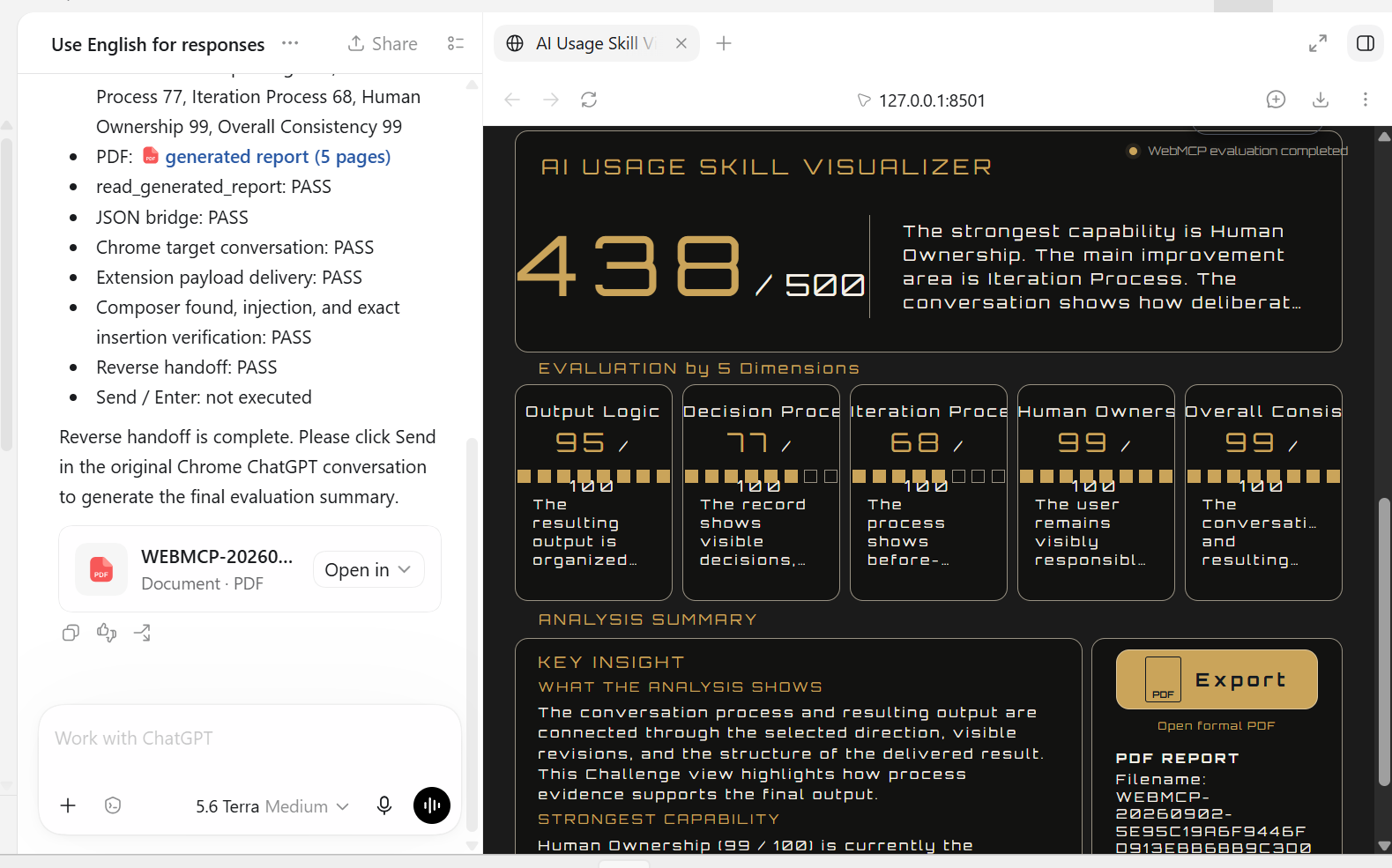
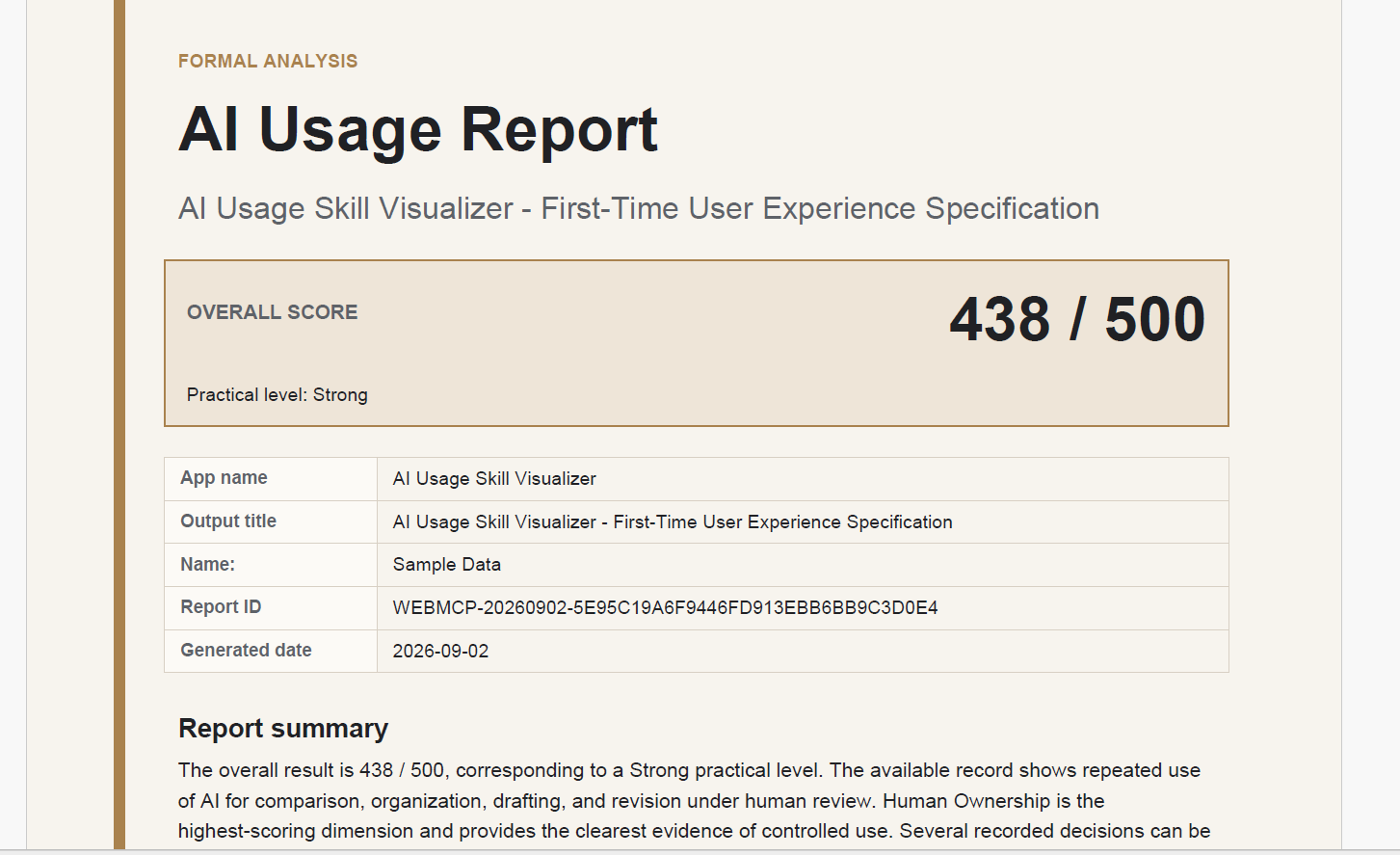
Evaluation result with 438/500 score, PDF generation, and successful reverse handoff
-
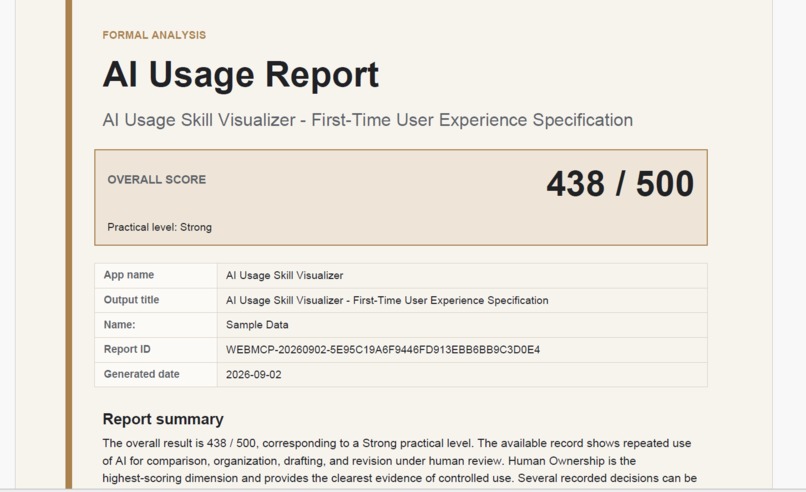
Generated AI Usage Report with an overall score of 438/500
-
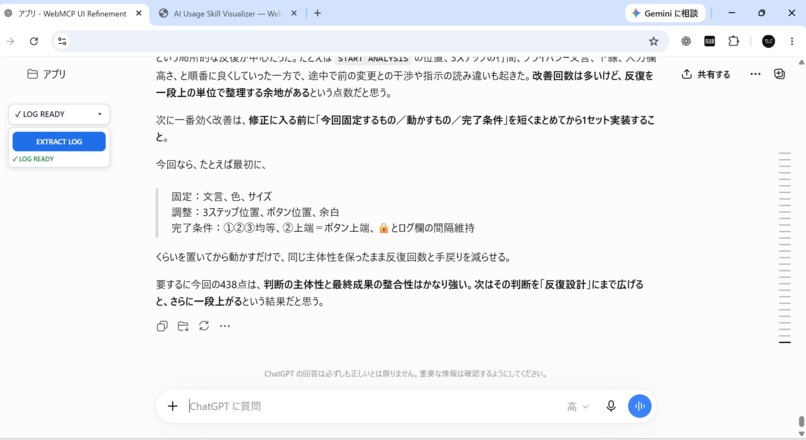
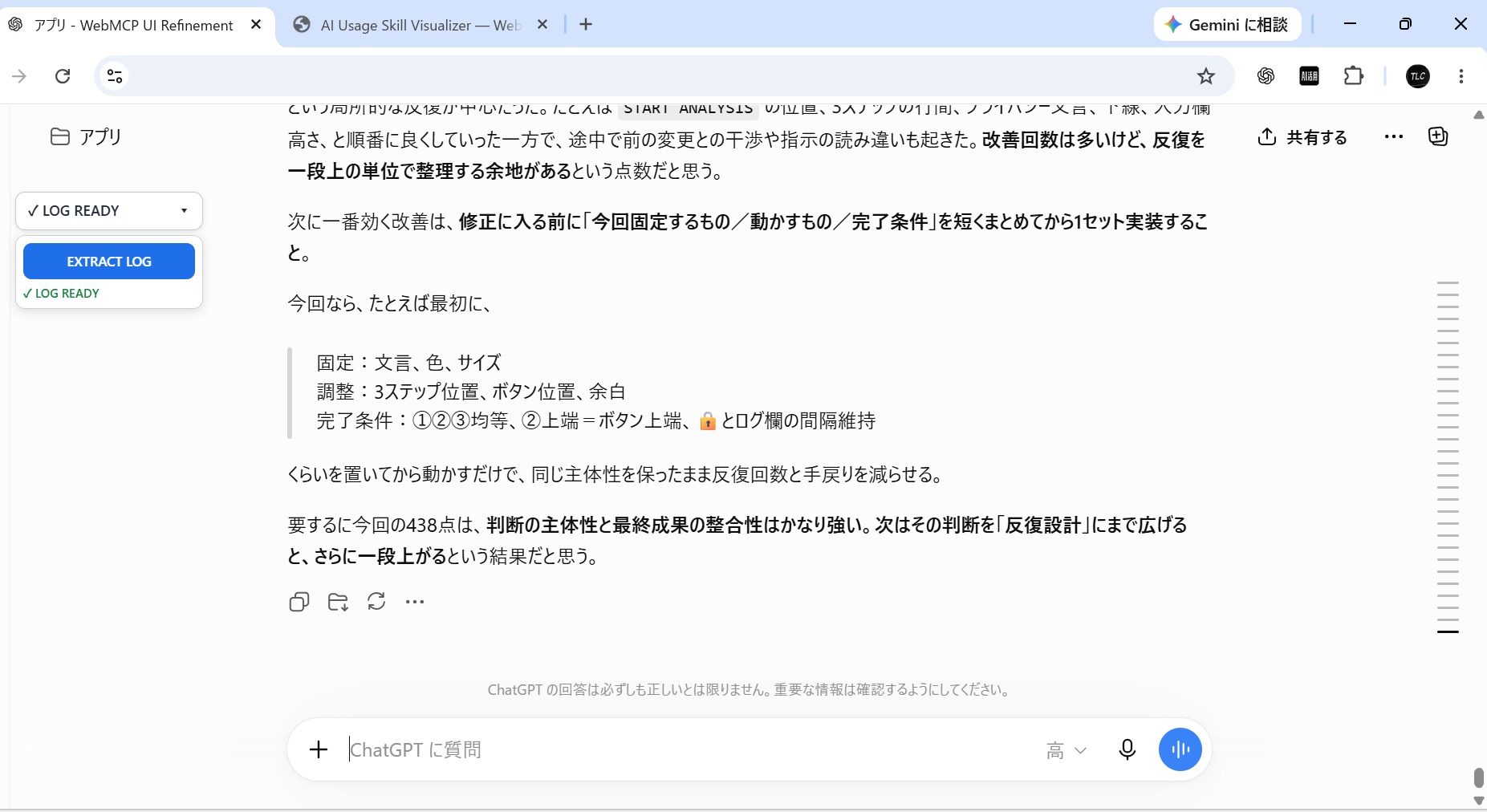
Chrome extension extracting the ChatGPT conversation log for evaluation
Inspiration
This project started with a question about my own use of AI.
During a conversation with AI, it pointed out something about the way I was using it.
That made me wonder:
How well am I actually using AI?
Then another question came to mind:
Isn't everyone using AI in more or less the same way?
And if not:
What is the difference?
That was the starting point for visualizing human AI usage skills.
By that time, I had already been using AI for more than two years.
Because of that experience, it felt natural to me that the final output alone could not tell you how well someone had used AI.
If I wanted to understand how a person used AI, I also needed to look at the conversation process that led to the final result.
So the idea was to evaluate the conversation log, the final output, and the relationship between them.
That became the foundation of AI Usage Skill Visualizer.
As I continued developing it, I noticed something else.
Knowing whether someone uses AI, or how much they use it, is not the same as understanding how well they can actually use it.
And knowing about AI is not the same as being able to use AI effectively in real work.
AI Usage Tracking ≠ AI Usage Skill
AI Knowledge ≠ Practical AI Capability
From the beginning, the concept was also broader than just building a standalone evaluation application.
I wanted to connect the whole process:
Use AI → Capture the interaction process → Evaluate human AI usage → Visualize the result → Return the result to the AI workflow
At the time, however, I did not have a practical way to directly connect the environment where people were actually using AI with the Visualizer.
So I started with what I could actually implement at the time: a standalone application.
The first approach was simple.
Users manually entered their conversation logs and outputs, and the Visualizer evaluated them.
But once I started using it myself, I realized that this manual input process was more cumbersome than I had expected.
To reduce that friction, I built a Chrome extension that could bring ChatGPT conversations into the Visualizer.
That made the process of importing conversation logs much simpler.
There was still another gap between the AI workflow and the Visualizer.
This is where WebMCP changed what was possible.
Using WebMCP Site Tools, the AI workflow can directly use the Visualizer's capabilities to run the evaluation, generate a PDF report, and read the generated report back into the workflow.
By combining that with the Chrome extension and reverse handoff, I was also able to return the evaluation result to the original ChatGPT conversation.
The Challenge Edition demonstrates this flow:
Chrome Extension × WebMCP × AI Usage Skill Visualizer
→ Evaluation → PDF Report → Reverse Handoff → ChatGPT Summary
WebMCP was not something I added afterward simply because this was a WebMCP Challenge.
From the beginning of the idea, I wanted to connect everything from using AI, to evaluating how it was used, to returning the result back to the AI workflow.
Using WebMCP finally allowed me to move closer to that original concept in a practical way.
Human Focus in AI.
What it does
AI Usage Skill Visualizer — WebMCP Edition is a Challenge-specific implementation that demonstrates how WebMCP can connect an AI interaction directly to AI usage evaluation.
The project combines:
Chrome Extension × WebMCP × AI Usage Skill Visualizer
The Chrome extension can extract a ChatGPT conversation and provide a path for that conversation to become Visualizer input.
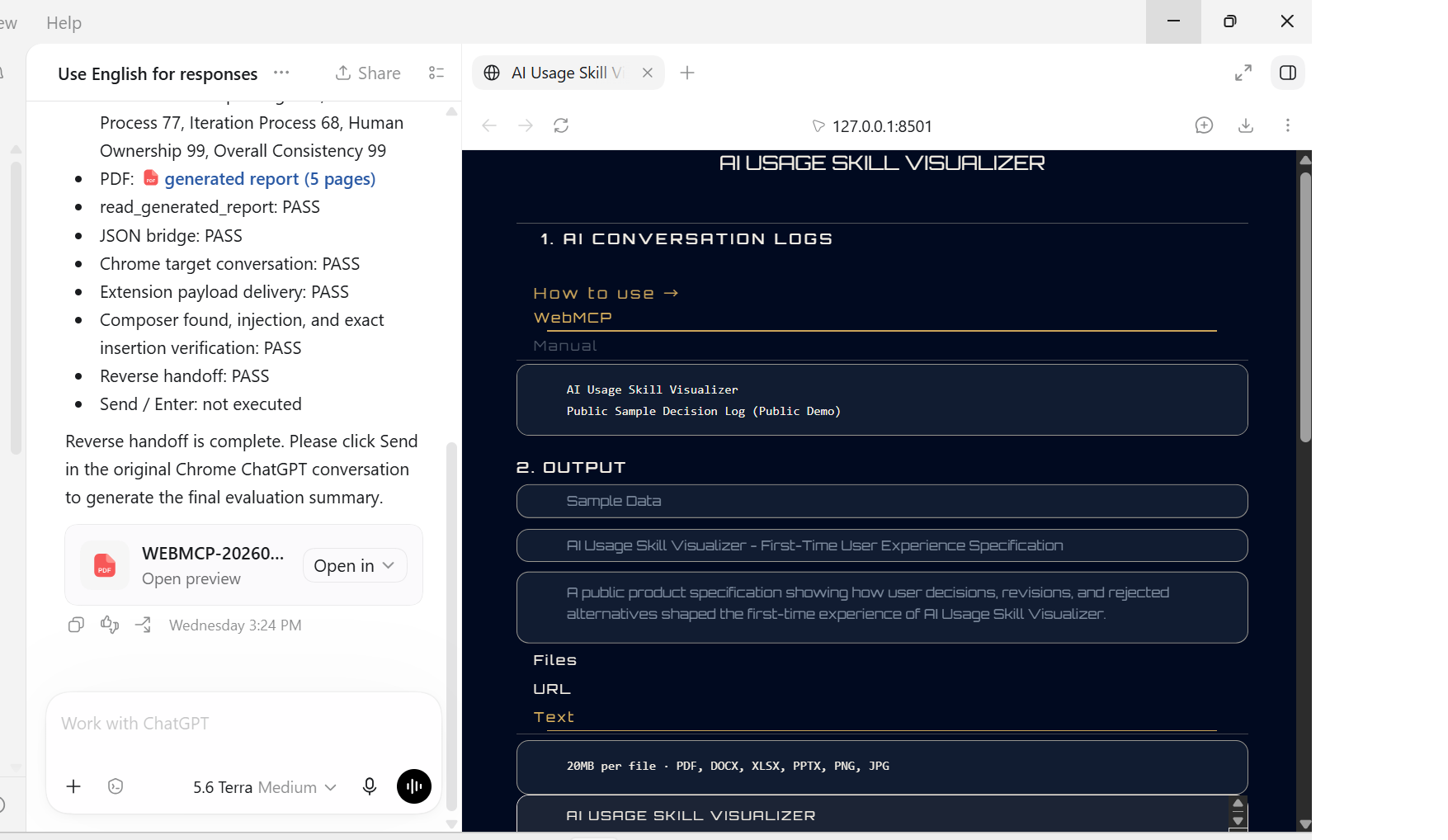
For the public Challenge demo, the built-in public sample data is used so that the evaluation workflow can be reproduced consistently.
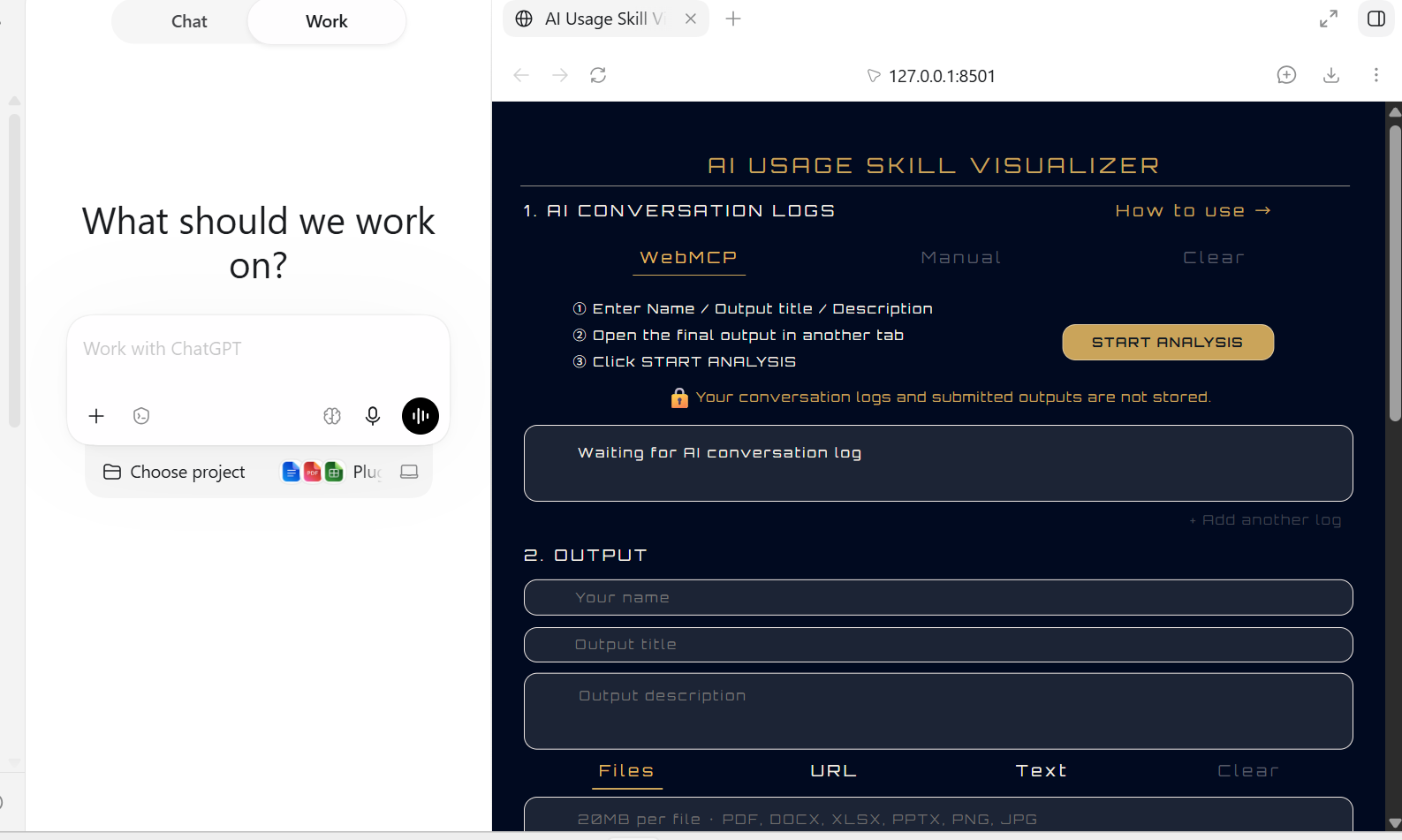
The user starts the analysis from AI Usage Skill Visualizer.
From there, Work uses WebMCP Site Tools to continue the workflow.
The WebMCP workflow can:
- receive the conversation log and final output
- run the Challenge-specific evaluation
- return structured evaluation results
- generate a PDF report
- read the generated report back into the workflow
After the evaluation and report workflow are complete, the result is prepared for reverse handoff.
The Chrome extension then returns the evaluation prompt to the original Chrome ChatGPT conversation.
The extension:
- identifies the target ChatGPT conversation
- receives the evaluation payload
- finds the ChatGPT composer
- inserts the evaluation prompt
- verifies the inserted text
It deliberately does not click Send or simulate Enter.
The final submission remains under human control.
After the user manually sends the prompt, ChatGPT summarizes the evaluation inside the original conversation.
The complete demonstration flow is:
Chrome Extension → WebMCP → AI Usage Skill Visualizer → Evaluation → PDF Report → Reverse Handoff → ChatGPT Summary
The Challenge Edition uses deterministic evaluation logic created specifically for this public demonstration.
It is intentionally separate from the production AI Usage Skill Visualizer evaluation engine.
The important part of this Challenge project is not the simplified score itself.
The important part is that WebMCP turns the Visualizer from a separate destination into something that can participate directly in an AI workflow.
How we built it
I built the WebMCP Challenge Edition as a separate implementation from the production AI Usage Skill Visualizer.
The Challenge application uses a lightweight web interface built with HTML, CSS, and JavaScript, together with a local backend for report generation and supporting the end-to-end workflow.
The application exposes WebMCP Site Tools that can be discovered and called from Work.
The main tools are:
evaluate_ai_usage_demo
This tool receives structured evaluation input including:
conversation_logoutput
It then:
- receives the submitted conversation log and output
- displays them in the Visualizer
- runs the Challenge-specific deterministic evaluation
- renders the evaluation result
- returns structured evaluation data through WebMCP
create_ai_usage_report
This tool receives the evaluation result and generates the PDF report used by the Challenge workflow.
The generated PDF is not only a UI result.
It becomes a real workflow artifact that can be passed to the next stage.
read_generated_report
This tool reads the generated report back into the workflow so that Work can verify the result and continue the process.
Together, these Site Tools allow Work to move from structured input through evaluation and report generation without requiring the user to manually transfer intermediate results between each stage.
The Challenge Edition also integrates with a Chrome extension.
The extension plays two roles.
First, it can extract a ChatGPT conversation and provide a path for that conversation to become Visualizer input.
Second, it supports reverse handoff.
After the WebMCP evaluation and report workflow are complete, the evaluation result can be returned to the original Chrome ChatGPT conversation.
The extension inserts the evaluation prompt into the ChatGPT composer and verifies that the intended text was inserted correctly.
It does not automatically submit the prompt.
The user manually clicks Send.
This creates an intentional boundary:
WebMCP and the extension automate the workflow, while the human retains control of the final submission.
For the public demo, the built-in public sample data is used as the evaluation input for reproducibility.
The Challenge-specific scoring logic is deterministic and separate from the production evaluation system.
No external AI API is required for Challenge scoring.
The submitted conversation text is not persisted in a database, localStorage, sessionStorage, or cookies.
Challenges we ran into
The first challenge was understanding how to build around a new interaction model.
I did not begin with the complete workflow.
I started with the smallest possible WebMCP proof of concept.
I first needed to confirm that:
- a web page could register a WebMCP tool
- the tool could be discovered
- the tool could be executed
- structured data could reach the application
- the application could update its UI
- the tool could return a structured response
Once those pieces worked, I expanded the implementation step by step.
The next challenge was moving from a single WebMCP call to a complete workflow.
The final Challenge Edition does not stop after evaluation.
It continues through:
Evaluation → PDF Generation → Report Reading → Reverse Handoff → ChatGPT Summary
That required the Visualizer, WebMCP Site Tools, the report backend, and the Chrome extension to work together.
Another challenge was identifying the authoritative conversation input.
The Visualizer contains several text fields.
During end-to-end testing, using a generic textarea selector could accidentally select output metadata instead of the actual AI conversation log.
That produced a technically valid evaluation using the wrong source data.
The final implementation therefore explicitly uses the Visualizer's conversation-log element as the authoritative source.
Only when that source is genuinely empty can the Chrome extraction path be used as a fallback.
This made the input contract explicit and prevented unrelated text fields from being evaluated as the conversation log.
Reverse handoff created another challenge.
It was not enough to simply send text toward Chrome.
The implementation needed to confirm:
- the correct target ChatGPT conversation
- successful payload delivery
- composer discovery
- prompt injection
- exact insertion verification
At the same time, I did not want automation to submit the final message without the user.
So the extension stops after successful insertion and verification.
The final Send action remains manual.
There was also a product architecture challenge.
AI Usage Skill Visualizer already existed before the Challenge.
I did not want to expose or reproduce the production evaluation engine simply to create a public WebMCP demonstration.
Instead, I created a separate deterministic Challenge implementation.
This allowed the WebMCP portion of the project to remain public, understandable, and testable while keeping a clear boundary around the production evaluation system.
Accomplishments that we're proud of
The biggest accomplishment is that the Challenge Edition became much more than a WebMCP proof of concept.
It became an end-to-end workflow.
The final implementation connects:
Chrome Extension × WebMCP × AI Usage Skill Visualizer
and creates a practical loop between the AI conversation and the evaluation application.
The workflow can:
- receive structured evaluation input through WebMCP
- evaluate the conversation log and final output
- return structured evaluation results
- generate a real PDF report
- read the report back into the workflow
- prepare the evaluation for reverse handoff
- return the result to the original Chrome ChatGPT conversation
- insert the evaluation prompt into the ChatGPT composer
- verify the inserted text
- preserve the final Send action for the user
- allow ChatGPT to summarize the evaluation in the original conversation
I am also proud that the Challenge Edition demonstrates the WebMCP architecture without exposing the production evaluation engine.
Most importantly, WebMCP solved a real connection problem that existed before the Challenge.
The project originally had an AI usage evaluation application.
Then the Chrome extension reduced the gap between the AI conversation and that application.
WebMCP reduced the gap further by allowing the AI workflow to directly use the Visualizer's capabilities.
The result is much closer to the original all-in-one concept.
What we learned
The biggest thing I learned is that WebMCP can be more than a way for an AI agent to operate a website.
At first, I thought its main value for this project would be on the input side.
AI usage evaluation depends on understanding the process of working with AI, so being able to pass that interaction directly into the Visualizer was already useful.
But the Challenge changed that view.
Using WebMCP Site Tools, Work could run the evaluation, generate the report, read that report back into the workflow, and continue the process toward reverse handoff.
That changed the architecture from a one-way input path into a connected process.
This matters particularly for AI Usage Skill Visualizer because the conversation itself is not merely operational data.
It is part of what the application is designed to analyze.
In other words, WebMCP is not only helping Work operate the Visualizer.
It is also helping transport and coordinate the information that the Visualizer exists to evaluate.
I also learned that automation does not need to remove human control.
The workflow can automatically:
- run the evaluation
- generate the report
- read the report
- prepare the result for reverse handoff
- return the result to Chrome
- insert the next ChatGPT prompt
while still stopping before the final Send action.
That boundary became an important part of the design:
Automation handles the workflow; the human retains the final submission decision.
The Challenge also changed how I see the existing product.
Before WebMCP, AI Usage Skill Visualizer was mainly a standalone destination for evaluation.
After this experiment, I can see a path where the Visualizer becomes part of the AI workflow itself.
What's next for AI Usage Skill Visualizer — WebMCP Edition
The next step is to bring what was proven in the Challenge Edition back into the existing AI Usage Skill Visualizer.
The production Visualizer already provides the evaluation capability.
The Challenge Edition demonstrated a new WebMCP-based workflow around that capability.
The natural next step is therefore not to move the Challenge scoring logic into production.
It is to combine:
the existing Visualizer's evaluation capability
with
the WebMCP workflow proven in the Challenge Edition.
The original product required users to manually bring conversation logs and outputs into the Visualizer.
The Chrome extension reduced part of that work.
The WebMCP Challenge demonstrated that even more of the workflow can be connected.
The direction I want to explore next is:
AI Interaction → WebMCP → AI Usage Evaluation → Visualization → Feedback to the AI Workflow
with fewer manual transfers between applications.
The Challenge also showed that evaluation does not have to be the end of the process.
The result can return to the AI conversation and become feedback for the user's next interaction.
That moves the project closer to the original idea:
Use AI → Understand how the human used AI → Visualize it → Return that understanding to the AI workflow
The long-term goal remains the same:
to make a person's current AI usage skills visible by analyzing the conversation process, the resulting output, and the relationship between them.
Human Focus in AI.
Built With
- chrome
- css
- html
- javascript
- webmcp

Log in or sign up for Devpost to join the conversation.