-
-
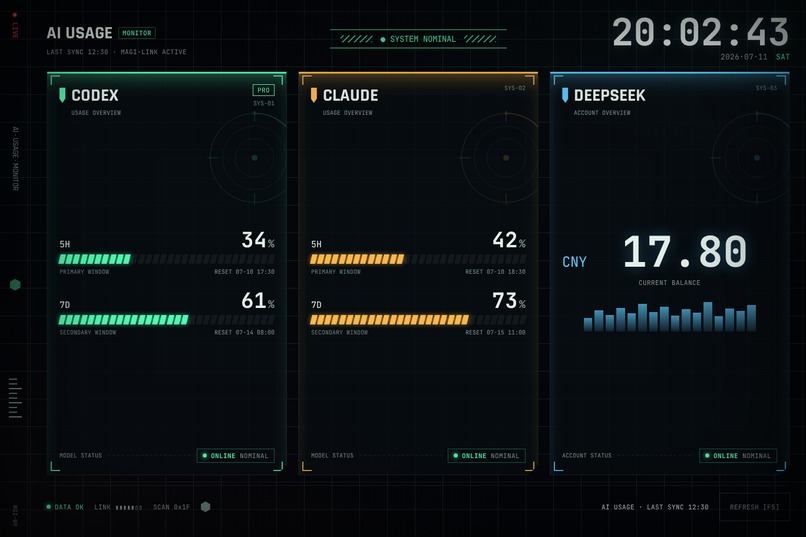
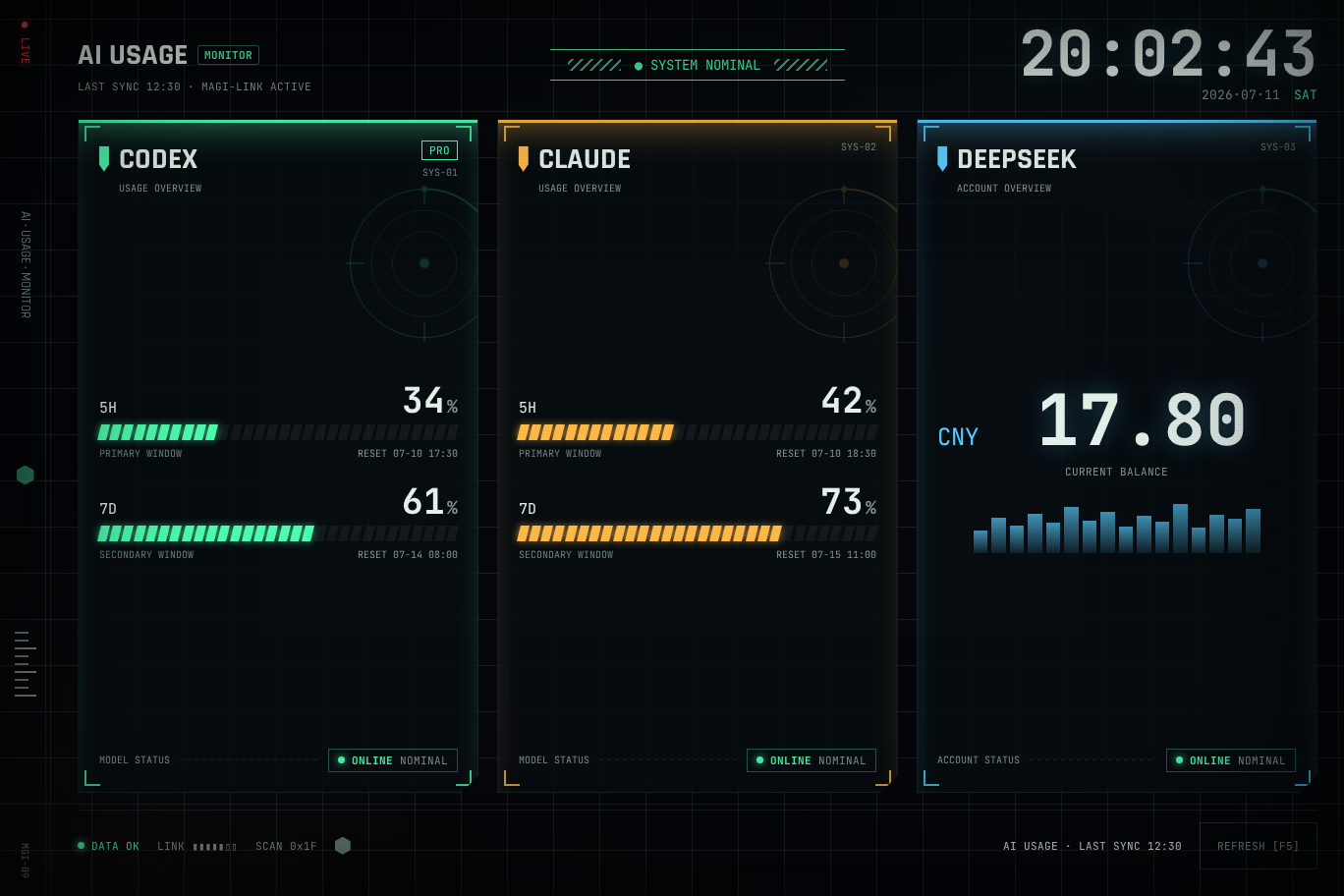
Synthetic three-provider dashboard showing Codex, Claude, and DeepSeek usage.
Inspiration
I had an older Surface sitting idle while my daily development work was split across Codex, Claude, and DeepSeek. Each service exposes usage differently, so checking quotas meant breaking focus, opening several interfaces, and sometimes discovering a limit only after a request failed.
AI Usage Dashboard turns that unused Surface into an ambient, glanceable monitor. The goal is simple: make AI capacity feel like a system resource that is always visible, instead of a surprise hidden behind multiple tools.
What it does
AI Usage Dashboard is a local-first Windows dashboard and screensaver for:
- Codex subscription usage windows
- Claude subscription usage windows
- DeepSeek account balance
It presents all three providers in a Surface-friendly fullscreen interface, refreshes them in the background, preserves last-known-good data, and clearly distinguishes healthy, stale, rate-limited, and failed states.
Users can enable only the providers they actually use. The layout responds intentionally from three panels down to zero. Disabling a provider is not merely cosmetic: the Rust backend excludes it from credential discovery, live requests, manual refreshes, aggregate health, and cache presentation. Its last-known cache is retained so re-enabling remains fast.
For judges, v0.3.0 includes a one-click AI Usage Dashboard (Judge Demo) shortcut. This mode uses embedded synthetic fixtures, separate preferences, and no live credentials, configuration, cache, or provider network requests.
What existed before Build Week
Before the event, the project already had its Tauri/Rust/React foundation, initial Codex/Claude/DeepSeek integrations, sanitized IPC, last-known-good caching, explicit failure states, fullscreen and screensaver modes, an initial Surface-oriented interface, automated tests, and Windows packaging.
What I added during Build Week
During Build Week, I used Codex with GPT-5.6 to turn that foundation into a safer and more complete v0.3.0 product:
- End-to-end provider selection with immediate atomic persistence
- Credential and network isolation for disabled providers
- Cache retention and refresh-concurrency handling
- Intentional zero-, one-, two-, and three-panel layouts
- Settings behavior across normal and fullscreen modes
- An isolated synthetic Judge Demo mode
- A dedicated NSIS Start menu shortcut for judges
- Expanded Rust, Playwright, Windows, WSL, viewport, and security validation
- Release documentation, judging instructions, and a tested public installer
How I built it with Codex and GPT-5.6
Codex was the main implementation partner, running directly against the project and the remote Surface development environment. GPT-5.6 helped reason across the full stack: React state and responsive layout, Tauri commands, Rust configuration boundaries, refresh concurrency, Windows packaging, and the security implications of provider toggles.
The most important design decision came from treating “disabled” as a data-boundary rule rather than a UI preference. We traced each provider through settings, persistence, credential discovery, fetch scheduling, manual refresh, aggregate status, cache rendering, and re-enable behavior. Codex then helped implement the changes and build regression coverage around those invariants.
The workflow was test-driven and iterative. We ran frontend builds and Playwright checks across seven viewports and multiple provider states, 44 Rust tests on WSL and Windows, Clippy with warnings denied, npm audit, RustSec, packaging checks, and a real Surface installation. The final Judge Demo was also verified not to change the live configuration or cache files.
Challenges
The hardest challenge was privacy. A usage dashboard needs enough local integration to be useful, but credentials and raw provider responses must never leak into the webview, logs, screenshots, or a judge build. The solution combines sanitized IPC, narrow Rust models, disabled-provider isolation, and a synthetic demo path.
The second challenge was concurrency. A provider can be disabled while refresh work is in flight. The implementation had to keep the saved preference, displayed panels, aggregate health, retained cache, and next refresh consistent without turning a simple toggle into a race condition.
Windows packaging added another layer: the same candidate had to work from source, as a normal desktop app, in fullscreen/screensaver use, and as a credential-free judge experience.
Accomplishments
I am proud that the result is not only a visual prototype. It is a runnable Windows product with a public installer, reproducible checksum, a safe test path, and tests for the failure modes that matter. It also gave an idle device a genuinely useful second life.
What I learned
Feature toggles that affect external services must be enforced at the data-access boundary, not only in the interface. I also learned how much “judgeability” improves a product: deterministic synthetic data, one-click startup, clear documentation, and honest disclosure of pre-event versus event work made the architecture better for normal users too.
What's next
Next I would add signed Windows releases, historical usage trends, more provider adapters built on stable official interfaces, and optional cross-device status sharing while preserving the local-first privacy model.
Links
Built With
- claude
- codex
- deepseek
- gpt-5.6
- nsis
- playwright
- react
- rust
- tauri
- typescript
- vite
- windows

Log in or sign up for Devpost to join the conversation.