-
-
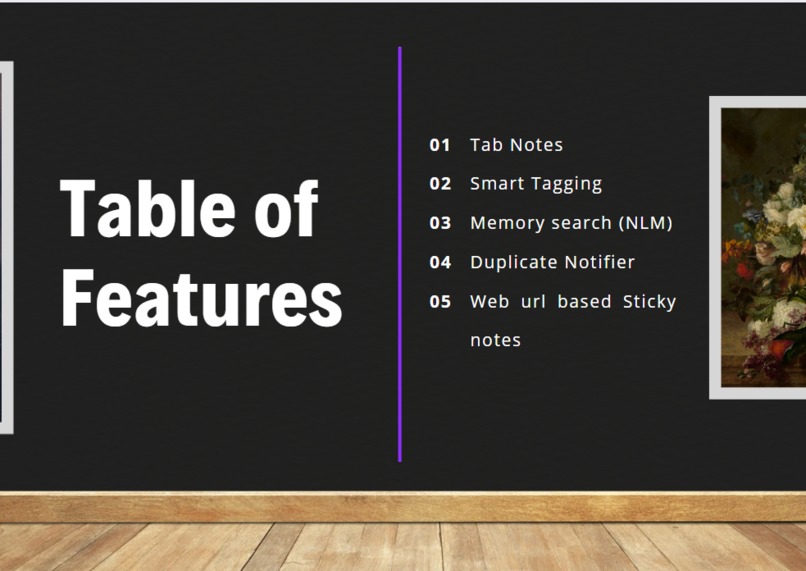
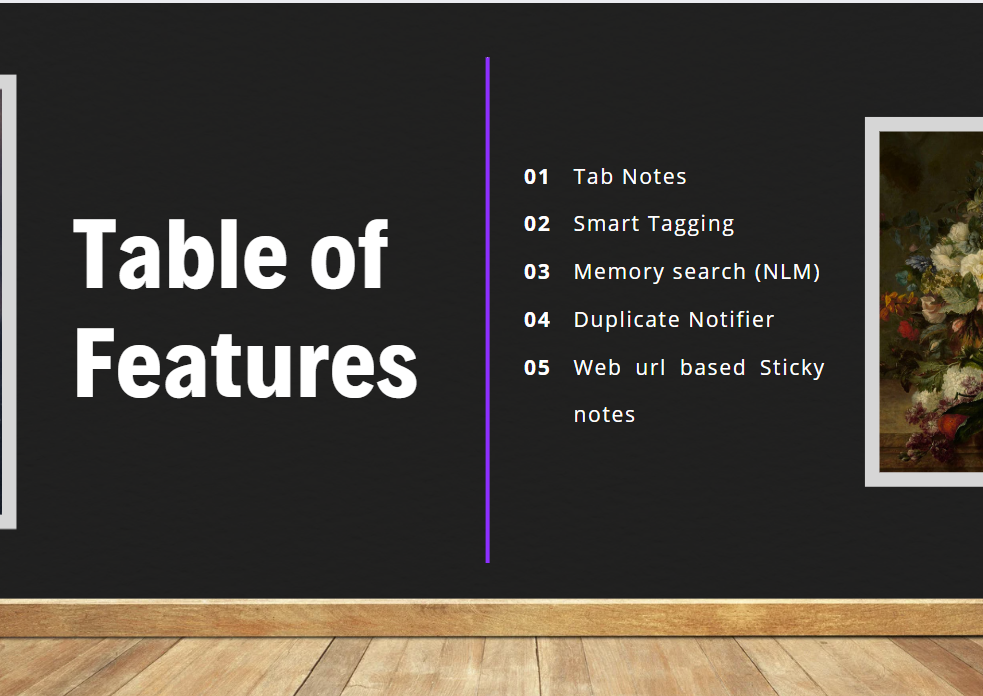
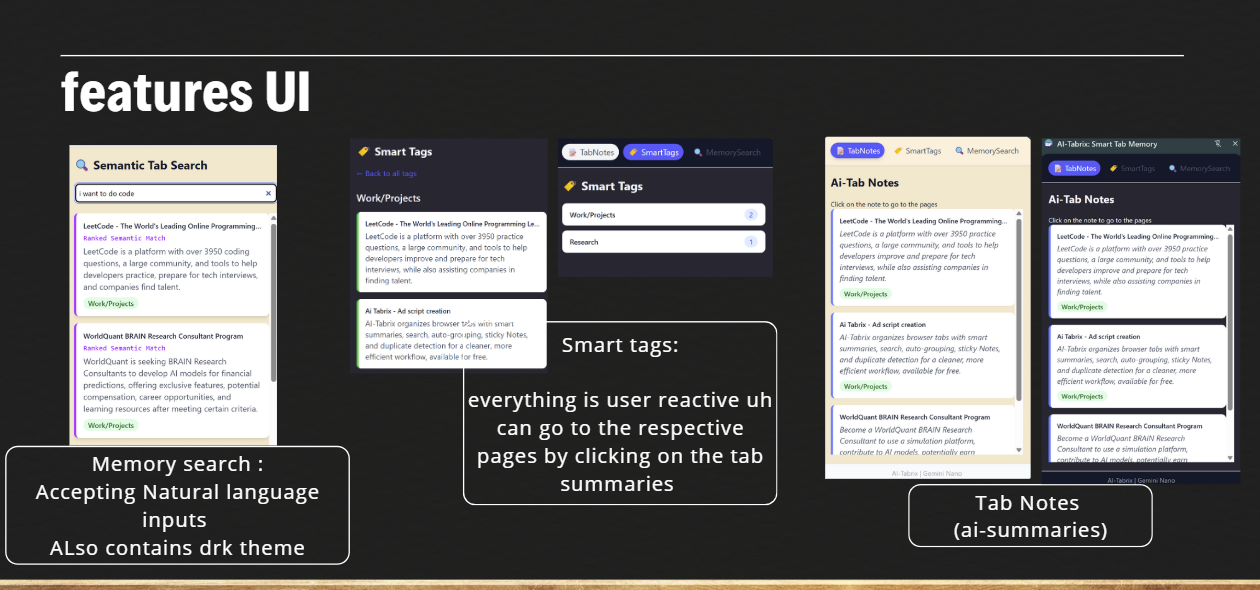
Currently Available features
-
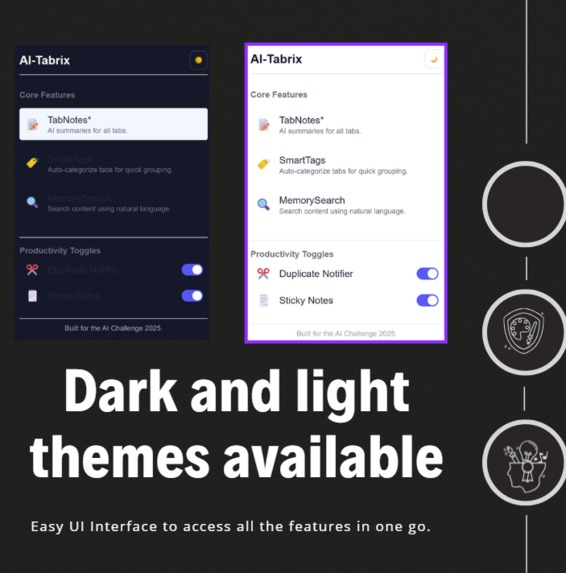
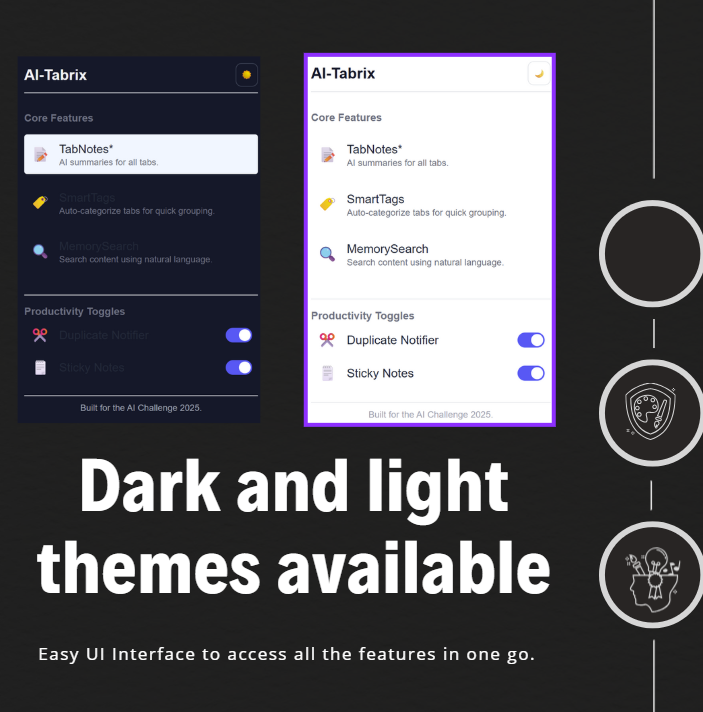
Making the Ui suitable for every user
-
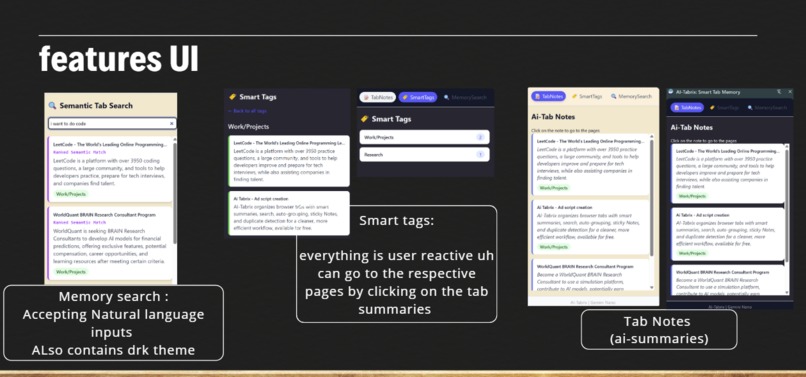
simple interative UI
-
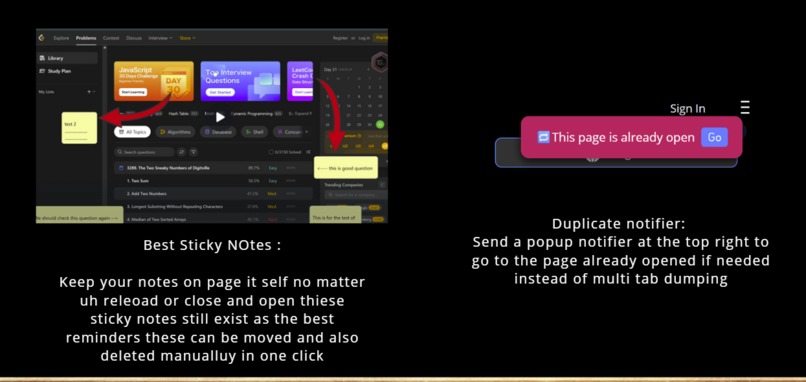
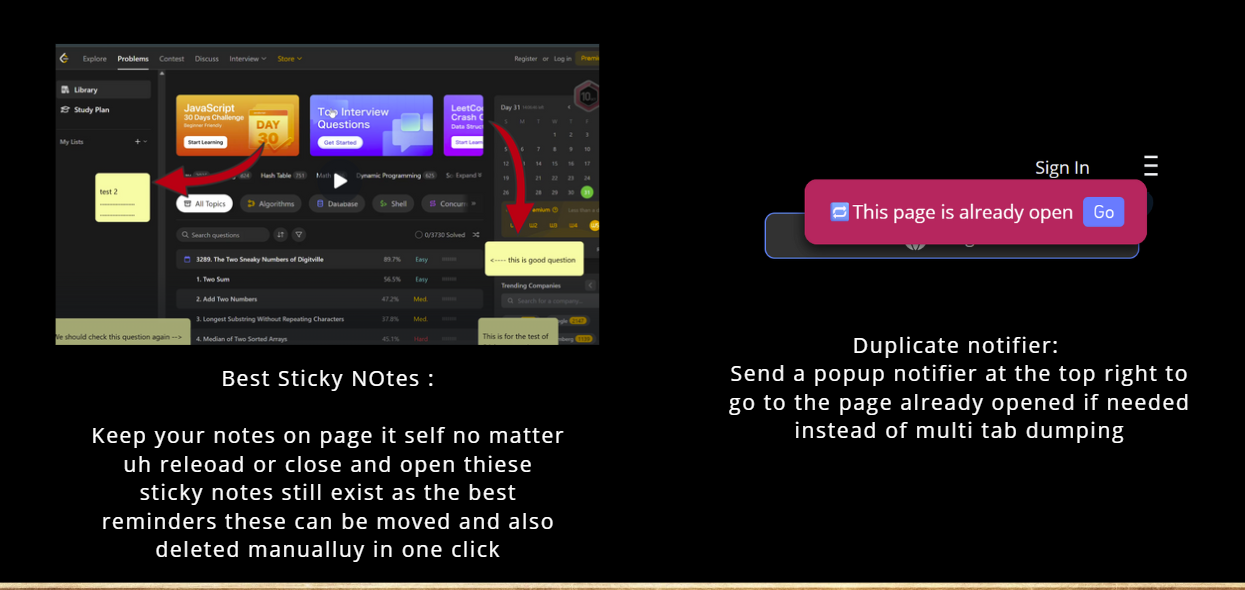
The most usefull feature : Sticky notes best reminders
Inspiration
It started pretty simply — we were just tired of losing track of our own tabs.
You open one tab for research, another for a tutorial, a few more for articles you swear you’ll read later… and before you know it, Chrome looks like a horizontal version of Jenga.
We tried using bookmarks, note apps, and even saving tabs into folders — but nothing understood what each tab was actually about. There was no real “memory.”
The browser just sat there, showing us pages — not helping us think.
That’s when the idea clicked:
What if your browser could actually remember, summarize, and organize itself — like a personal AI that keeps track of your digital brain?
But we didn’t stop there.
One of our favorite ideas became sticky notes for the web — a way to leave little thoughts, reminders, or highlights right inside the page.
You could note why you opened that article, what you wanted to check later, or the exact idea that caught your attention — and the best part? It stays there, even after you close the tab or restart your browser.
We didn’t want another productivity app. We wanted a browser that works with you — one that recalls what you were researching yesterday, groups your tabs by topic automatically, and lets you keep your thoughts attached to the places that inspired them.
Our vision became clear: build a browser that thinks alongside you — one that remembers your tabs, your context, and your ideas.
If you had to write it as a formula:
$$
\text{Cognitive Efficiency} = \frac{\text{Tabs + Notes Remembered}}{\text{Tabs You Opened}} \uparrow
$$
AI Tabrix is all about maximizing that — turning chaos into clarity, and making your browser feel a little more human.
What it does
AI Tabrix is like giving your browser a brain — it doesn’t just open tabs, it understands them.
It automatically keeps track of what you’re doing, summarizes every page, and organizes your tabs in a way that actually makes sense.
Here’s how it changes the whole browsing experience:
1. Instant AI Summaries
Every tab you open is instantly analyzed and summarized.
Whether it’s a research paper, a YouTube tutorial, or a long article, you get a short, clear summary right inside the extension — so you can remember what that tab was about without reopening it later.
No more guessing which tab had that “important section” — the summary tells you right away.
2. Smart Semantic Tagging
AI Tabrix reads your tab’s content and automatically generates contextual tags like “Machine Learning”, “Web Dev”, or “Startup Ideas”.
These tags aren’t random keywords — they come from a semantic understanding of the content using AI embeddings.
It’s like your browser finally knows what you’re working on.
Auto Grouping into 5 Clusters
Instead of one endless mess of tabs, AI Tabrix automatically groups them into five intelligent clusters based on topic and similarity.
So your design resources, documentation, and research articles each live in their own clean, labeled space.
Under the hood, it uses a semantic similarity formula:
$$
\text{similarity}(A, B) = \frac{A \cdot B}{|A||B|}
$$
That’s how it knows your “React performance tips” and “Chrome memory optimization” tabs belong in the same cluster — even if the titles are totally different.
4. Sticky Notes That Never Forget
Every tab comes with its own sticky note — a space where you can write quick thoughts like:
“Check API docs later,” or “Remember to compare this with the new GPT model.”
The best part? These notes stay saved even after you close the tab or restart your browser.
Weeks later, when you reopen that same page, your note pops back up — exactly where you left it.
It’s like having memory built into every tab.
5. Dual Search — Word + Meaning
The search bar in AI Tabrix works on two levels:
- Word-based search for exact matches
- Semantic search that understands meaning
So if you search “AI tools for writing,” it’ll find pages about GPT or copywriting even if those exact words aren’t there.
It’s fast, smart, and remembers everything you’ve read.
6. Duplicate Tab Detection
Ever open the same article twice without realizing it? AI Tabrix spots that instantly and gives you a friendly nudge:
“Hey, you already have this tab open.”
It saves memory, keeps your workspace light, and helps you stay focused.
7. Long-Term Memory & Recall
All your summaries, tags, and notes are saved securely using Chrome’s storage sync — meaning even if you close everything, AI Tabrix remembers.
You can come back days later, search a keyword, and instantly recall that old article — complete with your summary and notes.
Together, these features make browsing actually feel intelligent.
AI Tabrix doesn’t just help you manage tabs — it remembers your work, organizes your thoughts, and keeps your web life connected.
How we built it
We started with a simple goal: build a browser that remembers and understands tabs like a human would. From there, it was all about engineering memory and intelligence right into Chrome’s ecosystem.
The Architecture
Our extension is built around three main layers that work together seamlessly:
Content Scripts
These run inside web pages and extract meaningful content — titles, main text, and metadata.
We designed a heuristic that identifies core content blocks (like<main>or<article>) and ignores ads, sidebars, and comments.
This ensures summaries stay clean and contextually accurate.Background Service Worker
This is the brain of AI Tabrix.
It manages tab memory, communicates with AI APIs, and handles logic for duplicate detection, auto-grouping, and summary generation.
It also tracks tab lifecycle events — creation, updates, and closures — to keep everything in sync.React + Tailwind Side Panel UI
The UI acts as your command center.
Built with React and Tailwind CSS, it dynamically updates when new summaries, tags, or clusters are generated.
We made it responsive, minimal, and optimized for dark mode — productivity should look good too.
The API Core
AI Tabrix integrates multiple intelligent systems that make it feel alive:
Summarizer API → Quickly generates a short, context-rich summary for every tab. Even if you close a tab, you’ll remember what it was about.
Prompt API
- Lets you search by meaning, not just words. “Python array memory” and “list buffer in Python” lead to the same results.
- Uses cosine similarity on embeddings to group tabs into clusters like “Research,” “Tutorials,” or “Docs.”
Duplicate Notifier → Alerts you when you reopen the same content, saving both time and clutter.
Sticky Notes — Memory That Sticks
One of our favorite features is the Sticky Notes system.
Unlike normal notes that vanish with a refresh, these are attached to the tab’s URL — permanently.
You can leave thoughts, to-dos, or insights right on the page, and when you revisit it days later, they load instantly.
Under the hood, it’s powered by IndexedDB and Chrome’s sync storage to ensure persistence and reliability.
Even after long idle times or system restarts, your digital memory stays intact.
Engineering the Experience
To make everything smooth and fast, we:
- Used async message passing between scripts.
- Implemented lazy loading for AI models.
- Throttled summarization requests for users with dozens of tabs.
- Designed lightweight, state-aware React components for instant feedback.
By the end, we had a browser extension that doesn’t just open tabs — it remembers, organizes, and collaborates with you.
Challenges we ran into
Building AI Tabrix was exciting — but Chrome, APIs, and AI didn’t always play nice.
1. API Importing & Integration Chaos
In the early days, we struggled just to get our AI APIs running inside a Chrome extension.
CORS restrictions, missing headers, and module import issues from Vite and Manifest V3 constantly broke builds.
We had to rewrite our API layer multiple times — moving from direct imports to a unified async fetch handler in the background service worker.
Once that clicked, everything started falling into place.
2. Background Worker Losing State
Chrome’s Manifest V3 service worker kept unloading, wiping all memory of tabs and summaries.
We built a state hydration system that auto-saves the tab context and restores it when the worker wakes up — basically giving our AI a short-term memory.
3. Sticky Notes That Wouldn’t Stick
Sticky notes vanished after browser restarts because they were tied to tabId instead of URL.
Switching to a URL-based key system and caching with IndexedDB finally made them persistent.
4. Summary–Tag Race Conditions
Summaries and smart tags often ran at the same time, so tags loaded before summaries even existed.
We fixed it by chaining them properly — summary first, tags next — which made everything flow naturally.
Each of these issues forced us to engineer smarter — from API handling to state sync — until AI Tabrix became stable, fast, and actually felt intelligent.
Accomplishments that we're proud of
Looking back, what started as a messy idea — “let’s make Chrome smarter” — turned into something that actually works.
Seamless AI Pipeline
After fighting CORS, async issues, and API import chaos, we finally nailed a smooth AI integration.
Summaries, smart tags, semantic clustering, and duplicate detection all now work in harmony — like one connected thought process.
Word + Semantic Search Combo
We built a dual search engine inside our extension — combining both word-based and semantic search.
This means you can find tabs even if you forgot the exact title — just by meaning.
Sticky Notes That Truly Stick
We’re especially proud of our Sticky Notes feature — lightweight, fast, and bound to each webpage.
They reload instantly after days, browser restarts, or syncs.
It’s like leaving your thoughts in the web itself — and coming back to find them waiting for you.
A Clean, Responsive UI
We made a side panel UI that’s both functional and minimal — React + Tailwind handled that beautifully.
Everything updates in real time as AI processes finish, with full dark mode support for long nights of work.
AI Tabrix went from being a small extension idea to a fully functional AI-powered tab memory system — something we’re genuinely proud to have built from scratch.
What We Learned
This project taught us way more than we expected — not just about code, but about how humans and AI can actually collaborate.
Chrome Extensions are way deeper than they look.
Between service worker sleep cycles, storage limits, and event handling, we learned how to make a lightweight system that still feels intelligent.AI isn’t just about generating — it’s about remembering.
We discovered that the real power of AI comes when it helps you retain context across time — and that’s what made Tabrix feel alive.UX matters more than output.
The difference between a “cool idea” and a “usable tool” came down to smooth timing, predictable responses, and clean UI.
We learned that great AI products should feel invisible — helping silently in the background.Debugging async systems tests your patience and your soul.
We got really good at catching timing issues, managing background tasks, and syncing state between scripts. Chrome made us earn it.
More than anything, we learned that AI productivity tools aren’t about replacing humans — they’re about remembering with them.
What's Next for AI Tabrix
We’re just getting started. AI Tabrix already remembers and organizes your tabs — but we want to push that memory even further.
Coming Up:
- Session-Level Memory — bringing back entire browsing sessions with summaries, tags, and notes.
- Context-Aware Search — your queries will understand what you were doing last time, not just what you type.
- AI Chat Companion — chat with your past tabs, summaries, and notes like a personal knowledge base.
- Cloud Sync & Team Mode — share your tab memory across devices or with teammates for collaborative research.
- Productivity Metrics Dashboard — visualize your browsing habits and cognitive efficiency.
Our long-term goal is simple:
make the browser more human — one that not only opens pages but understands why you opened them.
AI Tabrix isn’t just an extension anymore — it’s the start of a self-organizing web experience.
Built With
- chrome
- github
- javascript
- prompt
- react
- summarizer
- tailwindcss
- typescript
- visual-studio
- vite


Log in or sign up for Devpost to join the conversation.