
Inspiration
Let's be honest: your browser looks like a crime scene. We've all been there—87 tabs open, a chaotic mix of recipes, Stack Overflow articles, that one YouTube cat video, and half-finished shopping carts. This "Tab-pocalypse" is a universal pain point for developers, students, researchers, and chronic tab-openers. Our inspiration was simple: to wave a magic, AI-powered wand and bring instant, non-judgmental order to that beautiful digital mess, giving users back their focus, sanity, and screen real estate.
What it does
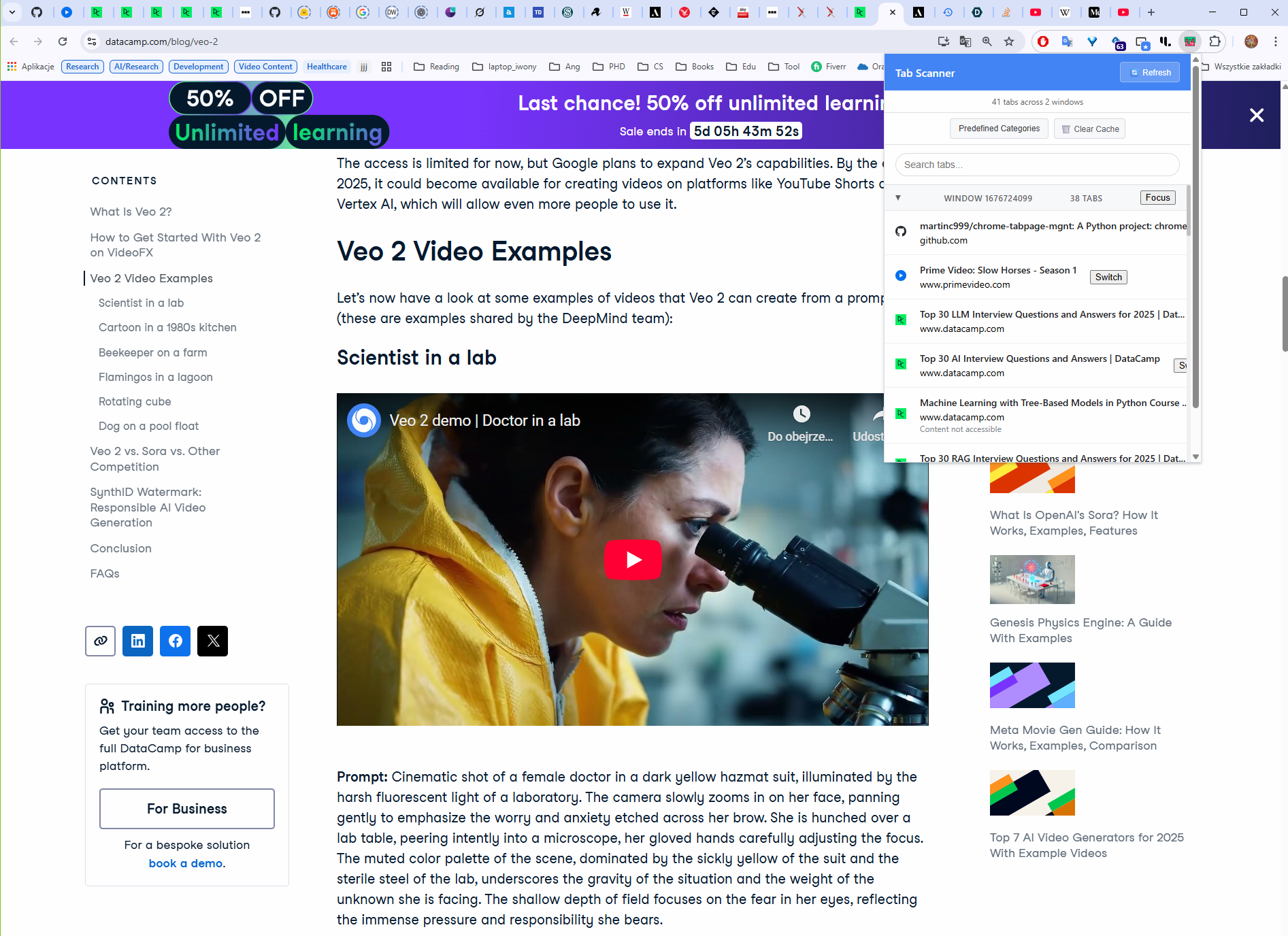
Tab Scanner is an AI-Powered Butler that transforms your browser clutter into a neatly organized workspace. It goes beyond simple tab listing by intelligently scanning, analyzing, and automatically categorizing all open tabs.
Key features include:
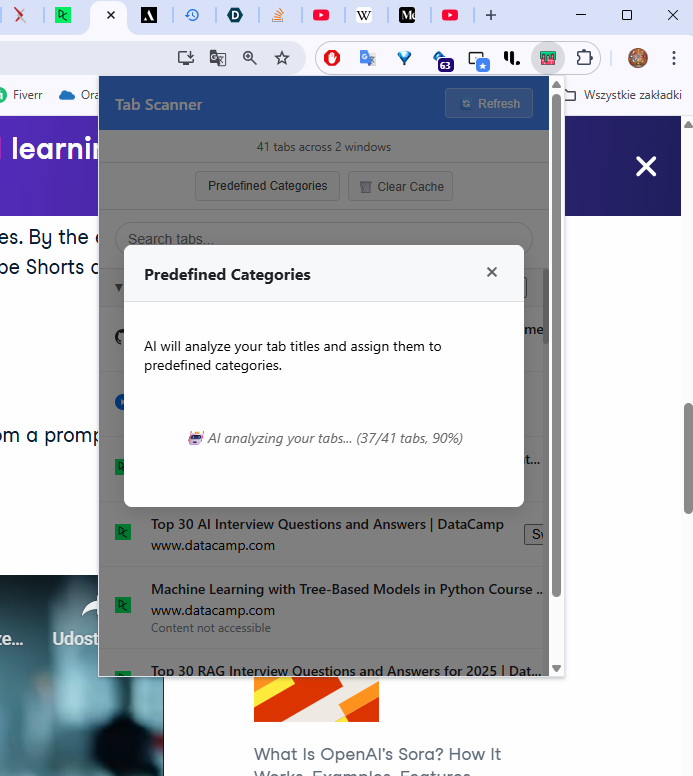
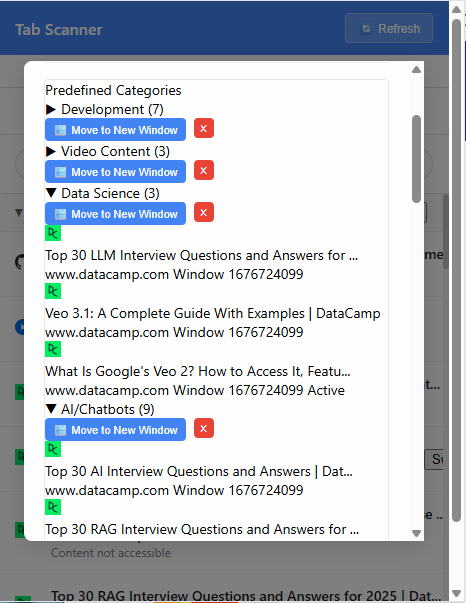
- One-Click AI Categorization: Scans content, titles, and domains to create logical groups (e.g., "Development," "Research," "Social Media," or even "Definitely-Not-Work-Stuff").
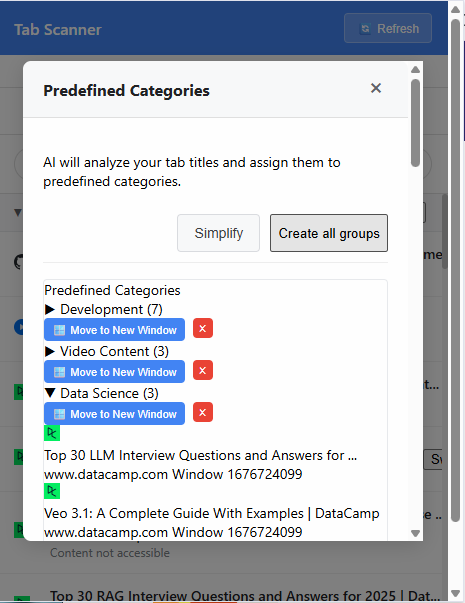
- Instant Tab Groups & New Windows: The flagship feature—move an entire category of tabs into a new, neatly labeled Tab Group in its own window with a single click. Go from 87 tabs in one window to 5 tidy groups in seconds!
- Smart Simplification: A "Simplify" button that leverages AI to merge overly specific categories (e.g., "React Help" and "Vue Project") into broader groups (e.g., "Web Development").
- Blazing Fast Caching: Only analyzes new tabs in subsequent scans, ensuring lightning-fast results and saving your RAM.
- Powerful Search & Navigation: Built-in search to quickly find and switch to any open tab by title, URL, or description.
- Clean Up with Confidence: Close an entire category of tabs with a single, immensely satisfying click using the "Close Category" button.
How we built it
We built Tab Scanner as a browser extension (initially for Chrome/Chromium) using the browser's native tab management APIs to access and manipulate tabs.
- Core Tab Access: Used the extension APIs to read tab titles, URLs, and content for every open tab, grouped by window.
- On-Device AI Magic: Implemented the categorization logic using an efficient, on-device AI model for speed and user privacy. This model performs NLP to analyze the extracted content, domains, and titles to assign the most logical category.
- The Workflow Engine: Developed the logic for the "Move to New Window" functionality, which uses the API to take a specific subset of tabs, create a new browser window, and automatically create a native Tab Group named after the AI's category.
- Intelligent Refinement: The "Simplify" feature required a secondary AI layer to re-analyze the initial categories and map them to broader, user-friendly concepts based on semantic similarity.
- Performance Focus: Incorporated a caching layer that stores the categorization results, only requiring the AI to process newly opened tabs on subsequent scans.
Challenges we ran into
- The Data Dilemma: The primary challenge was reliably and quickly extracting useful text content from tabs across the entire web for the AI to analyze, particularly dealing with various security headers (CORS) and dynamic, JavaScript-heavy pages.
- AI Goldilocks Zone: Training the AI to be "just right"—specific enough to be useful (e.g., "Machine Learning") but not so specific that it creates unnecessary clutter (e.g., "Python Stuff," "JS Things"). This directly led to the necessity of the "Simplify" feature.
- Balancing Speed and Depth: Ensuring the on-device AI could process a large number of tabs (the 87-tab-pocalypse scenario) quickly enough that the user wouldn't perceive a frustrating delay.
- Browser Group Integration: Mastering the API commands to seamlessly and reliably create, name, and populate native Tab Groups and new windows in a single, atomic action for the user.
Accomplishments that we're proud of
- The Ultimate Workflow: Successfully delivering the "Move to New Window" feature, which is the most powerful tool for immediately isolating a project or topic. It’s a true one-click transformation.
- AI Self-Correction: Developing the "Simplify Categories" functionality. It's rewarding to have the AI intelligently correct and refine its own output to match user needs.
- Achieving Browser Zen: Creating a tool that significantly reduces stress for users by turning a formerly chaotic browser into a perfectly organized workspace, proving that AI can solve real, everyday productivity problems.
- Blazing Fast Caching: Delivering a user experience where subsequent scans are nearly instant, a testament to effective performance optimization.
What we learned
We learned that users aren't just looking for better lists; they're looking for contextual understanding and instant action on their digital mess. The value of an organization tool skyrockets when it removes all manual effort.
- Automation is Key: The friction of manual sorting is a barrier to organization. One-click automation is the only way to effectively tame chronic tab-hoarding.
- User Control is Essential: While AI is great at the heavy lifting, features like renaming categories and the "Simplify" button are necessary to give users confidence and control over the final output.
- RAM Management is a Feature: Users are deeply aware of their browser's performance. Our ability to consolidate tabs into separate windows and close unnecessary groups is an unstated, but appreciated, performance utility.
What's next for AI Tab Scanner for automatic categorization
- Intelligent Project Archiving: Implement a feature to automatically suggest closing or archiving entire categories of tabs that haven't been active for a week or more, helping users maintain a clean slate.
- Custom Category Training: Allow users to manually drag tabs into a custom group and label it, which the AI would then use as a personalized training example to improve future categorization accuracy specifically for that user.
- Scheduled Scans: Provide an option to schedule a light, automatic scan and categorization prompt once a day (e.g., every morning) to start the day with an organized workspace.
Would you like me to elaborate on the technical requirements for implementing the on-device AI model?
Built With
- api
- chrome
- chrome's-native
- css3
- ecosystem
- frontend:-vanilla-html5
- gemini-nano
- javascript
- pandas
- python


Log in or sign up for Devpost to join the conversation.