-
-
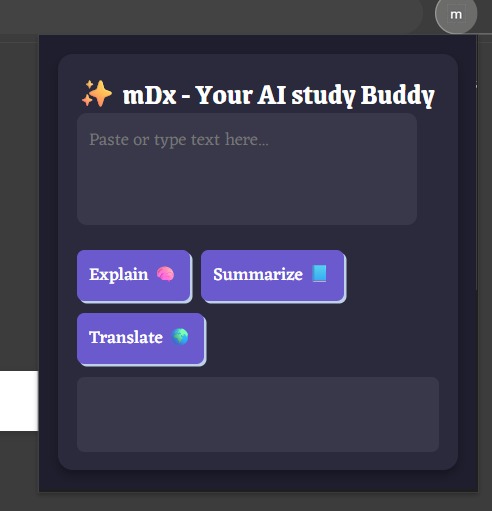
look and feel
Inspiration
As university students, we often spend hours trying to simplify complex lecture content, summarize long notes, or translate unfamiliar terms. Switching between multiple AI tools or apps was time-consuming. That’s when we thought — why not bring AI directly into the browser to help us study faster and smarter? This idea inspired AI Study Buddy, a browser-based assistant built to help students learn more efficiently.
What it does
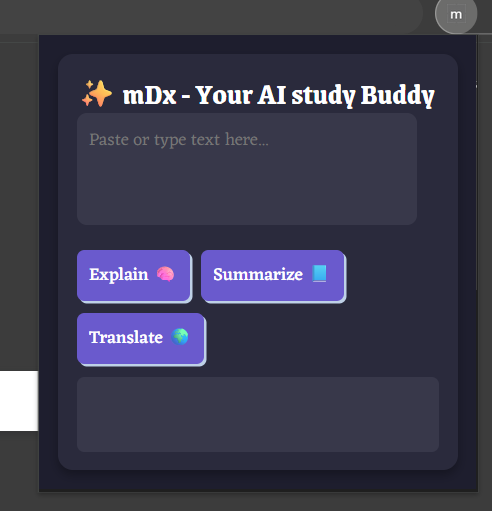
AI Study Buddy is a Chrome extension powered by Google Gemini AI that can: 🧠 Explain complex text in simple terms ✂️ Summarize long passages quickly 🌍 Translate text into English instantly It’s designed as an always-available study companion that helps students grasp information faster while browsing or reading online
How we built it
We built the frontend using HTML, CSS, and JavaScript, styled with Fanta CSS for a clean anime-inspired theme. The backend is developed with Node.js and Express, deployed on Railway.app. It connects to the Google Generative Language API (Gemini 1.5 models) to process user prompts. The extension sends a request to the backend, which fetches AI responses securely using an environment-protected API key.
Challenges we ran into
Setting up and authenticating the Gemini API. Managing CORS and permissions between the extension and backend. Securing the API key while deploying on public repositories. Debugging early issues like "ai is not defined" when testing local builds in Chrome Canary.
Accomplishments that we're proud of
Successfully built a fully functional AI-powered Chrome extension integrated with Google’s Gemini API. Deployed a working backend on Railway that handles real-time AI responses. Designed a simple, user-friendly interface for students and researchers.
What we learned
How to integrate browser extensions with AI APIs using Node.js and Express. How to securely manage environment variables in deployment. Gained hands-on experience with Google Cloud AI APIs and modern Chrome features like Manifest V3. Improved skills in frontend-backend communication and debugging asynchronous requests.
What's next for AI Study Buddy
Adding speech-to-text and text-to-speech features for better accessibility. Expanding to mobile and desktop apps. Enhancing UI with custom themes and personalized learning insights. Integrating Gemini Nano (on-device AI) for offline functionality.
Built With
- built-with:-node.js
- canary
- chrome
- css
- express.js
- git
- github
- google-generative-language-api-(gemini)
- html
- javascript
- railway


Log in or sign up for Devpost to join the conversation.