-
-
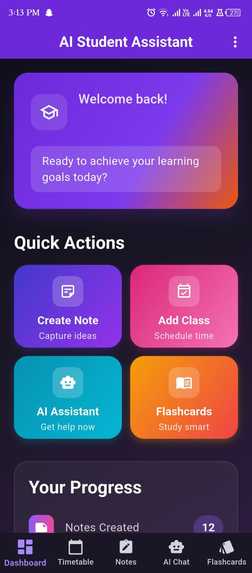
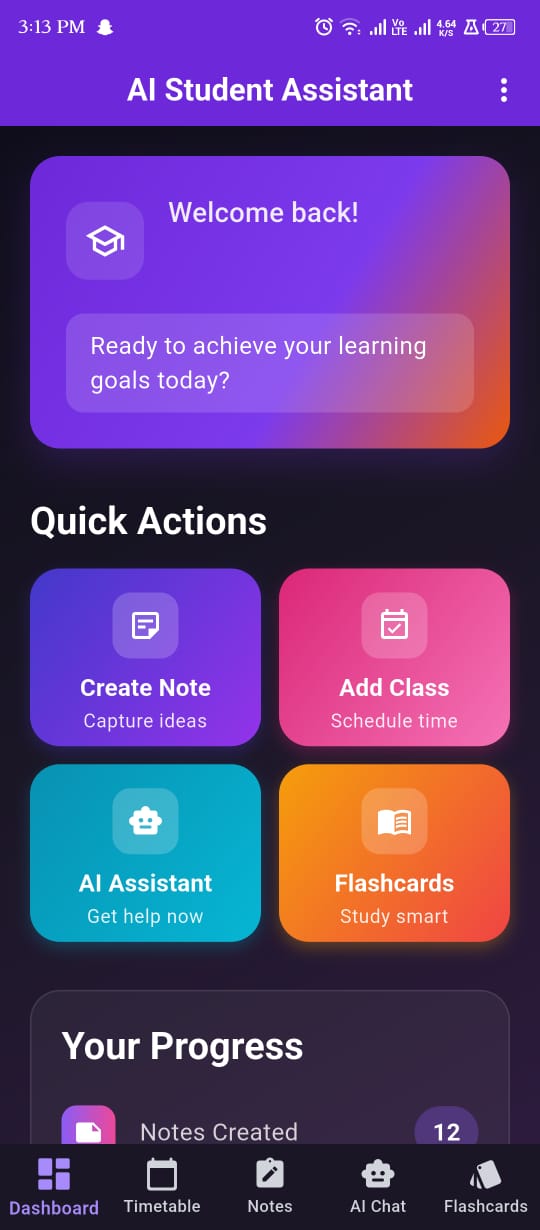
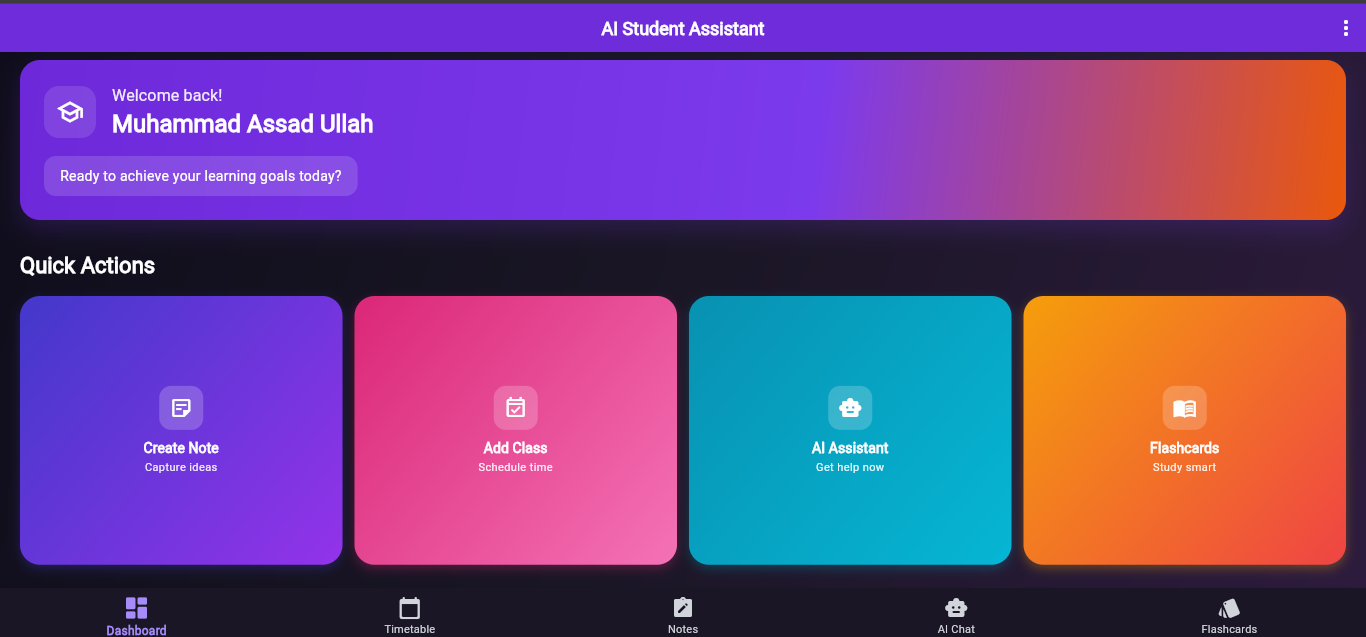
Dashboard Screen
-
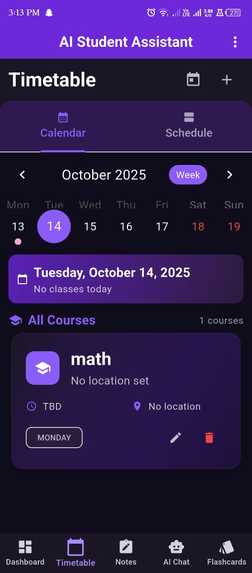
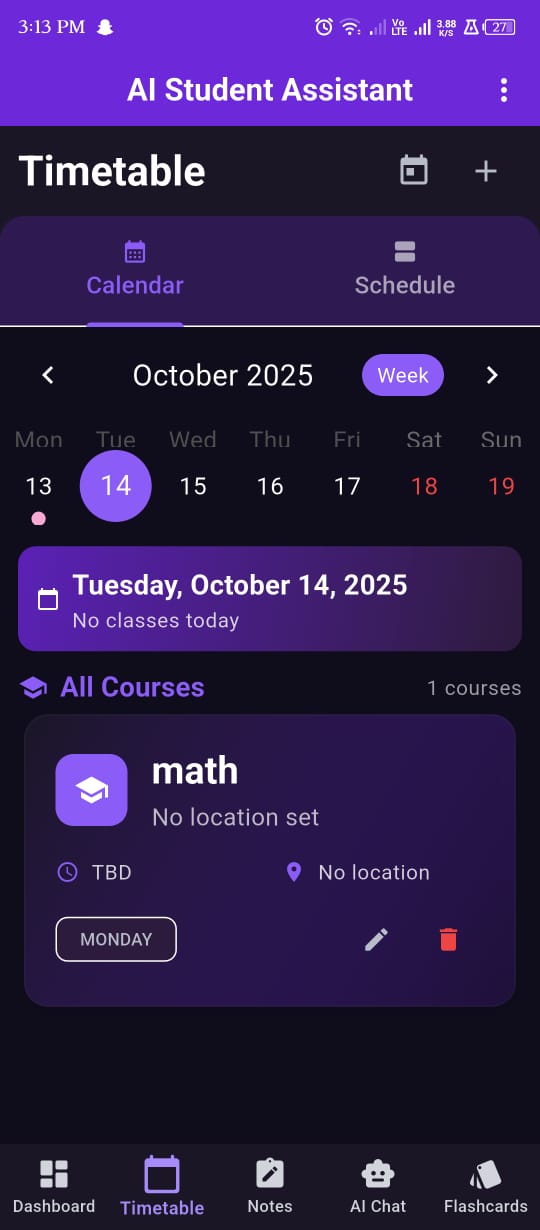
Timetable screen
-
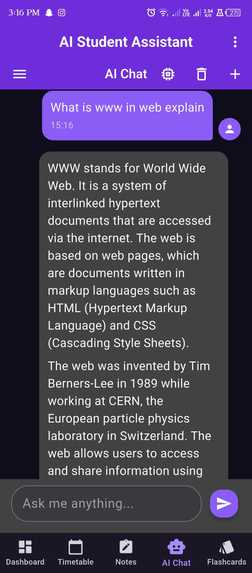
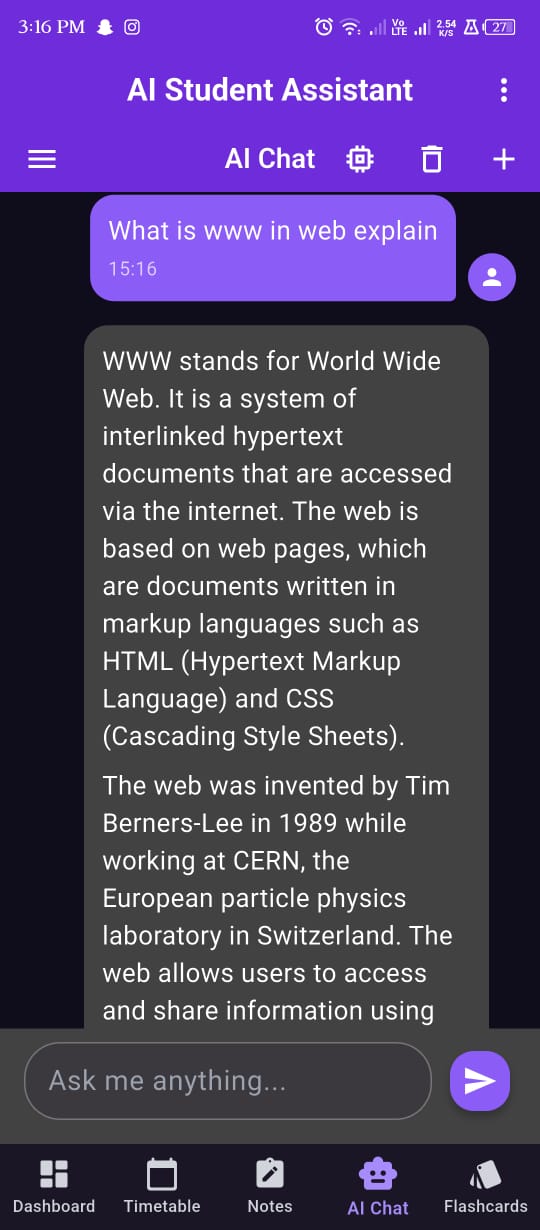
AI Chat screen
-
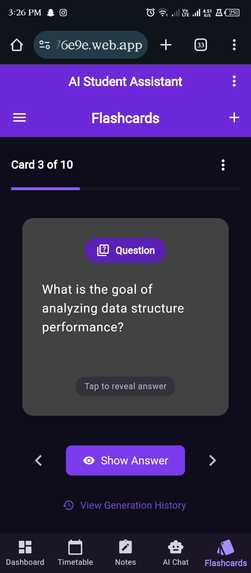
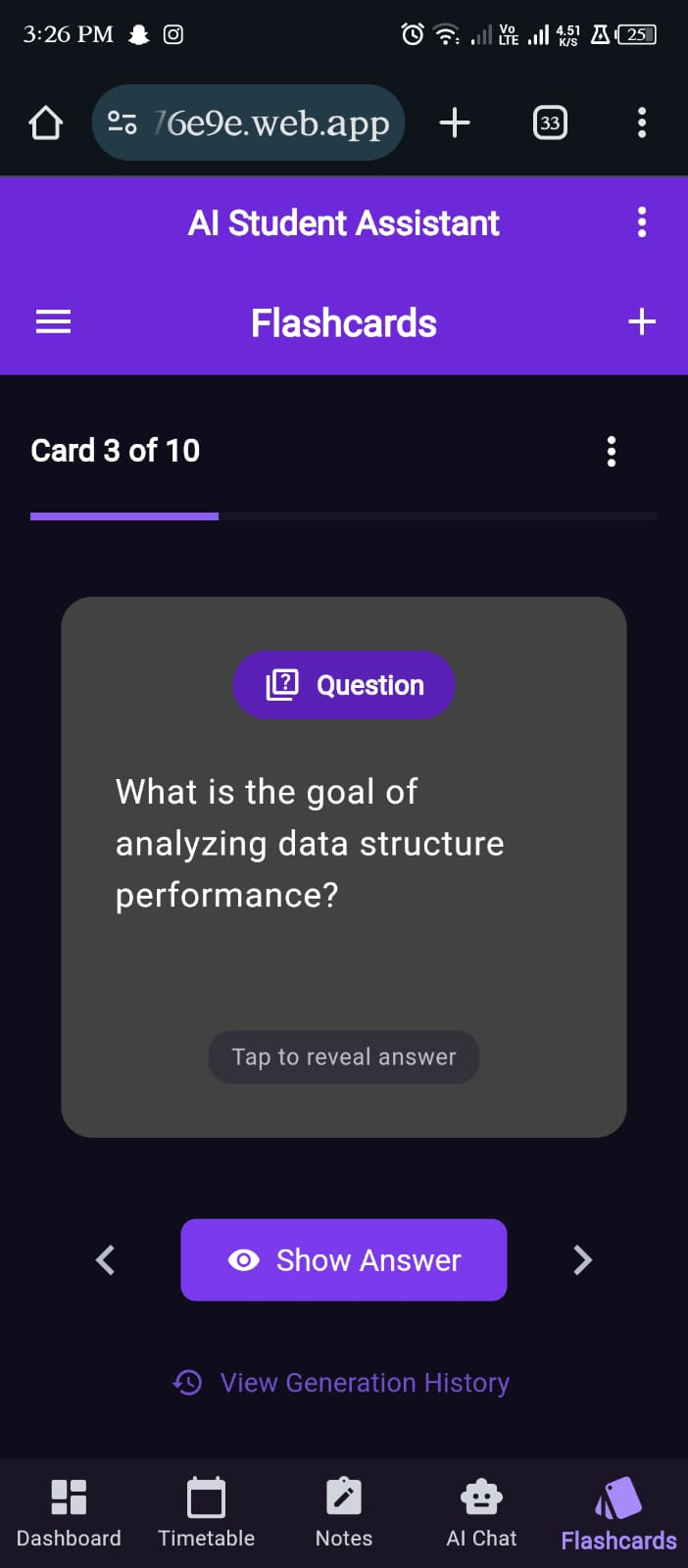
Flashcard Screen
-
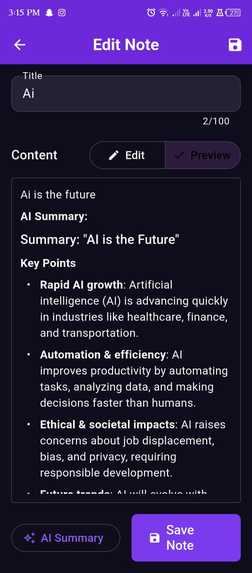
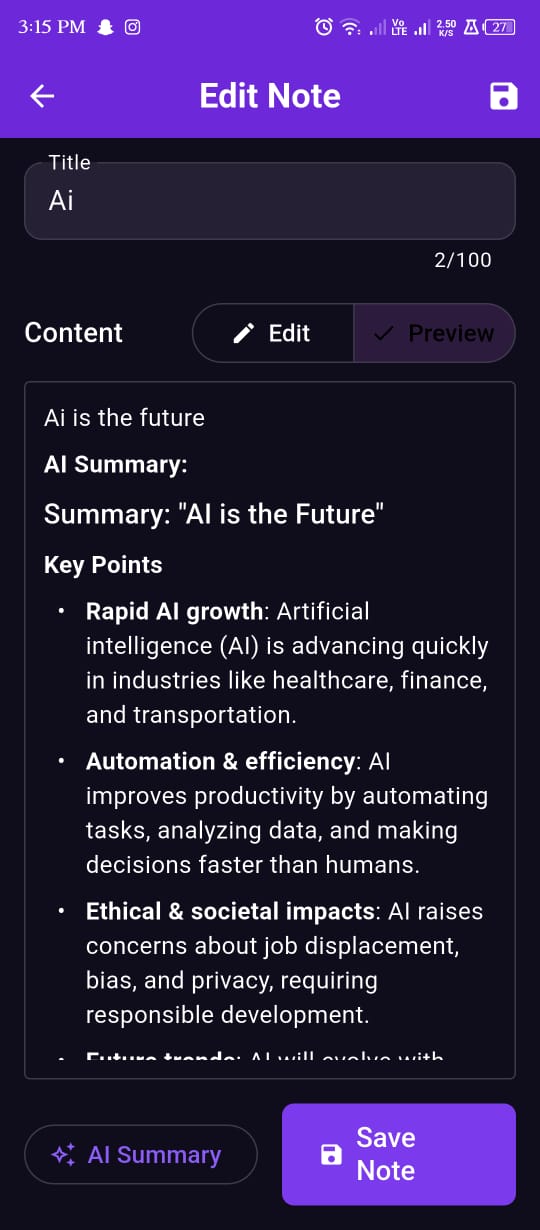
Note's Ai Summary Screen
-
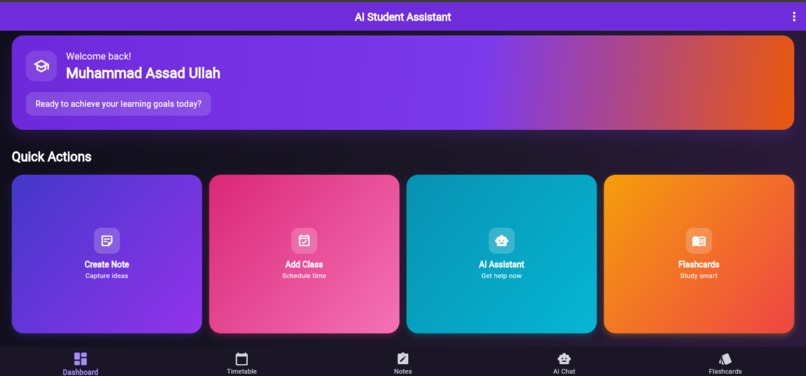
Web View
Inspiration As a student, I constantly juggled between multiple apps calendar for schedules, notes apps for lectures, flashcard apps for memorization, and chatbots for quick answers. This fragmentation killed my productivity. I realized students need ONE intelligent hub that understands their academic life. Inspired by the octopus's multitasking ability (perfectly fitting this hackathon's theme), I built an AI powered assistant that handles notes, schedules, flashcards, and conversational help all in one place.
What it does AI Student Assistant is a cross-platform Flutter app (Web, Android, iOS) that serves as your personal academic companion: Core Features: • AI Chat: Conversational AI powered via OpenRouter ask study questions, get explanations, or brainstorm ideas • Smart Notes: Create, organize, and search notes with rich text formatting and AI Summarization • Flashcards: Generate AI flashcards from notes, study with spaced repetition, and track mastery • Timetable Manager: Schedule classes, track attendance, get smart reminders via local notifications • Smart Notifications: Never miss a class or study session with intelligent reminders • Cloud Sync: Firebase Firestore ensures your data syncs across all devices in real-time • Secure Auth: Email/password + Google Sign-In via Firebase Authentication • Offline-First: SQLite local storage with automatic sync when reconnected
How I built it Tech Stack: • Frontend: Flutter (Dart) with Riverpod for state management • Backend: Node.js (Express) proxy server for secure API calls • Database: Firebase Firestore (cloud) + SQLite with Floor ORM (local) • AI/ML: o OpenRouter API (Claude Sonnet 4.5 for chat) o Hugging Face API (BART for text summarization) • Authentication: Firebase Auth SDK • Notifications: Flutter Local Notifications • Deployment: Firebase Hosting (web), Docker-ready backend Architecture: '''void main() async { WidgetsFlutterBinding.ensureInitialized();
debugPrint('Starting AI Student Assistant...');
// Load environment variables for API keys try { await dotenv.load(fileName: ".env"); debugPrint('Loaded .env file for API keys'); } catch (e) { debugPrint('No .env file found (will use --dart-define if available): $e'); }
// Initialize Firebase try { await Firebase.initializeApp( options: DefaultFirebaseOptions.currentPlatform, ); debugPrint('Firebase initialized successfully');
// Web: ensure auth persistence is set to LOCAL
if (kIsWeb) {
  await auth.FirebaseAuth.instance.setPersistence(auth.Persistence.LOCAL);
  debugPrint('Firebase Auth web persistence set to LOCAL');
}
} catch (e) { debugPrint('Error initializing Firebase: $e'); }
// Initialize notifications try { await NotificationService.initialize(); debugPrint('Notifications initialized successfully'); } catch (e) { debugPrint('Error initializing notifications: $e'); }
// Run the app with Riverpod provider scope runApp(const ProviderScope(child: AIStudentAssistantApp())); }'''
Development Process:
- Week 1: Designed architecture, setup Firebase + Flutter project
- Week 2: Built core features (notes, timetable, auth)
- Week 3: Integrated AI APIs (chat, summarization, flashcards)
- Week 4: Added offline sync, notifications, and cross-platform testing
- Week 5: UI/UX polish, web deployment, documentation
Challenges I ran into
1. Secure API Key Management Problem: Exposing OpenRouter/Hugging Face keys in frontend code risks theft and abuse. Solution: Built a Node.js proxy server that validates Firebase tokens before forwarding API requests. Keys never touch the client side. '''// Backend middleware for secure API calls router.post('/chat', verifyFirebaseToken, async (req, res) => { const apiKey = process.env.OPENROUTER_API_KEY; // Forward request to OpenRouter securely // Client never sees the actual API key });'''
2. Cross-Platform Compatibility Problem: Flutter web had CORS issues with external APIs, and iOS required specific Firebase setup. Solution: • Added CORS headers in backend with CORS_ORIGINS environment variable • Used FlutterFire CLI to auto-configure platform-specific Firebase files • Implemented conditional logic for web vs mobile features (notifications, persistence) '''// Platform-specific Firebase Auth persistence if (kIsWeb) { await auth.FirebaseAuth.instance.setPersistence(auth.Persistence.LOCAL); }''' 3. Offline-First Sync Logic Problem: Ensuring data consistency between SQLite (local) and Firestore (cloud). Solution: Implemented a sync service that: • Writes to SQLite first for instant UI updates • Queues changes and syncs to Firestore when online • Resolves conflicts using server timestamps • Handles network failures gracefully with retry logic 4. AI API Rate Limits Problem: Free-tier APIs have strict daily limits (200 requests/day for OpenRouter). Solution: • Implemented API key rotation (4 keys cycling based on current date) • Added in-app quota tracker showing "X/200 requests used today" • Cached AI responses to avoid duplicate API calls • Implemented exponential backoff for rate limit errors 5. Firebase Authentication on Web Problem: Web browsers blocked popup authentication and session persistence was inconsistent. Solution: • Set Firebase Auth persistence to LOCAL mode for web platform • Implemented proper error handling for popup blockers • Added fallback to redirect-based authentication
Accomplishments that I'm proud of Technical Achievements: • Fully Functional MVP: Deployed production-ready web app + built Android/iOS apps • Secure Architecture: Zero API keys exposed in client code, Firebase token validation • AI Integration: Successfully integrated 2 AI providers (OpenRouter + Hugging Face) • Cross-Platform: Single codebase works seamlessly on web, Android, and iOS • Offline Support: App remains fully usable without internet connection • Clean Code: Well-documented with 10+ comprehensive guides in docs folder Personal Achievements: • Solo Development: Built complete end-to-end product in 1 month as a solo developer • Production Deployment: Successfully deployed to Firebase Hosting with custom domain • Comprehensive Testing: Tested across multiple devices and platforms • Open Source: Made entire codebase available under MIT license
What I learned Technical Skills: • Flutter Mastery: Deep dive into Riverpod state management, Go Router navigation, and platform channels • Firebase Expertise: Authentication, Firestore security rules, FlutterFire CLI, and cross-platform configuration • API Integration: Handling rate limits, implementing retry logic, and proper error handling • Backend Development: Built my first Node.js proxy server with JWT validation and CORS handling • Docker & Deployment: Containerized backend for cloud deployment readiness • Security Best Practices: Environment variable management, token validation, secure API proxying Soft Skills: • Problem Decomposition: Breaking a large project into manageable weekly sprints • User-Centric Design: Focusing on actual student pain points (being the target user helped immensely) • Documentation: Writing clear, comprehensive guides for future contributors • Time Management: Balancing feature development, testing, debugging, and documentation • Debugging: Troubleshooting platform-specific issues across web, Android, and iOS Key Insights: • Environment-based configuration is crucial for managing secrets across platforms • Offline-first architecture significantly improves user experience and reduces API costs • API key rotation is essential for sustainable free-tier usage • Platform-specific code needs careful planning but enables true cross-platform apps • The best solutions come from solving your own problems - being a student myself made development incredibly focused
What's next for AI Student Assistant Immediate Roadmap (Next 3 Months):
- Analytics Dashboard • Study time tracking with visual heatmaps • Attendance trends and "at-risk" warnings for classes below 75% • Flashcard mastery graphs showing learning progress • Note-taking patterns and productivity insights
- Spaced Repetition System • Implement Anki-style SRS algorithm for flashcards • "Next review due" notifications based on forgetting curve • Difficulty-based card scheduling (easy, medium, hard) • Mastery levels with visual progress indicators
- Assignment Tracker • Deadline calendar with color-coded urgency levels • Integration with timetable for holistic view • AI-powered task prioritization based on due dates and difficulty • Progress tracking for long-term projects
- Voice Features • Speech-to-text for hands-free note-taking during lectures • Text-to-speech for audio flashcards (great for commuting) • Voice commands for AI chat interaction • Multi-language voice support Mid-Term Goals (6 Months):
- Enhanced AI Capabilities • Context-aware AI that remembers previous conversations • Subject-specific AI tutors (Math, Science, History, etc.) • AI-powered study plan generation based on exam schedules • Automatic quiz generation from notes
- Collaboration Features • Shared study groups with collaborative note-taking • Public flashcard deck marketplace • Peer review system for notes and flashcards • Real-time collaborative editing
- Platform Integrations • Google Calendar sync for automatic timetable import • Google Drive integration for file attachments • Notion API for bidirectional sync • Canvas/Moodle LMS integration


Log in or sign up for Devpost to join the conversation.