Inspiration
The inspiration for this project stems from a lifelong passion for robotics and autonomous systems. This project was a chance to delve into NVIDIA Isaac Sim, exploring simulated robotic systems while applying AI for natural language control. Integrating advanced simulation with real-time AI-driven interaction was both a challenge and an exciting opportunity provided by the hackathon.
What it does
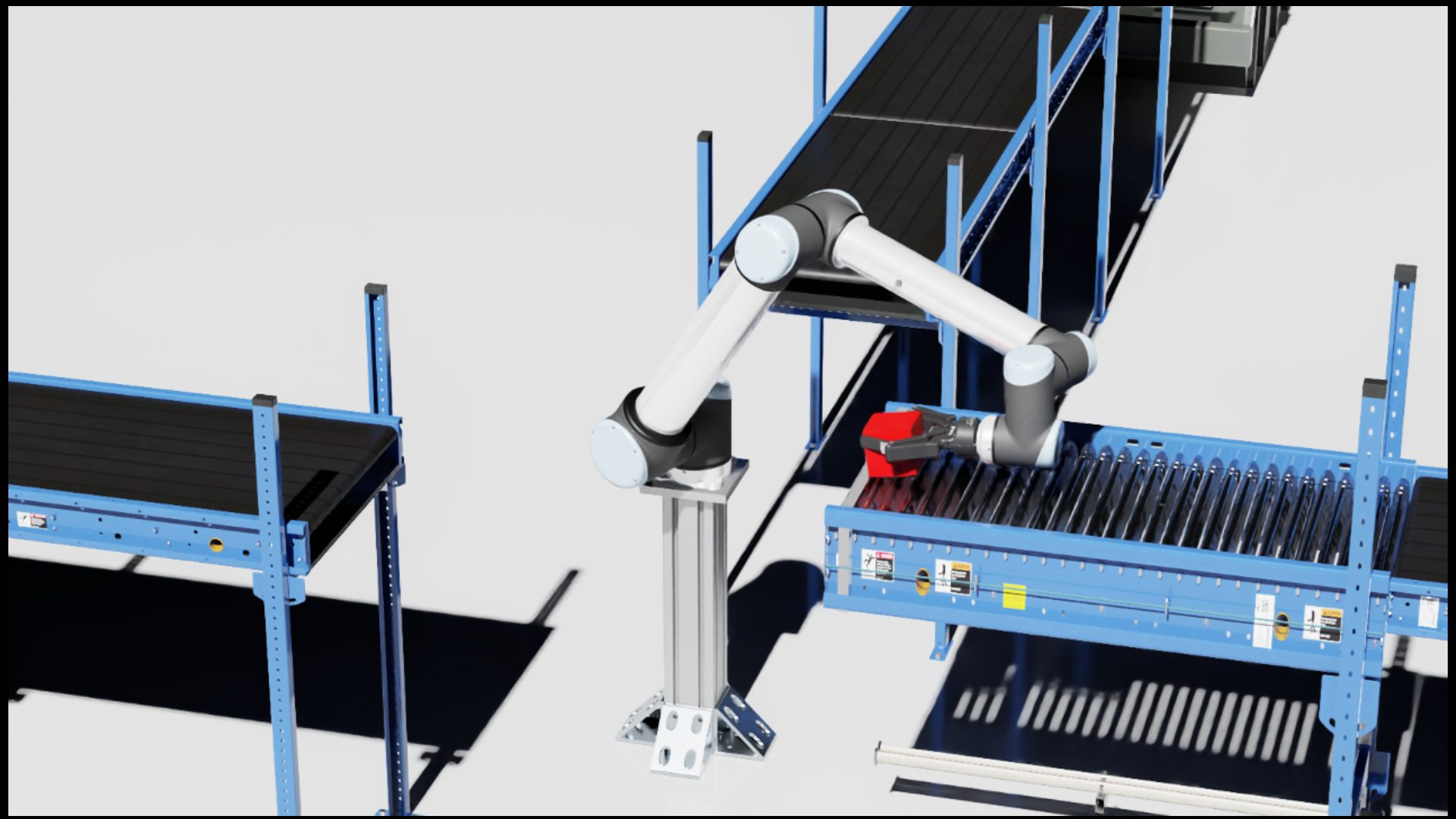
The project showcases a robotic arm simulation built with NVIDIA Isaac Sim. The robot performs pick-and-place tasks by grabbing cubes from a trigger zone on a conveyor belt and alternately placing them into North and West bins. Key functionalities include:
- Dynamic Grasping: Adapts to moving objects for accurate handling.
- Automated Item Respawning: Generates new cubes in the trigger zone after one is picked.
- State Tracking: Tracks and updates the number of items in each bin.
An Android app adds additional features:
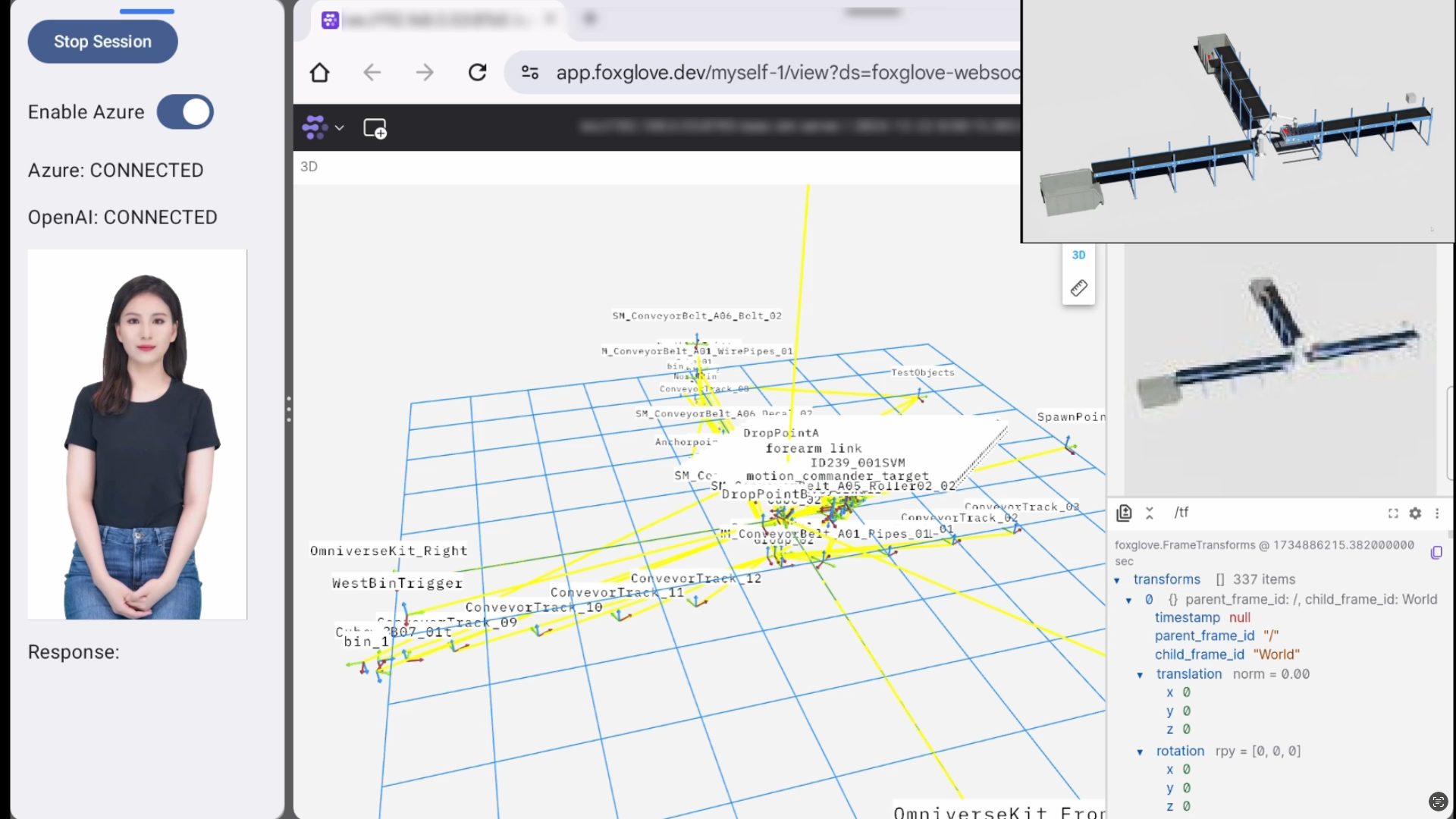
- Real-time visualization of simulation data via a web client.
- Voice-based interaction using OpenAI real-time API and Azure avatar, enabling commands like stopping or resuming the robot, spawning cubes, and querying bin statuses.
How I built it
Core Components
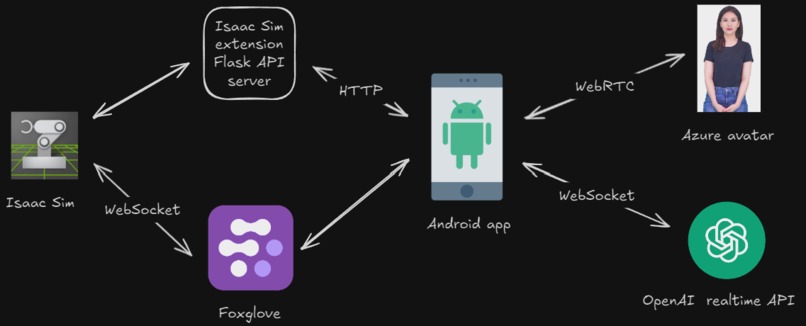
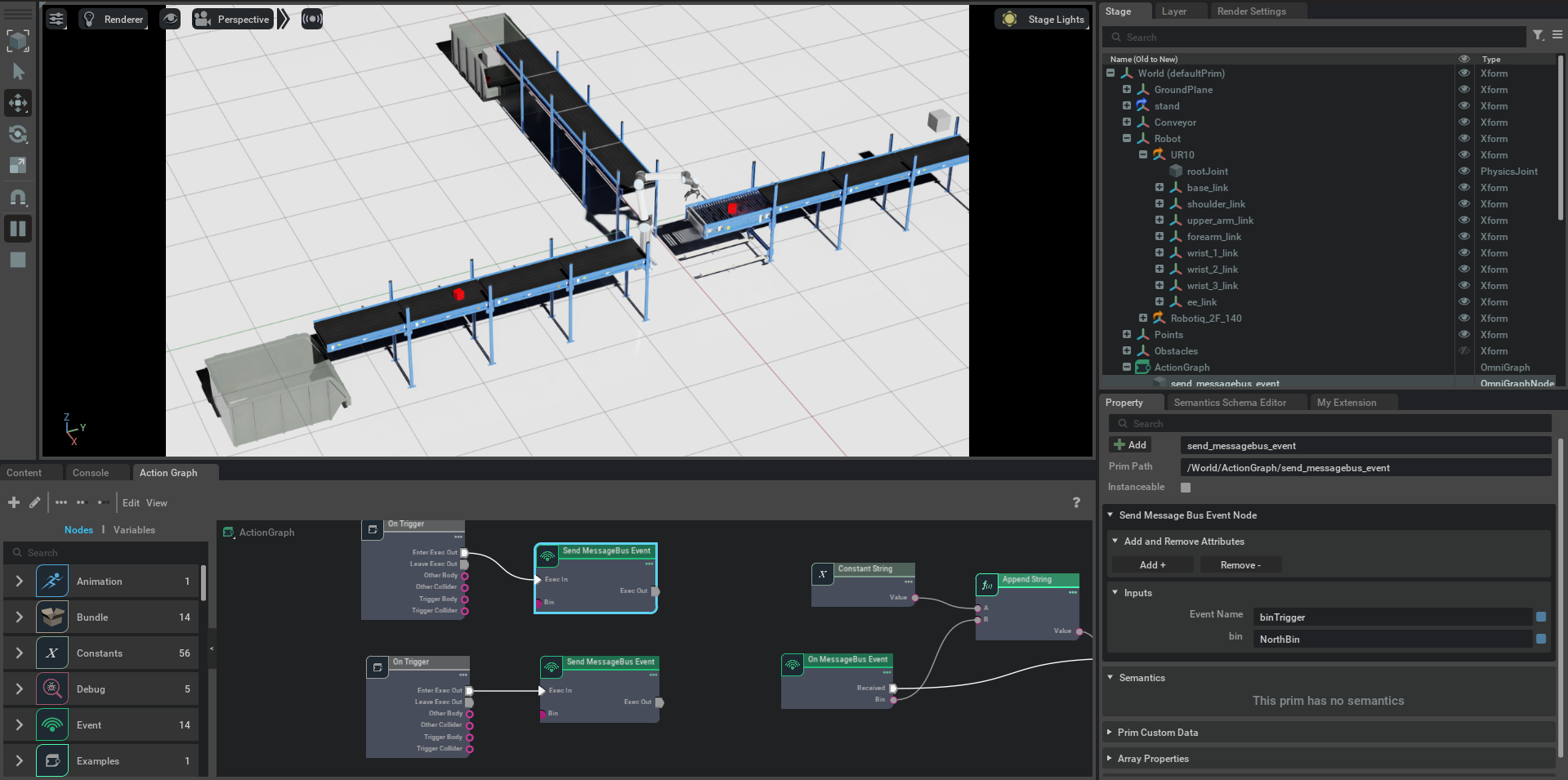
- NVIDIA Isaac Sim:
- Used for high-fidelity simulation of robotic environments.
- Leveraged Cortex Framework for task planning and RMPFlow for motion planning and obstacle avoidance.
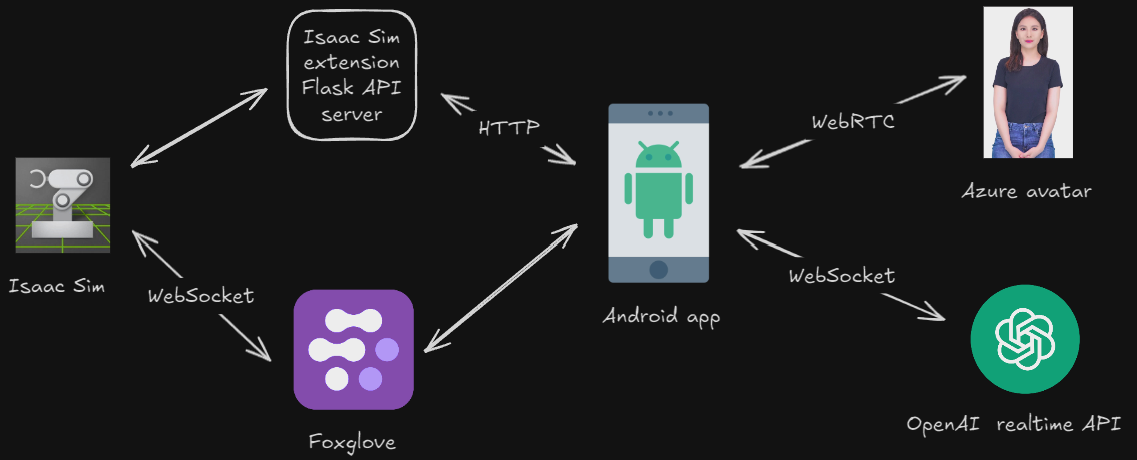
- Isaac Sim extension Flask API Server:
- Manages simulation state, including bin tracking and robot commands.
- Android App:
- Developed in Kotlin with Jetpack Compose.
- Connected to OpenAI real-time API and Azure avatar for natural language processing. The Azure avatar is used to act as an AI assistant. When talking to the Android app, the generated response text is forwarded to the Azure avatar to generate speech and human-like gestures in body, head, and lip sync.
- Integrated a split-view browser to display real-time simulation data with Foxglove.
GitHub Copilot Usage
For Robot:
- Merged Cortex walkthrough examples (e.g., Franka Block Stacking and UR10 Bin Stacking) to create the simulation’s core.
- Used Copilot to generate, debug, and clean up code.
- Created Flask server as part of a custom Isaac extension.
For Android:
- Converted Azure avatar Java example to Kotlin with Jetpack Compose.
- Generated code for WebSocket communication with OpenAI real-time API.
- Built UI components using autocomplete and commands.
Most commonly used Copilot features:
- Code Generation & Explanation: To simplify complex tasks, debug issues, and learn new frameworks.
- Code Cleanup & Documentation: Ensured high-quality, readable code across the project.
- Android Studio & VSCode:
- Copilot chat
- Code autocompletion
Ctrl ito query/modify code for selection
- VSCode chat commands:
@workspace- gets context from entire codebase when answering questions
#file- gets context from selected files when answering questions
#selection- gets context from selections when answering questions
@askstackoverflow- a Github Copilot extension that users knowledge from StackOverflow when answering questions
- VSCode "Edit with Copilot"
- Preview feature that modifies code for you. Used this primarily for learning about Isaac Sim OpenUSD tutorials, and Isaac Sim sample extensions, modifying Cortex examples, and modifying my own code.
- Copilot command line:
- Used occasionally when to explain errors that occur in the command line
gh copilot explain "..."
Challenges I ran into
- Learning New Tools: Mastering NVIDIA Isaac Sim, OpenUSD, Cortex, and RMPFlow without detailed video tutorials was challenging.
- Azure Avatar Audio Issues: The output audio sometimes got cut off or mixed with new audio due to buffer conflicts, which remains unresolved.
- OpenAI Real-Time API: Writing explicit instructions for the AI was necessary to ensure accurate task execution. Without clear directives, the AI occasionally misinterpreted commands, like conflating "start" and "resume."
- Integration Across Platforms: Ensuring seamless communication between the Isaac simulation, the Isaac extension Flask API server, the Android app, Foxglove, OpenAI, and the Azure avatar required meticulous testing and debugging.
- Streaming simulation data to Android: Originally, I wanted to stream the entire Isaac Sim interface over to the Android app via the WebRTC client. I would embed the generated link in a WebView. The problem was that the link didn't conform to the size of the screen and the webpage UI elements were inaccessible since if was cut off the screen. I tried fixing this by embedding the link in an HTML page that got rendered on the WebView in the Android app, but that didn't fix it. I then tried doing the same thing, but using Foxglove instead. However, the WebView wouldn't allow me to sign into Foxglove, unlike a normal browser like Chrome. So I ended up opening the Foxglove page in a Chrome tab in split view as a final solution.
Accomplishments that I'm proud of
- Using GitHub Copilot to significantly enhance productivity and solve complex coding problems.
- Successfully implementing dynamic pick-and-place with obstacle avoidance using NVIDIA Isaac Sim and Cortex Framework.
- Building an Android app that integrates natural language control and real-time data visualization.
- Learning and applying several new frameworks and tools, despite the steep learning curve.
What I learned
- GitHub Copilot: Learned to effectively use various Copilot features for development, debugging, and documentation.
- Technical Skills: Gained expertise in NVIDIA Isaac Sim, Cortex, RMPFlow, Foxglove, OpenAI real-time API, and Azure avatar integration.
- Problem-Solving: Overcame challenges in integrating multiple APIs, including ensuring seamless communication between OpenAI real-time API, Azure avatar, and the Flask server. Tackled complex issues in robotic simulation setup, such as implementing dynamic pick-and-place tasks, configuring motion planning with RMPFlow, and debugging interactions between Cortex decision-making and physical simulation. Adapted to gaps in available documentation by cross-referencing examples, troubleshooting errors, and iterating solutions to achieve a fully functional system.
What's next for AI robot and app
- Fixing Azure Avatar Audio Issues: Resolve audio buffer conflicts for a smoother interaction experience.
- Improve pick and place: Currently if a robot drops a cube that is out of reach, it still keeps that cube as the target cube, but returns back to the home position until the target cube is within reach. This idea needs to be revisited to determine what the best strategy is. Need better manipulation graspings. Right now it is hardcoded to grab an object in a particular transform, but it should dynamically do this in the future.
- Add depth camera: In the future, I'll need to add a simulated depth camera that reads in the virtual world. Right now, it knows the exact position and shape of all prims in the scene since it is a simulation, but this won't be the case in the real world.
- Physical Robot Deployment: Transition the simulation setup to real-world hardware for practical applications.
There's more!
Be sure to check out the README in the GitHub repo for more technical details and instructions on how to run the application.

Log in or sign up for Devpost to join the conversation.