-
-
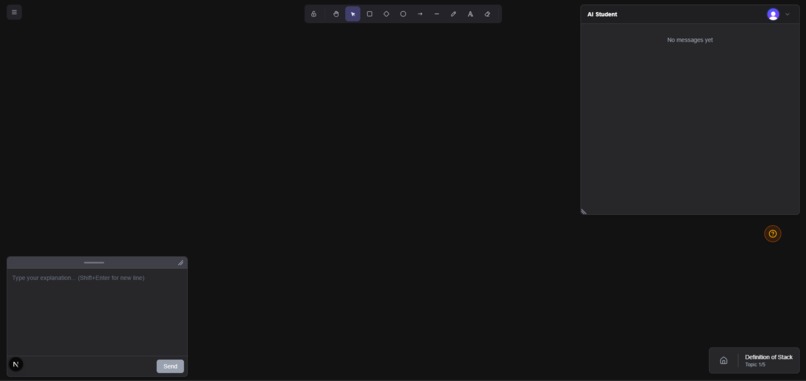
Teaching screen
-
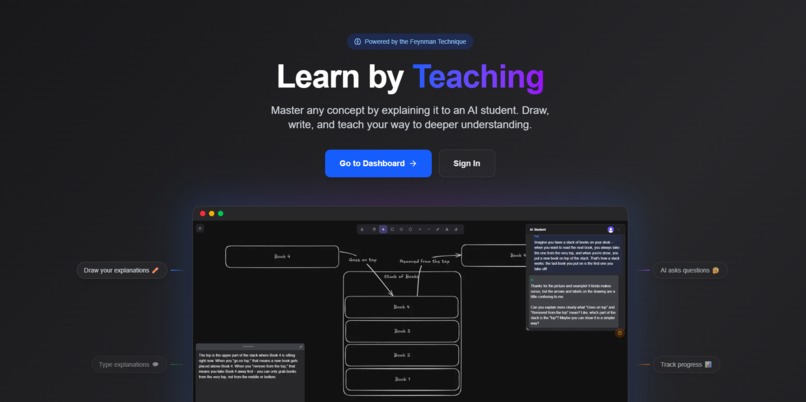
Landing page


Inspiration
I'm currently learning data structures and algorithms, and honestly, the textbook is boring. I needed a better way to actually understand and retain the material instead of just reading through it passively.
I've always found that explaining something to someone else is the best way to learn it. There's the Feynman Technique—the idea that if you can't explain something simply, you don't really understand it. And there's the rubber duck debugging concept in programming, where you explain your code to a rubber duck to find bugs.
I wanted to combine these ideas into an app. Instead of bothering friends with explanations about binary trees at 2am, I could teach an AI student. It's a bit like Frankenstein—instead of AI teaching you, you bring knowledge to life by teaching the AI. The AI asks questions, challenges your explanations, and fact-checks you against your source material.
What it does
AI Protégé implements the Feynman Technique through interactive dialogue with an AI "student" that acts like a curious 12-year-old.
Provide source material - Drop in a URL or PDF of whatever you're trying to learn
Extract concepts - The app identifies 5 key concepts you need to understand
Teach each concept - Use a canvas to draw diagrams and text to write explanations
Get challenged - The AI asks questions about clarity AND uses RAG to fact-check your accuracy against the source
See the summary - At the end, the AI summarizes what it learned. If the summary is wrong, that means your explanation wasn't good enough.
The AI combines three inputs when evaluating your teaching: your canvas drawing (vision), your text explanation, and relevant chunks from your source material (RAG). This triple-input approach ensures the AI can challenge both how clearly you explain things and whether you're actually correct.
How I built it
I built this solo over about a month using Kiro's spec-driven development approach.
Tech stack:
- Next.js 15 (App Router)
- Convex (real-time database + vector search for RAG)
- Excalidraw (canvas for drawing)
- OpenAI (GPT for dialogue, embeddings for RAG)
- Clerk (authentication)
- Vercel (deployment)
The Kiro workflow:
I created 5 specs throughout the project:
- ai-protege-learning-app - Initial prototype
- ai-protege-v2 - Full rewrite with multi-concept flow
- session-dashboard - User session management
- convex-agent-streaming - RAG integration
- excalidraw-redesign - Canvas migration
Each spec gave me structured requirements, design docs, and implementation tasks. The specs became a source of truth that kept the project organized as it grew.
Tips that made Kiro work better:
- Wireframes first - AI isn't great at UI design. I made wireframes and referenced them in specs so Kiro had a visual target.
- Include relevant docs - When using external libraries, I'd find the specific documentation pages needed and include them. Not the whole docs—just what was relevant.
- Manual testing instructions - Every task had manual testing steps. AI tends to write automated tests that pass its own code. Manual testing keeps you honest.
Challenges I ran into
Excalidraw migration - I originally used tldraw but migrated to Excalidraw for better UI (and because I love Excalidraw). The challenge was finding the correct TypeScript types. Excalidraw's documentation doesn't cover everything, so I had to dig through their GitHub repo to find the right interfaces. Some types weren't fully available, so parts of the code still use any types. It works, but the code needs cleanup.
Convex RAG streaming - Getting RAG retrieval and AI streaming to work together in Convex took hours of debugging. I initially gave Kiro the wrong documentation, which led to code that looked right but didn't work. I had to read through Convex blog posts to understand the correct patterns. Once I found the right docs and gave Kiro that context, it worked.
Scope creep - This started as a simple "teach an AI" prototype and grew into a full app with authentication, session management, PDF processing, and a dashboard. Kiro's specs helped me manage this—each new feature got its own spec instead of becoming a tangled mess.
Accomplishments that I'm proud of
This is honestly my biggest and most ambitious project yet. I'm proud that:
- It actually works end-to-end as a real product
- The RAG fact-checking genuinely catches inaccuracies in explanations
- The multi-input approach (canvas + text + RAG) creates meaningful AI responses
- I built it solo in a month while balancing freelance work and studies
- I learned several new technologies along the way
What I learned
- RAG implementation - First time building retrieval-augmented generation from scratch with vector embeddings and similarity search
- AI text streaming - Handling streaming responses and displaying them progressively
- Excalidraw API - Working with a complex canvas library and its event system
- Spec-driven development - Using structured documentation to guide AI-assisted coding. The specs became living documents that helped me stay organized as the project grew.
What's next for AI Protégé
I built this for my own use case, so I'll definitely keep using it. Future improvements:
- Bug fixes and code cleanup - There's technical debt to address
- Voice input/output - Speak your explanations instead of typing
- AI collaborator mode - Transform the AI student into a brainstorming partner or co-worker for different use cases
Built With
- clerk
- convex
- excalidraw
- nextjs
- openai
- vercel

Log in or sign up for Devpost to join the conversation.