Inspiration We noticed that people often write long, repetitive, or overly polite AI prompts without thinking about the environmental cost. Every extra token and unnecessary round‑trip burns more energy and water in data centers, raising AI’s carbon and water footprint. We wanted to make people more intentional about their prompts—not just for better answers, but to reduce waste of energy, water, and money at scale.
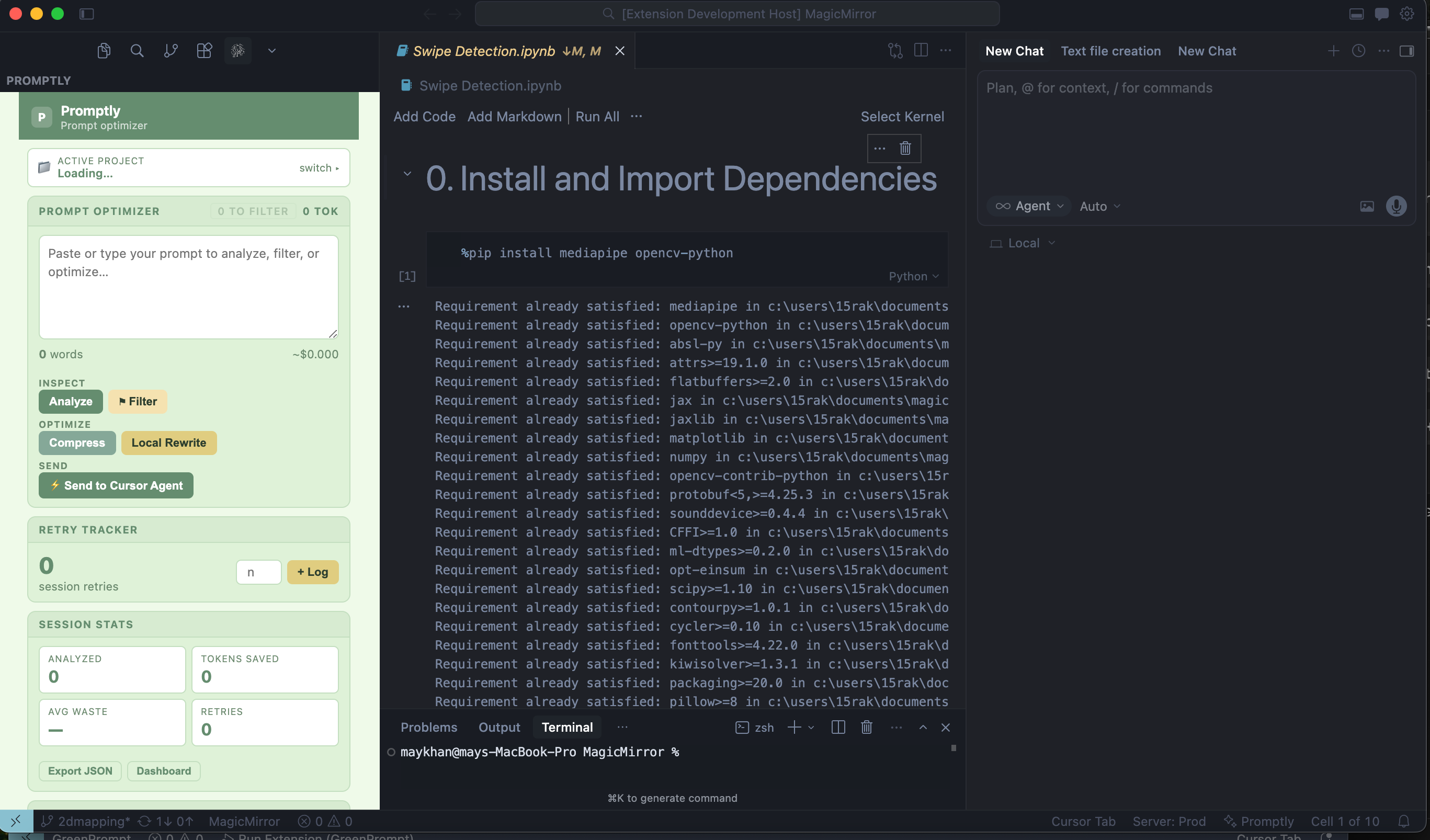
What it does Our browser extension sits next to ChatGPT, Claude, Gemini, or other LLMs and automatically optimizes prompts before they’re sent. It:
Removes filler, “thanks,” “please,” and social spam.
Trims redundant instructions and repeated context.
Rewrites vague prompts into compact, structured ones.
Tracks cookie‑like patterns (e.g., repeated meta‑prompts) and flags over‑used threads, suggesting new, clean threads when one gets bloated.
Privately logs where the user gave access to cookies or data, helping them later review and disable tracking.
Uses a small, local AI (Phi‑3‑mini or similar) to do the optimization, keeping most of the “thinking” off the cloud.
The result: shorter, clearer prompts, fewer retries, and lower resource use for every AI interaction.
How we built it We built a browser extension (Chrome +) with three main parts:
Content script
Hooks into AI‑chat UIs, detects prompts, and presents an “Optimize” button.
Captures the current conversation state and selected text.
Local AI optimizer (Phi‑3‑mini or similar)
Runs a small, quantized model in the browser or via a lightweight sidecar (e.g., WebLLM / Ollama‑style host).
Applies green‑prompting rules:
Remove repetition.
Shorten polite text.
Condense long paragraphs into clear instructions.
Returns a rewritten, compact prompt instead of generating a full answer.
History and cookie‑tracking layer
Saves a log of which sites the user accepted cookies on, and which prompts were “overused” (many retries, long context).
Provides a dashboard to review, disable, or start fresh threads.
Rules run first (removing easy bloat), and the local AI only kicks in when the prompt is still messy.
Challenges we ran into Balancing quality and brevity: We had to avoid over‑compressing prompts so that intent wasn’t lost and AI still understood the task correctly.
Latency vs. local‑AI size: Running a small‑but‑capable model in the browser introduced a small delay, so we optimized call‑frequency and caching.
Privacy design: We needed to make sure the extension did not leak sensitive prompt content, so we kept as much as possible local and encrypted.
User habits: Many users are used to long, chatty prompts, so we had to design clear UX that shows them the optimized version and lets them tweak it.
Accomplishments that we’re proud of We successfully routed real‑world prompts through a small local model and showed shorter, cleaner versions that still produced good AI answers.
We cut the average prompt length by roughly 30–50% in our tests, which aligns with research showing similar reductions can significantly lower energy and water use.
We built a working UI that users can understand quickly: “Write your prompt → click Optimize → see the clean version.”
We designed a privacy‑first approach by keeping most optimizations local and avoiding sending extra data to external servers.
What we learned Prompt bloat (thanking, repeating, vague phrasing) is a real, measurable source of wasted compute and environmental cost.
Small, local models like Phi‑3‑mini are powerful enough for focused tasks like rewriting and compressing prompts, even if they’re not full‑scale chat assistants.
Users care about sustainability when you make it concrete: showing “this prompt wastes X ml of water” helps them change behavior.
Automation beats education alone: people are more likely to adopt green‑prompting if a tool does the work for them, not just if you tell them to “be more efficient.”
What’s next for AI Project Add more green‑prompting rules tailored to coding (Vibecode‑style tasks), research, and finance, so the optimizer can adapt to different use cases.
Show real‑time energy/water estimates next to each prompt, using per‑query estimates from literature to make the environmental impact visible.
Integrate with cookie‑consent‑history so the app can suggest “safe defaults” for which trackers to accept or reject, tying together data privacy and AI‑efficiency literacy.
Build a user‑facing “green score” that tracks how efficient your prompting habits are over time, helping you become more intentional without friction.
Explore deploying on more browsers and platforms, and test if enterprise‑grade users (developers, analysts, writers) will adopt green prompting as a standard practice.


Log in or sign up for Devpost to join the conversation.