-
-
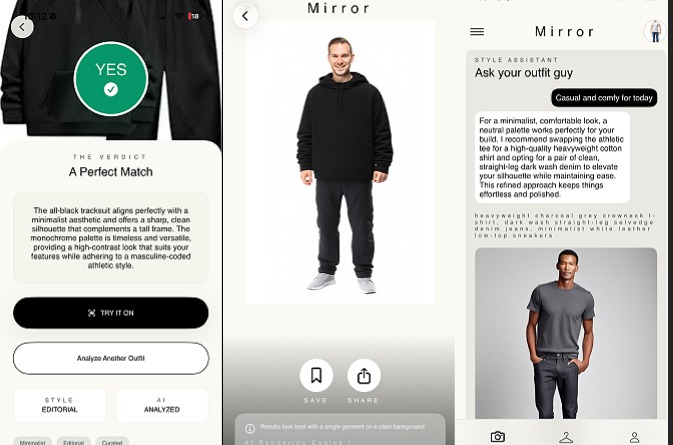
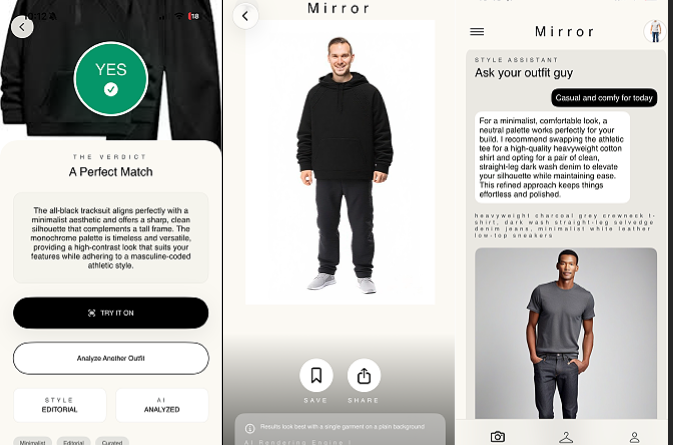
Upload an outfit. Get a verdict. Try it on. Or just ask your stylist. Mirror does it all.
Inspiration
I was scrolling Pinterest one day and kept saving outfits to my camera roll. I would keep thinking to myself, "this looks great, but would it actually look good on me?" I had no way of testing them out unless I went and bought them.
This is a problem that thousands of people who shop online face. There are hundreds of millions of Pinterest and Instagram outfit screenshots sitting in people's camera rolls right now with exactly that unanswered question attached to them.
I wanted to build something that answered the question instantly — not a generic "yes" or "no," but a personalized answer with the ability to try outfits on without having to leave your house.
What it does
Mirror is a native iOS app that acts as your personal AI stylist in two ways:
Outfit Verdict Upload a photo of yourself and a screenshot of any outfit. Mirror uses Gemini 3.1 Flash-Lite to analyze your photo (skin tone, body proportions) against the outfit's color palette and silhouette. In seconds you get a clear Yes or No with a 2–3 sentence explanation of why.
Style Chat If you don't have a specific outfit in mind, you can ask the AI stylist. Type "something casual and comfy for the weekend" and Mirror generates a personalized outfit recommendation, creates a preview image of the complete look, and lets you try it on — all in one flow.
Virtual Try-On Both flows end at the same place: tap "Try It On" and Perfect Corp's Clothes Try-On API renders you wearing the outfit. See how it looks on your body before buying anything. Save or share the result directly from the app.
Everything is personalized through a Style Profile set during a 30-second onboarding — style vibe, what matters most to you, gender, and body type. This profile is injected into every Gemini prompt so verdicts and suggestions are specific to you, not generic fashion advice.
How we built it
Mirror is a native iOS app built entirely in Swift + SwiftUI with no backend infrastructure. Every API call hits the services directly from the app via URLSession with async/await concurrency.
AI Verdict Engine Both photos are base64-encoded and sent to Gemini 3.1 Flash-Lite as a multimodal request. The system instruction constrains Gemini to analyze exactly two factors — color harmony and silhouette compatibility — and return a strict JSON response:
{
  "verdict": true,
  "reasoning": "The warm earth tones complement your skin's undertone..."
}
The StyleProfile context is prepended to the system instruction, so Gemini knows the user's aesthetic, priority, and body type before it even looks at the photos.
Style Chat Pipeline The chat runs a two-phase async pipeline:
Phase 1: User message + profile photo → Gemini 3.1 Flash-Lite
         → OutfitSuggestion { reply, outfitDescription, imagenPrompt, garmentCategory }

Phase 2: imagenPrompt → Image generation API
         → Lookbook-style outfit preview image
The garmentCategory field (upper_body, full_body, etc.) is determined by Gemini and passed directly to Perfect Corp for the try-on call — no manual routing needed.
Perfect Corp Integration The Clothes Try-On API is called in both flows. The user photo and outfit photo are preprocessed (resized to max 1024px, JPEG at 0.85 quality) before being sent as multipart form data. The rendered image comes back and is displayed full-screen.
UI
Built on a custom design system — Playfair Display serif headlines, Hanken Grotesk body text, and a warm editorial color palette (#fbf9f3 cream, pure black accents). The design was created in Google Stitch and translated 1:1 into SwiftUI components with a full DesignSystem.swift constants file.
Challenges we ran into
Getting Perfect Corp's API to behave The Clothes Try-On API is sensitive to image format, dimensions, and photo angle in ways the documentation doesn't fully surface. Getting consistent renders required trial and error on the preprocessing pipeline — the 1024px max dimension + 0.85 JPEG quality combination was the sweet spot. Full model shots from Pinterest produce composite-style results rather than seamless try-ons, which is a fundamental limitation of the API that we surfaced in the UI rather than pretending it wasn't there.
Constraining Gemini to structured output
Getting Gemini to return clean JSON with no markdown fences, no preamble, and no explanation outside the object required careful system instruction design. Early iterations would occasionally wrap the JSON in json blocks or add a sentence before it. The solution was both a tight system instruction and a JSON-cleaning step in the service layer that strips fences before decoding.
The two-phase chat pipeline
Coordinating Gemini → image generation → optional try-on while keeping the UI responsive and informative required careful async state management. I track loading phases (styling → generatingPreview) separately so the UI communicates exactly what's happening at each step, rather than showing a single spinner for the whole thing.
Keyboard and scroll coordination
StylistChatView lives inside a ScrollView in HomeView. Getting the keyboard dismissal, scroll behavior, and focus state to cooperate — especially when the user taps outside the text field — required threading a @FocusState binding from the root view down into the chat component and adding tap gesture handlers at every content layer.
Accomplishments that we're proud of
- Built a fully functional, production-quality iOS app in under a week — from a blank Xcode project to a complete feature set
- Two distinct AI-powered flows that both lead to a Perfect Corp virtual try-on — the upload-and-analyze path and the conversational chat path
- Zero backend infrastructure — the entire app is self-contained on-device, which means no server costs, no auth to manage, and user data never leaves their phone
What we learned
Prompt constraints matter more than prompt length. My most effective Gemini prompts are short and restrictive, not long and descriptive. Telling the model what not to do (don't consider occasion, don't add text outside the JSON) produced more consistent results than writing elaborate positive instructions.
UI polish is what separates a demo from a product. The core functionality was working by day 4. The next two days of UI work — the verdict badge animation, the polaroid thumbnail, the cycling loading text, the editorial typography — are what make the app feel worth using. Engineering time is not the bottleneck on perception of quality.
What's next for Mirror
App Store launch — freemium model: 3 free analyses per day, unlimited for $4.99/month. The core loop is already tight enough for a real product.
Outfit linking — detect the source URL when a user shares an outfit image from Pinterest or Instagram, identify the specific items, and generate affiliate purchase links. This adds a revenue stream on top of the subscription and makes the verdict actionable.
Wardrobe Mode — photograph clothes you already own. The AI builds outfits from what's actually in your closet rather than things you'd need to buy.
Social layer — share your verdict and try-on result with friends for a second opinion before buying. The Save and Share functionality is already built; the social graph is the next step.
Android — port once the iOS version is validated on the App Store.


Log in or sign up for Devpost to join the conversation.