-
-
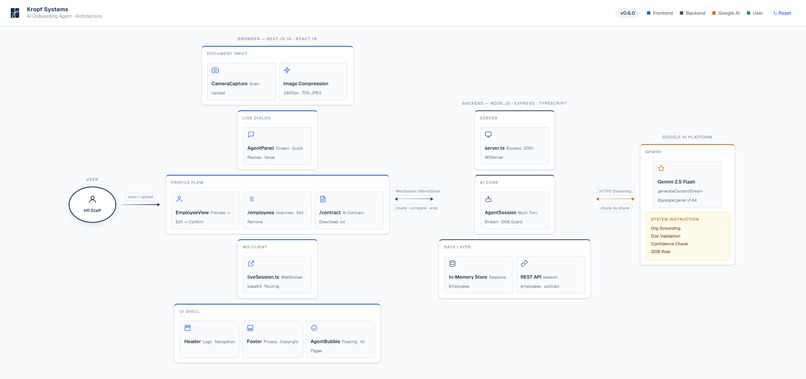
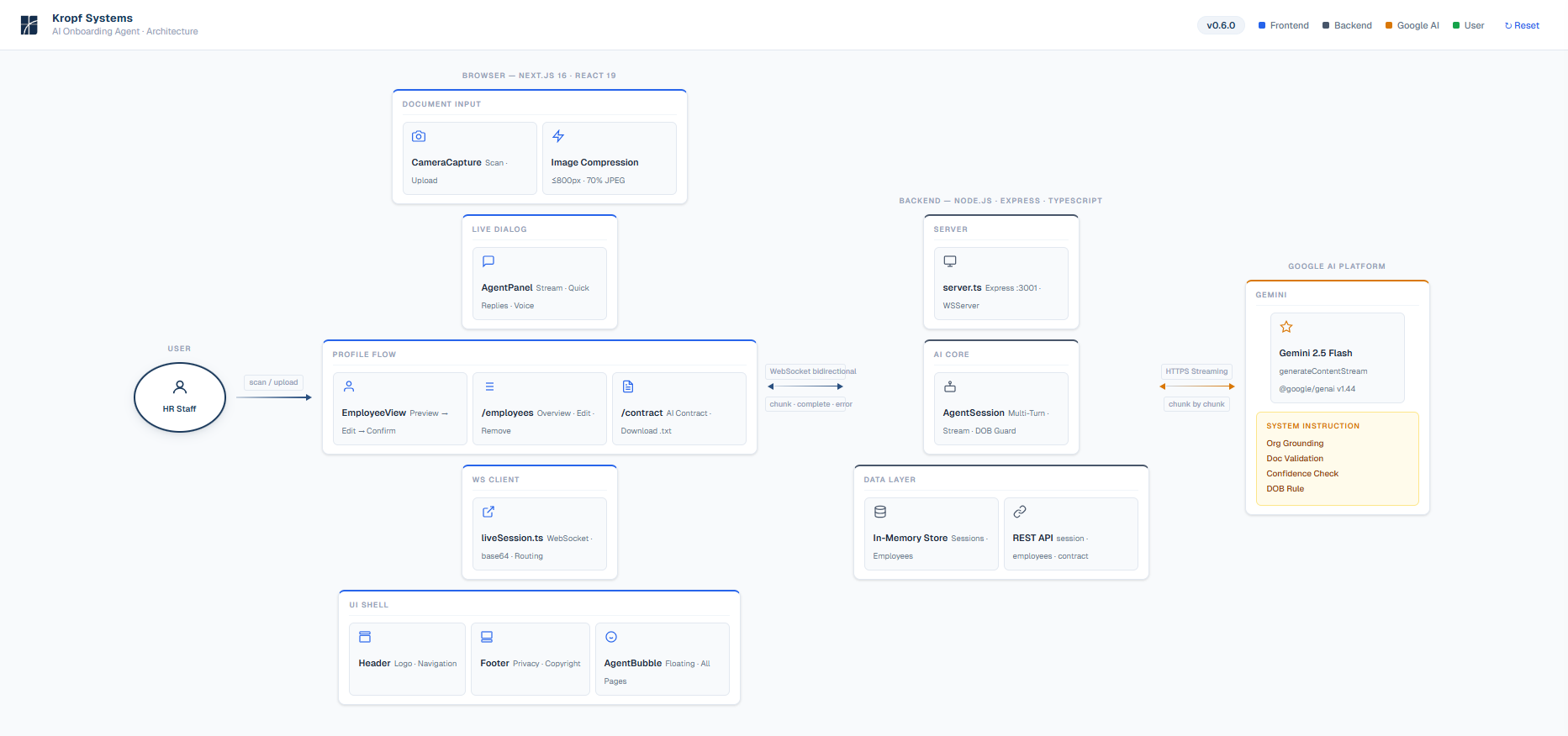
System architecture — Frontend, Backend, Gemini 2.5 Flash, Google Cloud Run
Inspiration
Switching to a new system is rarely blocked by the software itself.
The real barrier is onboarding.
Small businesses and organizations often work with paper forms, handwritten notes, identity documents, and folders full of unstructured information. Before they can use a new system, all of this must be manually entered and structured.
This process is slow, error-prone, and often the biggest reason why software adoption fails.
We asked: what if the system adapted to the real world — not the other way around?
What It Does
The AI Onboarding Agent converts real-world documents directly into structured system data through a natural, live conversation.
Instead of filling out forms, users simply take a photo of a document.
The agent:
- Analyzes the document using Gemini's multimodal vision capabilities
- Extracts relevant information and streams results in real time
- Asks short follow-up questions for any missing fields
- Shows a preview — the user confirms, edits inline, or discards
- Saves a clean, structured employee profile
- Offers to generate an employment contract immediately after onboarding
Once onboarding is complete, the agent stays available on every page. Users can ask questions ("How many employees are in the Therapy team?"), navigate the app by voice ("Show me all employees"), or trigger follow-up actions like generating an employment contract — all through natural conversation, no forms, no menus.
Example: A user photographs an employee ID card. The agent detects the person's name and date of birth — and starts asking: role, team, start date. A complete employee profile is created in seconds. No forms. No manual entry.
How We Built It
AI — Gemini 2.5 Flash (Google GenAI SDK)
The agent is powered by Gemini 2.5 Flash using the Google GenAI SDK (@google/genai).
The model receives document images and multi-turn conversation history on every call. It extracts structured data from visual documents, conducts real-time dialogue, and returns a final structured JSON when all fields are collected.
The agent's behavior is defined through a system instruction that governs:
- Document validation and field extraction
- How to ask follow-up questions (one at a time, concisely)
- Organization grounding (only valid roles and teams)
- How to handle uncertainty (confidence threshold 0.7 — ask, don't guess)
- DOB rule: never accept "UNKNOWN" — always get a confirmed date of birth
Streaming via WebSocket
Responses are streamed token-by-token from the backend to the frontend via WebSocket. The experience is live and immediate — no waiting for a full response. Users can interrupt mid-stream with voice or text input.
Frontend — Next.js
The web application handles document scanning via the native device file picker, renders the agent panel with streaming output, quick-reply buttons (Yes/No, roles, teams), and voice input via the Web Speech API.
After the agent completes the dialogue, the frontend shows a profile preview — the user confirms, edits inline, or discards before anything is saved.
The employee list supports CSV import and export — useful for bulk onboarding or migrating existing data into the system.
Backend — Node.js + Express + WebSocket
The backend runs the AgentSession class — which manages the conversation history and calls Gemini on each turn. The REST API handles session tracking and employee persistence.
A second WebSocket endpoint (/ws/chat) handles the persistent idle agent — it queries the in-memory employee store and returns navigation signals to the frontend.
Voice Input
The agent panel includes a microphone button (Web Speech API). Users can speak their answers instead of typing. Live speech recognition with a pulsing red indicator while active.
Cloud — Google Cloud Run
Both the frontend and the backend are deployed as Cloud Run containers. The demo uses an in-memory store for employee data (intentional for the hackathon demo — Firestore is the planned next step for production).
Challenges We Ran Into
The original plan was to use the Gemini Live API (bidirectional WebSocket). Due to account-level access restrictions, we pivoted to a WebSocket-based backend architecture with generateContentStream. This turned out to be a cleaner separation of concerns — the frontend handles UI, the backend handles all AI logic.
Getting streaming responses to feel truly live was the hardest UX problem: partial messages, JSON detection within streamed text, and interruption handling required careful implementation.
The DOB issue was real: without explicit instruction reinforcement and a backend guard, the model sometimes produced "UNKNOWN" as the birth date. Solving this required both prompt engineering and a server-side fallback.
Accomplishments We're Proud Of
- A fully working vision → dialogue → structured profile pipeline in one seamless flow
- Real-time streaming: responses appear token-by-token, never a loading spinner
- Voice input: users can speak their answers naturally
- Profile preview before saving: the agent proposes, the user decides
- The agent feels like a person asking questions — not like a form
- Confident DOB extraction with graceful handling of ambiguous or missing data
- A persistent agent that stays active across the entire app — navigating, answering, and acting on voice commands
- Employment contract generation immediately after onboarding — the agent proactively offers it
- Proactive agent panel: opening an existing employee record automatically triggers the agent to offer contract generation — no user action required
- CSV import/export for bulk onboarding and data migration
What We Learned
Designing for streaming AI output is fundamentally different from request/response. The UX must adapt to uncertainty — partial messages, model "thinking out loud", and outputs that need post-processing (like JSON extraction from conversational text). Getting this to feel natural took iteration.
Prompt engineering for production-like behavior requires rules for every edge case — not just the happy path.
What's Next
This demo uses a minimal employee data model (name, date of birth, role, team, start date) — intentionally scoped for clarity. A production version would extend this with additional fields (address, employee number, gender, emergency contacts) and a full document layer: uploaded contracts, diplomas, profile photos, and the original onboarding documents (stored for transparency and audit purposes) — all managed within the same agent-driven flow.
The same approach — real-world document → live AI dialogue → structured data — also applies beyond employee onboarding:
- Customer onboarding
- Calendar digitization
- Organizational structure setup
- Document ingestion at scale
- System migration assistance
Built With
- Gemini 2.5 Flash (
gemini-2.5-flash) - Google GenAI SDK (
@google/genai) - Google Cloud Run
- Next.js / React 19 / Tailwind CSS 4
- Node.js / Express / TypeScript
- WebSocket (
ws) - Web Speech API (Voice Input)
Privacy Note
The demo uses synthetic sample documents. In real deployments, identity documents and personal data must be handled in accordance with applicable data protection regulations (GDPR, etc.).
Try It
- Live Demo: https://glac-frontend-842528390248.us-central1.run.app
- Repository: https://github.com/LeeWu-Agents/ai-onboarding-agent
- Demo Video: https://www.youtube.com/watch?v=XJjfxDNQwdg
Built With
- express.js
- gemini-2.5-flash
- google-cloud-run
- google-genai-sdk
- next.js
- node.js
- react
- tailwind-css
- typescript
- web-speech-api
- websocket

Log in or sign up for Devpost to join the conversation.