Inspiration
Analyzing Medical information's, data, Images etc. has not been easy. Its time consuming and creates monotony in the work task for Medical Teams. Google Gemini AI & Open AI(ChatGPT) to the rescue via introduction of AI Medical Portal
What it does
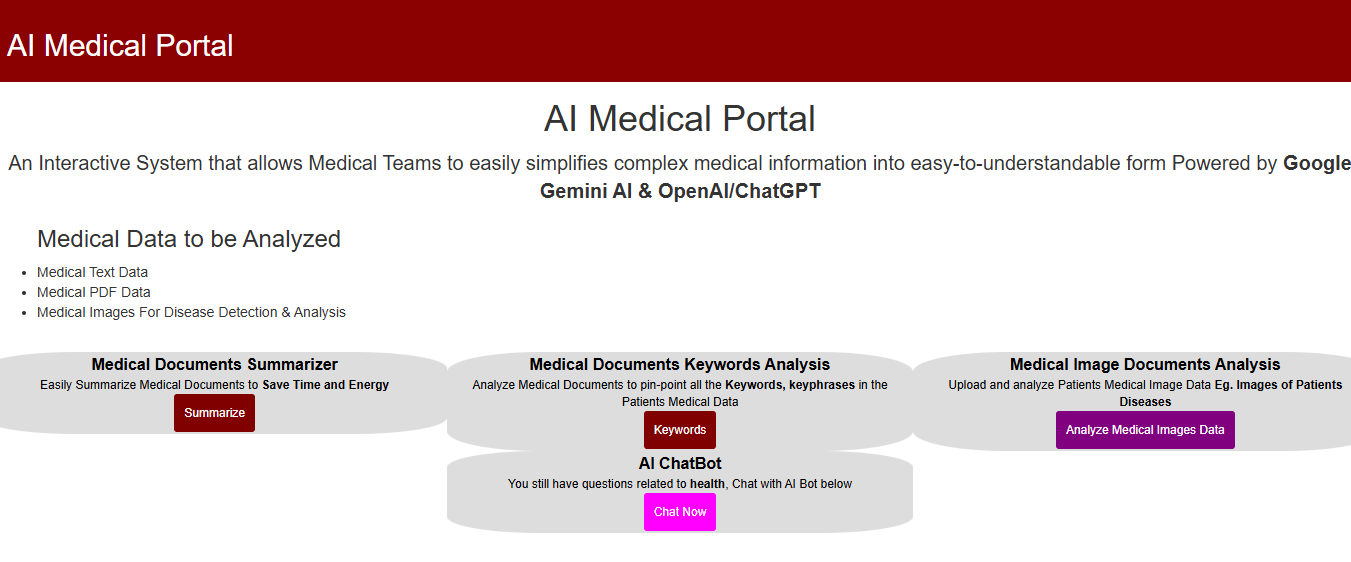
An Interactive System that allows Medical Teams to easily simplifies complex medical information into easy-to-understandable form Powered by Google Gemini AI & OpenAI/ChatGPT
Medical Data to be Analyzed:
1.) Medical Text Data
2.) Medical PDF Data
3.) Medical Images For Disease Detection & Analysis
The App Comprises of 4 Major Components:
1.) Medical Documents Summarizer:
This components allows Medical Teams to easily Summarize Medical Documents to Save Time and Energy.
2.) Medical Documents Keywords Analysis:
This components allows Medical Teams to analyze Medical Documents to pin-point all the Keywords, keyphrases, entities etc. in the Patients Medical Data
3.) Medical Image Documents Analysis:
This components allows Medical Teams to easily Upload and analyze Patients Medical Image Data Eg. Images of Patients Diseases
4.) AI ChatBot:
This components allows Medical Teams to ask questions and get real-time medical response related to health with Chatbot AI.
AI Workability:
You can choose to set either Google Gemini AI only or with OpenAI only. You can also enable both if you want to.
Lets assume you want to work with Open AI only, Then set Gemini API Key to 0 in the settings.php file and vice versa.
How we built it
Building and Testing the Application Locally:
This application was written in PHP, Ajax, JQUERY, Bootstraps, Css, Mysql etc.
1.)You will need to Download and install Xampp Server. After installation, ensure that Apache has been started and Running from Control Panel.
2.) Download and Unzip the main application folder from github eg. medical.zip to xampp htdocs directories e.g C:\xampp\htdocs. After unzipping the directory will look like C:\xampp\htdocs\medical
3.) Edit Settings.php file at /backend/settings.php to update your ChatGPT/OpenAI API Keys, Google Gemini API Key where appropriates.
NB: In production, This settings.php file should be kept outside the internet reach. ie outside the web root (public_html) and should be called dynamically by the authorized php script
4.) Download PDF Parser Library at https://github.com/smalot/pdfparser . This is used to extract text from the pdf documents. Then unzip it directly into the main application backend folder. eg medical/backend/ and rename the folder to pdfparser so that the folder structure will be like medical/backend/pdfparser.
The zipped folder name must be name pdfparser.
Ensure that you have composer installed. then in windows open command prompt and cd into application pdfparser directory Eg.
cd /medical/backend/pdfparser press enter button and next run the command below
composer require smalot/pdfparser
This command above will install the pdfparser.
Please Note: I have already done this Step 4. above (PdfParser Install) for you. No need to install it again.
5.) Callup the application on the browser Eg http://localhost/medical/index.php
Technology Used
1.) Open Sourced Html Text Editor Markdown: https://github.com/markedjs/marked
2.) ChatGPT/OpenAI: https://platform.openai.com
To obtain Chatgpt API Keys . Goto this link below and signup https://beta.openai.com/account/api-keys
After that go to this link and get and generate ChatGPT api key and click on View API Keys https://platform.openai.com/account/api-keys
3.) Google Gemini AI : To get started with Google Gemini AI and to get the API Key, visit https://aistudio.google.com/prompts/new_chat. Click on Get API Key at top right. Note that Google may require you to enable billing before you can used the API Key
4.) Open Source PDF Parser: PDF parser library (https://github.com/smalot/pdfparser) to extract text from the pdf Medical documents.
What's next for AI Medical Portal
Statistical Analysis coming soon


Log in or sign up for Devpost to join the conversation.