-
-
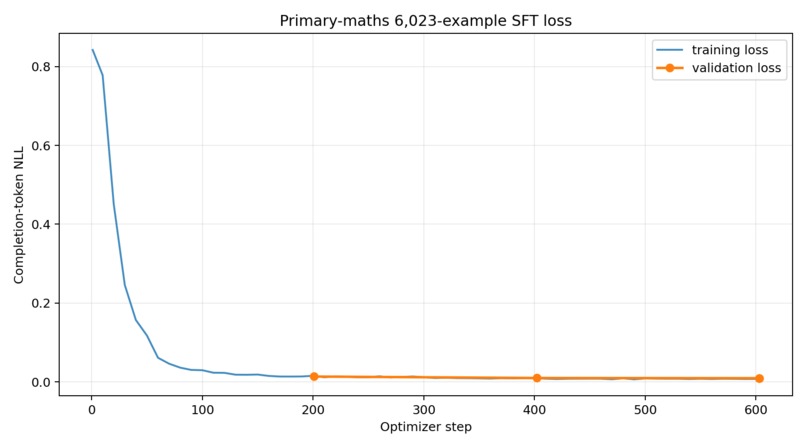
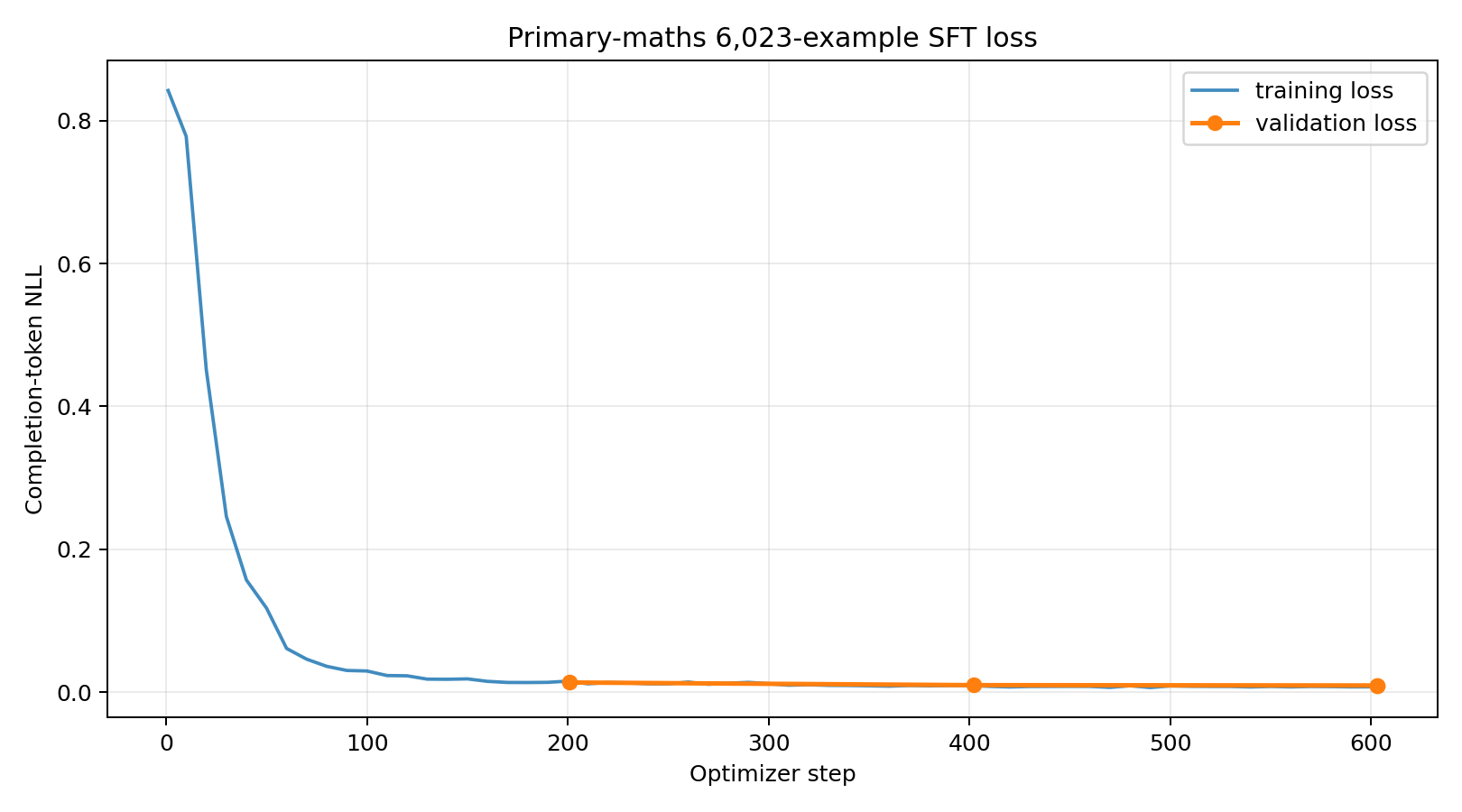
Training Graph
Inspiration
The idea for AI Maths Animator came from something I had seen personally.
I have spent time in underserved communities, including IDP camps, and one thing that stood out to me was how difficult it can be for teachers to give students the kind of learning experience they deserve.
The teachers are often doing their best. The problem is that they do not always have the tools.
Internet access can be poor or completely unavailable. Schools may have very limited digital resources, and paying for subscriptions to frontier AI models is simply not realistic for many of them.
At the same time, students in better-connected schools are starting to learn with interactive tools, videos and AI-powered platforms. That means the schools that could benefit the most from this technology are often the least able to access it.
That was what made me start thinking:
What if a teacher could create a good visual maths lesson without needing reliable internet, an expensive AI subscription, or animation skills?
That question became AI Maths Animator.
The goal is to take some of the capabilities we are seeing from modern generative AI and make them useful in places where internet access and computing resources are limited.
A teacher should be able to sit with a low-cost computer, type in the maths concept they want to explain, and create something visual that can help their students understand it.
For me, educational technology should not become useless the moment the internet goes down
What it does
AI Maths Animator takes a maths idea or question from a teacher and turns it into a visual animated lesson.
A teacher can describe what they want to teach in normal language, and the model can understand the maths, break the explanation into a teaching storyboard, and generate executable Manim code for the animation.
The core experience can also run locally, which means the teacher does not have to depend on an internet connection every time they want to create a lesson.
A simple example is fractions.
Instead of only writing:
1/2 ÷ 1/4 = 2
on the board, a teacher can generate an animation that divides a whole into fractions and actually shows the learner why two quarters fit inside one half.
That visual explanation matters, especially for younger learners. Maths can become very abstract when students only see symbols and equations. Sometimes seeing objects split, move, group or transform makes the idea click much faster.
How we built it
We started with Qwen2.5-Coder-3B-Instruct because we needed a relatively small code-focused model that we could specialize and eventually run on affordable hardware.
We trained it mainly to do two things well:
Turn maths teaching instructions into executable Manim animation code. Turn maths concepts into structured educational storyboards that can later become animations.
One thing we realised early was that simply training on question-and-answer examples would not be enough.
So instead, we built a multi-task supervised fine-tuning dataset with 6,023 examples covering fractions, place value, multiplication and division from Primary 2 to Primary 6.
The dataset includes:
Topic-to-Manim-code generation Topic-to-storyboard generation Storyboard-to-Manim-code conversion Broken-code repair Runtime-error repair Instruction-following and layout corrections Repairing mathematically incorrect visualizations Replacing hallucinated or unsupported Manim APIs
A big part of the work was actually building and cleaning this dataset.
We checked the examples for valid JSON structure, Python syntax, proper Manim scene structure, external-asset dependencies and common Manim API errors.
We also render-tested thousands of the reference animations while building the dataset because valid Python alone does not tell us whether an animation actually works.
For training, we used Unsloth, four-bit QLoRA, and rank-32 rsLoRA adapters on a Tesla T4 through Google Colab.
We used completion-only loss, sequence packing, a 95/5 training-validation split and trained for three epochs.
The full training run completed 603 optimizer steps in roughly four hours.
Validation loss moved from 0.013588 after the first epoch to 0.009423 after the third epoch.
After training, we merged the adapter back into the base model and converted the result into the more compact Q4_K_M GGUF format so that it would be more practical to run locally.
The final model is about 1.797 GiB and has been published on Hugging Face:
https://huggingface.co/Chimanwakis/qwen_manim_animation_q4_k_m_v5
Challenges we ran into
One of the biggest things we discovered is that generating Manim code is not the same as generating normal Python code.
A program can be perfectly valid Python and still produce a terrible animation.
Objects can overlap. Text can go outside the frame. The animation can show the wrong number of objects. Labels can cover important parts of a diagram. Timing can feel awkward. Even worse, the code can render successfully while the visual explanation is mathematically misleading.
That made evaluation much harder than simply asking, “Does the code run?”
Manim itself also has a fairly large and precise API.
Earlier versions of the model would sometimes invent methods, use unsupported arguments, reference variables that did not exist or generate LaTeX that would break during rendering.
Instead of only adding more clean examples, we started deliberately creating repair examples around these failures.
We showed the model broken code and taught it how to fix it.
Another difficult part was instruction following.
A single teacher prompt might ask for a particular grade level, an exact number of objects, specific colours, a particular visual method, a recap, a time limit and a required output format.
The model has to keep track of all of those requirements while still producing code that actually runs.
Hardware was another constraint.
Some of the training examples contain fairly long pieces of code, but we were working with a Tesla T4 in Colab rather than a large training cluster.
We had to make careful use of four-bit loading, gradient checkpointing, sequence packing and gradient accumulation so we could maintain an effective batch size of 16 without running out of memory.
We also learned not to get carried away by good-looking training numbers.
Our validation loss became very low, but the dataset is synthetic and highly structured. A low loss tells us the model learned the training distribution well. It does not automatically mean every animation will render correctly, teach the maths correctly or generalise to something it has never seen before.
That still has to be tested separately.
Accomplishments that we're proud of
One thing I am particularly proud of is that we went beyond prompt engineering.
We did not just take an existing model, write a long system prompt and call it an AI maths animator.
We built the dataset, the training pipeline, the validation process and the model itself around this specific problem.
So far, we have:
Built a 6,023-example multi-task dataset specifically for primary-school mathematics animation Covered five grade levels Trained across fractions, place value, multiplication and division Combined animation generation, storyboarding, code repair and instruction-following in the same training pipeline Render-validated 2,295 foundation Manim programs Achieved a 24/24 render pass on a stratified sample of the final targeted repair dataset Completed three full training epochs on an accessible Tesla T4 Colab GPU Reduced validation loss at every epoch checkpoint Preserved the training configuration, environment, history and reproducibility hashes Produced a standalone 1.797 GiB Q4_K_M GGUF model Published the model so that other people can download and test it
But the part that matters most to me is what the system now represents.
A teacher can start with a simple idea in natural language and move from that idea to a teaching storyboard and then to an actual animated mathematical explanation.
That is the path we set out to build.
What we learned
The biggest lesson from this project is that educational code generation is not really just a coding problem.
For an animation to be useful in a classroom, several things have to work at the same time.
The code has to run.
The maths has to be correct.
The visuals have to match the maths.
The language has to make sense for the learner's age.
Objects have to appear at the right time and in the right place.
And the animation still needs to feel like a lesson rather than a collection of moving shapes.
We also found that repair examples are extremely useful.
Clean examples show the model what a good answer looks like, but broken examples teach it what can go wrong.
By including examples with incorrect object counts, undefined variables, unsupported Manim methods, bad layouts and other realistic failures, we could explicitly teach the model how to recover from mistakes that it is likely to make during real generation.
Completion-only training also worked well for this project because we wanted the model to focus its learning on the desired storyboard or animation code rather than spending training loss learning to reproduce the user's prompt.
Another important lesson was that fairly capable specialized models can be trained without having access to enormous compute.
With QLoRA, sequence packing, gradient accumulation and careful memory management, we were able to train a three-billion-parameter coding model on a standard Colab Tesla T4.
Finally, we learned to separate training metrics from real-world performance.
A good validation curve tells us the optimization is working.
It does not tell us whether a six-year-old will understand the resulting animation.
For that, we still need syntax checks, safe rendering, mathematical evaluation and, most importantly, feedback from actual teachers and learners.
What's next for AI Maths Animator
The next stage is to move beyond supervised fine-tuning and begin optimizing the model based on the quality of the animations it actually produces.
We are working toward this using Group Relative Policy Optimization (GRPO).
The idea is that, for one teaching prompt, the model can generate several possible Manim animations instead of only one.
We then use a purpose-built verifier to render and evaluate those candidates.
The verifier will look at things such as whether the code:
Uses valid Python and supported Manim APIs Renders successfully without timing out Represents the mathematics correctly Follows the teacher's instructions Keeps text and objects readable and inside the frame Shows the correct visual counts, groups, labels and equations Explains the concept in a sensible teaching sequence Follows the requested timing and pacing Avoids unsafe code and unnecessary external dependencies
Building this verifier properly is one of the most important parts of the next phase.
We do not want to reward a program simply because it executes successfully. A technically valid animation can still be a bad lesson.
The verifier therefore needs to judge several things together: code correctness, render behaviour, mathematical correctness, visual quality and instructional usefulness.
We plan to combine deterministic checks, information collected during rendering, curriculum-specific mathematical rules and structured evaluation from teachers.
We also want to expand well beyond the topics currently supported.
The current model focuses on fractions, place value, multiplication and division, but future datasets will include geometry, measurement, algebra, statistics, functions, limits, differentiation, integration and other secondary-school and university topics.
The long-term idea is to create a continuous improvement loop.
The model generates several animations. They are rendered and checked safely. The strongest ones become learning signals. The failures are studied and turned into new repair examples.
Over time, that should move AI Maths Animator from simply being a model that writes Manim code into something much closer to what we actually want:
a reliable offline tool that helps teachers turn maths into clear, accurate and engaging visual lessons, even in places where access to the internet and expensive AI tools cannot be taken for granted.
[Note]: During Testing, Judges can test the generated code in this website (https://animg.app/en/playground)

Log in or sign up for Devpost to join the conversation.