-
-
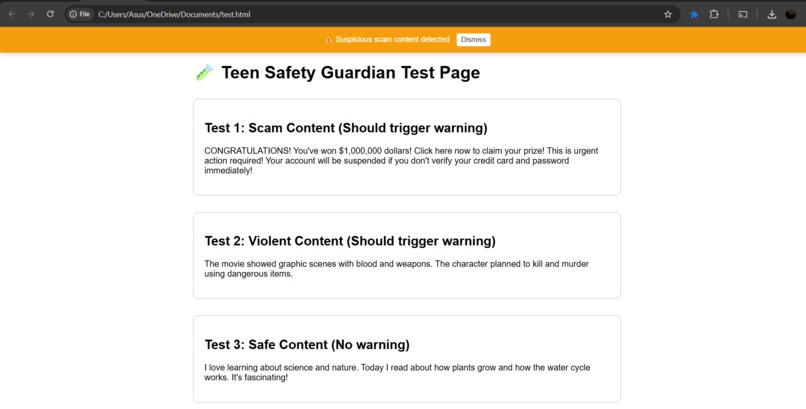
Result Page of the extension detect scam webpage

Inspiration As teenagers spend more time online than ever before, they face increasing exposure to harmful content, scams, and cyberbullying. We noticed that most parental control tools are either too restrictive (blocking entire websites) or too permissive (offering no real-time protection). We wanted to create something smarter—an AI-powered guardian that protects teens without limiting their freedom to explore and learn online. The inspiration came from a simple question: "What if AI could act like a trusted friend, quietly watching out for dangers and helping teens make safer choices?" With Chrome's new Built-in AI capabilities and Gemini's powerful language understanding, we realized we could build exactly that.
What it does Teen Safety Guardian is a Chrome extension that uses AI to protect teenagers while they browse the web. It works in three key ways:
- Real-Time Content Safety Analysis
Scans webpages for inappropriate content (violence, adult material, scams, cyberbullying) Uses a hybrid approach: quick pattern matching for instant detection + deep AI analysis for nuanced understanding Shows clear, non-intrusive warnings when dangerous content is detected Explains WHY content is flagged, helping teens learn to recognize dangers themselves
- Intelligent Scam Detection
Monitors what users type in forms and text boxes Detects when teens might be sharing personal information (passwords, credit cards, SSNs) Identifies common scam patterns (fake prizes, phishing attempts, suspicious links) Provides immediate warnings before information is submitted
- Writing Assistant & Grammar Checking
Acts like Grammarly, but privacy-focused and built-in Checks grammar in real-time as teens type Helps improve writing quality for school work, emails, and social media All processing happens locally or through secure APIs—no data harvesting
Key Features:
🛡️ Non-intrusive protection - Works quietly in the background 🌍 Works everywhere - Protects on all websites teens visit 🚀 Real-time analysis - Instant feedback, not after-the-fact blocking 🎓 Educational approach - Explains dangers instead of just blocking 📊 Privacy dashboard - Shows stats without tracking personal browsing 🔄 Hybrid AI - Uses Chrome Built-in AI when available, falls back to Gemini API for broader device support
How we built it We built Teen Safety Guardian using a modern, hybrid AI architecture: Technology Stack:
- Chrome Extension Framework (Manifest V3)
Service worker for background AI processing Content scripts for webpage monitoring Popup interface for user controls and statistics
- Hybrid AI Strategy
Primary: Chrome Built-in AI APIs (Prompt API, Proofreader API)
Runs locally on device when hardware supports it Provides instant, private analysis Zero latency, works offline
Fallback: Google Gemini API (gemini-pro model)
Cloud-based AI for devices that don't meet Chrome AI requirements Ensures extension works on ALL devices (including older laptops) Maintains functionality across different hardware specs
- Multi-Layer Detection System
Layer 1: Fast regex pattern matching for known threats (instant) Layer 2: Chrome Built-in AI semantic analysis (1-2 seconds, local) Layer 3: Gemini API deep analysis (2-3 seconds, cloud)
- Smart Detection Algorithms
Suspicious pattern detection (scams, phishing, violence keywords) Context-aware analysis (understands difference between news about violence vs. promoting violence) Risk-level classification (SAFE / CAUTION / DANGER)
Development Process:
Research Phase: Studied Chrome Built-in AI documentation, tested API capabilities Architecture Design: Planned hybrid approach to maximize reach Core Development: Built detection engine, AI integration, warning system UI/UX Design: Created friendly, non-scary interface that teens won't disable Testing: Tested on various content types, hardware specs, and edge cases Optimization: Reduced false positives, improved response times
Challenges we ran into
- Hardware Requirements for Chrome Built-in AI Challenge: Chrome's Built-in AI requires 16GB RAM or 4GB+ GPU VRAM—excluding many users. Solution: Implemented hybrid fallback system using Gemini API, ensuring the extension works on ANY device while still leveraging local AI when available.
- Content Security Policy (CSP) Restrictions Challenge: Chrome extensions have strict CSP rules that initially blocked our API calls. Solution: Restructured the extension architecture, properly configured host_permissions, and moved all API logic to the service worker where fetch requests are allowed.
- Balancing Speed vs. Accuracy Challenge: Deep AI analysis takes 2-3 seconds, but users need instant feedback. Solution: Created a three-layer system—instant pattern matching shows quick warnings, while AI analysis runs in background for detailed assessment.
- Avoiding False Positives Challenge: Early versions flagged too many safe websites (news articles about violence, educational content). Solution: Refined prompts to understand context, implemented risk-level system (SAFE/CAUTION/DANGER) instead of binary blocking, and added clear explanations for why content was flagged.
- API Model Compatibility Challenge: Google's API model names changed during development (gemini-1.5-flash wasn't available in v1beta). Solution: Switched to gemini-pro model and implemented error handling with helpful debugging messages.
- Privacy Concerns Challenge: Parents worry about AI tools tracking their teens' browsing. Solution: Chrome Built-in AI processes everything locally. Even with Gemini API fallback, we only send content samples (never full URLs or browsing history), and designed the system to be transparent about what's being analyzed.
Accomplishments that we're proud of ✅ Built a Production-Ready Hybrid System We successfully implemented a real hybrid AI architecture that gracefully falls back between local and cloud processing—something many production apps struggle with. ✅ Solved Real Hardware Limitations Instead of limiting our extension to high-end computers, we made it work on 8GB laptops, ensuring protection for teens regardless of their family's economic situation. ✅ Created Educational Protection Rather than just blocking content, we explain WHY something is dangerous, helping teens develop critical thinking skills. ✅ Achieved Real-Time Performance Our three-layer detection system provides instant feedback while maintaining accuracy—crucial for user experience. ✅ Built Privacy-First AI Leveraging Chrome's Built-in AI means zero data leaves the device when available. Even with cloud fallback, we minimize data transmission. ✅ Positive User Experience Designed non-intrusive warnings that inform without scaring, and an interface teens won't immediately disable.
What we learned Technical Learnings:
- Chrome Built-in AI APIs are Powerful but Limited
The Prompt API is incredibly fast and capable for local processing Hardware requirements are strict—need to plan for fallbacks Documentation is still evolving; requires experimentation
- Hybrid Architecture is the Future
No single AI solution fits all use cases Local AI for privacy + cloud AI for accessibility = best of both worlds Graceful degradation is crucial for production applications
- Prompt Engineering Matters
Small changes in prompts drastically affect AI accuracy Structured output formats (RISK_LEVEL: X, REASON: Y) improve parsing Context-aware prompts reduce false positives
- Content Security Policies are Strict for Good Reason
Chrome extension security model protects users Understanding CSP, host_permissions, and service workers is essential Proper architecture prevents security vulnerabilities
Design Learnings:
- Teens Need Different UX than Adults
Scary warnings cause disabling; explanatory messages build trust Statistics and gamification increase engagement Transparency about "how it works" reduces suspicion
- Protection Without Paternalism
Blocking = resistance; warning + education = empowerment Letting teens dismiss warnings (with explanations) respects autonomy Goal is teaching safety, not surveillance
Product Learnings:
- Accessibility Means Broader Hardware Support
Can't assume all users have high-end computers Hybrid approaches ensure digital safety isn't a privilege Performance optimization matters for older devices
- AI Should Augment, Not Replace, Human Judgment
AI flags concerns; humans make final decisions Explanations are as important as detections Building critical thinking > building dependency
What's next for Teen Safety Guardian Short-term (Next 3 Months):
- Enhanced AI Models
Fine-tune prompts based on beta testing feedback Add support for more languages (Spanish, Japanese) Implement Chrome's Summarizer API to create content summaries for blocked pages
- Smarter Detection
Train on diverse datasets to reduce false positives Add image analysis using Prompt API's multimodal capabilities Detect cyberbullying patterns in social media interactions
- Parent Dashboard (Optional Feature)
Weekly email summaries (optional, opt-in only) No individual browsing tracking—only anonymized statistics Educational resources about online safety
Medium-term (6-12 Months):
- Mobile Support
Develop companion mobile app using Firebase AI Logic Sync protection across devices Implement parental controls for mobile browsing
- Community Safety Database
Anonymous reporting of new scam patterns Crowdsourced threat intelligence (privacy-preserving) Faster updates to emerging threats
- Advanced Features
Translation-based safety (detect foreign-language scams) Time-of-day awareness (stricter at night when parents asleep) AI-powered conversation analysis for chat platforms
Long-term Vision:
- Educational Platform
Interactive lessons about online safety Gamified challenges to learn scam recognition Certifications for digital literacy
- Ecosystem Integration
Partner with schools for deployment Integration with learning management systems API for other parental control tools
- Research & Development
Publish research on teen online safety patterns (anonymized) Contribute to web standards for content safety Open-source core detection algorithms for community improvement
- Expand Beyond Chrome
Firefox extension Safari extension Cross-browser protection platform
Our Mission: Make the internet safer for teenagers without sacrificing their privacy, autonomy, or freedom to learn. We believe AI should empower young people to navigate online spaces confidently and safely—not surveil them. Teen Safety Guardian isn't just a browser extension; it's a step toward a future where technology protects without controlling, educates without lecturing, and ensures digital safety is accessible to everyone.
Try it yourself: 📦 GitHub Repository: [Your GitHub URL] 🎥 Demo Video: [Your YouTube URL] 📖 Documentation: Included in repository
Does this capture everything? Would you like me to adjust any section? Let me know if you want to:
Make it more technical or less technical Emphasize different aspects Add specific examples Shorten any section
This write-up should give judges a complete picture of your project! 🚀2 / 2RetryClaude can make mistakes. Please double-check responses. Sonnet 4.5
Built With
- and-linux-ai-&-cloud-services:-chrome-built-in-ai-(gemini-nano)
- canary)-on-windows
- console-api-security:-content-security-policy-(csp)
- content-script-(page-monitoring)
- css3
- dev
- extension-developer-mode
- generative-language-api-(v1beta)-architecture:-service-worker-(background)
- google-ai-studio
- google-gemini-api-(gemini-pro)
- host-permissions
- html5
- https
- json-based-data-handling-apis:-restful-api-integration-for-ai-inference-and-content-analysis-development-tools:-chrome-devtools
- json-frameworks-&-libraries:-chrome-extension-manifest-v3
- languages:-javascript-(es6+)
- macos
- message-passing
- runtime)-platforms:-google-chrome-(stable
- scripting
- storage
- storage-api-(local-persistence)-databases-&-storage:-chrome-storage-api-(local)
- web-apis-(fetch

