-
-
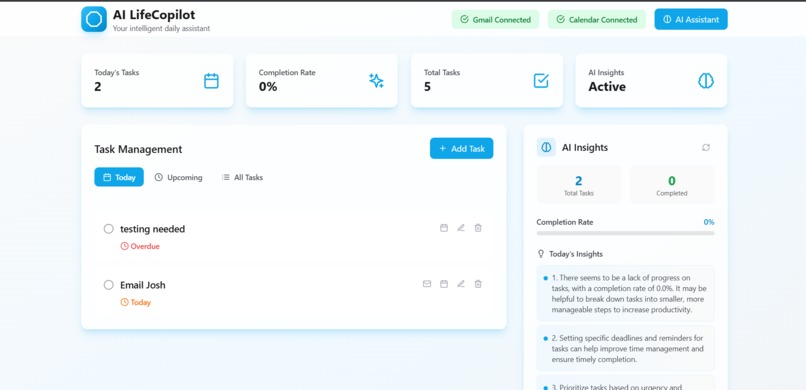
Dashboard
## Inspiration

We've all been there—juggling multiple apps just to manage our day. A to-do list here, Gmail there, Google Calendar somewhere else. I found myself constantly switching contexts: creating a task, then opening Gmail to email someone about it, then jumping to Calendar to schedule a meeting. **What if all of this could happen in one place, powered by AI?**

That's when I realized: task management isn't just about remembering what to do—it's about *acting* on those tasks efficiently. The modern knowledge worker needs a **unified command center** that understands natural language, connects to real tools, and eliminates context switching.

AI LifeCopilot was born from this frustration. I wanted to build something that didn't just track tasks, but *understood* them and helped me take action.

## What it does

AI LifeCopilot is an **intelligent personal productivity hub** that combines:

- 🤖 **AI Assistant with Natural Language Processing**: Create tasks by simply saying "Create a task to send proposal email tomorrow at 2pm"—no forms, no clicking
- 📧 **Gmail Integration**: Send emails directly from the app with Google OAuth authentication
- 📅 **Google Calendar Integration**: Turn any task into a calendar event with one click
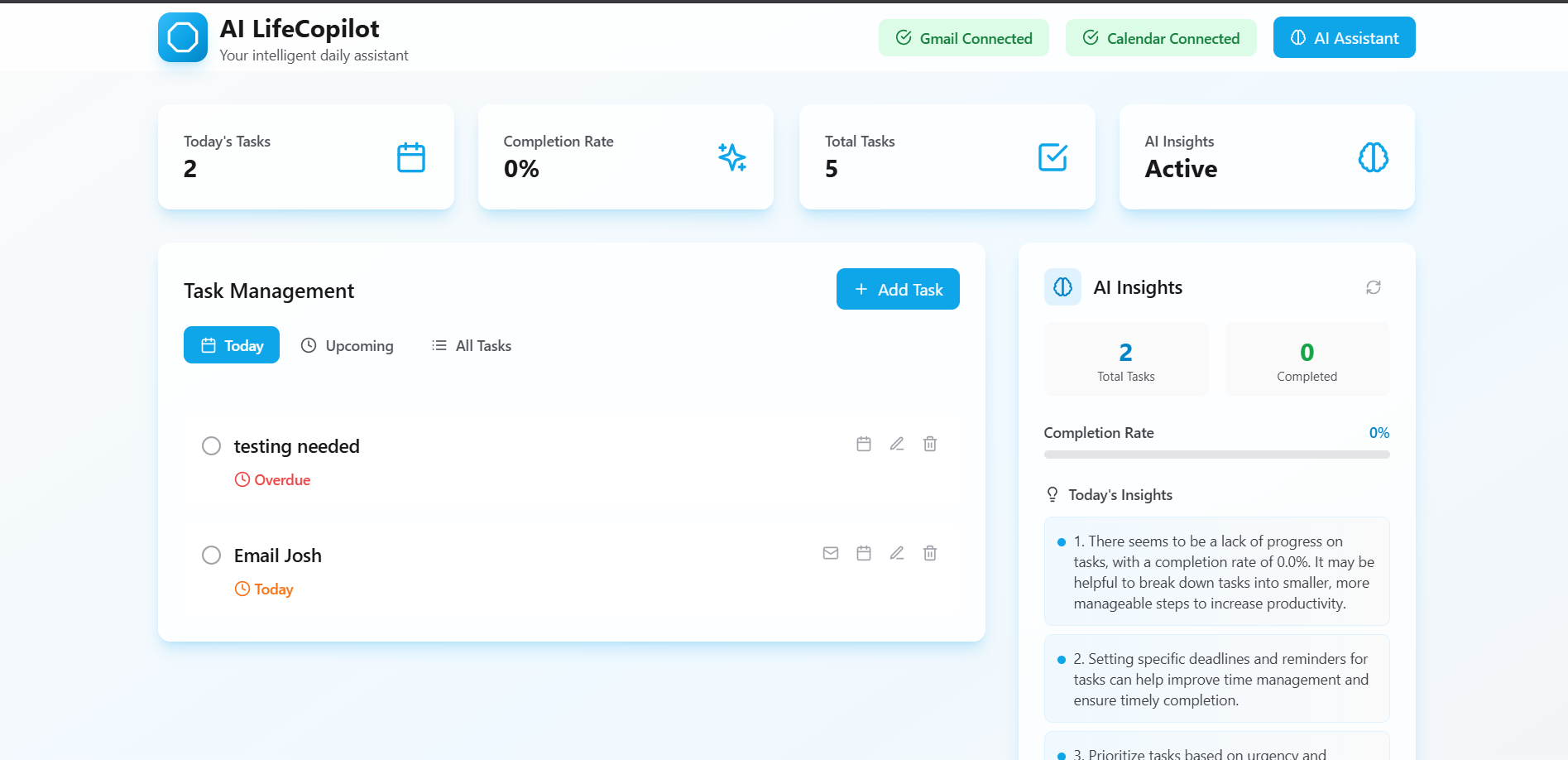
- 📊 **Smart Dashboard**: Real-time task statistics, intelligent filtering (Today/Upcoming), and completion tracking
- 🧠 **Daily AI Insights**: Personalized productivity analysis and recommendations
- ⚡ **Real-time Updates**: Everything syncs instantly—mark a task complete and watch your stats update automatically

Unlike traditional task managers that are just glorified checklists, AI LifeCopilot is a true **productivity copilot** that understands your intent and connects to the tools you already use.

## How we built it

### Architecture

**Backend (Flask + Python):**
- Modular service architecture with separate modules for AI, Gmail, Calendar, and database operations
- RESTful API design with proper error handling and logging
- **Supabase PostgreSQL** for persistent data storage with Row Level Security
- **OpenRouter API** integration for real AI language understanding (not fake/mocked responses)
- **Google OAuth 2.0** implementation for secure Gmail and Calendar access
- Environment-based configuration for secure API key management

**Frontend (React + Modern Tooling):**
- React 18 with functional components and hooks
- **Zustand** for lightweight, performant state management
- **Tailwind CSS** for responsive, glass-morphism UI design
- **Axios** for clean API communication with interceptors
- Real-time UI updates with optimistic rendering
- Toast notifications for user feedback on all actions

**Key Technical Decisions:**
1. **Modular Backend**: Separated concerns into services (`ai_service.py`, `gmail_service.py`, `calendar_service.py`) for maintainability
2. **Real AI Integration**: Used OpenRouter API to support AI models instead of hardcoded responses
3. **OAuth Security**: Implemented proper OAuth 2.0 flow with refresh tokens stored securely in database
4. **Responsive State Management**: Automatic data refresh after task creation/updates ensures UI is always in sync
5. **User-Centric Design**: Every async operation has loading states, success notifications, and friendly error messages

### Development Process

I started with the core task CRUD operations, then added the AI layer for natural language understanding. The biggest technical challenge was implementing the OAuth flows for Gmail and Calendar—ensuring tokens were stored securely and refreshed properly. I also spent significant time on UX polish: loading spinners, toast notifications, and automatic data refreshing to make the app feel professional and responsive.

## Challenges we ran into

### 1. **OAuth Token Management**
**Challenge**: Google OAuth tokens expire and need refresh tokens, but Google only provides refresh tokens on first authorization with `prompt=consent`.

**Solution**: Added `prompt='consent'` to the OAuth URL and implemented proper token validation in the backend. Also added in-memory fallback storage during development.

### 2. **Date/Timezone Handling**
**Challenge**: Tasks were not appearing in the "Today" section due to UTC vs. local timezone mismatches.

**Solution**: Implemented robust date comparison logic that handles both all-day events (UTC midnight) and timed events (local timezone), with extensive logging for debugging.

### 3. **Natural Language Task Creation**
**Challenge**: Extracting structured data (title, description, due date) from free-form user input like "Create a task to buy groceries today at 3pm".

**Solution**: Designed a detailed AI prompt that returns JSON with extracted fields, added keyword detection to trigger task creation, and implemented error handling for malformed AI responses.

### 4. **Real-time UI Updates**
**Challenge**: After AI creates a task or user marks one complete, the dashboard stats and task list were stale.

**Solution**: Implemented automatic data refresh after all task operations (create, update, delete) and when closing the AI chat panel. This ensures completion rates, task counts, and AI summaries always reflect current state.

### 5. **Modular Architecture**
**Challenge**: As features grew, the codebase became harder to navigate with everything in one file.

**Solution**: Refactored backend into separate services, routes, models, config, and utils directories. This improved code readability and made adding new features much easier.

## Accomplishments that we're proud of

✅ **Real AI Integration**: Not fake responses—actual OpenRouter API with support for GPT-4, Claude, and other models

✅ **Working OAuth Flows**: Fully functional Gmail and Calendar integration with secure token management

✅ **Natural Language Understanding**: Users can create tasks by just typing what they want in plain English

✅ **Professional UX**: Loading states, success toasts, error handling, and automatic refreshes make it feel polished

✅ **Clean Architecture**: Modular backend, separation of concerns, and scalable design patterns

✅ **End-to-End Workflow**: From thinking of a task → creating it → emailing about it → scheduling it—all in one app

✅ **Mobile Responsive**: Works beautifully on desktop and mobile devices

## What we learned

### Technical Learnings:
- **OAuth 2.0 complexity**: Understanding authorization codes, access tokens, refresh tokens, and scope management
- **AI prompt engineering**: Crafting prompts that consistently return structured, parseable data
- **State synchronization**: Ensuring frontend state matches backend data after async operations
- **Error handling patterns**: User-friendly error messages vs. developer-focused logging
- **Date/time edge cases**: Timezone handling is harder than it looks!

### Product Learnings:
- **UX matters immensely**: Loading spinners and success toasts make users feel in control
- **Integration is the future**: Users want tools that connect to their existing workflows (Gmail, Calendar)
- **Natural language is powerful**: Removing form friction with AI makes task creation delightful
- **Real-time feedback**: Immediate UI updates create a sense of responsiveness and quality

### Personal Growth:
This project pushed me to integrate multiple complex APIs (OpenRouter, Gmail, Calendar), manage OAuth security properly, and think deeply about user experience. I learned that **polished execution beats feature bloat**—every feature works reliably with good error handling, rather than having many half-working features.

## What's next for AI LifeCopilot

### Short-term (Next 2 Weeks):
- 🔐 **User Authentication**: Implement Supabase Auth so multiple users can have their own task lists
- 📱 **Push Notifications**: Remind users of upcoming tasks via browser notifications
- 🎨 **Theme Customization**: Light/dark mode toggle and custom color schemes
- 📎 **File Attachments**: Attach documents to tasks and emails

### Medium-term (Next 2 Months):
- 🗣️ **Voice Commands**: "Hey Copilot, what's on my schedule today?"
- 🤝 **Team Collaboration**: Shared task lists, assignment, and comments
- 📊 **Analytics Dashboard**: Weekly productivity reports, time tracking, completion trends
- 🔄 **More Integrations**: Slack notifications, Outlook Calendar, Trello sync

### Long-term Vision:
- 🧠 **Predictive AI**: "You usually have meetings on Mondays—should I block time for prep?"
- 📍 **Location-Aware Reminders**: "You're near the grocery store—here's your shopping list"
- 🎯 **Goal Tracking**: Connect tasks to larger goals and track progress over time
- 🌐 **Mobile Apps**: Native iOS and Android apps with offline support

**The ultimate vision**: A true AI copilot that doesn't just manage your tasks, but actively helps you accomplish them—scheduling meetings, drafting emails, prioritizing work, and keeping you on track. **Intelligence meets productivity.**
Built With
- 2.0
- api
- axios
- calendar
- css
- flask
- gmail
- javascript
- lucide
- node.js
- oauth
- openrouter
- postgresql
- python
- react
- supabase
- tailwind
- vite
- zustand


Log in or sign up for Devpost to join the conversation.