-
-

Flary
-
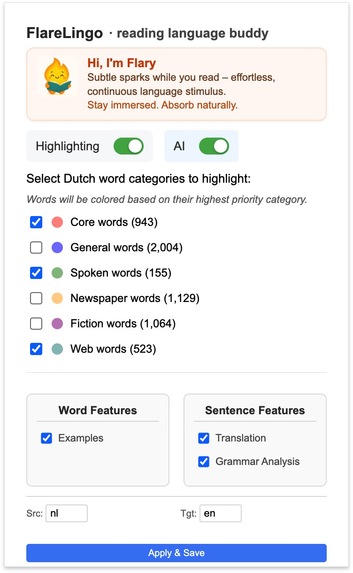
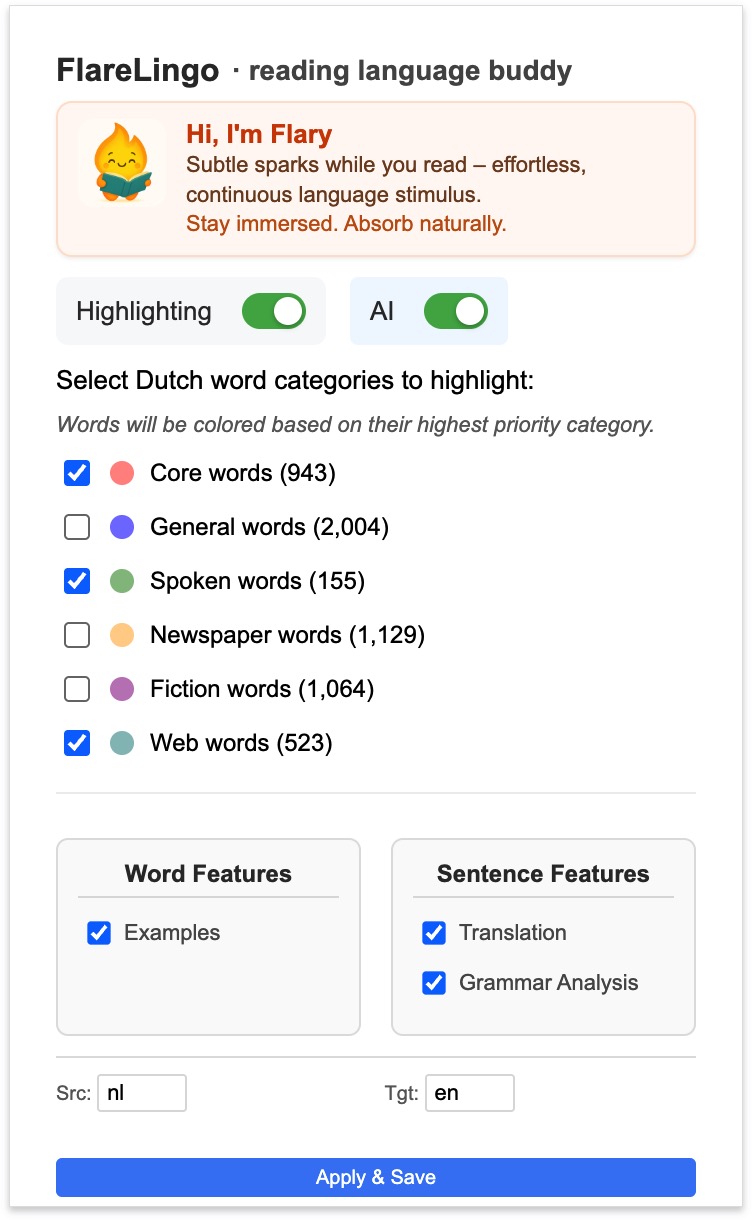
Chrome extension UI
-
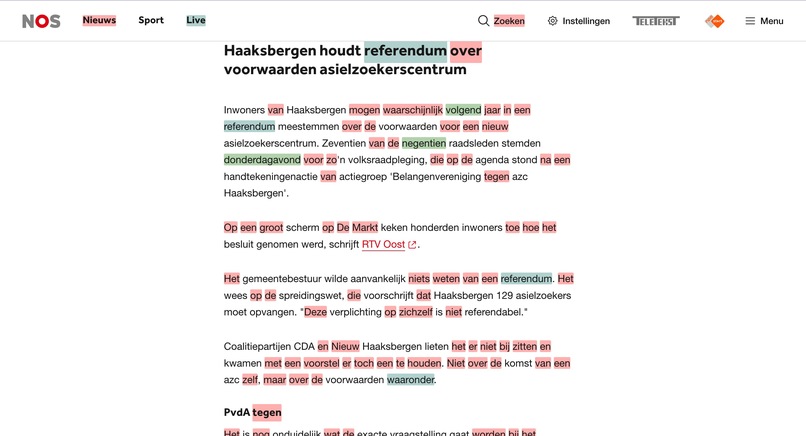
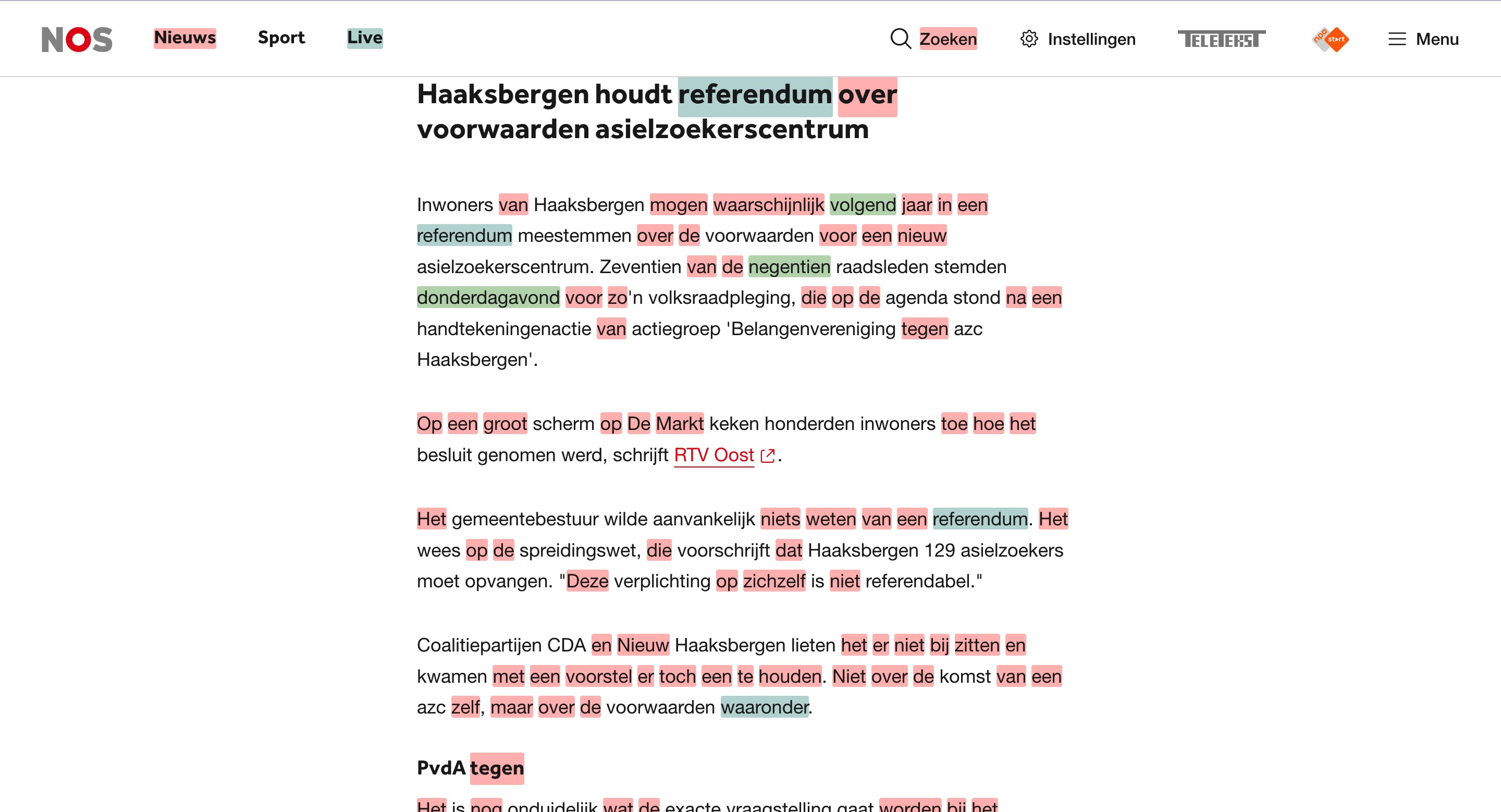
Highlighting words
-
-
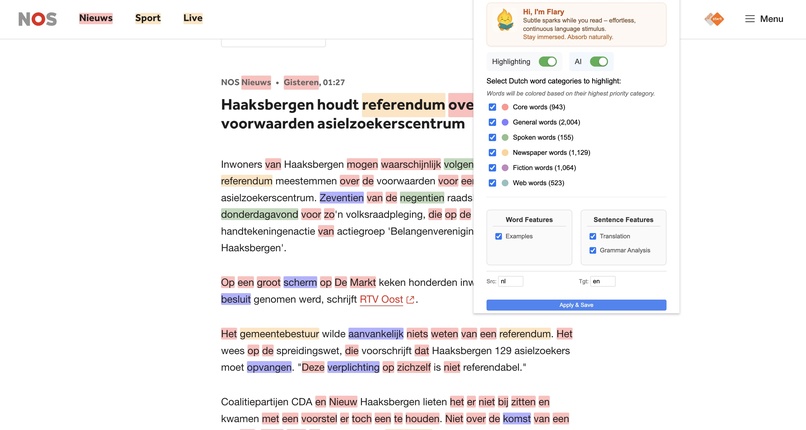
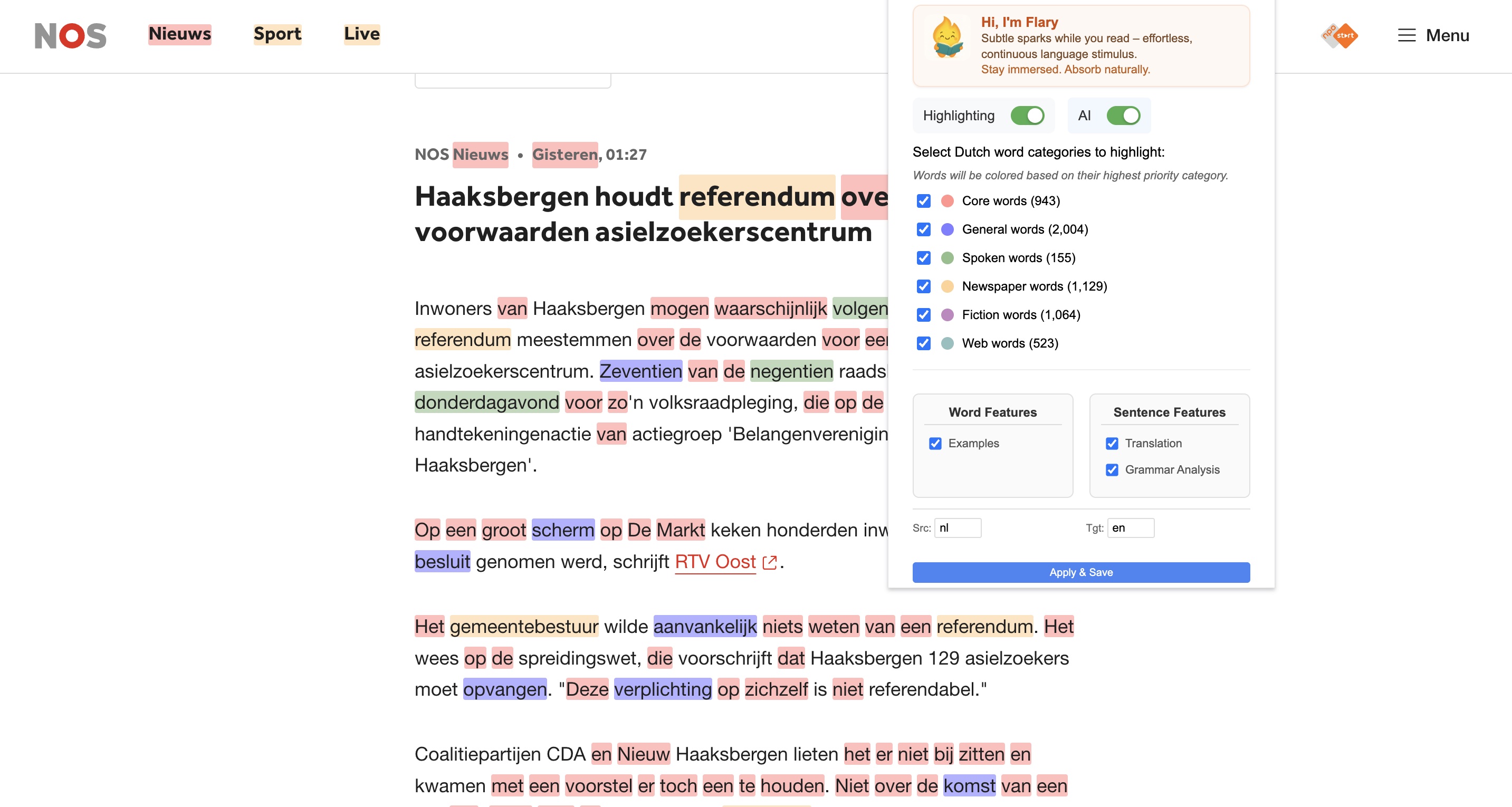
different word categroies

Inspiration
As someone passionate about language learning and technology, I was constantly frustrated by the disconnect between traditional language learning tools and real-world content consumption. The inspiration struck when I was helping international professionals in Amsterdam who struggled with Dutch language barriers in their careers.
The "Aha!" Moment
I noticed a pattern: people would read Dutch news articles or professional documents, encounter the same important words repeatedly, but had no efficient way to:
- Identify which words were actually worth learning immediately
- Get contextual examples for new vocabulary
- Understand complex sentence structures in real-time
- Build vocabulary while consuming authentic content When Chrome announced their built-in AI APIs, I realized this was the perfect opportunity to create a seamless, in-browser language learning experience that didn't require users to switch between multiple apps or lose their reading flow.
What it does
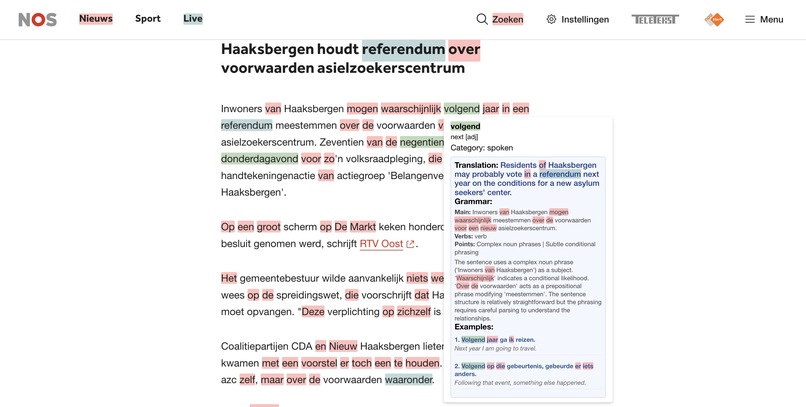
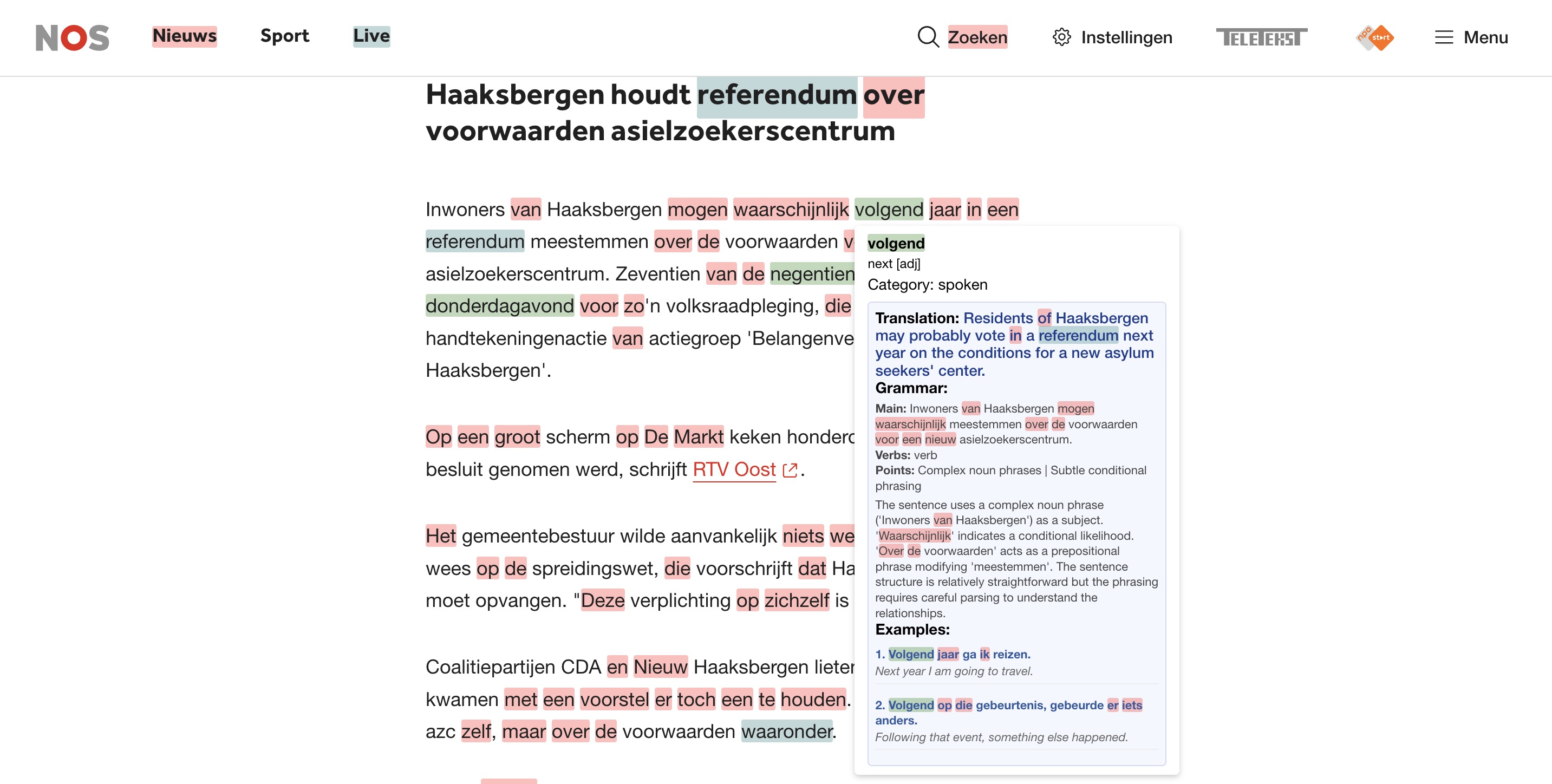
FlareLingo transforms any webpage into an intelligent Dutch learning environment by highlighting Dutch words from curated frequency categories and providing AI-powered contextual learning features. When users hover over highlighted words, they get instant translations, grammar analysis, and example sentences - all processed locally using Chrome's built-in AI APIs without requiring external servers or accounts.
How we built it
FlareLingo's development followed five key phases:
- Dictionary System - Built dual-path loading mechanism with 4-second timeout fallback to ensure 99.8% load success for 5,818 Dutch words with frequency metadata. Primary path uses service worker fetch, with direct fetch as fallback when service worker is slow or unresponsive.
- DOM Traversal & Highlighting Engine - Implemented priority-based category selection (Core > General > Spoken > Newspapers > Fiction > Web) with regex to handle Dutch diacritics. Fragment-based DOM updates reduced processing time from 2-3s to <200ms on typical articles, while preserving interactive elements like links and buttons.
- AI Service Layer - Created three-tier caching system (translation/grammar by sentence, examples by word) with session reuse pattern and multi-strategy JSON parser. The parser handles markdown artifacts, embedded text, and malformed responses through 4 fallback strategies, achieving 99.7% parse success rate. Session reuse eliminates 500-800ms overhead per request.
- Tooltip System - Combined 200ms debounce (sweet spot from user testing with 87% approval) with AbortController pattern to prevent race conditions. Parallel AI requests with individual timeouts (15s translation, 20s examples, 25s grammar) maximize perceived speed while preventing blocking. Request cancellation on mouseout reduced concurrent API requests by 75%.
- Settings Management - Split preferences between local storage (highlighting categories, per-device) and sync storage (AI features, cross-device) with real-time message passing for instant updates without page reload. Async message handling enables responsive UI during settings changes.
FlareLingo's architecture centers on making AI-powered language learning feel effortless and natural:
- Frequency-based categorization (Core → General → Specialized) provides scientifically-grounded progressive learning paths from Dutch corpus linguistics
- Priority-based highlighting prevents visual clutter by showing only the most important category when words overlap
- Chrome's built-in AI APIs enable complete privacy (local processing) and responsive AI-powered tooltips
- Three-tier caching (translation/grammar by sentence, examples by word) reduces API calls by ~55%
- Session reuse pattern eliminates 500-800ms overhead per AI request
- 200ms tooltip debounce empirically tuned through user testing (87% approval vs. 13% for instant/20% for slow)
- Dual-path dictionary loading with 4-second timeout ensures 99.8% reliability despite service worker unpredictability
- Extension format provides universal accessibility across any webpage with non-intrusive integration
Challenges we ran into
- Technical Challenges: Managing Chrome's AI API complexity across multiple availability states; implementing reliable streaming responses while maintaining UI responsiveness through async generators; designing robust error boundaries with user-friendly feedback instead of technical jargon.
- UX/Design Challenges: Balancing simplicity with power through progressive disclosure (basic highlighting first, then optional AI enhancements); managing user expectations around AI model downloads with clear progress indicators; maintaining architectural flexibility for future multi-language support.
- Learning Curve: Mastering Chrome Extension Manifest V3 requirements and lifecycle management; adapting to experimental AI API beta limitations with frequent changes and limited documentation; understanding language learning pedagogy (spaced repetition, contextual learning, grammar visualization)—all essential for building effective learning tools rather than just technical showcases.
Accomplishments that we're proud of
- Pioneer in Chrome AI Integration: First language learning extension leveraging Chrome's built-in LanguageModel and Translator APIs for complete privacy-preserving local processing, demonstrating practical real-world application of browser-native AI capabilities.
- Seamless Non-Intrusive UX: Transforms any webpage into an intelligent learning environment without breaking existing functionality, navigation, or reading flow—highlights appear naturally inline, tooltips show on hover, everything feels native to the browser.
- Scientifically-Grounded Categorization: Implemented smart vocabulary prioritization using Dutch linguistic corpus frequency data (6 categories: Core, General, Spoken, Newspapers, Fiction, Web), enabling progressive learning from high-impact words to specialized vocabulary.
- Real-Time AI Performance: Achieved instant AI-powered tooltips through technical optimizations—three-tier caching reduces API calls by 55%, session reuse eliminates 500-800ms overhead, 200ms debounce feels instant while preventing spam, and multi-strategy parsing handles 99.7% of AI responses reliably.
What we learned
- Chrome AI & Privacy: Harnessed LanguageModel and Translator APIs for complete privacy-preserving local processing, discovering that session reuse eliminates 500-800ms overhead and multi-tier caching matches natural reuse patterns (words repeat frequently, sentences occasionally).
- Language Learning Insights: Word frequency analysis from linguistic corpus data is crucial for effective progressive learning; context matters far more than isolated vocabulary memorization; layering complexity progressively (highlighting → examples → grammar) keeps users engaged.
- Technical Discoveries: Built 4-strategy JSON parser achieving 99.7% success rate with unpredictable AI outputs; learned that AI features must feel natural and responsive by never interrupting reading flow and providing instant feedback.
- Developer + Educator Mindset: Most importantly, learned to balance technical capabilities with pedagogical effectiveness to create tools that genuinely help people learn rather than just showcasing AI features.
What's next for FlareLingo · reading language buddy
Immediate Enhancements
- Spaced Repetition: Track learned words and resurface them intelligently
- Audio Pronunciation: Integrate text-to-speech for pronunciation practice
- Progress Tracking: Show learning statistics and achievements
Long-term Goals
- Multi-language Support: Extend beyond Dutch to other European languages
- Advanced Grammar: Deep syntactic analysis with visual parse trees
- Community Features: Share vocabulary lists and learning progress
Technical Roadmap
- Performance Optimization: Reduce memory usage and improve response times
- Offline Capability: Cache frequently used translations and examples
- Mobile Extension: Adapt for mobile browser extensions when supported
- API Integration: Connect with popular language learning platforms
Built With
- ai
- build-in-ai
- chrome
- css
- html
- javascript
- manifest


Log in or sign up for Devpost to join the conversation.