Perfect — you’re following the Devpost / Hackathon submission format 👏
Here’s a polished and detailed version of those sections tailored specifically for your project Languaboost – AI Language Learning Chrome Extension built for the Google Chrome Built-in AI Challenge 2025 👇
🧠 Inspiration
Learning a new language is rewarding — but traditional apps make it feel like a chore. We spend hours every day browsing the web, yet that time rarely helps us practice or learn something new. The inspiration for Languaboost came from a simple question:
“What if the browser itself could become your personal language tutor?”
We wanted to make language learning invisible yet powerful — something that blends into your daily routine rather than demanding extra effort. With Chrome’s new Built-in AI APIs and Gemini Nano, we saw a chance to turn the browser into a smart, offline, and privacy-first learning companion.
🌍 What It Does
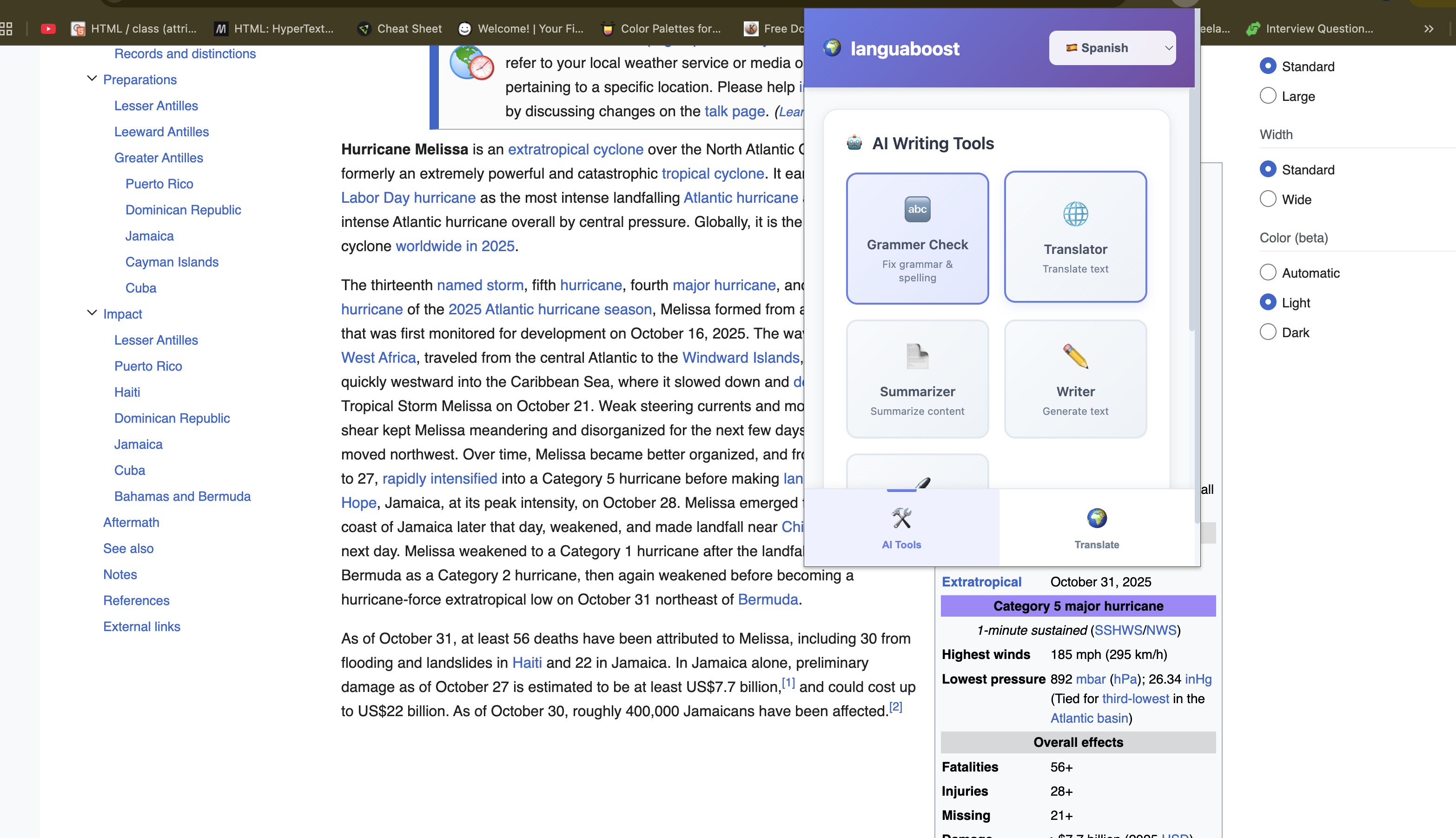
Languaboost is an AI-powered Chrome extension that helps users learn languages naturally while browsing the web — all with on-device AI and complete privacy.
✨ Key Features:
- 🔄 Instant Translation: Hover over text to see real-time translations using the Translator API.
- ✍️ Grammar Coach: Get instant grammar corrections and explanations powered by the Proofreader API.
- 📚 Vocabulary Builder: Save new words and generate example sentences using the Writer and Rewriter APIs.
- 📊 Progress Tracker: Visualize your learning progress, streaks, and achievements.
- 🔒 Privacy-First: Everything runs locally via Gemini Nano — no data leaves your device.
- 📴 Offline Ready: Works perfectly even without an internet connection.
In short, Languaboost turns every webpage into an immersive language-learning experience. 🌐💬
🛠️ How We Built It
We built Languaboost entirely with vanilla JavaScript, leveraging the latest Chrome Built-in AI APIs:
- Translator API → Instant in-page translations
- Proofreader API → Grammar correction & writing feedback
- Writer API → Auto-generates example sentences
- Rewriter API → Suggests alternative phrasings
- Summarizer API → Summarizes long text for reading practice
We used Chrome Canary (AI Early Preview Program) to access these APIs locally with Gemini Nano, which performs all AI inference directly on the user’s device.
The extension follows a simple structure:
content-script.jshandles webpage interactions and overlayspopup.jsmanages the user interface and grammar practice featuresservice-worker.jscoordinates background AI processing
No backend, no API keys — just pure on-device AI magic.
⚙️ Challenges We Ran Into
Every innovation comes with challenges, and this project was no exception:
- 🧩 Limited documentation on the new Chrome Built-in AI APIs meant a lot of experimentation.
- ⚡ Performance tuning for smooth hover translations and overlays required optimization.
- 🔒 Ensuring data privacy and storage isolation in Chrome’s local environment took careful design.
- 🌐 Handling multi-language support with different writing systems (like Chinese and Japanese) introduced rendering challenges.
But solving these challenges helped us understand the real potential of on-device AI — fast, private, and completely under the user’s control.
🏆 Accomplishments That We’re Proud Of
- 🚀 Successfully integrated five Chrome Built-in AI APIs into one cohesive, offline-ready extension.
- 💡 Built a tool that’s both educational and privacy-first — no external servers, no subscriptions.
- 🎯 Designed a simple and intuitive UI that blends with users’ browsing habits.
- 🌍 Created a real-world use case for Gemini Nano that demonstrates the future of edge AI learning.
- 🔓 Released it open-source so others can explore Chrome’s AI APIs and extend the idea further.
Seeing the first instant translation overlay pop up locally — with no network request — was an incredible moment!
📚 What We Learned
- 🧠 Learned how Chrome’s Built-in AI ecosystem works and how to use Gemini Nano for real-time local inference.
- 💻 Gained deep understanding of content scripts, service workers, and Chrome extension APIs.
- 🔐 Discovered new ways to design privacy-first AI experiences that don’t depend on cloud models.
- 🌎 Realized that AI + everyday browsing can transform the way people learn languages.
Most importantly, we learned that AI doesn’t have to live in the cloud — it can live in your browser.
🚀 What’s Next for AI Language Learning Companion
We see Languaboost as the first step toward a new generation of AI-driven language learning companions.
Next, we plan to:
- 🔊 Integrate Speech Recognition & Pronunciation Feedback using Chrome’s Speech APIs.
- 💬 Add Conversational AI Practice — talk to Gemini Nano in your target language.
- 🌈 Introduce Adaptive Learning Paths that evolve with each user’s progress.
- 📱 Expand to mobile Chrome versions for Android and ChromeOS.
- 🌐 Support more languages — Korean, Portuguese, Russian, and beyond.
Our ultimate goal is to make language learning seamless, contextual, and fully private — powered by the next generation of on-device AI.
Built With
- api
- css3
- gemini
- html5
- javascript
- translator

Log in or sign up for Devpost to join the conversation.