Inspiration
We saw creators tethered to static templates and fragmented workflows—juggling separate AI tools, 3D editors, and video exporters. We imagined bringing all of that power directly into Adobe Express.
What it does
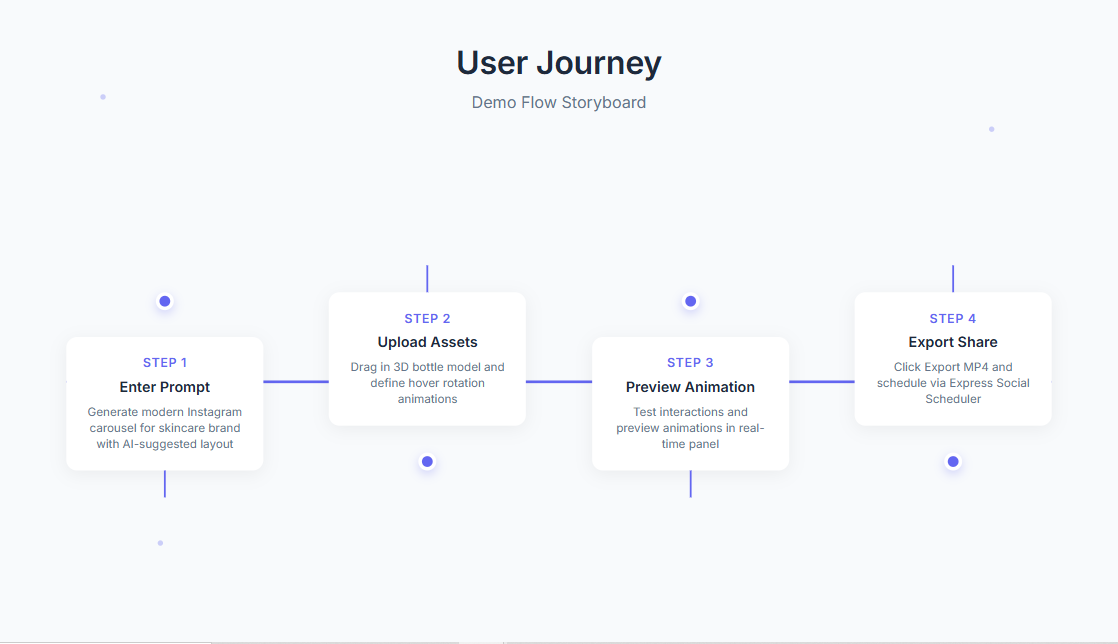
Once built, AI Interaction Studio will let users:
- Enter a brand brief to generate custom copy, images, colors & animation specs via Gemini AI
- Drag in 3D models or Lottie files and define named states & transitions
- Preview interactivity live in Express
- Export polished MP4 videos, static PNGs, or self‑contained HTML bundles
How we’ll build it
- UI & Canvas Integration: Adobe Express Add‑on SDK (iframe + Document API)
- AI Layer: Proxy to Gemini 2.5 Flash for JSON outputs (textFields, imagePrompts, colorUpdates, animations)
- 3D & Animation: Three.js for glTF previews; Lottie‑web for JSON animations
- Export Service: Headless Chromium + FFmpeg microservice for video encoding
Challenges we anticipate
- Mapping Gemini’s JSON to Express node IDs and metadata reliably
- Ensuring real‑time sandboxed previews without performance lag
- Coordinating headless rendering at scale under time constraints
Accomplishments we aim for
- A unified pipeline from “brief → AI → in‑Canvas customization”
- Robust 3D state‑driven animations native to Express
- One‑click multi‑format exports that maintain design fidelity
What we’ll learn
- Advanced patterns for iframe ↔ sandbox messaging (
apiProxy/exposeApi) - Best practices for headless rendering of interactive layouts
- Tuning AI prompts for design consistency and brand alignment
What’s next for AI Interaction Studio
- Beta launch to gather real‑user feedback and refine UX
- Deeper Brand Kit AI integrations (fonts, logos, style guides)
- Support for advanced event triggers (onScroll, onTimer, onDrag)
- Direct social scheduling integration for seamless publishing
Built With
- adobe-express

Log in or sign up for Devpost to join the conversation.