Inspiration
Every AI image generator ships with a blank text box and a blinking cursor. You are expected to know what to type, how to structure it, which words trigger which visual styles, and how to keep output consistent across a series. Most people do not know any of that. They stare at the box, type something vague, get a mediocre result, and assume the model is not good enough.
The reality is different. The model is capable. The prompt is the bottleneck.
I built the AI Image Prompts page to solve that bottleneck from both directions. First, a curated prompt library so nobody has to start from a blank box. Second, an AI image prompt generator that takes a rough idea and returns a complete, structured prompt with a JSON style template. The goal was to turn prompt writing from a guessing game into a repeatable craft, and to give every user a path from "I do not know what to type" to "I have a reusable template I can deploy across an entire image series."
What it does
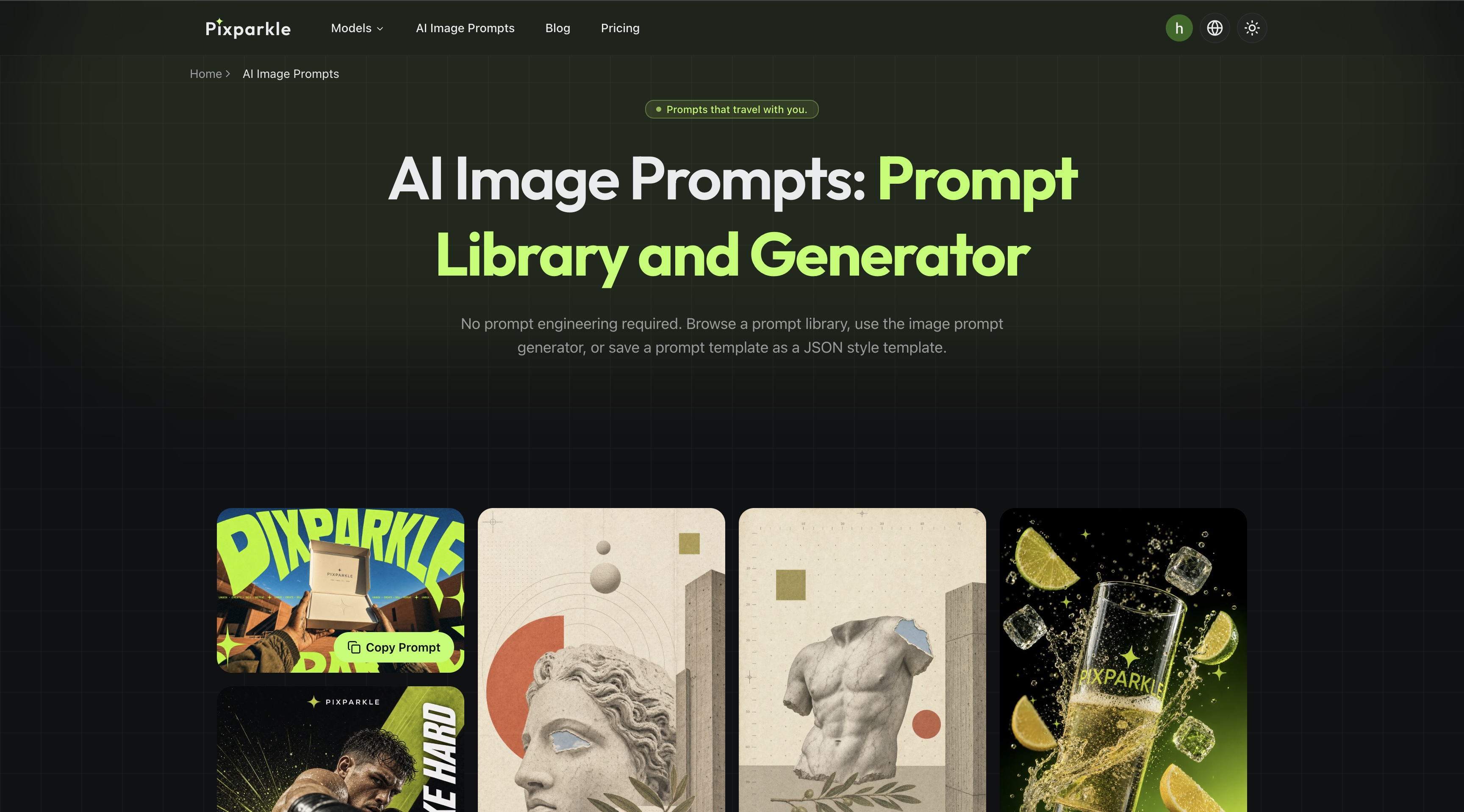
The AI Image Prompts page is a complete prompt workflow tool built around three interconnected components.
Curated Prompt Library. A searchable, filterable gallery of production-tested AI image prompts. Every prompt in the library has been validated across multiple models (Nano Banana, GPT Image, Gemini Image, Flux, Seedream) so users can copy and paste with confidence. Each card shows the prompt text with a one-click copy button. The library loads 16 prompts at a time with infinite scroll, and every prompt is designed as a starting variable rather than a fixed output: users are encouraged to swap the subject, adjust the mood, or change the aspect ratio to fit their brand.
AI Image Prompt Generator. Paste any rough idea, from a single sentence to a messy paragraph, and the generator expands it into a complete, copy-ready prompt. It works by applying a structured question framework: for every input, the generator answers nine designer questions covering subject detail, style anchor, lighting type and direction, composition framing, mood register, color palette, material and texture, typography, and aspect ratio. The output appears in two tabs: an Enhanced Prompt (natural language, ready to paste into any chat) and a JSON Style Template (structured brief with named fields for reuse).
JSON Style Templates. The JSON template is the core differentiator. It organizes a prompt into named fields: style, subject, lighting, typography, aspect_ratio, and more. This is not a technical configuration file the model parses; it is a structured designer brief you write once and swap variables on for each image in a series. Change the lighting field from "hard afternoon sunlight" to "soft diffused overcast" and the entire emotional register shifts without touching any other field. The template travels across models: a photoreal prompt that works on Nano Banana might need a softer style descriptor on Flux, and with a JSON template you edit exactly one field rather than rewriting the entire prompt.
The page also includes a complete educational layer: the 5-Part Prompt Template Formula (subject, style, lighting, composition, mood/material), a step-by-step guide to building reusable templates, and a field-by-field breakdown of how each JSON key controls a distinct visual output dimension.
Target audiences span designers shipping concept boards, marketers producing campaign visuals at scale, e-commerce sellers creating product imagery without a photographer, content creators feeding social calendars, indie developers prototyping in-app art, and educators building visual lesson materials.
How I built it
Frontend. The page is built on Next.js 15 with App Router, React 19, and Tailwind CSS v4. The prompt library uses a prompt gallery grid component with infinite scroll pagination (16 prompts per load), one-click copy with toast feedback, and loading skeletons. The image prompt generator is an interactive split-panel component: a textarea with example buttons on the left, and a tabbed output panel (Enhanced Prompt / JSON Style Template) on the right, with per-tab copy buttons and empty-state hints. The educational layer uses a waterfall features block for the pain-to-solution narratives and a three-step progression block for the prompt mastery path.
Backend. The prompt library is served from a server-only service layer that queries a curated prompt database, with pagination and filtering. The image prompt generator calls the Pixparkle evaluator pipeline: the user's rough idea is sent to the LLM evaluator, which applies the 9-question designer framework and returns both a natural-language expansion and a structured JSON template. The evaluator runs on Gemini 3 for multimodal understanding and strong instruction-following on structured output formats.
Content architecture. All page copy, labels, placeholders, error messages, FAQ entries, and structured data are defined in a single i18n content file organized by page section (hero, promptShowcase, howTo, painSolutions, audiences, rewriterEntry, levelUp, faq, cta, schemas). This keeps the component layer thin and the content layer the single source of truth for everything from button labels to JSON-LD structured data.
Structured data. The page ships with SoftwareApplication and HowTo JSON-LD schemas for search engine rich results, with feature lists and step-by-step markup aligned to the 4-step Browse-Copy-Tweak-Generate workflow.
Challenges I ran into
The biggest challenge was designing a prompt template format that is structured enough to be useful and flexible enough to not constrain creativity. JSON was the obvious choice for structure, but the risk was that users would interpret it as a technical configuration language the model executes directly. The final design leans hard into the "structured designer brief" framing: every JSON field contains plain English, every field name maps to a visual concept users already understand, and the educational layer walks users through what each field controls. The UI reinforces this by showing the JSON template alongside the natural-language Enhanced Prompt, making it clear they are two representations of the same brief.
Prompt quality validation across models was another significant challenge. A prompt that produces stunning output on Nano Banana can look over-rendered on Flux or washed out on Seedream. Building the library required testing every prompt against every supported model and documenting which style descriptors need adjustment per model. The solution was to design prompts around stable core fields (subject, composition) and parameterize the style-dependent fields (lighting descriptors, mood words) so users can swap per-model presets without rewriting from scratch.
The generator's 9-question framework had to be tuned carefully. Too few questions and the output is shallow; too many and the LLM produces bloated, repetitive prompts. Finding the right question set and the right output length (targeting 200-400 characters per prompt) required extensive iteration on the evaluator prompt. The JSON template output was particularly tricky: the LLM needs to produce valid, parseable JSON while also writing natural, useful English inside each field. Early versions produced technically valid JSON with robotic field content that read like a form filled out by a machine. Getting the field content to sound like a human designer wrote it required adding style examples and tone constraints to the evaluator system prompt.
Handling the empty states gracefully was a UX challenge. If the LLM returns an Enhanced Prompt but cannot structure it as valid JSON, the JSON tab shows a clear hint rather than a broken experience. If the user has not typed anything yet, example buttons provide one-click starting points. Every error state (session expired, input too long, LLM failure) has a specific, actionable message rather than a generic "something went wrong."
Accomplishments that I'm proud of
The JSON style template format is the feature I am most proud of. It bridges the gap between one-off prompt copying and systematic prompt authorship. Most prompt libraries give you text to copy; this one gives you a structured brief you can version, remix, and deploy across an entire image series. The fact that it works as both Nano Banana Prompts, GPT Image Prompts, Flux Image Prompts, and Gemini Image Prompts from the same template, with model-specific adjustments limited to one or two fields, makes it genuinely portable across the model landscape.
The AI image prompt generator's dual output (Enhanced Prompt + JSON Style Template) came together better than I expected. Showing both representations side by side teaches users the relationship between natural-language prompts and structured briefs without requiring them to read documentation. Users who start by copying the Enhanced Prompt eventually start using the JSON tab because they see the value of field-level control.
Building the entire educational layer (5-part formula, template reuse guide, field-by-field breakdown) into the same page as the interactive tools means users learn by doing rather than reading a separate guide. The progression from browsing the library, to generating a prompt, to saving a JSON template, to understanding every field, maps naturally to how users actually build prompt writing skill.
The prompt library's curation standard is something I stand behind. Every prompt is production-tested, not scraped or auto-generated. The library is designed to be a starting variable, not a fixed output: each prompt includes guidance on which fields to swap when adapting it to a different subject or model.
What I learned
Prompt portability across models is not about finding a universal prompt format. It is about separating stable fields (subject, composition) from model-sensitive fields (style descriptors, lighting language) and giving users explicit control over both. The JSON template format emerged from this insight rather than being designed upfront.
Users learn prompt writing fastest when they can see the relationship between a rough idea and a structured output. The generator's dual-tab design was originally just a convenience feature; it turned out to be the primary learning mechanism. Users who interact with both tabs understand the 5-part formula faster than users who only read the educational content.
Curating a prompt library is a signal-to-noise problem. A library of 10,000 auto-generated prompts is less useful than 200 production-tested ones. Users need confidence that a prompt will work before they invest time customizing it. The decision to test every prompt against every supported model was expensive in time but is the thing that makes the library trustworthy.
Structured data (JSON-LD) for a tool page is worth the effort. The SoftwareApplication and HowTo schemas on this page drive rich results that bring users directly into the generator workflow, not just to a landing page.
What's next for AI Image Prompts
- User-saved templates. Let users save their JSON templates directly to their Pixparkle account, with a personal template library alongside the curated public library. Templates should be shareable via link so teams can distribute brand style briefs.
- Template marketplace. A community-driven template exchange where designers, marketers, and e-commerce sellers can publish and discover prompt templates organized by industry (fashion, food, tech, real estate) and use case (Amazon listing, Instagram ad, YouTube thumbnail).
- Model-specific preset packs. One-click model presets per template: load a photoreal product template and toggle between the Nano Banana preset, the Flux preset, and the Seedream preset, with each preset auto-adjusting the style and lighting fields for optimal output on that model.
- Batch prompt expansion. Upload a CSV of subjects and have the generator produce a complete prompt for each row using a single JSON template as the style base. Turn a product catalog spreadsheet into a full image brief deck in one operation.
- Prompt version history. Track changes to a template over time so users can compare outputs from different versions and roll back to a previous iteration without losing work.
- Deeper model coverage. Expand the library's tested-model matrix as new models launch, and add per-model prompt tips directly in the library card UI so users see compatibility guidance at a glance.
Built With
- cloudflare
- next.js
- typescript

Log in or sign up for Devpost to join the conversation.