Inspiration
Customer support is one of those areas where a lot of time is lost on repetitive work.
In a typical help desk workflow, an agent receives a ticket and has to read the entire message, understand the issue, determine its category, decide how urgent it is, and then write an appropriate response — often doing this dozens or even hundreds of times a day.
I wanted to explore a simple question:
What if AI could handle the repetitive first steps while keeping the human agent in control?
That idea became AI Help Desk.
The goal was never to replace support agents. Instead, I wanted to build an AI assistant that could give them a strong starting point — automatically understanding the ticket, organizing it, and preparing a response so the agent could spend more time on judgment, problem-solving, and customer experience rather than repetitive typing.
This project also gave me an opportunity to integrate a real generative AI API into a traditional PHP and MySQL application and see how AI can enhance an existing business workflow.
What It Does
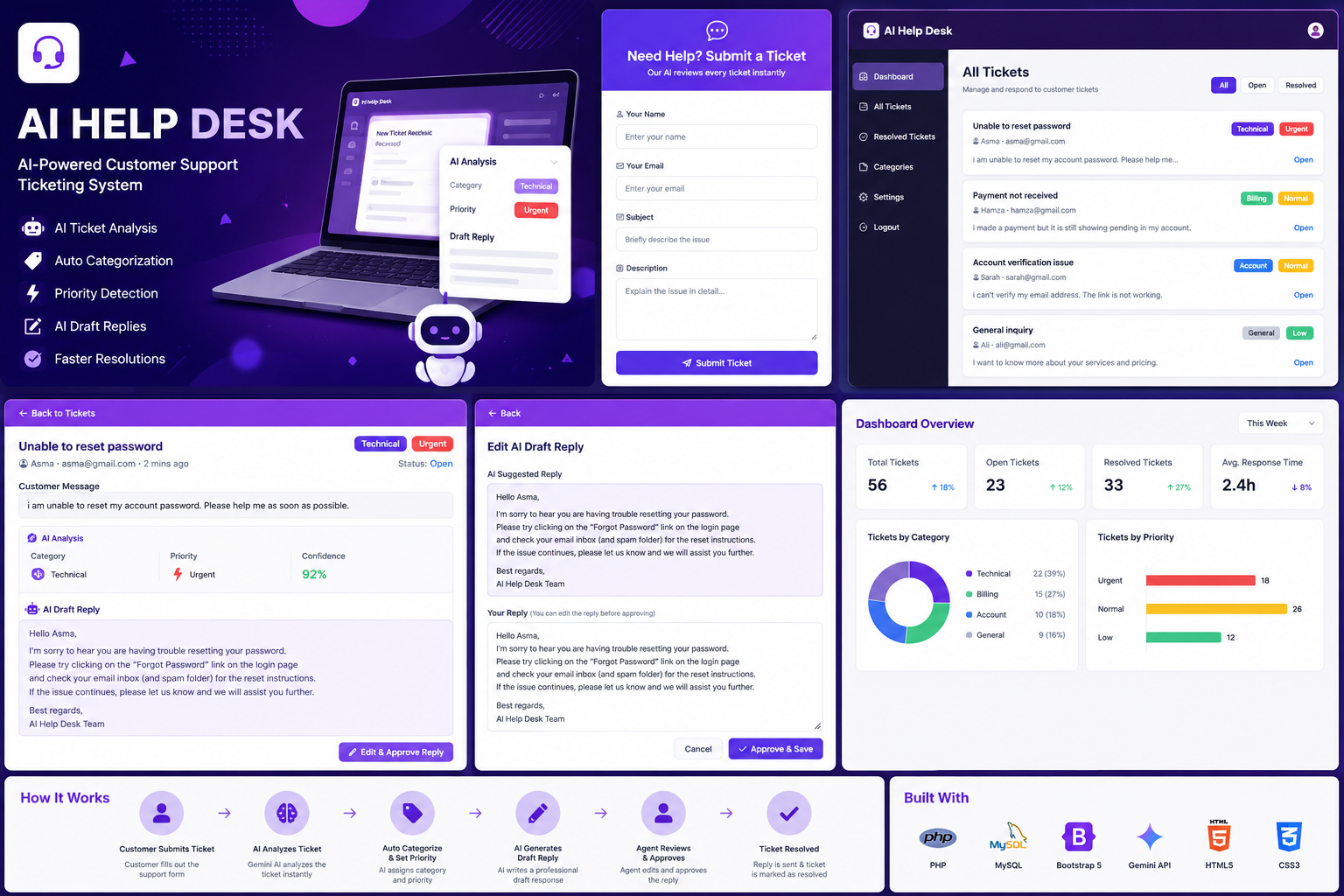
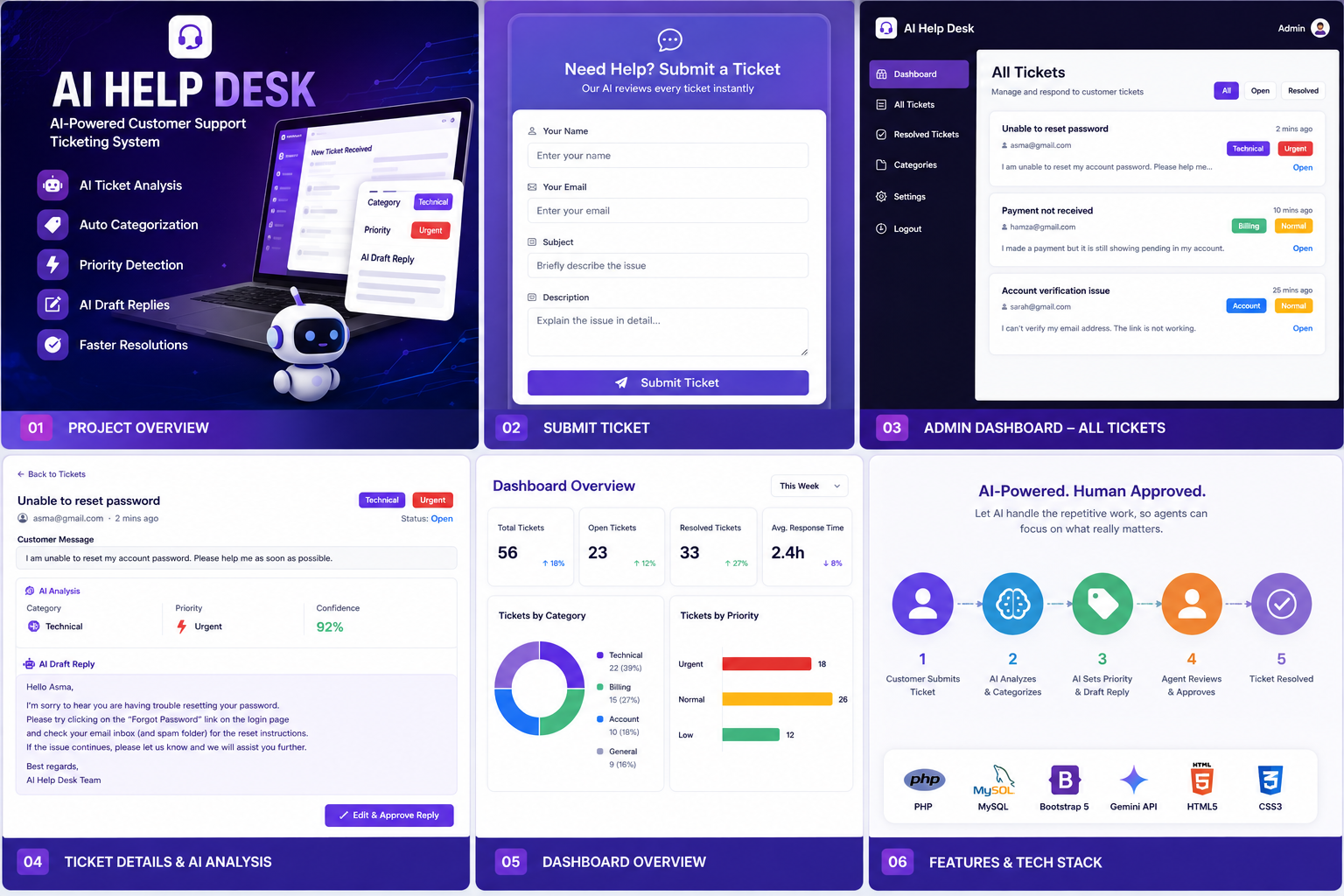
AI Help Desk is a lightweight AI-powered customer support ticketing system that turns a manual ticket-triage process into an AI-assisted workflow.
1. Customer submits a ticket
Customers use a simple web form to provide:
- Name
- Subject
- Description of their issue
2. AI analyzes the ticket
As soon as the ticket is submitted, the system sends the subject and description to Google Gemini.
Gemini analyzes the customer's message and returns three important pieces of information:
- Category: Billing, Technical, Account, or General
- Priority: Urgent, Normal, or Low
- Draft Reply: A professional response tailored to the customer's issue
3. Everything is stored automatically
The original ticket and AI-generated information are stored together in a MySQL database.
This means agents don't have to manually classify every incoming request before working on it.
4. Agents review instead of starting from scratch
Support agents can view incoming tickets through a clean admin dashboard.
Each ticket displays:
- Customer information
- Original message
- AI-generated category
- AI-detected priority
- Suggested reply
- Ticket status
The agent can edit the AI-generated response when necessary and click Approve & Save to finalize the ticket.
The key idea is simple:
Instead of giving an agent a blank ticket, AI gives them a triaged ticket with a ready-to-edit response.
The human remains in control, while AI handles the repetitive groundwork.
How I Built It
I intentionally kept the architecture lightweight while still integrating a real AI workflow.
Frontend
The customer form and admin dashboard were built using:
- HTML
- CSS
- Bootstrap 5
- Bootstrap Icons
- Google Fonts (Poppins)
I designed the interface around a modern purple-gradient theme with card-based layouts, badges, decorative background elements, and clear visual hierarchy.
The goal was to make the system feel like a real support product rather than just a basic hackathon prototype.
Backend
The backend is built with PHP, using mysql for database operations.
The main application flow is:
Customer Form → PHP Backend → Gemini API → JSON Response → MySQL → Admin Dashboard
Database
I used MySQL with a tickets table containing:
- Customer name
- Customer email
- Subject
- Description
- AI category
- AI priority
- AI draft reply
- Ticket status
- Timestamp
AI Integration
The AI layer uses the Google Gemini API (gemini-2.0-flash).
Instead of asking Gemini for free-form text, I designed the prompt to return structured JSON containing:
{
  "category": "...",
  "priority": "...",
  "draft_reply": "..."
}
The PHP backend then parses the response and stores the individual fields in MySQL.
This makes the AI output usable by the application instead of treating it as simple chatbot text.
Challenges I Ran Into
Building an AI-powered workflow introduced challenges that I wouldn't normally encounter in a traditional PHP/MySQL application.
1. Making AI output predictable
One of the biggest challenges was getting reliable structured output.
Initially, Gemini could sometimes return JSON inside Markdown code fences or add additional explanation around the JSON. That caused parsing errors because the backend was expecting clean JSON.
I solved this in two ways:
- Improved the prompt to explicitly request raw JSON only.
- Added a cleanup layer before decoding the response.
This taught me an important lesson:
AI output should never be treated as perfectly predictable.
Even when you ask an AI model for a specific format, your application should be prepared for unexpected output.
2. Handling API failures
An AI API can fail because of network problems, invalid responses, rate limits, or other unexpected issues.
I didn't want a temporary AI failure to prevent a customer from submitting a support ticket.
So I added fallback behavior. If the AI response fails or cannot be parsed, the system uses safe defaults such as:
- Category → General
- Priority → Normal
- A generic support response
The ticket can still be saved and handled by a human agent.
This makes the AI an assistant rather than a single point of failure.
3. Building the complete system solo
Another challenge was building the entire workflow from scratch within a limited hackathon timeframe.
This included:
- Designing the UI
- Building the PHP backend
- Connecting MySQL
- Learning and integrating the Gemini API
- Designing AI prompts
- Parsing AI responses
- Creating the admin dashboard
- Implementing the approval workflow
- Handling AI failures
The project pushed me beyond simply building a CRUD application and required me to connect several technologies into one complete working workflow.
What I Learned
This project taught me that adding AI to an application isn't simply about sending a prompt to an API.
I learned how to:
- Integrate a real generative AI API into a PHP/MySQL application.
- Design prompts for structured and machine-readable responses.
- Handle unpredictable AI output programmatically.
- Build fallback mechanisms for AI failures.
- Connect AI-generated information with a traditional database workflow.
- Design an interface around an AI-assisted business process.
- Think about AI as a workflow enhancement, rather than just a chatbot.
Most importantly, I learned that a useful AI application doesn't necessarily need to be complicated.
Sometimes the biggest value comes from removing a few repetitive steps from an existing workflow.
Impact
AI Help Desk demonstrates how generative AI can be integrated into an everyday business process without removing humans from the loop.
Instead of requiring an agent to:
Read → Categorize → Prioritize → Think of a response → Write
the workflow becomes:
Review AI analysis → Edit if needed → Approve
This can reduce repetitive work, provide more consistent initial responses, and allow support agents to focus their attention on cases that genuinely require human judgment.
The project is intentionally designed as AI-assisted support, not AI-replaced support.
What's Next
There are several ways I would expand AI Help Desk beyond the hackathon prototype.
📧 Automated Email Responses
After an agent approves a response, the system could automatically send it to the customer's email.
🔎 Ticket Search & Filtering
Agents could quickly search and filter tickets by:
- Status
- Category
- Priority
- Date
🎯 AI Confidence Scores
The AI could provide a confidence score for its category and priority predictions.
For example, a low-confidence classification could automatically be flagged for human review.
🚨 Human Escalation
Tickets with low AI confidence, urgent issues, or sensitive requests could automatically be escalated to a senior support agent.
📊 Support Analytics
A future dashboard could provide insights such as:
- Most common support issues
- Average resolution time
- Ticket volume by category
- Urgent ticket trends
- AI-assisted resolution rate
📚 Knowledge Base Integration
The system could eventually connect tickets with a company's knowledge base and use relevant documentation to generate more accurate support responses.
Final Vision
The long-term vision for AI Help Desk is not to create a system where AI replaces support agents.
It is to create a system where AI handles the repetitive work and humans handle the important decisions.
A support agent should not have to spend their time repeatedly sorting tickets and writing the same types of responses.
They should be able to open a ticket and immediately understand:
What is the issue? How urgent is it? What should I respond?
AI Help Desk is a step toward that workflow — turning a traditional ticketing system into an AI-assisted support workspace where technology handles the busywork and people stay in control.


Log in or sign up for Devpost to join the conversation.