-
-
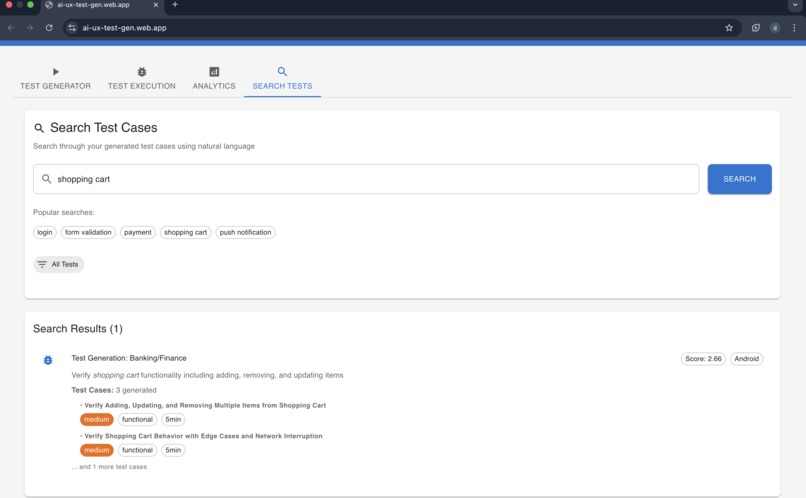
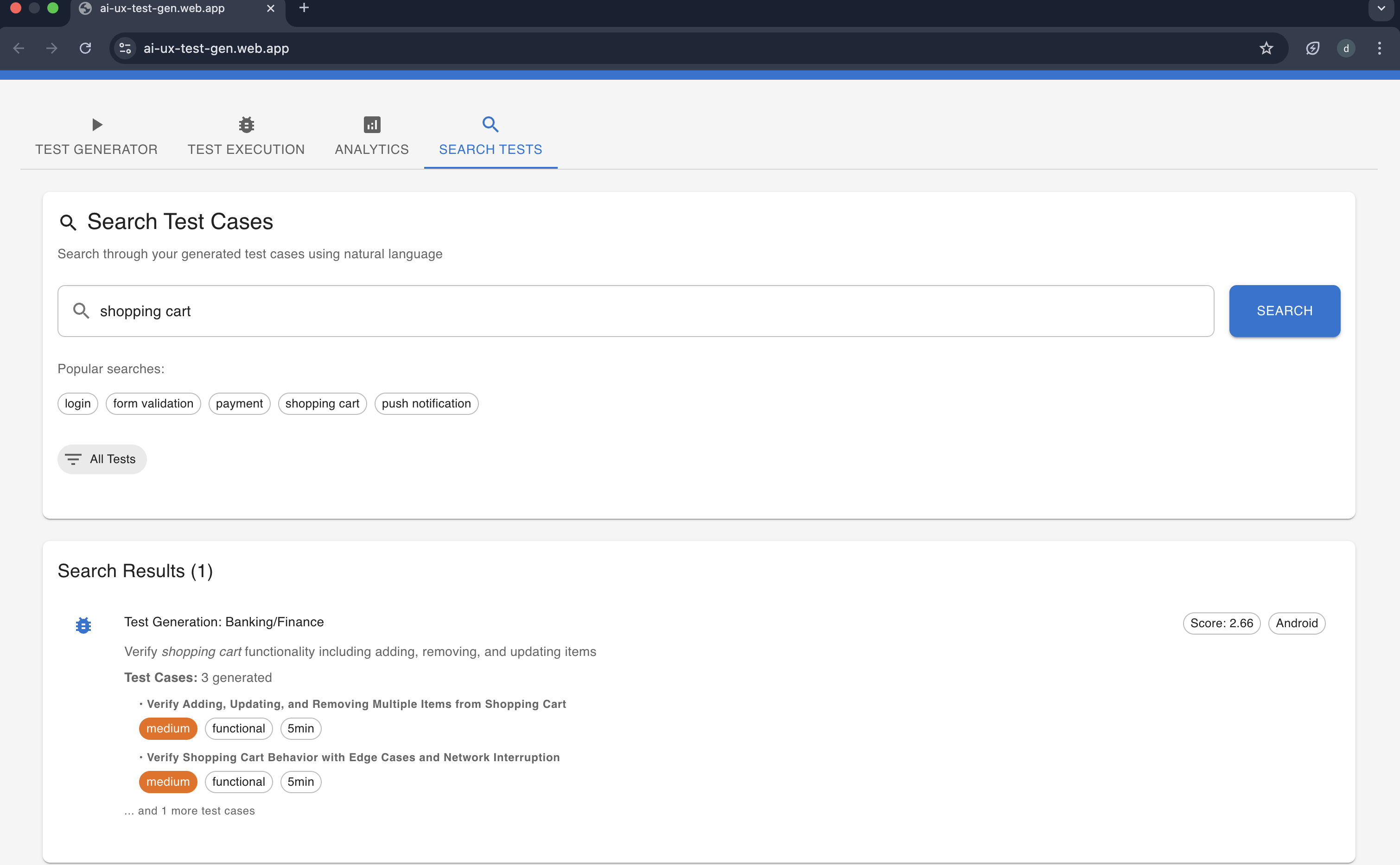
Elastic Search Functionality
-
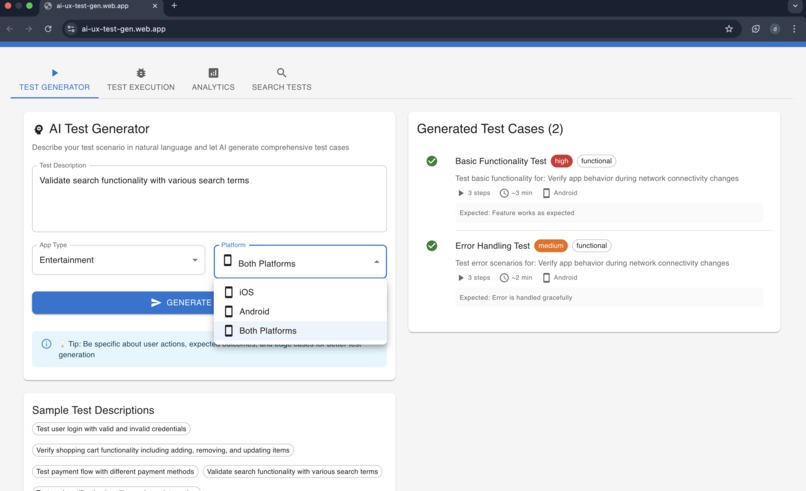
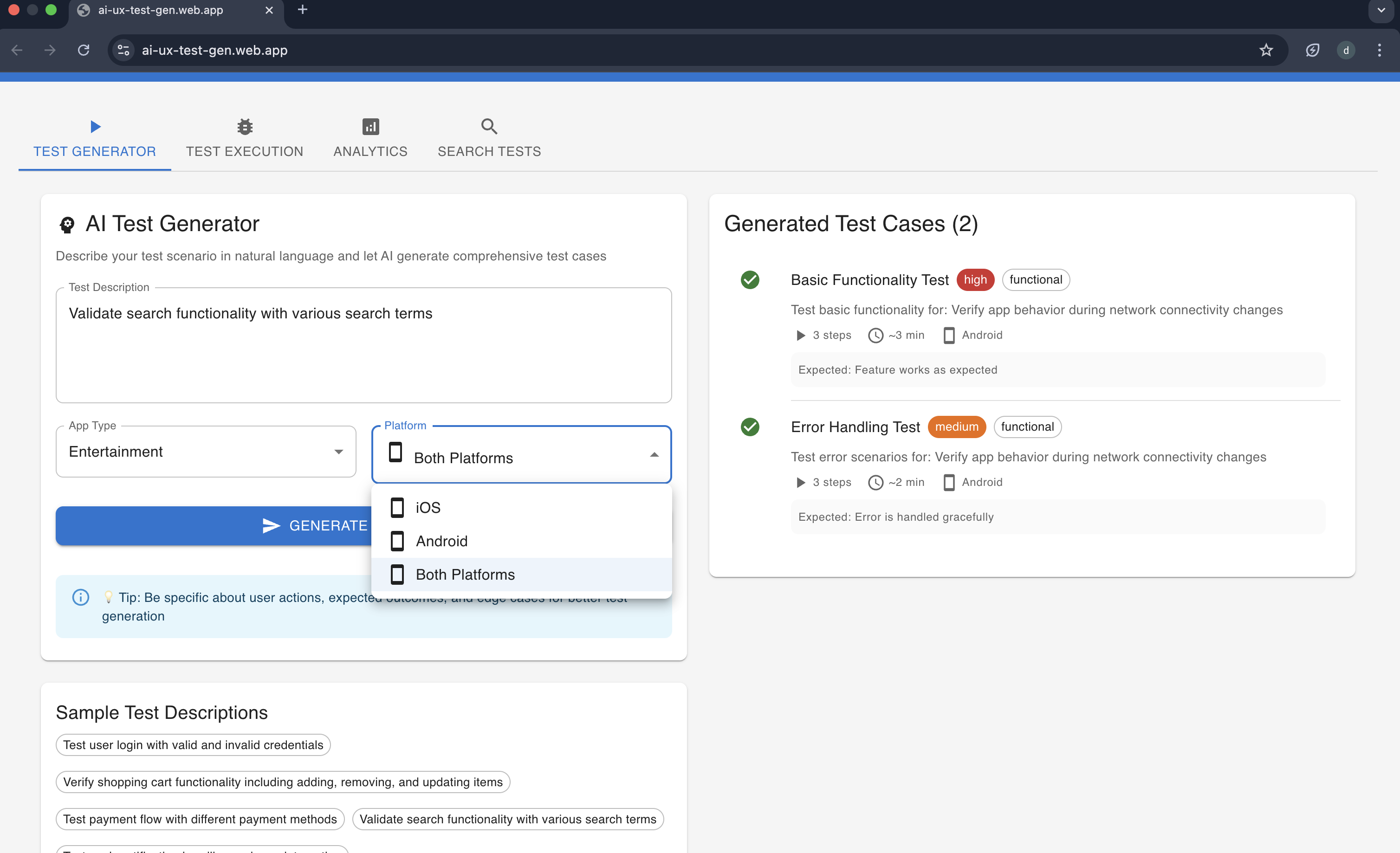
Gemini Powered Test Generation
-

Selecting Test for Execution
-
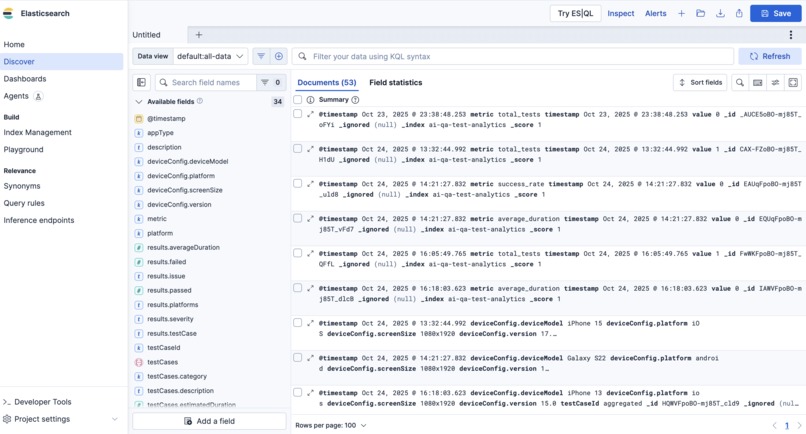
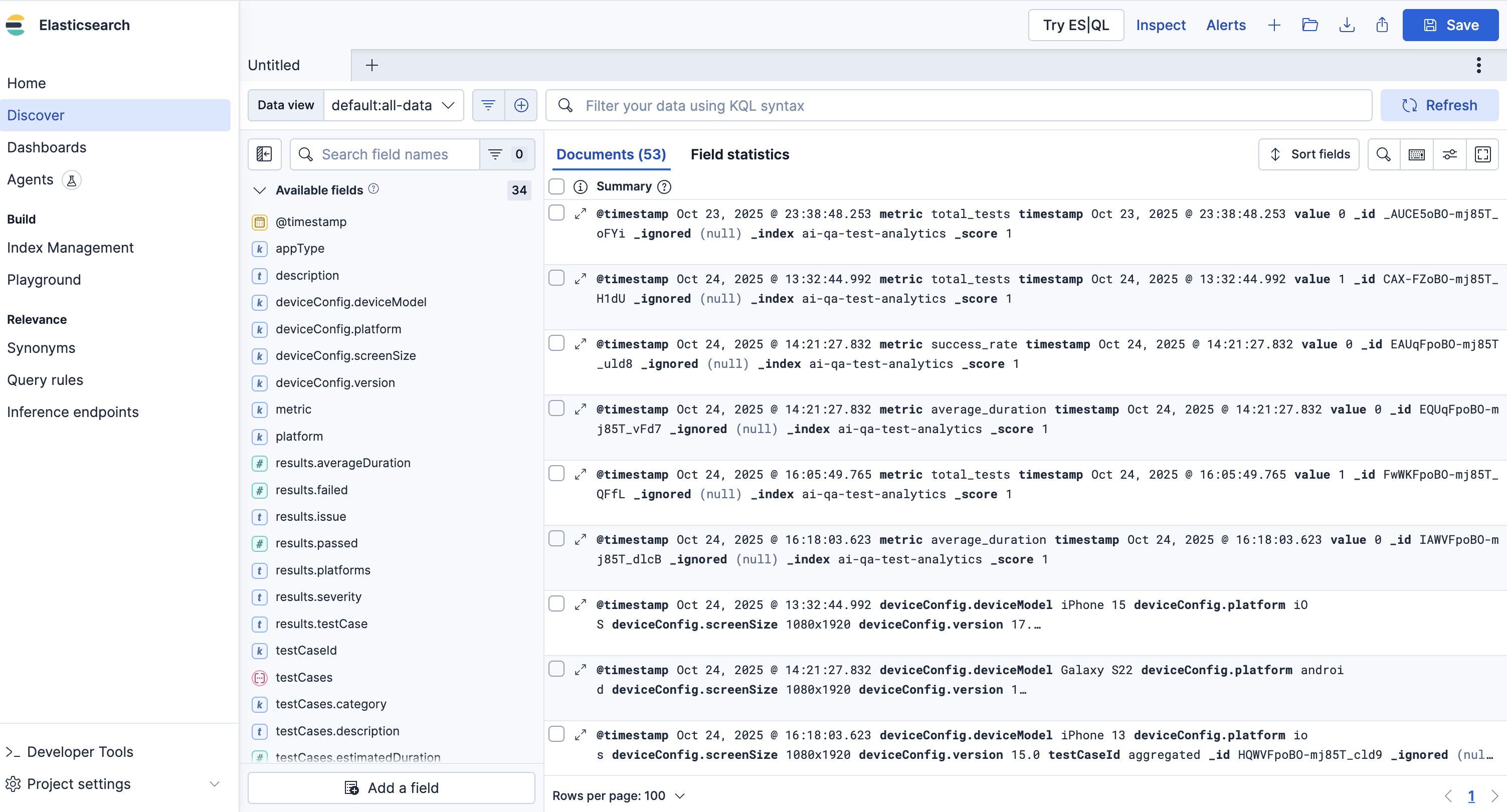
Elastic Search Console
-
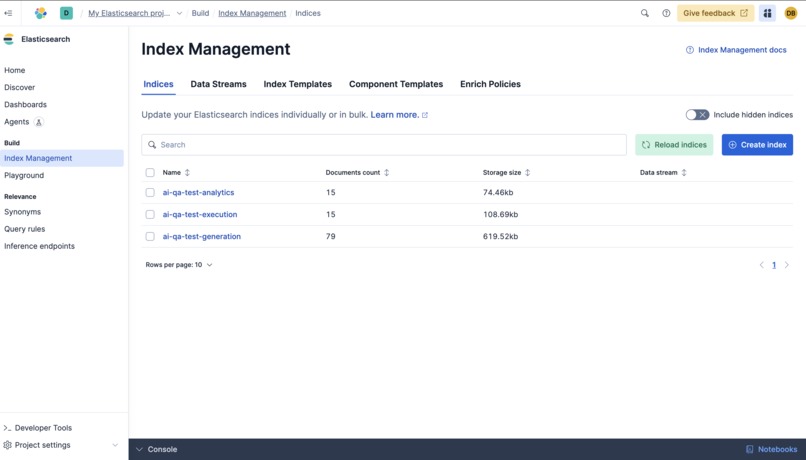
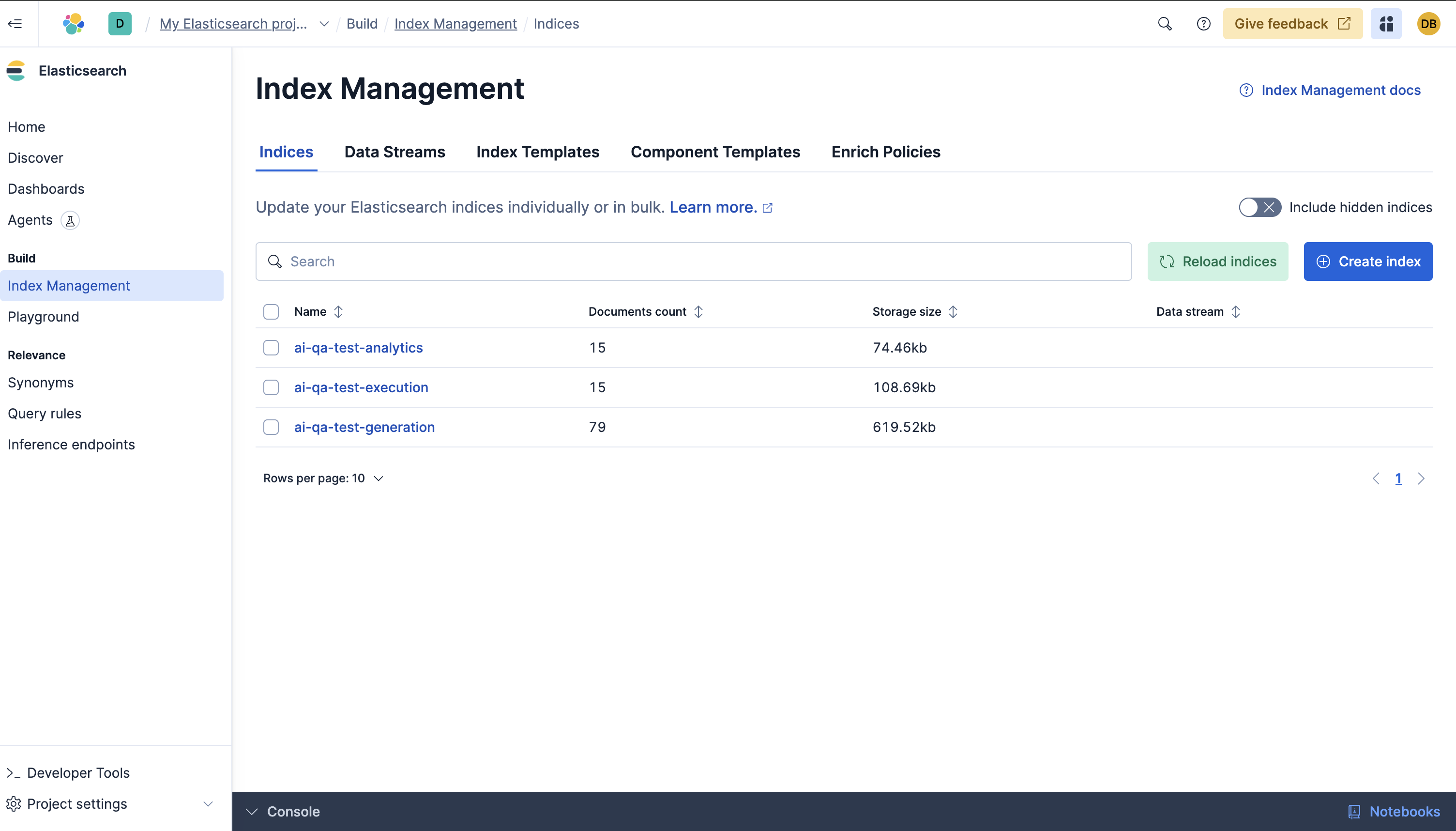
Elastic Search Indexes

Mobile App testing Agent Demo
🎉 What We've Built
A comprehensive AI-powered mobile app testing agent with complete frontend and backend implementation, ready for deployment on Firebase hosting using Gemini for natural language based test creation & storing these in Elastic Indexes.
The product can be expanded to test specific packages, libraries, simply using natural language
The results can be even open sourced & updated as a public good to keep best practices & have ready to use test cases
Currently the users can search through the UI and it provides results from the indexes stored
🏗️ Architecture Overview
┌─────────────────────────────────────────────────────────────┐
│                    React Frontend (Next.js)                │
├─────────────────────────────────────────────────────────────┤
│  🎨 Material-UI Components   │  📊 Real-time Dashboards     │
│  🎯 Test Generator UI        │  🔍 Search Interface         │
│  ⚡ Test Execution Monitor   │         │
└─────────────────────────────────────────────────────────────┘
                              │
                              ▼ HTTP/REST API
┌─────────────────────────────────────────────────────────────┐
│                Firebase Functions Backend                   │
├─────────────────────────────────────────────────────────────┤
│  🤖 AI Test Orchestrator    │  📱 Mobile Interaction Sim     │
│  🔄 Cross-Platform Testing  │  🎯 Smart Prioritization       │
│  📊 Analytics Engine        │                               |
└─────────────────────────────────────────────────────────────┘
                              │
                              ▼ External APIs
┌─────────────────────────────────────────────────────────────┐
│                    External Integrations                   │
├─────────────────────────────────────────────────────────────┤
│  🧠 Google GenAI API        │  🔍 Elasticsearch Cloud      │
│  ☁️  Firebase Services      │
└─────────────────────────────────────────────────────────────┘
📁 Project Structure
The complete AI QA Agent demo includes:
Frontend (React/Next.js)
pages/- Next.js pages and routingcomponents/- React UI componentscontext/- State management providers
Backend (Firebase Functions)
functions/src/services/- Core business logic- API endpoints for all features
External service integrations
aiTestOrchestrator.ts- Uses the Google GeminielasticSearchService.ts- Integrates with Elastic search. Generated Test, executed test are stored in elastic.
Elasticsearch Indices
ai-test-generation- Stores generated test casesai-test-execution- Stores test execution resultsai-test-analytics- Stores aggregated analytics data
Key UI Components Created:
TestGenerator.tsx- AI-powered test generation UITestExecution.tsx- Cross-platform test execution(Mock tests, can be integrated with Firebase device testing)Analytics.tsx- Real-time analytics dashboardSearchTests.tsx- Elasticsearch-powered searchSettings.tsx- Configuration management (Not displayed in the frontend, can be used later to set email options)
🚀 Key Features Implemented
1. 🤖 AI Test Orchestrator
- Google GenAI Integration: Natural language to test case conversion
- Smart Test Generation: Creates comprehensive test scenarios
- Fallback System: Mock data when API unavailable
- Test Complexity Analysis: Estimates execution time and complexity
2. 📱 Mobile Interaction Engine
- Gesture Simulation: Tap, swipe, pinch, rotation
- Biometric Authentication: TouchID, FaceID, fingerprint
- Device State Testing: Background/foreground, network changes
- Platform Adaptation: iOS vs Android specific behaviors
3. 🔄 Cross-Platform Testing Framework(Simulated, next setp is to integrated with Firebase Cloud Device Testing)
- Device Matrix: Multiple iOS/Android device configurations
- Parallel Execution: Concurrent testing across platforms
- Performance Comparison: Platform-specific metrics
- Compatibility Scoring: Device compatibility assessment
4. 🎯 Smart Prioritization Engine (Dummy, but needs to integrated with Git to fetch code changes)
- Risk Assessment: Historical failure rate analysis
- Code Change Impact: Determines test relevance
- Business Criticality: Priority-based test ordering
- Time Optimization: Respects execution time constraints
5. 📊 Analytics & Search (Elasticsearch)
- Real-time Dashboards: Success rates, trends, performance
- Natural Language Search: Find tests using plain English
- Historical Analysis: Long-term trend identification
- Device Performance: Cross-device compatibility insights
6. 📧 Email Notifications(Code exists but the functionality is not deployed)
- Automated Reports: HTML email with test results
- Executive Summaries: High-level overview for management
- Multiple Templates: Different report types available
🎨 Frontend Features
Modern React Architecture
- Next.js 14: Latest React framework with SSG
- TypeScript: Full type safety throughout
- Material-UI 5: Professional component library
- Context API: Centralized state management
- Real-time Updates: Live test execution monitoring
Interactive Components
- Test Generator: AI-powered test creation interface
- Execution Monitor: Real-time progress tracking
- Analytics Dashboard: Interactive charts and metrics
- Search Interface: Elasticsearch-powered search
⚡ Backend Services
Firebase Functions Architecture
- Serverless: Auto-scaling cloud functions
- TypeScript: Type-safe backend development
- Express.js: RESTful API framework
- CORS Support: Cross-origin request handling
API Endpoints
POST /api/generate-tests     - AI test generation
POST /api/execute-tests      - Cross-platform test execution
GET  /api/analytics          - Test analytics and metrics
GET  /api/search             - Natural language search
POST /api/send-report        - Email report delivery
GET  /api/health             - Service health check
🔧 Configuration & Deployment
Clone the project
git clone https://github.com/deepakbhatia/ai-ux-test-gen
Create a Google Cloud & Firebase project
Add the Firebase Web config to
firebase.json
In .firebaserc add your project-id
Environment Variables Required
.env file in functions directory

# Google GenAI
GOOGLE_CLOUD_PROJECT_ID=your-project-id
GOOGLE_CLOUD_LOCATION=us-central1
GENAI_API_KEY=your-genai-api-key
DEMO_MODE=false

# Elasticsearch
ELASTICSEARCH_NODE=https://your-cluster.elastic-cloud.com
ELASTICSEARCH_API_KEY=your_api_key

.env file in root directory

NEXT_PUBLIC_FIREBASE_API_KEY=your-api-key
NEXT_PUBLIC_FIREBASE_AUTH_DOMAIN=your-project.firebaseapp.com
NEXT_PUBLIC_FIREBASE_PROJECT_ID=your-project-id
NEXT_PUBLIC_FIREBASE_STORAGE_BUCKET=your-project.appspot.com
NEXT_PUBLIC_FIREBASE_MESSAGING_SENDER_ID=your-sender-id
NEXT_PUBLIC_FIREBASE_APP_ID=your-app-id

NEXT_PUBLIC_API_BASE_URL=https://your_cloud_functions_url
NODE_ENV=production
Development
Manual Setup
1. Install Dependencies
npm install
cd functions && npm install && cd ..
2. Configure Environment
cp functions/.env.example functions/.env

cp .env.example .env

# Edit .env & functions/.env with your API keys & other variables
3. Required API Keys
See above
4. Start Development
# Start Firebase emulators
firebase emulators:start

# In another terminal
npm run dev
Deployment Scripts
- Firebase Functions deployment
   cd functions
   npm install
   cd ..

   # Build the application
   echo "🔨 Building application..."
   npm run build

   # Deploy to Firebase Functions
   echo "🚀 Deploying to Firebase Functions..."
   firebase deploy or npm run deploy
- Firebase Hosting configuration
   in the root folder


   npm run build

   npm run deploy:hosting
🎯 Demo Scenarios
Sample Test Descriptions to Try
"Test user login with biometric authentication"
- Generates comprehensive login flow tests
- Includes biometric scenarios and fallbacks
"Verify shopping cart functionality"
- Creates e-commerce workflow tests
- Covers item management and checkout
"Test push notification handling"
- Generates notification flow tests
- Tests background/foreground scenarios
📈 Analytics Capabilities
Real-time Metrics
- Test execution success rates
- Performance trends over time
- Platform comparison analytics
- Device compatibility scores
- Failure pattern analysis
Search Features
- Natural language test search
- Filter by platform, category, status
- Historical test execution lookup
- Error message and log search
🎉 Demo Highlights
Live Features You Can Test
- AI Test Generation: Enter natural language → Get structured tests
- Mock Test Execution: See realistic cross-platform testing
- Interactive Analytics: Explore charts, metrics, and trends
- Search Functionality: Find tests using natural language
- Real-time UI: Watch test execution progress live
Production Integrations
- Google GenAI: Real AI-powered test generation
- Elasticsearch: Actual search and analytics backend
- Firebase: Full cloud hosting and serverless functions
Future
Integrate to read git repos & perform real tests for the generated tests with Firebase device testing
Built With
- elasticsearch
- firebase
- google-cloud
- google-gemini

Log in or sign up for Devpost to join the conversation.