-
-
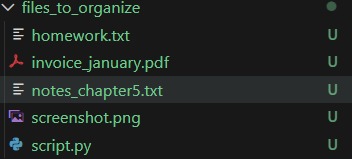
Messy folder
-
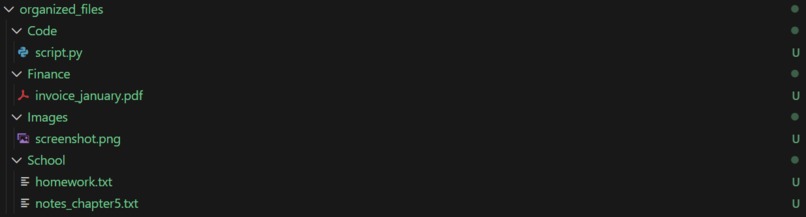
Cleaned Folder
\section{Inspiration}
Download folders get messy very quickly with school files, screenshots, code, and random documents all mixed together. Manually organizing files is annoying, and basic rule-based organizers don’t work well because filenames don’t always describe what a file is actually for. I wanted to build a smarter tool that could understand the purpose of a file and organize it automatically.
\section{What it does}
AI File Organizer scans a folder and automatically sorts files into categories such as \textbf{School, Finance, Images, Code, Personal,} and \textbf{Other}. It uses AI to classify each file based on its filename and basic information, then moves the file into the correct folder. A dry-run mode allows users to preview what will happen before any files are moved.
\section{How I built it}
I built the project as a Python command-line application. The program scans files using \texttt{pathlib}, sends file information to the OpenAI API, and prompts the AI to select exactly one category from a predefined list. Once a file is classified, it is moved into the appropriate directory using Python’s file system utilities. The project is structured in a modular way to keep the AI logic and file-handling logic separate.
\section{Challenges I ran into}
One challenge was ensuring that the AI produced consistent and predictable results. I solved this by restricting the output to a fixed set of categories. Another challenge was setting up the OpenAI API and handling changes in the Python SDK. I also focused on keeping the project structure clean and easy for others to run.
\section{Accomplishments that I'm proud of}
\begin{itemize} \item Built a fully working AI-powered file organizer \item Created a clear and visual demo showing files being automatically organized \item Successfully integrated an AI API into a real automation workflow \item Kept the project simple, reliable, and easy to use \end{itemize}
\section{What I learned}
I learned how to safely integrate AI into an automation task, how prompt design affects AI behavior, and how to structure a small but complete project for a hackathon. I also learned the importance of reliability and clarity when building tools that modify files.
\section{What's next for AI File Organizer}
With more time, I would add file content previews, an undo feature, command-line options, and possibly a simple graphical interface. The tool could also be extended to continuously organize folders or integrate with cloud storage services.

Log in or sign up for Devpost to join the conversation.