-
-
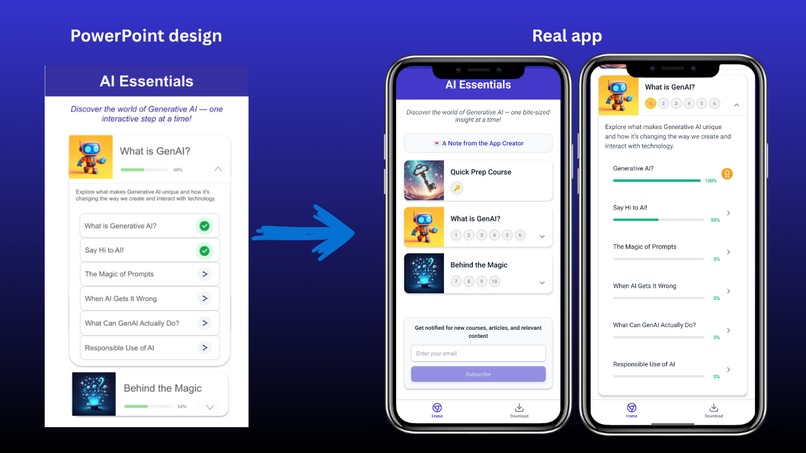
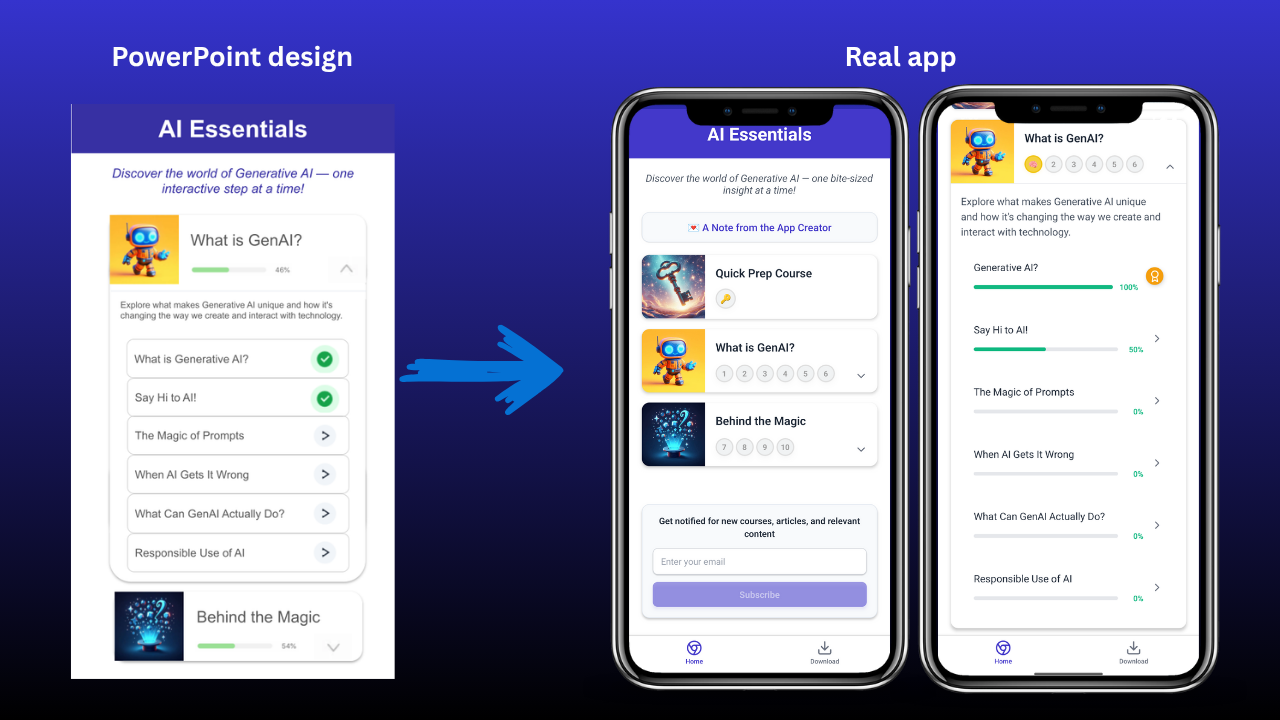
from design to real app
Inspiration
This idea started with a simple but powerful question my manager asked when I showed him an AI image generation tool: “Does AI really know what yellow is?” That moment made me realize that although more and more people are using AI, few truly understand how it works behind the scenes — and that understanding is key to using AI responsibly and effectively.
So I created this app to help people quickly understand what AI is capable of, where its limits are, and how to use it safely and confidently.
What it does
AI Essentials offers bite-sized courses to help people quickly understand AI and use it confidently, creatively, and responsibly.
Key features:
- 10 bite-sized lessons on core AI concepts
- Progress tracking with badges and indicators
- Interactive sections to explore AI directly
- Quizzes to check understanding
- Downloadable course content for future reference
- Easy email subscription for future updates
Whether you’re a curious beginner or an everyday AI user, AI Essentials helps you explore AI with confidence, curiosity, and care.
How I built it
I built AI Essentials entirely with Bolt.new and Supabase. I'd summarize my development as follows:
- Phase 1: Created course content, researched course app designs online, and drafted the UI layout in PowerPoint, saving it as an image.
- Phase 2: Shared my design image with Bolt.new to start turning it into a real app.
- Phase 3: Built more courses, added progress tracking features, and connected to Supabase for users to store or remove their subscription emails.
- Phase 4: Refined the app design and tested all features extensively, with help from friends who tested it on their iPhones.
Challenges I ran into
- Describing design needs clearly: I often didn’t know the right UI terms (e.g., tab bar, modal view, expandable cards etc). To overcome this, I shared my UI mockup images with Bolt.new to communicate visually. Or research the exact terms online to communicate effectively with Bolt.new.
- Long conversations using many tokens: As my chats with Bolt.new grew, it used a lot of tokens, even for small edits. I learned to fork or duplicate versions to restart conversations and save tokens, though it required careful tracking to keep important updates.
- Identifying technical issues: Sometimes features didn’t work, and I couldn’t tell why from Bolt.new's responses. I learned to check Bolt and Terminal logs in the Code section to identify error details. For example, after forking a backup, the app couldn't work anymore. It took me a while to figure out from the logs that there were empty file errors. Re-uploading images solved it.
- Maintaining version control: Remembering which version had which updates was tricky. At times, I accidentally reverted to versions missing recent work, which required extra time to restore.
Accomplishments that I'm proud of
- I created an AI learning app from scratch! ✨
- I enabled Gemini’s text-to-text and text-to-image features in my app! ✨
- I transformed a PowerPoint design into a real, functioning app on a phone! ✨
- I summarized key generative AI concepts into 10 mini-courses to help more people use AI confidently and responsibly! ✨
I’m also proud that as I interacted with Bolt.new, I became more confident in communicating with AI tools. I learned how to break down tasks into clear steps, a skill that applies beyond this project.
What I learned
- Step-by-step instructions work best: I learned that AI works better with step-by-step instructions rather than complex multiple requests in a prompt. For example, designing a user interface first in a prompt, confirming it, then defining how each element should function in another prompt.
- Learn from Bolt.new's responses: I picked up many new UI design terms from Bolt.new’s responses — like "tab bar", "modal view", “course cards”, “styled containers” etc. and how it organized scripts as session1.tsx, session2.tsx, etc. Knowing these terms made my communication with Bolt.new more effectively.
- Editing directly saves tokens: Instead of asking Bolt.new to revise text or images which seem usually consuming more tokens, I learned to edit them directly in the script files in the Code section or update images in the folder directly to avoid using extra tokens.
- AI empowers non-coders: This project showed me how helpful AI is in coding. For software engineers, it likely speeds up work dramatically. For non-coders like me, tools like Bolt.new open up opportunities to build things we never thought we could. While there’s room for AI tools to improve in security design, coding quality, and stability etc., I’m optimistic about their potential to empower more people.
What's next for AI Essentials
We’re living at the start of an incredible AI journey. I feel lucky to have grown up brainstorming ideas from scratch, then learning from the internet, and now building with AI.
Because I studied machine learning, understanding AI’s capabilities and limitations comes naturally to me. I want to continue distilling this knowledge into quick, accessible guides so the public can use AI confidently and responsibly.
Looking ahead, here are some ideas I’m considering to further develop AI Essentials:
- Enabling an Android version of the AI Essentials app to reach a broader audience
- Adding more mini-courses as AI technology evolves
- Offering interactive examples that don’t require an API key
- Providing course content in different languages to reach more learners
These are possibilities I hope to explore to make AI learning even more accessible for everyone.
Built With
- bolt.new
- gemini
- supabase

Log in or sign up for Devpost to join the conversation.