Inspiration
What it does
How we built it
Challenges we ran into
Accomplishments that we're proud of
What we learned
What's next for AI Data Analysis Assistance
📊 AI Data Analyst Pro
🚀 About the Project
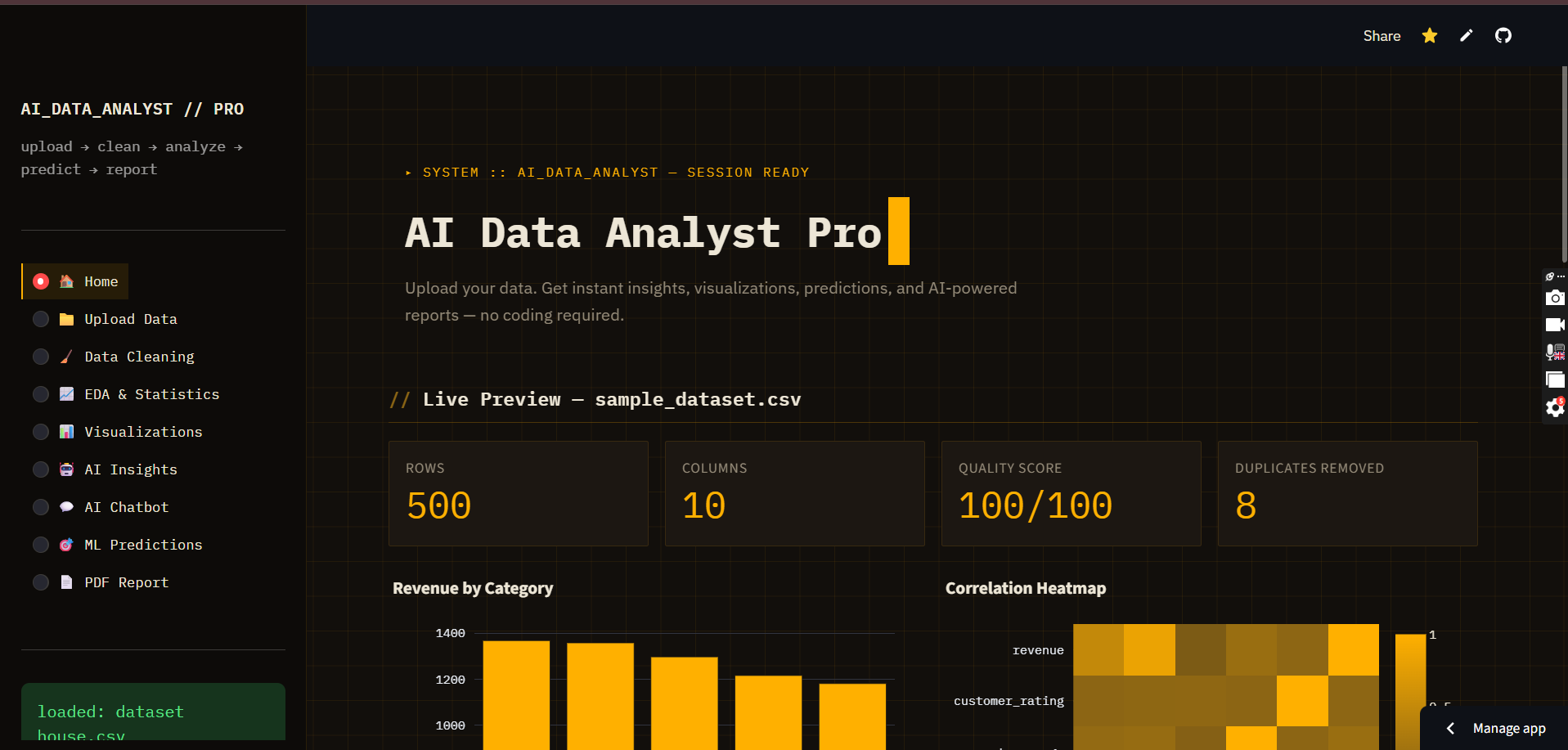
AI Data Analyst Pro is an AI-powered web application that transforms raw datasets into meaningful insights within minutes. The platform is designed for students, data analysts, freelancers, researchers, startups, and business professionals who want to explore, understand, and visualize their data without writing complex code.
Users can upload CSV, Excel, or JSON files, and the application automatically performs data cleaning, exploratory data analysis (EDA), interactive visualization, AI-generated insights, machine learning predictions, and professional report generation—all through a simple and intuitive interface.
💡 Inspiration
Many students and beginners struggle with data analysis because it requires knowledge of Python, statistics, SQL, and visualization libraries. Even experienced analysts spend a significant amount of time performing repetitive tasks such as cleaning data, generating charts, and preparing reports.
The idea behind AI Data Analyst Pro was to simplify this workflow by combining traditional data science techniques with modern Generative AI. Instead of manually writing code for every dataset, users can upload their data and receive intelligent insights within seconds.
The goal is to make data analysis more accessible, faster, and easier for everyone.
🎯 Problem Statement
Working with datasets often involves repetitive and time-consuming tasks:
- Cleaning missing or duplicate data
- Understanding dataset structure
- Creating visualizations
- Finding correlations and trends
- Performing statistical analysis
- Building predictive models
- Writing summary reports
For many users, especially beginners, these steps can be overwhelming.
AI Data Analyst Pro automates these processes and provides clear explanations, enabling users to focus on decision-making rather than repetitive coding.
⚙️ How the Project Works
The application follows an end-to-end data analysis workflow:
- Upload a CSV, Excel, or JSON dataset.
- Validate and preview the uploaded data.
- Perform automatic data profiling.
- Identify missing values, duplicates, and data quality issues.
- Generate summary statistics and exploratory analysis.
- Create interactive Plotly visualizations.
- Produce AI-generated insights and recommendations.
- Train machine learning models for prediction (when applicable).
- Generate a professional PDF report containing charts, statistics, and AI observations.
- Allow users to download cleaned datasets and generated reports.
🛠️ Technologies Used
Frontend
- Streamlit
- HTML/CSS
- Custom CSS Styling
Backend
- Python
Data Analysis
- Pandas
- NumPy
Machine Learning
- Scikit-learn
Visualization
- Plotly
- Matplotlib
Artificial Intelligence
- OpenAI / Claude / Gemini API
Report Generation
- ReportLab
Deployment
- Streamlit Cloud
✨ Key Features
- 📁 CSV, Excel, and JSON upload
- 📊 Automatic Exploratory Data Analysis (EDA)
- 📈 Interactive charts and dashboards
- 🤖 AI-generated insights and recommendations
- 🧹 Automatic data cleaning
- 📉 Correlation and statistical analysis
- 🧠 Machine learning prediction module
- 💬 AI chatbot for dataset-related questions
- 📄 Professional PDF report generation
- 📥 Download cleaned datasets
- 🌙 Modern responsive interface
- ☁️ One-click deployment on Streamlit Cloud
🧠 What I Learned
Building this project helped me gain practical experience in:
- Data preprocessing techniques
- Exploratory Data Analysis (EDA)
- Feature engineering
- Interactive data visualization
- Machine learning workflows
- Prompt engineering for AI assistants
- API integration
- PDF report generation
- Streamlit application development
- Cloud deployment
- Building user-friendly interfaces
- Error handling and application design
Beyond the technical aspects, I also learned the importance of designing applications that solve real-world problems while remaining simple and accessible for users.
🚧 Challenges Faced
During development, several challenges needed to be addressed:
- Supporting multiple file formats reliably
- Handling datasets with missing or inconsistent values
- Creating visualizations that adapt to different data structures
- Integrating AI-generated insights while avoiding unsupported conclusions
- Optimizing performance for larger datasets
- Designing a responsive and intuitive user interface
- Generating well-formatted PDF reports
- Preparing the application for deployment on Streamlit Cloud
- Managing API keys securely using environment variables and Streamlit Secrets
Each challenge provided an opportunity to improve the architecture, usability, and robustness of the application.
🌍 Future Improvements
Future versions of AI Data Analyst Pro may include:
- Natural language queries for data analysis
- SQL query generation
- Advanced forecasting models
- Time-series analytics
- Automated dashboard creation
- Collaboration and team workspaces
- User authentication and saved projects
- Multi-language support
- Business KPI templates
- Integration with cloud storage services
- Explainable AI (XAI) for model predictions
🎯 Impact
AI Data Analyst Pro aims to reduce the barrier to entry for data analysis by combining automation, machine learning, and Generative AI into a single platform.
The project demonstrates how AI can support education, research, and business by helping users transform raw data into meaningful insights quickly and efficiently.
📌 Final Note
AI Data Analyst Pro is more than a visualization tool—it is an intelligent data analysis assistant designed to empower users with actionable insights, interactive analytics, and AI-powered decision support, making data science more accessible to everyone.
Built With
- artificial-intelligence
- css
- csv
- data-analysis
- data-visualization
- excel
- exploratory-data-analysis
- git
- github
- javascript
- machine-learning
- matplotlib
- numpy
- openai
- pandas
- plotly
- python
- reportlab
- scikit-learn
- streamlit
- streamlit-cloud


Log in or sign up for Devpost to join the conversation.