-
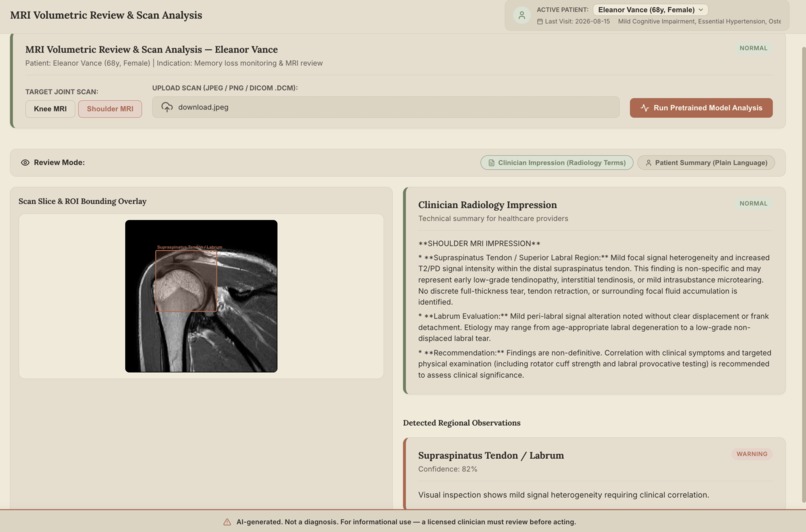
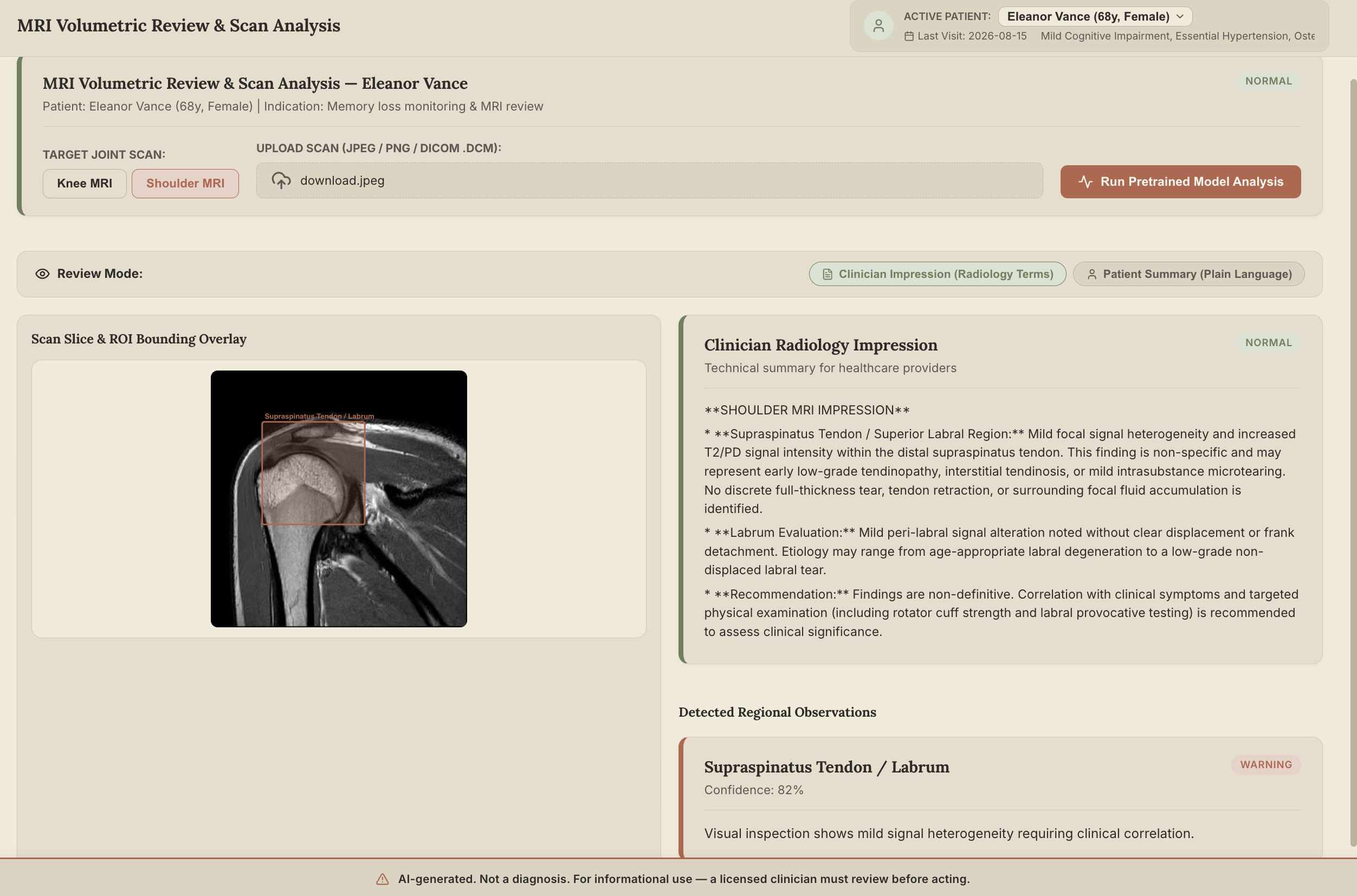
AI analyzes shoulder and knee MRI scans to detect potential abnormalities, highlight regions of interest and generate clear clinical finding
-
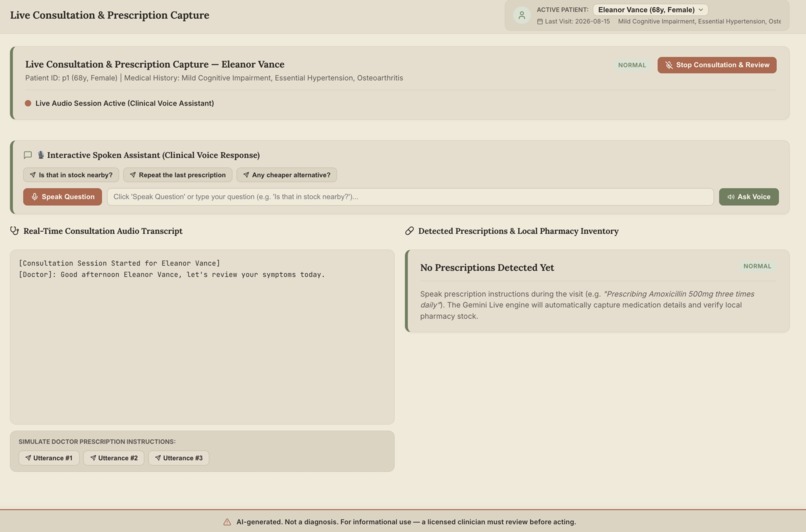
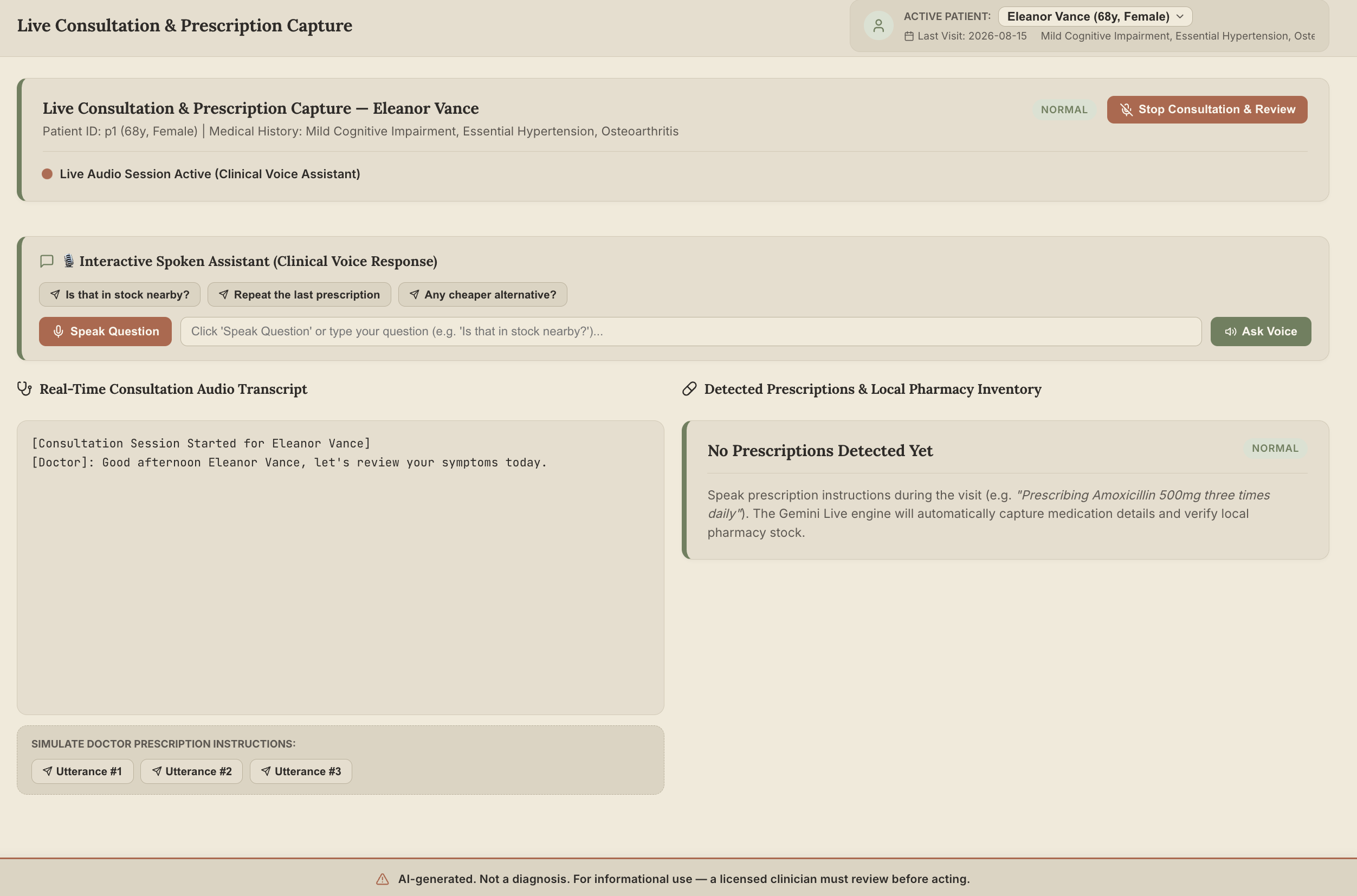
AI listens to consultations, extracts medicines, dosage and duration, checks pharmacy stock, and prepares a prescription for doctor approval
-
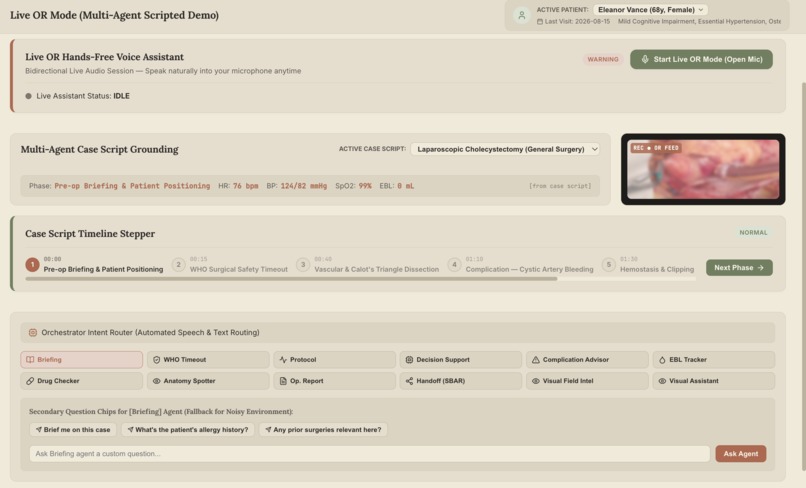
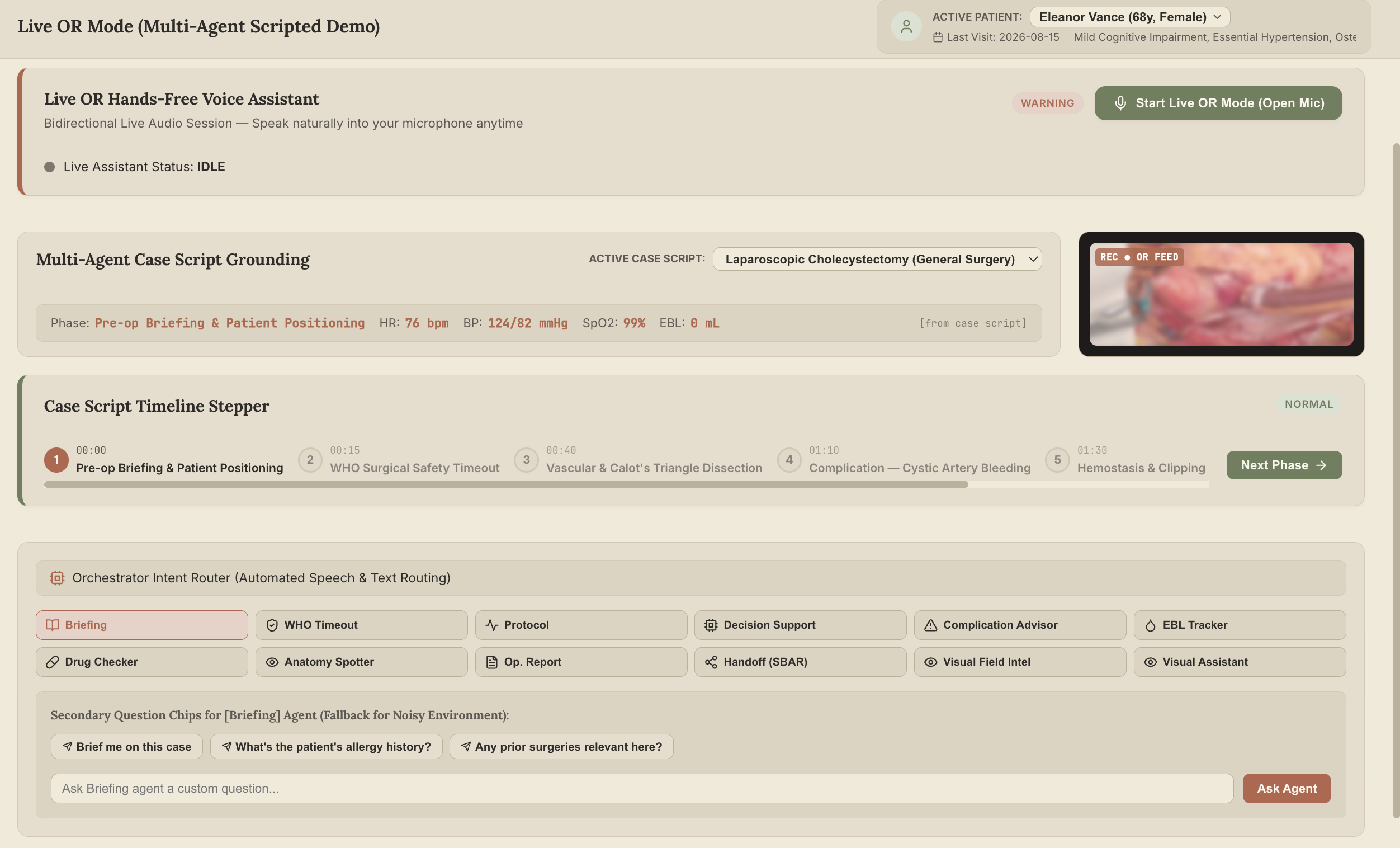
Live OCR reads medical documents during surgery, extracts key information, and lets surgeons ask questions by voice while staying focused.
-
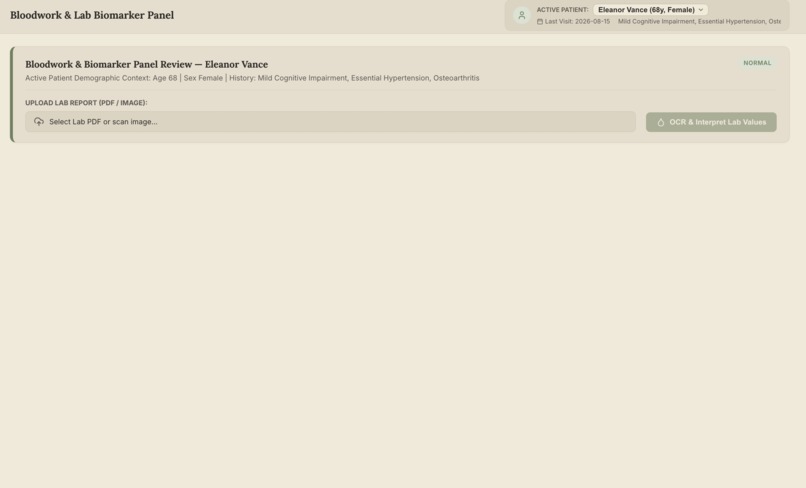
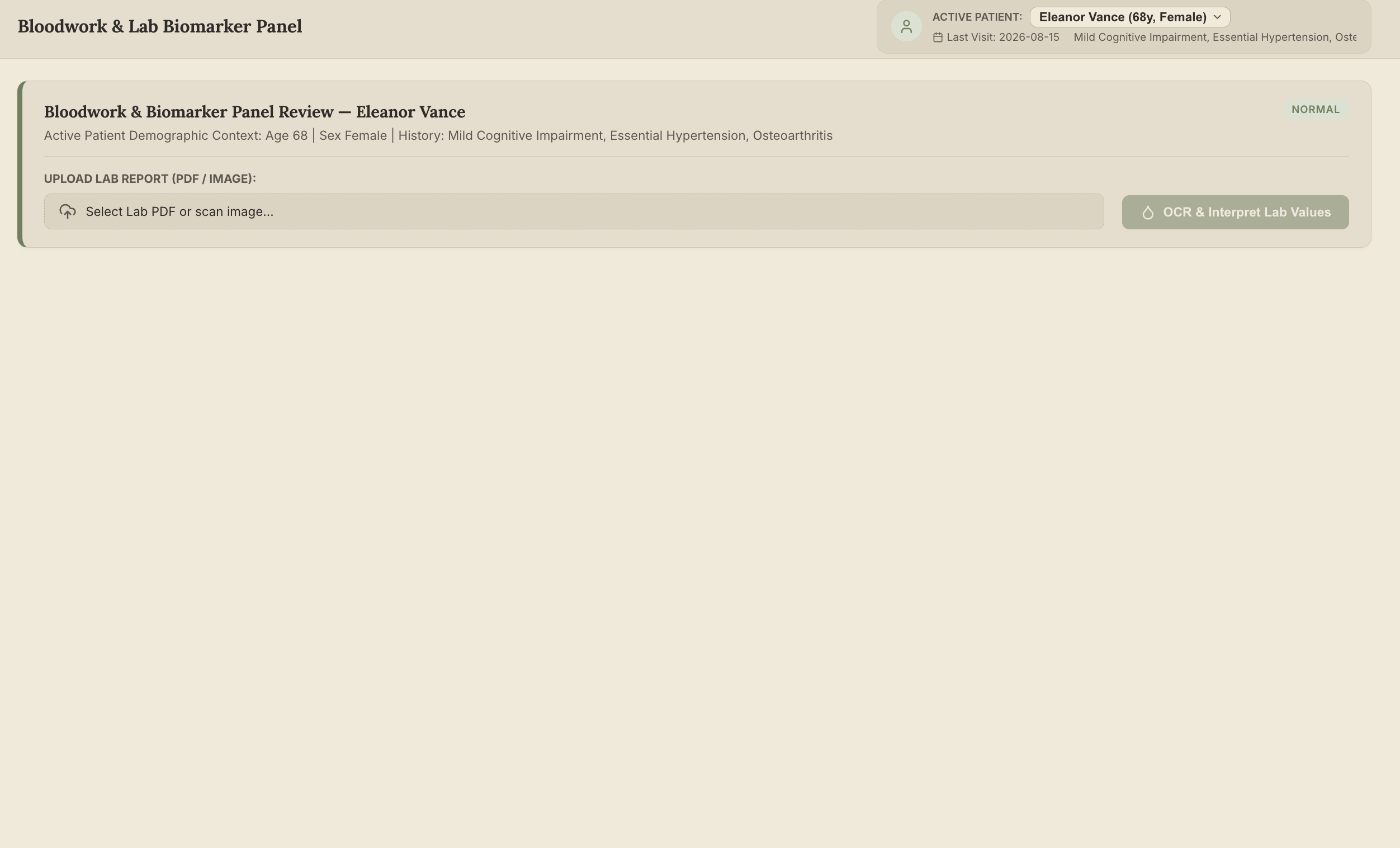
AI reads blood reports, extracts biomarkers, flags abnormal values, and generates simple clinical and patient-friendly health summaries.
AI Clinical Copilot
An AI assistant that listens, understands, and assists clinicians — from consultation room to operating room.
From Idea to Impact
The Problem — Doctors have to remember, document, decide, and act at the same time.
A clinical workflow doesn't stop at diagnosis. During a single patient visit, the doctor may need to listen to the patient, review history, prescribe multiple medicines, check dosages, explain treatment, document the consultation, and arrange follow-up — often while interacting with a computer.
The problem becomes even more critical inside the operating room, where clinical decisions happen in real time and the surgeon's hands and attention are occupied.
The evidence:
Clinicians spend substantial time on documentation — studies have found physicians can spend roughly 2 hours on EHR and documentation work for every hour of direct patient care, contributing to administrative and cognitive burden.
Medication-related harm is a major patient-safety problem — medication errors occur across prescribing, dispensing, administration, and monitoring, making accurate medication information critical.
Medication errors carry a global economic cost of around $42 billion annually, highlighting the importance of safer prescription workflows.
Consultations contain critical information that is easy to lose — medication names, dosage, frequency, duration, allergies, and follow-up instructions are often captured manually during or after the conversation.
Surgery adds a unique constraint: the surgeon's hands are busy. During a procedure, stopping to search patient records, protocols, allergies, or previous imaging creates friction at exactly the moment information is needed.
Blood-loss estimation can be highly inaccurate — studies have reported estimation errors of 52–85% across simulated blood-loss scenarios.
Surgical safety checklists have measurable impact — a landmark WHO checklist study found major complications fell from 11.0% to 7.0% and inpatient deaths from 1.5% to 0.8% after implementation.
Critical safety steps can go undocumented — one study of laparoscopic cholecystectomies found satisfactory documentation of the Critical View of Safety in only 23.1% of cases.
The information exists. The challenge is making it available, understandable, and actionable at the exact moment the clinician needs it — without distracting them from the patient or procedure.
The Solution — A clinical AI that listens throughout the workflow.
AI Clinical Copilot is a multimodal assistant designed around two primary experiences:
Live Consultation Mode and Live Surgery Mode.
Instead of forcing clinicians to constantly type and navigate software, the AI listens, understands, retrieves information, documents actions, and provides assistance through natural voice interaction.
Live Consultation Mode — The AI listens while the doctor focuses on the patient
With appropriate consent, AI Clinical Copilot listens to the consultation and continuously extracts clinically relevant information.
It can capture:
- Symptoms and chief complaints
- Medical history
- Allergies
- Current medications
- Doctor's observations
- Treatment decisions
- Prescriptions
- Dosage
- Frequency
- Duration
- Follow-up instructions
Prescription Intelligence
When a doctor says:
"Take azithromycin 500 mg once daily for three days."
the AI automatically structures the prescription:
| Information | AI extracts |
|---|---|
| Medicine | Azithromycin |
| Dosage | 500 mg |
| Frequency | Once daily |
| Duration | 3 days |
| Instructions | Extracted from conversation |
The doctor doesn't have to stop and type.
Local Medicine Availability
The AI can then check connected local pharmacy data for availability.
The doctor can ask:
"Is this medicine available nearby?"
The system can return available options where connected data is available and identify generic alternatives when appropriate, while keeping the final decision with the clinician.
Consultation Command Examples
| Intent | Example Command | Response / Action |
|---|---|---|
| Patient summary | "Summarize this patient." | Concise clinical summary |
| Lab information | "What were the abnormal labs?" | Retrieves relevant findings |
| Medication history | "What medications is the patient taking?" | Displays current medications |
| Prescription extraction | "Start azithromycin 500 mg once daily for 3 days." | Extracts drug, dosage, frequency and duration |
| Medicine availability | "Is this medicine available nearby?" | Checks connected local pharmacy data |
| Documentation | "Draft today's consultation note." | Generates structured clinical notes |
| Patient explanation | "Explain this report to the patient." | Generates a simpler explanation |
Live Surgery Mode — A second set of eyes, ears, and memory
The same assistant can continue into the operating room.
Here, the challenge is fundamentally different:
The surgeon cannot stop operating to interact with a computer.
AI Clinical Copilot therefore uses a voice-first, hands-free workflow.
The surgical team can ask for information, trigger safety workflows, record events, track blood loss, retrieve protocols, and generate documentation without navigating through multiple systems.
Surgical Command Center
| Intent | Example Command | Response / Action |
|---|---|---|
| Patient data | "Show allergies." | Displays allergies and relevant medication information |
| Latest labs | "What was the latest hemoglobin?" | Retrieves the latest available value |
| Pre-op briefing | "Brief me on this case." | Concise patient and case summary |
| WHO Timeout | "Run the timeout." | Guided safety checklist with verbal confirmation |
| Blood loss tracking | "Blood loss 200 mL." | Updates cumulative EBL |
| Blood loss query | "How much blood have we lost?" | Returns current cumulative EBL |
| Drug safety | "Is cefazolin safe for this patient?" | Checks allergies and contraindications |
| Protocol guidance | "What protocol applies to this complication?" | Retrieves relevant protocol information |
| Anatomy guidance | "What's at risk here?" | Provides contextual anatomical information |
| Surgical event | "Document that the specimen was removed." | Creates a timestamped event |
| Visual assistance | "Is there bleeding?" | Provides permitted visual, text-grounded assistance |
| Operative report | "Generate the operative report." | Creates a structured surgical report |
| Handoff | "Prepare the handoff." | Generates an SBAR handoff |
| Session information | "What have we documented so far?" | Summarizes recorded surgical events |
The surgeon speaks. The system listens, understands, and responds.
Specialized Surgical Agents
Behind the voice interface, specialized agents handle different parts of the surgical workflow.
| Agent | Purpose |
|---|---|
| Pre-Op Agent | Patient history and case briefing |
| WHO Timeout Agent | Surgical safety verification |
| Drug Checker | Allergy and contraindication checks |
| EBL Tracker | Continuous blood-loss tracking |
| Protocol Agent | Phase-specific surgical guidance |
| Complication Advisor | Relevant emergency protocol retrieval |
| Anatomy Agent | Anatomical risk context |
| Operative Report Agent | Continuous surgical documentation |
| Handoff Agent | Structured SBAR handoff |
| Visual Assistant | Permitted visual, text-grounded assistance |
The goal is not autonomous surgery.
The goal is to give the surgical team a second set of eyes, ears, and memory — without taking control away from the surgeon.
One Patient. One Clinical Context.
The most important part of AI Clinical Copilot is that these aren't isolated tools.
A patient arrives.
The doctor speaks.
The AI captures the consultation and prescription.
The medicine is checked for local availability.
The prescription is confirmed.
Later, the same clinical context can support pre-operative briefing, surgical safety checks, medication verification, and operative documentation.
Consultation → Prescription → Clinical Record → Surgery
The AI follows the patient's clinical context, rather than making the doctor repeatedly provide the same information.
Supporting Medical Intelligence
While Live Consultation and Live Surgery are the core experiences, AI Clinical Copilot also provides supporting multimodal capabilities.
OCR Mode
- Extracts information from blood reports and medical documents
- Identifies test values, units, and reference ranges
- Classifies findings as Normal, Borderline, or High Alert
- Generates clinical and patient-friendly summaries
- Allows voice-based Ask the Report interaction
Medical Scan Mode
- Supports shoulder and knee MRI/DICOM analysis
- Identifies potential abnormalities
- Highlights regions of interest
- Provides clinician-oriented and patient-friendly findings
These capabilities feed additional information into the same clinical intelligence layer.
How we built it
AI Clinical Copilot combines:
- Speech recognition
- Conversational AI
- Medical OCR
- Multimodal vision
- Clinical information extraction
- Voice interaction
- Context-aware reasoning
- Prescription extraction
- Real-time clinical agents
- Human-in-the-loop validation
The architecture is built around a simple principle:
AI reads. AI listens. AI organizes. AI suggests. The clinician reviews and decides.
Challenges we ran into
Understanding natural prescriptions — Doctors don't speak prescriptions in a fixed format, so the AI must correctly identify medication, dosage, frequency, duration, and instructions from natural conversation.
Maintaining clinical context — Information mentioned minutes earlier may become important later in the consultation or surgery.
Real-time voice interaction — The assistant needs to respond quickly while handling interruptions and natural conversation.
Operating-room constraints — Surgical assistance must be concise, hands-free, and designed not to distract from the procedure.
Safety and reliability — AI-generated information must remain clearly distinguishable from clinician-confirmed decisions.
Accomplishments we're proud of
Consultation that feels conversational — Doctors can speak naturally while the AI captures clinical information and documentation.
Prescription intelligence — The AI extracts medicine + dosage + frequency + duration directly from spoken instructions.
Local availability integration — The workflow can connect prescriptions with available local pharmacy information.
Hands-free surgical assistance — Surgeons can retrieve information, run safety workflows, track events, and generate documentation using voice.
Unified clinical context — Reports, conversations, prescriptions, imaging, and surgical information can contribute to the same patient context.
What we learned
- The best clinical AI should fit into the doctor's workflow, not create another workflow.
- Voice can remove a major interaction barrier in healthcare.
- Extracting information is only useful when it can lead to an action.
- Clinical context becomes more powerful when different modalities are connected.
- Human oversight is fundamental to safe clinical AI.
The Vision
Today, healthcare AI often exists as separate tools:
One for reports. One for transcription. One for prescriptions. One for imaging. One for surgery.
We believe these experiences can become one intelligent clinical layer.
AI Clinical Copilot
Listens during the consultation. Understands the prescription. Checks what is available. Remembers the clinical context. Assists during surgery. Documents what happened.
We are not building an AI doctor.
We are building the AI that works alongside the doctor.
Built With
- api
- computer-vision
- generative-ai
- javascript
- machine-learning
- natural-language-processing
- node.js
- python
- react
- speechapi


Log in or sign up for Devpost to join the conversation.