Introduction
“If you understand why you fell, you’ll conquer the climb next time.”
That belief is what inspired AI Climbing Tokyo.
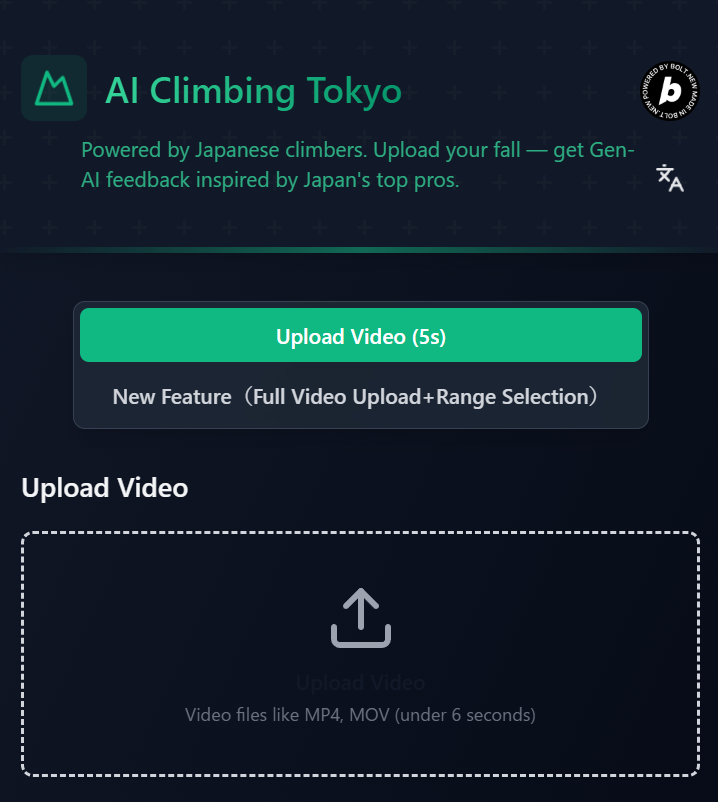
Upload a video of your attempt, mark the few seconds before and after you fall, and the system generates a one‑line tip for your next try.
🎥 Demo Video
🌍 Bouldering Landscape — Why an AI Coach Now?
- Olympic Boost & Exploding Participation
- Sport climbing became an official Olympic event at Tokyo 2020.
- Global climbers: ≈ 44.5 million (IFSC 2019).
Registered IFSC competitors: ≈ 140 k, World Cups in 50 + countries.
Japan: A Climbing Powerhouse
Domestic climbers + enthusiasts: ≈ 2.79 million.
≈ 800 gyms nationwide.
Japanese athletes are regular World Cup finalists, often sweeping the podium.
Japanese Gyms as “Meccas”
Renowned for route‑setting quality, attracting international climbers on gym tours.
It’s common to see top world athletes training in Japan.
Perfect Fit for Video × Rest Routine
Bouldering requires a few minutes’ rest between attempts—ideal for instant video review.
Tripod + phone → immediate form check is already the norm.
Training Methods Still Maturing
The sport’s young; scientific coaching is work‑in‑progress.
Yet Japanese pros share tips enthusiastically.
By feeding these into RAG, we can let climbers feel a “Japanese pro at your side.”
The “Climbing × Japan” brand is trusted worldwide, so the project targets a global launch.
Why short, fast advice?
Climbers need a quick read during rest. Using Cloud Run + Gemini 2.0 Flash‑lite, we tune for < 30 s total processing.
⭐ TL;DR (3‑line summary)
- Analyze user‑selected fall segment with RAG → generate one‑line advice.
- Serverless stack: Cloud Run × Cloud Storage × Vertex AI (Gemini 2.0 Flash‑lite).
- OSS repo: https://github.com/Hassan-python/Hackathon_aiclimbingtokyo
🔄 CI/CD & Integration Flow
Developer → GitHub (push) ─┬─► Cloud Build (inject secrets, build) │ └─► Artifact Registry → Cloud Run (deploy) │ Netlify CI (build SPA) ─┴─► Netlify CDN │ End Users ⇄ HTTPS SPA ⇄ REST API (Cloud Run) + signed URLs
🧗♂️ User Flow (Input → Output)
Open site ↓ ① Select “clip” mode ↓ ② Drag‑and‑drop video ↓ ③ POST /upload → Cloud Storage ↓ ④ POST /analyze → Gemini 2.0 Flash‑lite + ChromaDB ↓ ⑤ Receive JSON ↓ ⑥ Show one‑line advice
🚀 Roadmap
Mobile Apps 📱 iOS / Android native release via App Store & Google Play.
Seamless shoot‑to‑analysis on phone.
AI Analysis Upgrades 🤖 Skeleton tracking for real‑time joint & muscle analysis.
Finer motion insights, including 3‑D pose estimation.
Advanced RAG via MCP Server 🔍 Integrate Model Context Protocol (MCP) for faster, richer queries.
Expand knowledge base with external climbing datasets.
These features will maximize training impact and help more climbers progress faster. Join us on the ascent!
Built With
- chromadb
- gcp
- netlify
- python
- react
- typescript

Log in or sign up for Devpost to join the conversation.