-
-
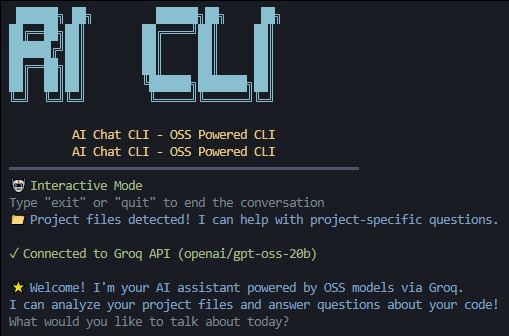
AI-CHAT-CLI-OSS

AI CLI OSS
Inspiration
We were inspired by the friction developers face when switching between their code editor, terminal, and web browser just to get AI assistance. Every time you need help understanding a codebase, debugging an issue, or getting coding guidance, you have to leave your flow. We wanted to create a seamless experience where powerful OSS AI models could provide intelligent, context-aware assistance directly in the terminal where developers already spend most of their time.
What it does
AI CLI OSS is a command-line assistant that brings OSS AI models (via Groq's fast inference) directly into your terminal workflow. It provides:
Interactive chat sessions for extended problem-solving
Single-shot questions for quick answers
Smart context detection that automatically includes your project files when relevant
Comprehensive project analysis with structured insights
Secure local configuration with no data persistence
Global CLI access with simple setup
The tool intelligently determines when to use your local project context versus general knowledge, making it both a coding assistant and a general-purpose AI helper.
How we built it
We built AI CLI OSS using Node.js with a focus on developer experience and performance:
Commander.js for robust CLI argument parsing and command structure
Groq SDK for fast OSS model inference (openai/gpt-oss-20b)
Inquirer.js for interactive prompts and setup wizards
Chalk for beautiful colored terminal output
Conf for secure, cross-platform configuration storage
Smart file context detection that scans project directories and intelligently includes relevant code files
Structured system prompts that make OSS model behavior predictable and useful for developer tasks
The architecture prioritizes local-first operation with no web browsing or external tool calls beyond the AI API.
Challenges we ran into
Context window optimization: Balancing comprehensive project context with token limits while keeping responses fast and relevant
Smart context detection: Building reliable heuristics to determine when questions need project context versus general knowledge without false positives
Cross-platform compatibility: Ensuring secure config storage and proper terminal handling across Windows, macOS, and Linux
User experience design: Creating an intuitive CLI that works for both interactive sessions and one-off commands
File scanning efficiency: Implementing fast directory traversal that excludes noise (node_modules, .git) while capturing relevant project files
Accomplishments that we're proud of
Published to npm: Successfully deployed as a global CLI tool that anyone can install with npm install -g ai-cli-oss
Smart context switching: Built an intelligent system that automatically provides project context when relevant, making the AI significantly more useful for development tasks
Zero-config operation: Supports environment variables for ephemeral usage while providing persistent config for regular use
Local-first security: No conversation storage, no web browsing, just secure API communication
Comprehensive project analysis: Delivers structured insights that actually help developers understand and improve their codebases
Clean developer UX: Intuitive commands, helpful setup wizard, and beautiful terminal output
What we learned
OSS models like gpt-oss-20b excel at structured, instruction-following tasks when given clear system prompts and relevant context
Developer tools succeed when they integrate seamlessly into existing workflows rather than requiring context switching
Smart defaults and automatic context detection are crucial for CLI tool adoption - users shouldn't have to think about when to include project files
Fast inference (via Groq) makes conversational AI in the terminal actually practical for daily use
Local-first approaches build trust - developers want to see exactly what context is being sent to AI models
What's next for AI CLI OSS
Immediate roadmap:
Enhanced file operations: Safe, auditable code editing suggestions with explicit diff previews
Multi-model support: Add support for other OSS models and let users choose based on their needs
Workspace intelligence: Better understanding of project types (React, Python, etc.) for more targeted assistance
Plugin architecture: Allow custom prompts and workflows for specific development scenarios
Future vision:
Team collaboration: Shared project analysis and insights for development teams
CI/CD integration: Automated code review and documentation generation
IDE extensions: Bring the same intelligent assistance to popular code editors
Advanced project understanding: Code dependency analysis, refactoring suggestions, and architectural insights
Inclusion of Agentic AI so that more efficiently the work canbe carried out
The goal is to make AI-powered development assistance as natural and essential as git or npm in every developer's toolkit.
Built With
- groq
- javascript
- openai


Log in or sign up for Devpost to join the conversation.