🧠 AI Care Assistant
Client-side Chrome Extension powered by Gemini Nano and Chrome Built-in AI APIs
基于 Gemini Nano 与 Chrome 内置 AI API 的客户端智能护理助手扩展
💡 Inspiration
EN:
The inspiration for AI Care Assistant came from real-world challenges faced by home-based caregivers — both family members and professionals — who often work without immediate medical guidance. I wanted to build a privacy-safe, offline, intelligent assistant that could provide structured caregiving plans even when the internet or cloud access is unavailable.
ZH:
本项目的灵感来源于居家照护的真实痛点:无论是家庭照护者还是专业护理人员,常常缺乏即时、科学的指导。
我希望打造一个隐私安全、离线可用的智能护理助手,即使在没有网络或云端支持的情况下,也能为照护者提供结构化的护理计划。
💬 What it does
EN:
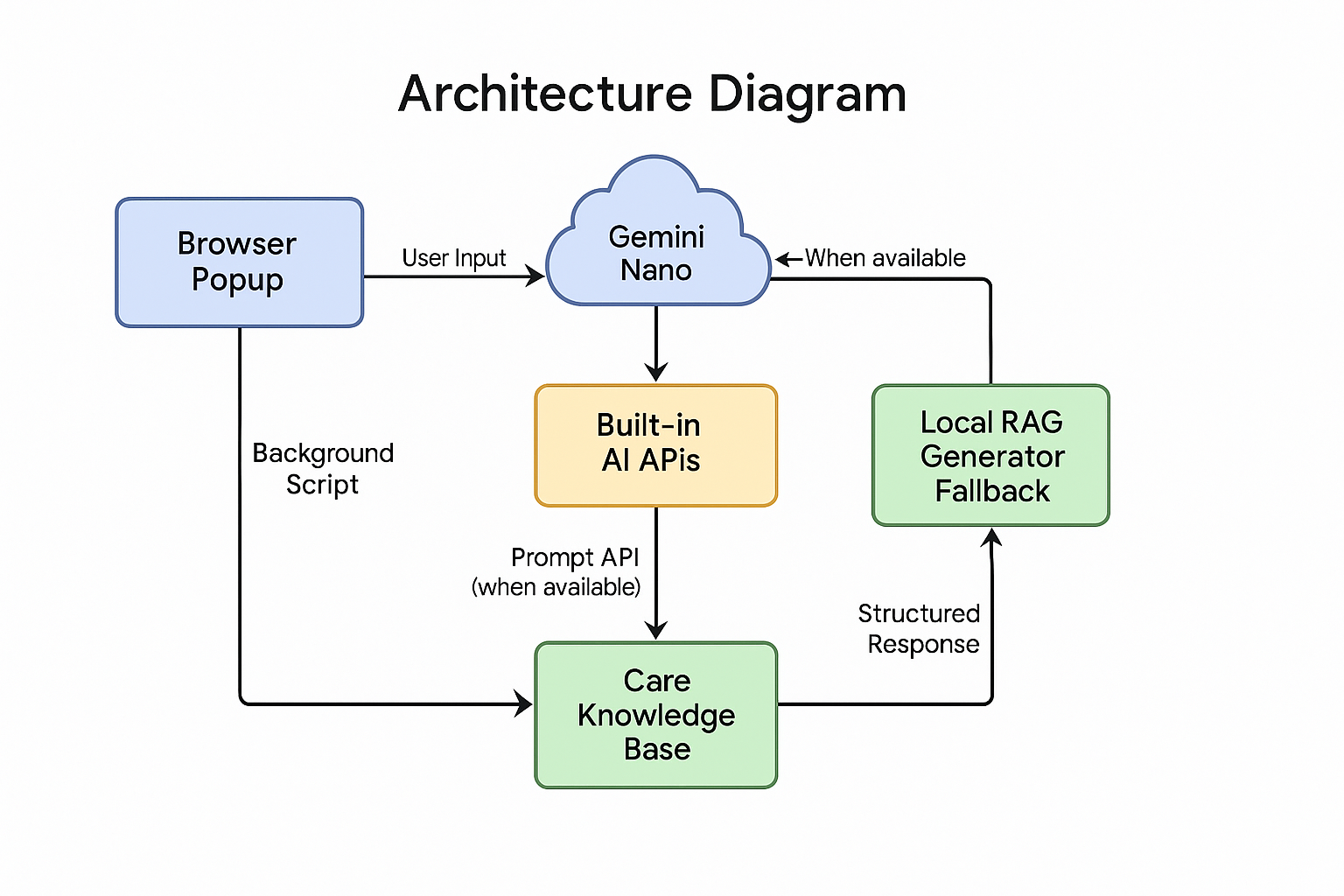
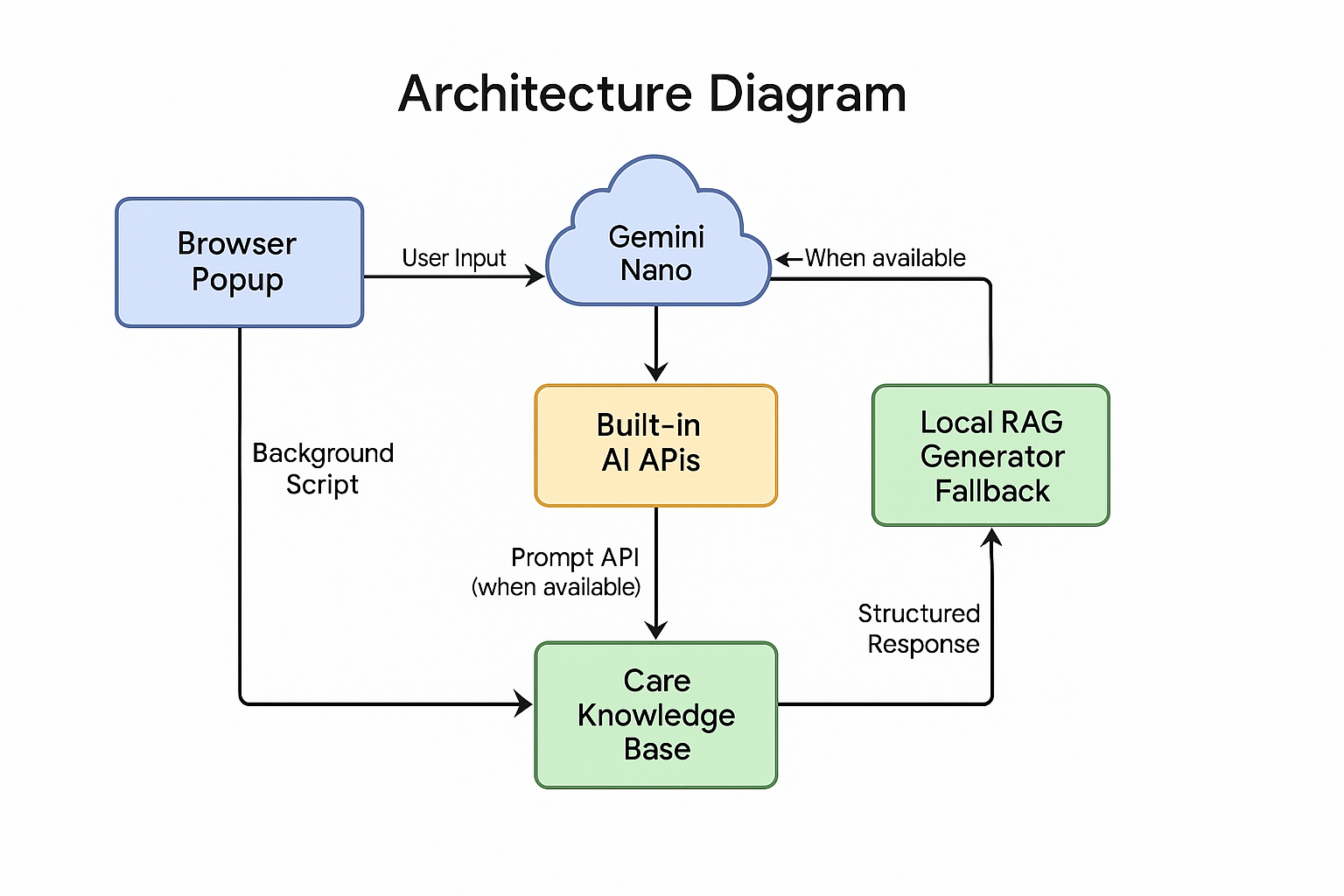
AI Care Assistant is a Chrome Extension that generates evidence-informed caregiving guidance locally using Chrome’s Built-in AI (Gemini Nano).
When Gemini Nano is unavailable, it automatically switches to a local retrieval-augmented generation (RAG) fallback mode — ensuring continuous, private, and offline access.
ZH:
AI Care Assistant 是一款基于 Chrome 内置 AI(Gemini Nano)的浏览器扩展,能够在本地生成循证护理指导。
当 Gemini Nano 暂不可用时,系统会自动切换为本地检索增强生成(RAG)模式,确保用户在离线和隐私环境下依然能获得完整服务。
🧩 How we built it
EN:
- Built as a Manifest V3 Chrome Extension using plain HTML, CSS, and JavaScript.
- Implemented Popup UI for caregiver interaction and Background Service Worker for AI logic.
- Integrated the Prompt API (Gemini Nano) for on-device text generation.
- Created a local Markdown knowledge base (
care_knowledge_en.md) to support retrieval and fallback generation. - Added structured formatting, animations, and visuals for clear, user-friendly caregiving plans.
ZH:
- 使用 Chrome Manifest V3 构建,前端采用原生 HTML、CSS、JavaScript。
- 实现了用于交互的 Popup UI 以及负责 AI 调用与逻辑处理的 后台服务线程(Background Service Worker)。
- 集成 Prompt API(Gemini Nano) 以实现本地文本生成。
- 构建了一个 Markdown 格式的本地知识库 (
care_knowledge_en.md),支持检索增强与备用生成。 - 输出结构化内容、配色与动画增强,提升护理计划的可读性与交互体验。
⚙️ Challenges we ran into
EN:
The main challenge was ensuring compatibility across Chrome versions since the Built-in AI APIs are still in Early Preview.
We also faced limitations with Gemini Nano availability on some devices. To overcome this, we designed a progressive fallback system that automatically switches to a local RAG generator when the Prompt API is inaccessible.
ZH:
主要挑战是确保扩展在不同 Chrome 版本间的兼容性,因为内置 AI API 目前仍处于 早期预览阶段。
同时,一些设备暂时无法启用 Gemini Nano。
为此,我们设计了一个 渐进式回退系统(progressive fallback),在 Prompt API 不可用时自动切换到本地 RAG 生成器,实现功能稳定运行。
🏆 Accomplishments that we’re proud of
EN:
- Successfully built a fully client-side AI system with no server dependency.
- Achieved privacy-by-design architecture — all processing and generation remain on the device.
- Developed adaptive output modes for family vs professional caregivers, and brief vs detailed responses.
- Demonstrated Chrome’s Built-in AI potential for real healthcare applications.
ZH:
- 成功实现了一个 完全在本地运行的 AI 系统,无需服务器依赖。
- 建立了 隐私优先的体系架构,所有生成与处理均在设备端完成。
- 设计了 家庭/专业照护者 及 简版/详版 的自适应输出模式。
- 展示了 Chrome 内置 AI 在实际健康护理领域中的应用潜力。
📚 What we learned
EN:
We learned how to integrate emerging AI APIs directly into browser environments without relying on cloud services.
We also discovered the importance of fallback strategies for user trust — ensuring a consistent and private user experience regardless of technical limitations.
ZH:
我们学习了如何将新兴的 AI API 直接整合进浏览器环境中,而无需依赖云服务。
同时,我们认识到 回退策略(fallback strategy) 对用户信任的重要性:无论技术限制如何,都要保证一致且安全的体验。
🚀 What's next for AI Care Assistant for Home-Based Services
EN:
- Integrate additional Chrome Built-in AI APIs such as Summarizer and Proofreader.
- Enable multilingual support with the Translator API.
- Expand the local knowledge base for disease-specific guidance.
- Add daily care plan generation and export features.
- Explore use cases in home-based long-term care insurance systems.
ZH:
- 集成更多 Chrome 内置 AI API,如 Summarizer(摘要) 和 Proofreader(校对)。
- 借助 Translator API 实现 多语言支持。
- 扩充知识库,涵盖更多疾病与照护场景。
- 增加 每日护理计划生成 与导出功能。
- 进一步探索在 居家长期护理保险体系 中的应用潜力。
🧠 Technical Keywords
Chrome Extension · Gemini Nano · Built-in AI APIs · Client-side AI · RAG · Privacy-preserving · Offline AI · Caregiver Support · Geriatric Nursing
Built With
- html
- javascript
- rag
- ui


Log in or sign up for Devpost to join the conversation.