-
-
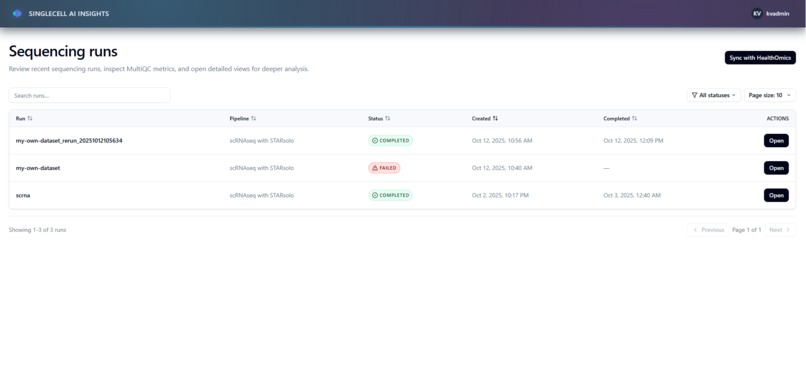
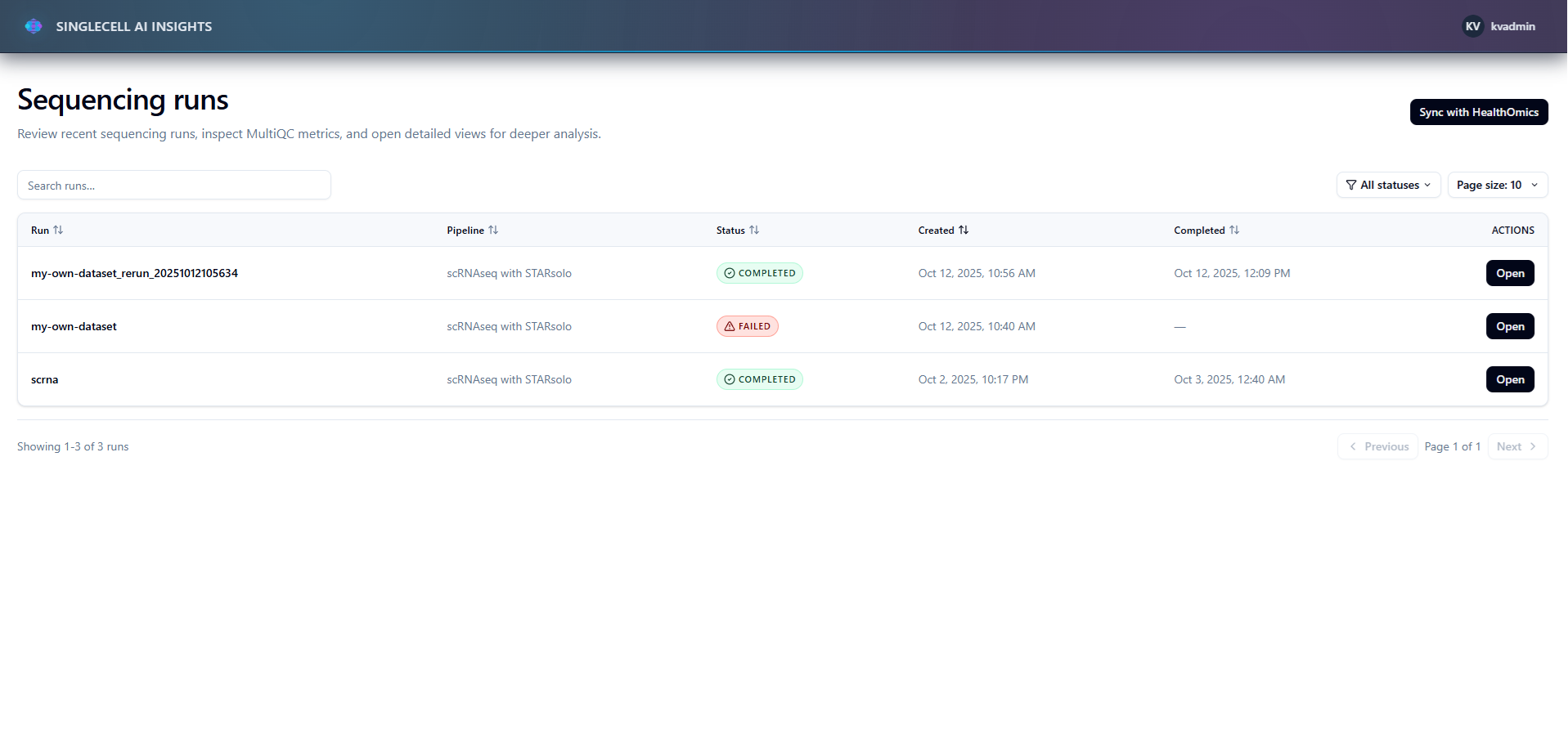
Home page showing Healthomics runs
-
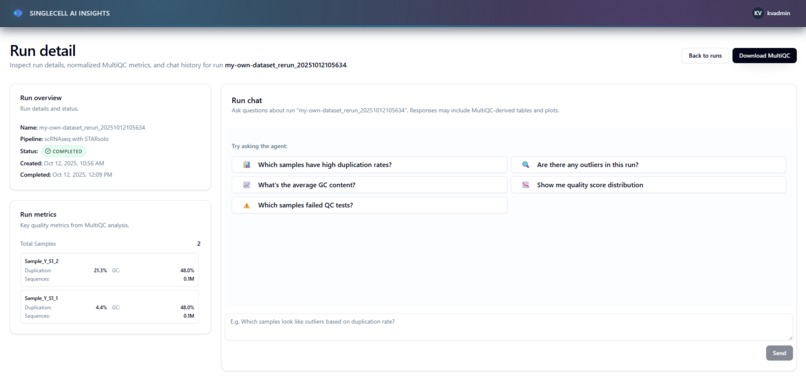
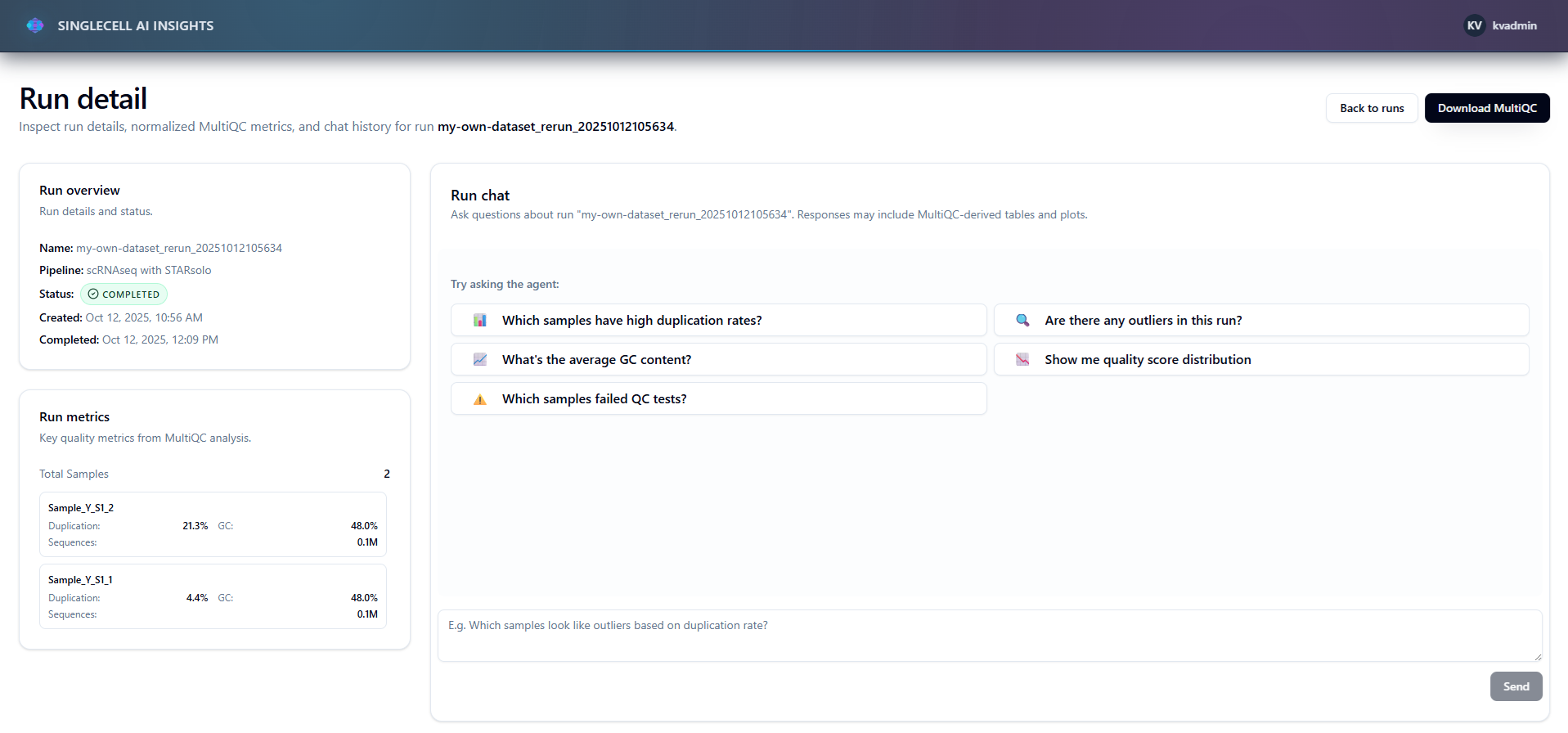
Run analysis details page with details/metrics and agent access
-
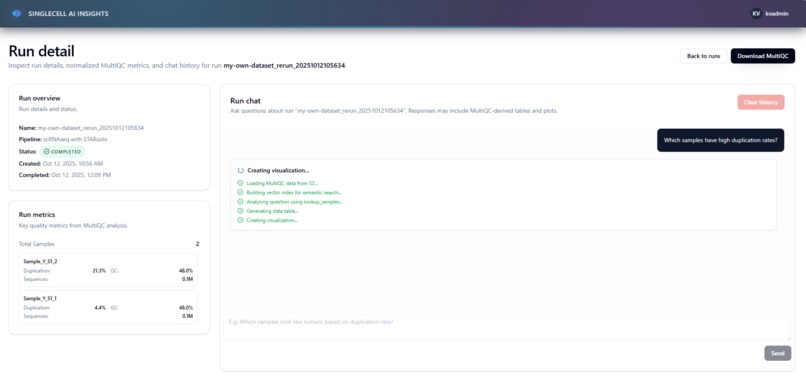
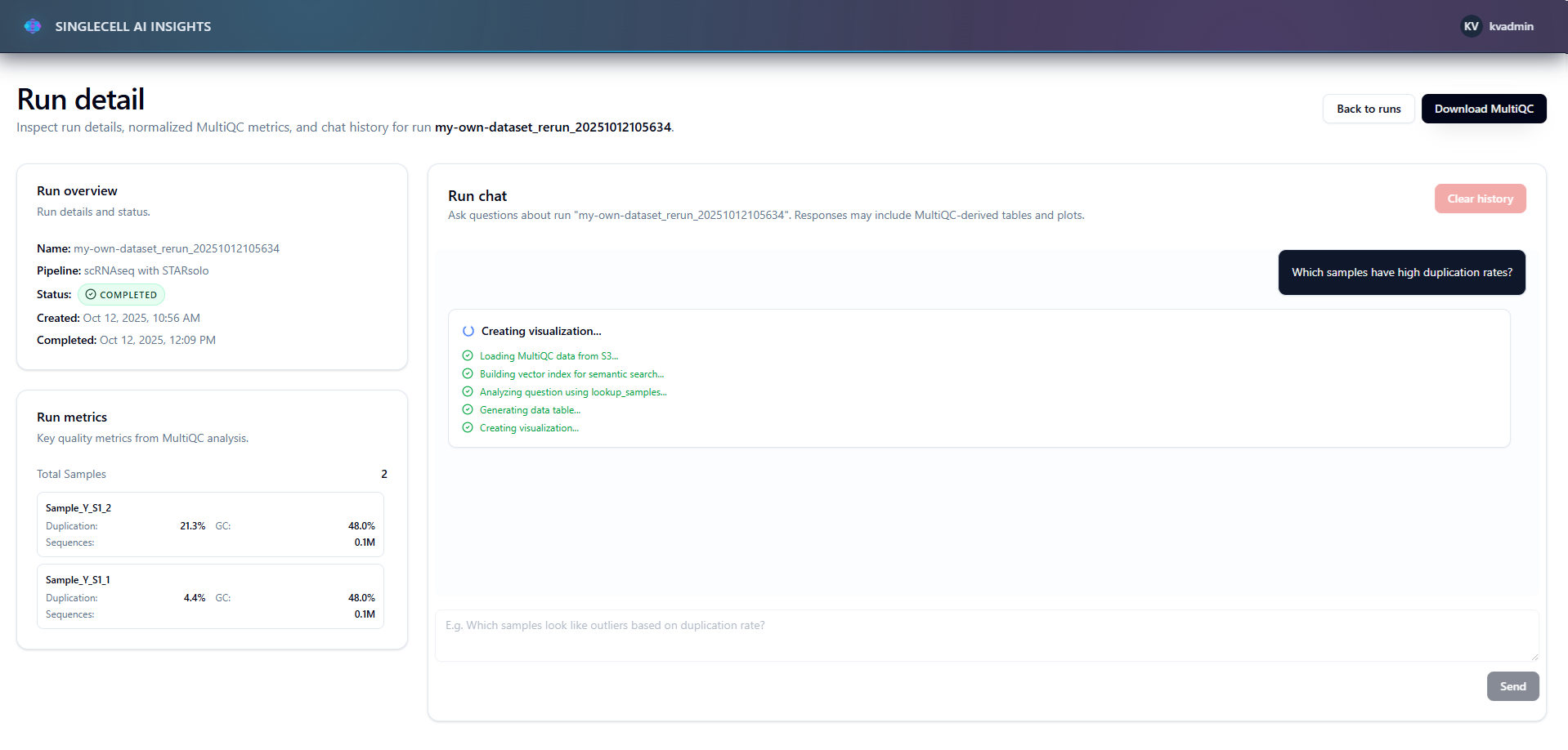
Users asked question - agent thinking
-
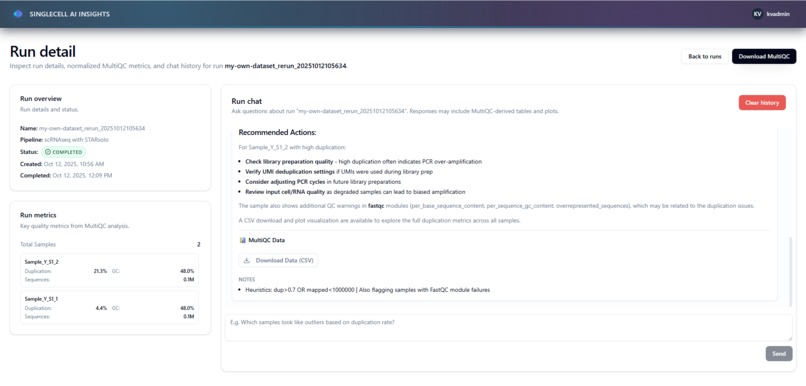
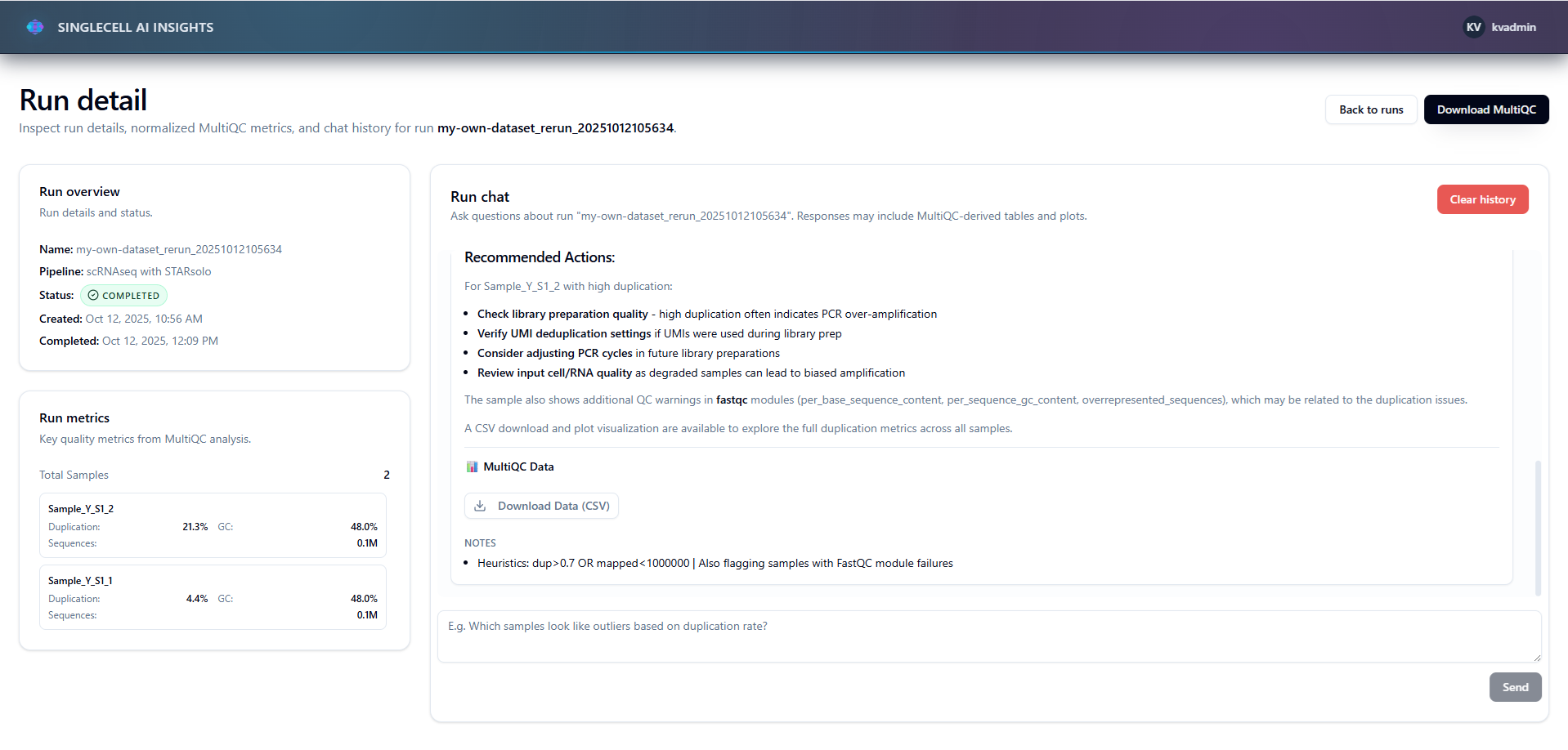
Agent response
-
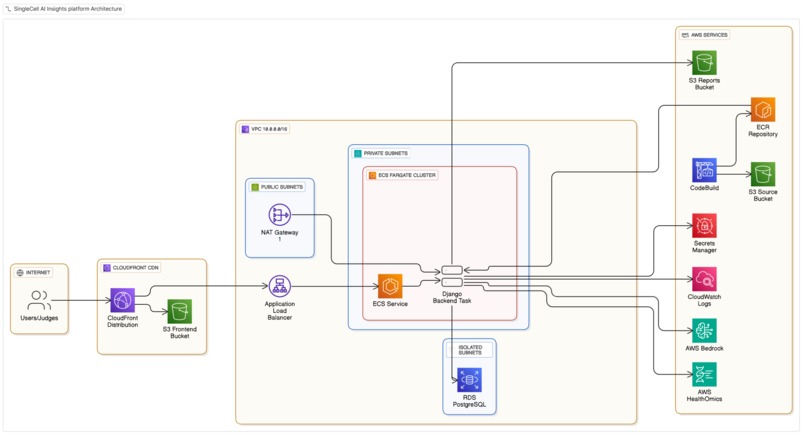
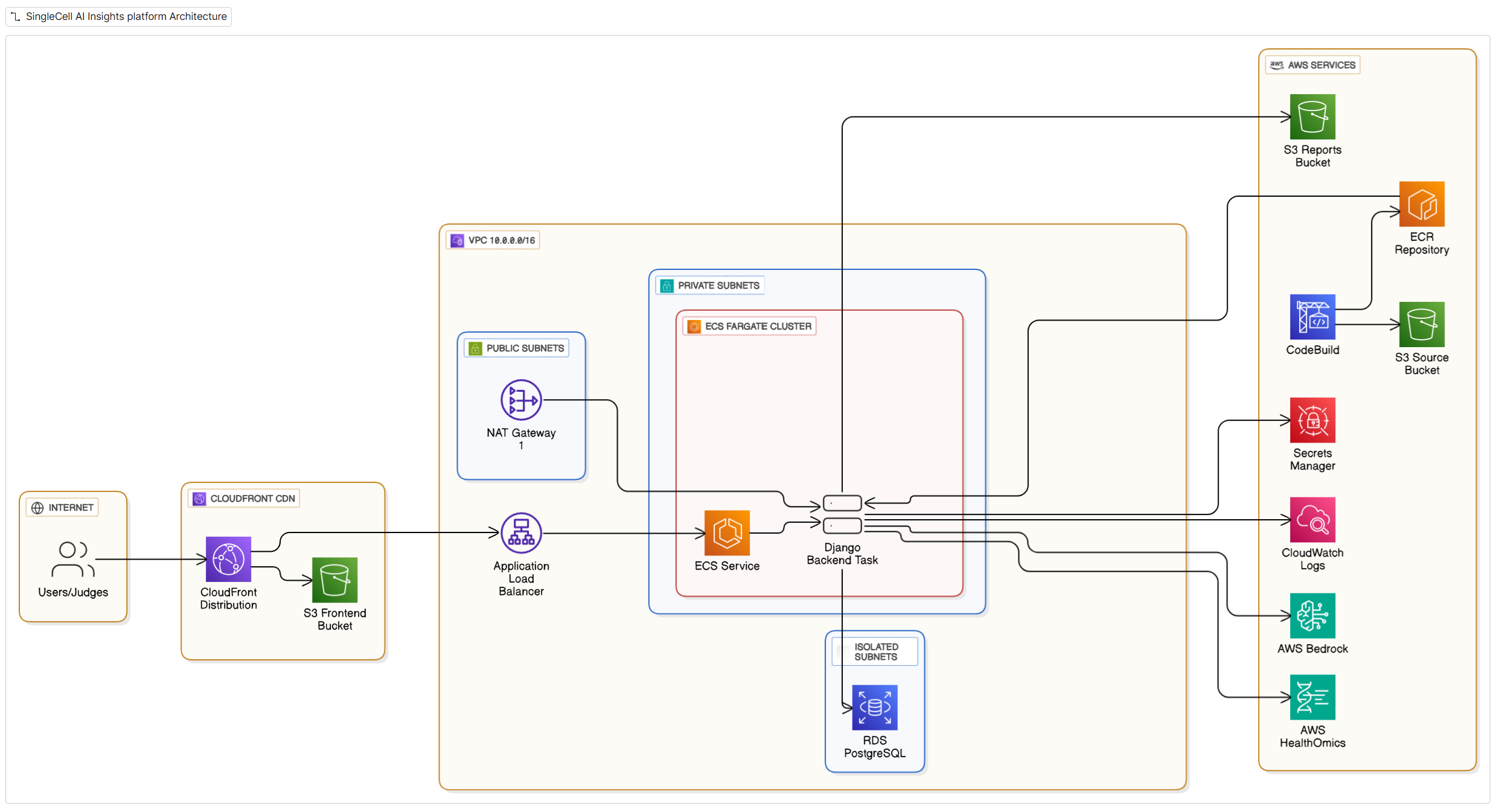
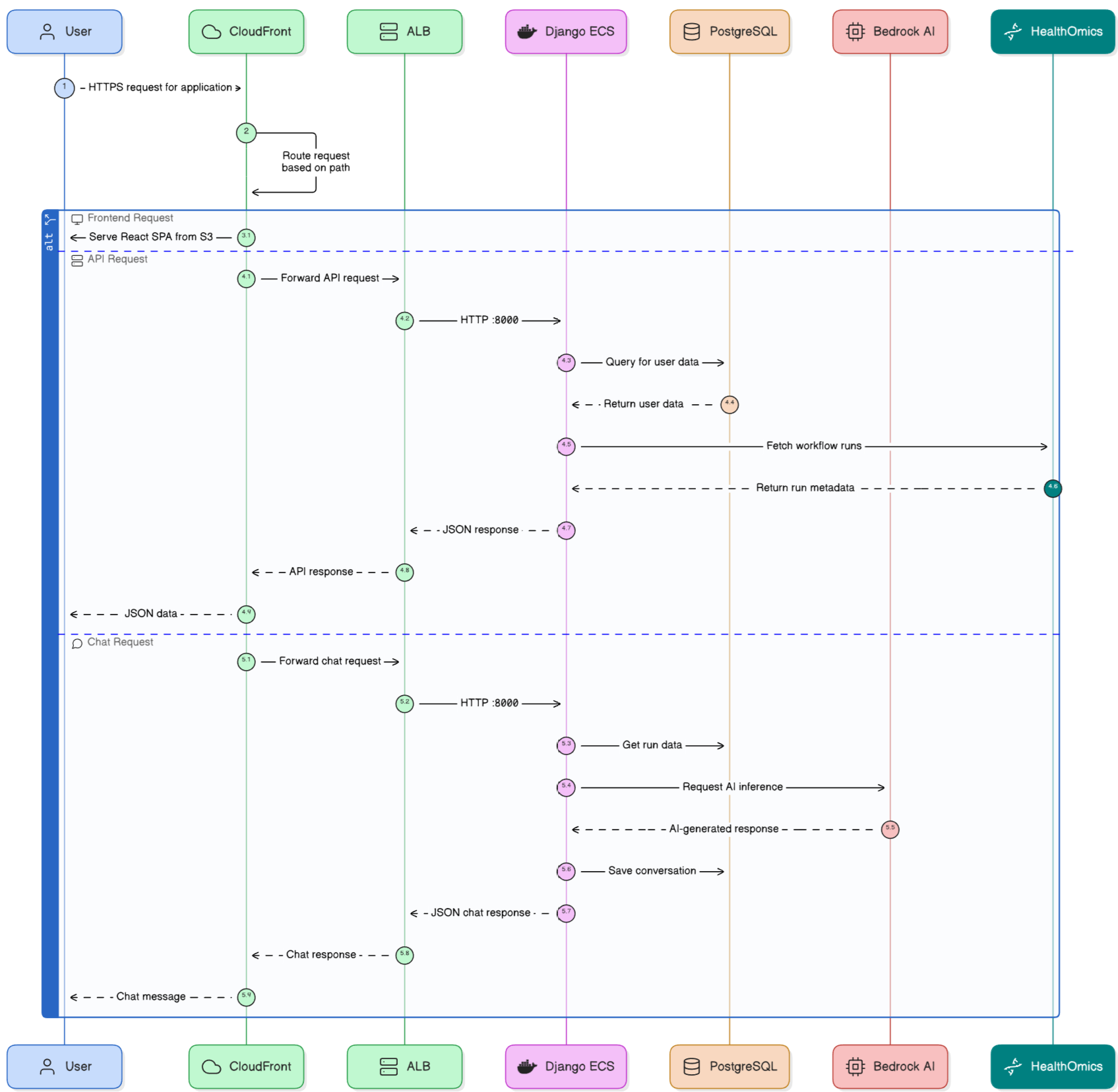
AWS Architecture diagram
-
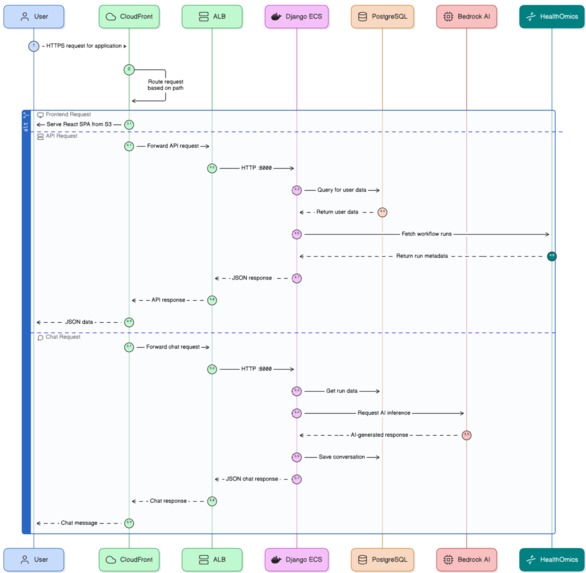
communication flowchart
-
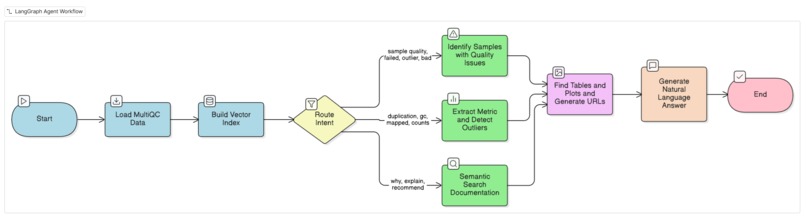
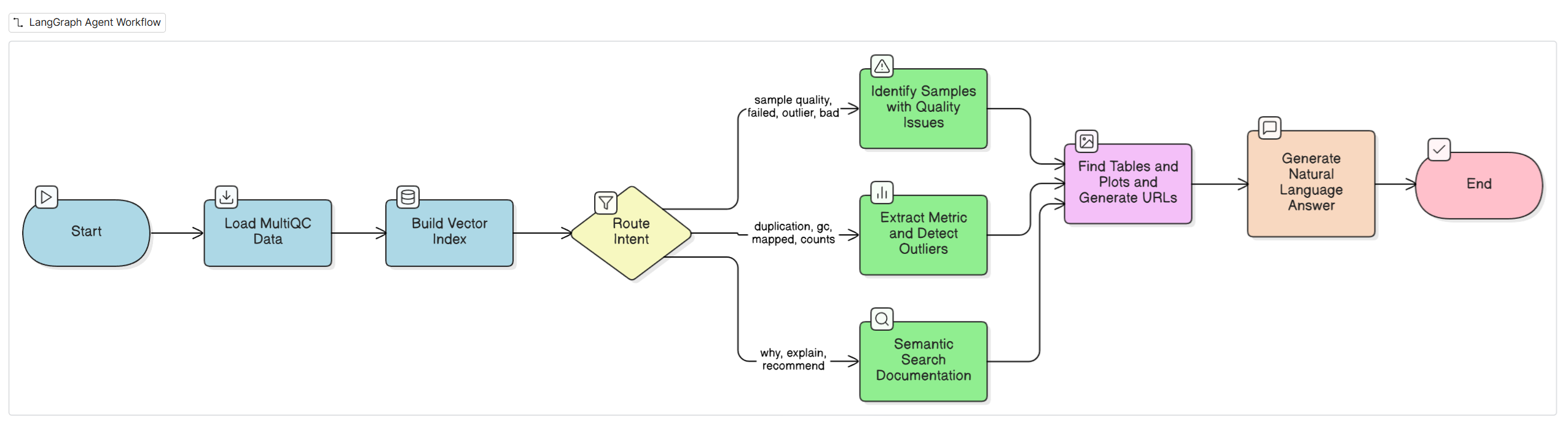
Langgraph flow
SingleCell AI Insights
Tagline: Platform for viewing AWS HealthOmics workflow runs and analyzing genomic QC reports through natural language conversation with an AI agent
Inspiration
I'm a tech lead at a bioinformatics company. Our scientists spend hours manually analyzing MultiQC quality control reports—hundreds of metrics across dozens of samples. Questions like "Which samples failed?" or "Why is this duplication rate high?" require deep expertise and tedious manual inspection.
The key realization: MultiQC outputs are highly structured and consistent across workflows. Every report has the same JSON format, same metric names, same documentation structure. This makes them perfect for AI assistance—the agent doesn't need to understand arbitrary data formats, it can learn the MultiQC schema once and apply it everywhere.
I wanted to learn about agentic AI workflows, and this hackathon was the perfect opportunity to build something practical: an AI agent that lets researchers ask questions about their data in plain English.
What it does
MVP Scope
For this hackathon, I focused on building a complete end-to-end AI analysis platform with deliberate architectural trade-offs for rapid development:
Data: Three manually-executed AWS HealthOmics Ready2Run workflows (single-cell RNA-seq) — two successful, one purposely failed to demonstrate both scenarios.
Architecture Choices:
- Agent embedded in Django - Not a separate microservice (simpler deployment, tighter coupling)
- In-memory FAISS - Vector index rebuilt per request (no persistent vector DB like Pinecone)
- Hybrid routing - Keyword-based question routing, but LLM-based artifact selection for intelligent plot/table curation
- Single pipeline type - nf-core/scrnaseq only (not generalized for arbitrary workflows)
- Analysis-only - No pipeline triggering, monitoring, or parameter configuration
These choices enabled rapid iteration but would need rearchitecting for production scale (persistent vector store, separate agent service, LLM-based routing, multi-pipeline support).
AI Agent Workflow
You ask questions about your genomic quality control data in natural language. The agent:
- Loads MultiQC reports from AWS HealthOmics workflows
- Analyzes using LangGraph workflow:
- Routes questions to specialized nodes (sample lookup, metric comparison, or RAG)
- Calculates statistics and detects outliers
- Retrieves relevant documentation via FAISS vector search
- Uses LLM to intelligently select relevant plots and tables based on the question
- Links to selected MultiQC artifacts with presigned S3 URLs
- Interprets results and suggests next steps for scientists
- Responds with natural language answers using LLM
Example questions:
- "Which samples have quality issues?"
- "Show me duplication rates across all samples"
- "Why does sample X have low mapping rates?"
The agent streams progress in real-time, maintains conversation history, and provides downloadable artifacts.
How I built it
Stack: React 19 + TypeScript (frontend), Django + LangGraph (backend), AWS CDK (infrastructure), AWS HealthOmics, AWS Bedrock (Claude Sonnet 4 + Titan Embeddings)
Agent Workflow (LangGraph)
I built an 8-node directed graph:
- load_multiqc - Downloads MultiQC JSON from S3
- ensure_index - Builds FAISS vector index from documentation panels
- route_intent - Routes to one of three analysis strategies (keyword-based):
- lookup_samples - Identifies samples with quality issues
- lookup_metric - Extracts specific metrics with outlier detection
- rag - Semantic search over MultiQC documentation
- make_table - LLM models selects relevant tables, generates presigned S3 URLs
- plot_metric - LLM models selects relevant plots, generates presigned S3 URLs
- synthesize - LLM models generates natural language answer
All nodes flow through the same path (make_table → plot_metric → synthesize), but the analysis node determines what data gets passed forward. The agent links to existing MultiQC artifacts rather than generating new ones.
Why LangGraph? Traditional RAG is stateless. Quality analysis needs multi-step reasoning with state accumulation across nodes.
Frontend
Modern React 19 stack with real-time streaming UX:
- Server-Sent Events - Stream agent progress updates as each LangGraph node executes
- shadcn/ui + Radix - Accessible component primitives (dialogs, dropdowns, tooltips)
- TailwindCSS 4 - Utility-first styling with custom design tokens
- React Query - Server state caching and automatic background refetching
- JWT Authentication - httpOnly cookies for secure token storage (no localStorage)
- React Router 7 - Type-safe routing with protected route wrappers
- Lucide Icons - Consistent iconography throughout the UI
Infrastructure
AWS CDK deploys:
- VPC with 3-tier subnets (public/private/isolated)
- CloudFront (routes
/to S3,/api/*to ALB) - ECS Fargate (Django backend, auto-scales 1-4 tasks)
- RDS PostgreSQL (conversation history)
- S3 Frontend Bucket (React app)
- CodeBuild for Django deployment
- ECR for Django container
- Secrets Manager for sensitive data
- CloudWatch for logging
One-command deployment: ./stack_upgrade.py --infrastructure --backend --frontend
Challenges I ran into
LangGraph state management: Took me a while to understand how state flows between nodes. Early nodes would add data, but later nodes couldn't access it. Fixed by using explicit state updates instead of relying on automatic merging.
Selecting relevant artifacts: MultiQC reports contain 9 plots and 7 tables. The agent needs to pick the right ones based on the question. Initially tried keyword matching, but switched to LLM-based selection where the model intelligently chooses which artifacts to show. This provides much smarter curation but required careful retry logic to handle AWS Bedrock rate limits (2 LLM calls per question instead of 1).
Learning AWS CDK: I've set up AWS infrastructure before using CloudFormation templates, but this was my first time using CDK. The Python-based approach is more flexible, but came with a learning curve—reading docs to understand this IaC language.
MultiQC data variability: Different workflows produce different structures. Built a normalization layer to handle missing keys and flatten nested metrics.
Accomplishments that I'm proud of
Built my first agentic AI system: The LangGraph workflow works end-to-end. It performs multi-step reasoning, autonomous decision-making, and tool integration.
Deployed on real AWS infrastructure: Not just a local prototype. Zero-downtime deployments, auto-scaling, proper security (isolated subnets, Secrets Manager). One-command deployment automation.
Streaming UX: Users see progress as the agent works ("Loading data..." → "Building index..." → "Analyzing..."). Makes the AI feel less like a black box.
Solves a real problem: Bioinformatics teams spend hours on manual QC analysis. This agent interprets metrics, detects outliers, and explains issues in natural language—turning what used to take 30+ minutes of manual inspection into a 30-second conversation.
What I learned
Agentic AI is different: It's not about chaining prompts. It's about orchestrating specialized functions that collaborate. LangGraph's graph-based approach with conditional edges was key.
Production-grade from the start: I built the full platform capabilities locally first, then invested in proper AWS infrastructure. This forced me to think about deployment, security, and scalability early—not as an afterthought. The result is a genuinely production-ready system, not just a demo that "works on my machine."
Streaming UX matters: The agent takes 10-15 seconds to respond, but users don't complain because they see progress. Transparency > speed.
AWS Bedrock works well: No API key management (IAM roles), low latency (~2-3s), regional deployment. For AWS-native apps, it's simpler than external APIs.
What's next for SingleCell AI Insights
I'm planning to demo this MVP within my company to collect feedback and figure out next steps. We have an existing pipeline platform where the AI agent can get built into and scaled.
Better agent capabilities:
- Persistent vector store (Pinecone/Weaviate) instead of in-memory FAISS
- LLM-based intent classification instead of keyword matching
- Expanded knowledge base (nf-core docs, best practices, troubleshooting)
- Support for more output types (VCF files, alignment stats, variant calling)
- Guardrails and output validation
Enterprise features:
- Custom quality thresholds per workflow type
- Batch analysis across multiple runs
- LIMS integration for sample metadata
- PDF export for compliance
Advanced AI:
- Automated troubleshooting (suggest parameter adjustments)
- Cross-study analysis (patterns across hundreds of runs)
- Multi-pipeline support (rnaseq, atacseq, chipseq, sarek)
- Pipeline triggering capabilities (launch HealthOmics workflows from UI)
Tech Stack
Frontend: React 19, TypeScript, Vite, TailwindCSS, shadcn/ui
Backend: Django 4.2, LangGraph, AWS Bedrock (Claude Sonnet 4 + Titan Embeddings)
Infrastructure: AWS CDK, ECS Fargate, RDS PostgreSQL, CloudFront, S3
Deployment: One-command: ./stack_upgrade.py --infrastructure --backend --frontend
Built With
- bedrock
- django
- healthomics
- javascript
- lambda
- python

Log in or sign up for Devpost to join the conversation.