AI Agent Host
The AI Agent Host is a module-based environment designed to facilitate rapid experimentation and testing. It includes a docker-compose configuration with QuestDB, Grafana, and Code-Server. The AI Agent Host provides a seamless interface for managing and querying data, visualizing results, and coding in real-time.
Features
QuestDB: QuestDB is a high-performance, open-source time-series database. It allows for efficient storage and querying of time-series data, making it ideal for working with real-time data streams.
Grafana: Grafana is a popular open-source platform for data visualization and monitoring. It provides a rich set of features for creating interactive dashboards and visualizing data from various sources.
Code-Server: Code-Server is a web-based IDE based on Visual Studio Code. It provides a familiar coding environment with features such as code completion, syntax highlighting, and debugging capabilities.
Getting Started
To use the AI Agent Host, follow these steps:
Set up or use an existing environment with Docker installed.
Clone the AI Agent Host repository and navigate to the docker directory.
git clone https://github.com/BouarfaMahi/AI-Agent-Host.git
cd AI-Agent-Host/docker
- Launch the AI Agent Host using the provided docker-compose configuration.
docker-compose up -d
- Once the services are up and running, you can access the AI Agent Host interfaces:
- QuestDB: Visit https://questdb.domain.tld in your web browser.
- Grafana: Visit https://grafana.domain.tld in your web browser.
- Code-Server: Visit https://vscode.domain.tld in your web browser.
- To connect the AI Agent Host to a remote JupyterHub environment from Code-Server:
Set up or use an existing remote JupyterHub that includes the necessary dependencies for working with your notebooks and data.
Connect to the remote JupyterHub environment from within the Code-Server interface provided by the AI Agent Host
Start working with your notebooks and data, using the pre-installed tools and libraries that are included in your remote environment.
AI Agent Host Architecture Diagram
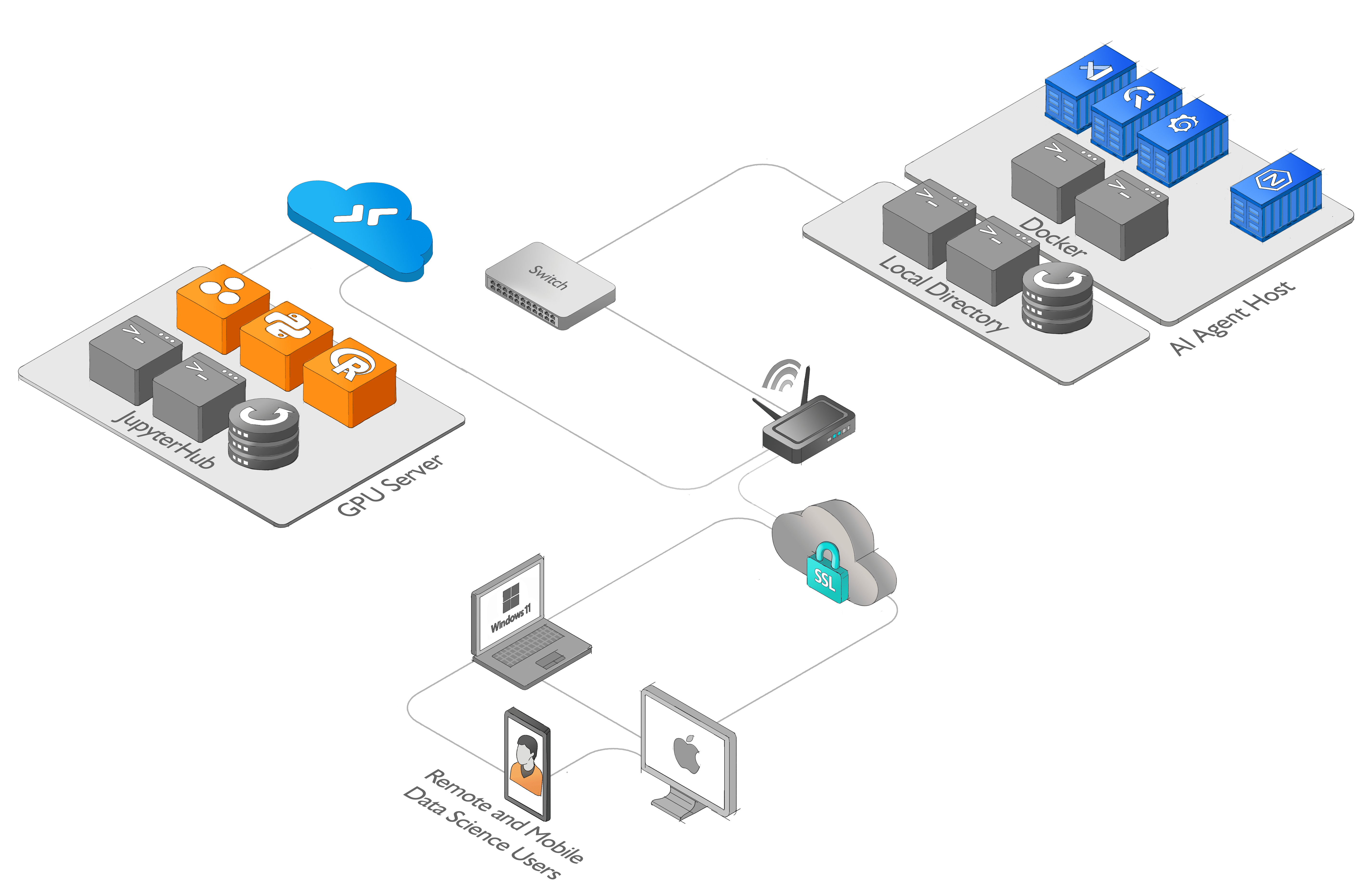
:pencil: High resolution diagram Application architecture diagram
Built With
- code-server
- dockerfile
- grafana
- jupyter-notebook
- jupyterhub
- questdb

Log in or sign up for Devpost to join the conversation.