Inspiration
The American Cancer Society tells people to plan before hair loss: "If you are able to plan ahead, there are a few steps you can take to fit and match your wig before you lose your hair," and "Take photos of your current hairstyle." The window is short. ACS says hair loss "usually starts about 2 to 3 weeks after the first cycle."
Hair loss affects about 65% of patients treated for cancer, and a review of 36 articles found it "was consistently ranked as one of the most distressing side effects of cancer treatment" (PubMed 26594010). Brows go too. In a Mayo Clinic registry of 838 people with breast cancer, "Eyebrow loss was reported by 89% of chemotherapy recipients" (PubMed 39366882).
Wig try-on already exists. Perfect Corp and Nao-Art launched medical-wig try-on in Japan (2024). Ahead fixes the step before it: you can only match what you saved.
What it does
Ahead has four steps.
- Capture. You take or upload one photo, face and shoulders, with your hair down and brows visible.
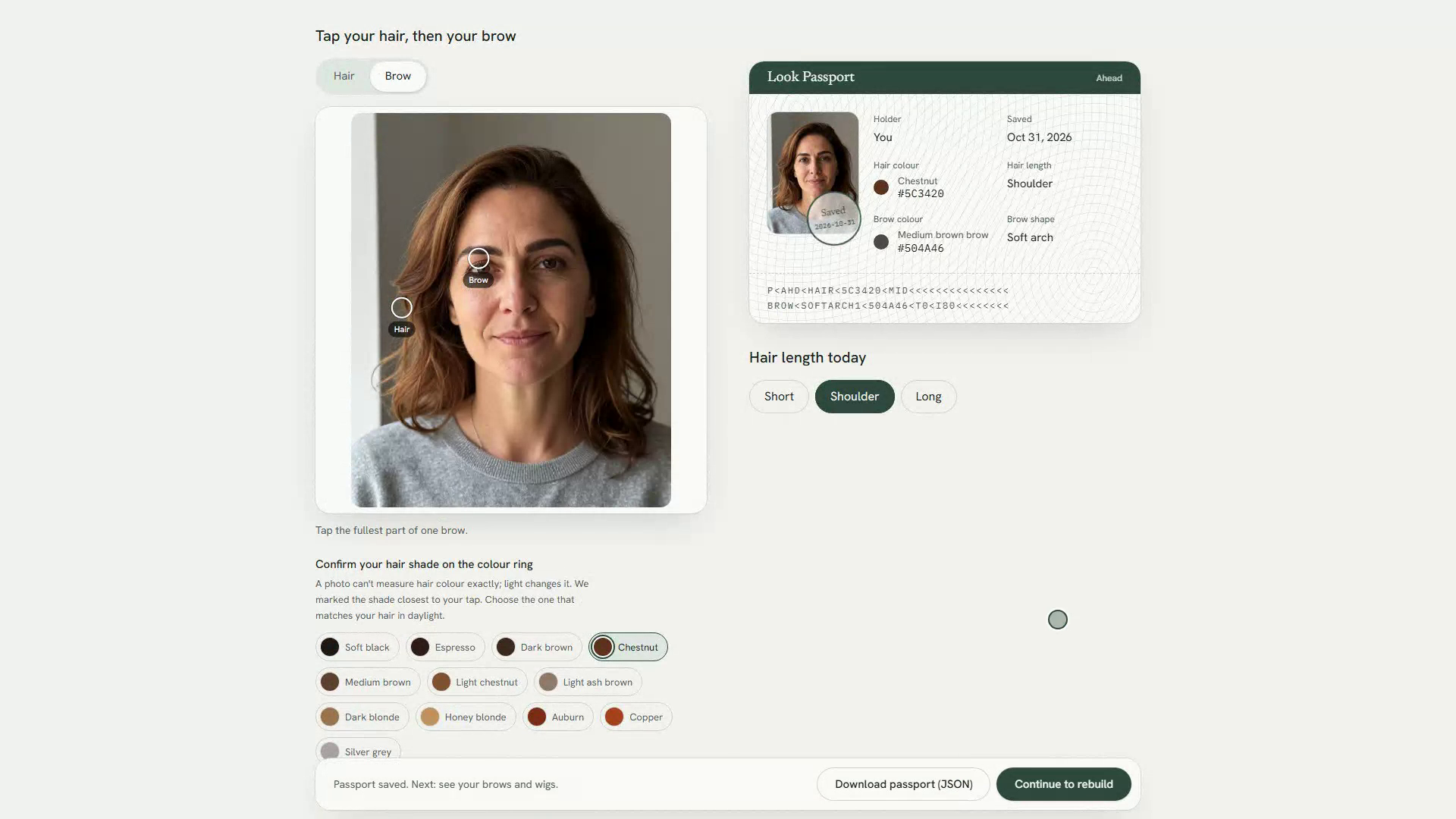
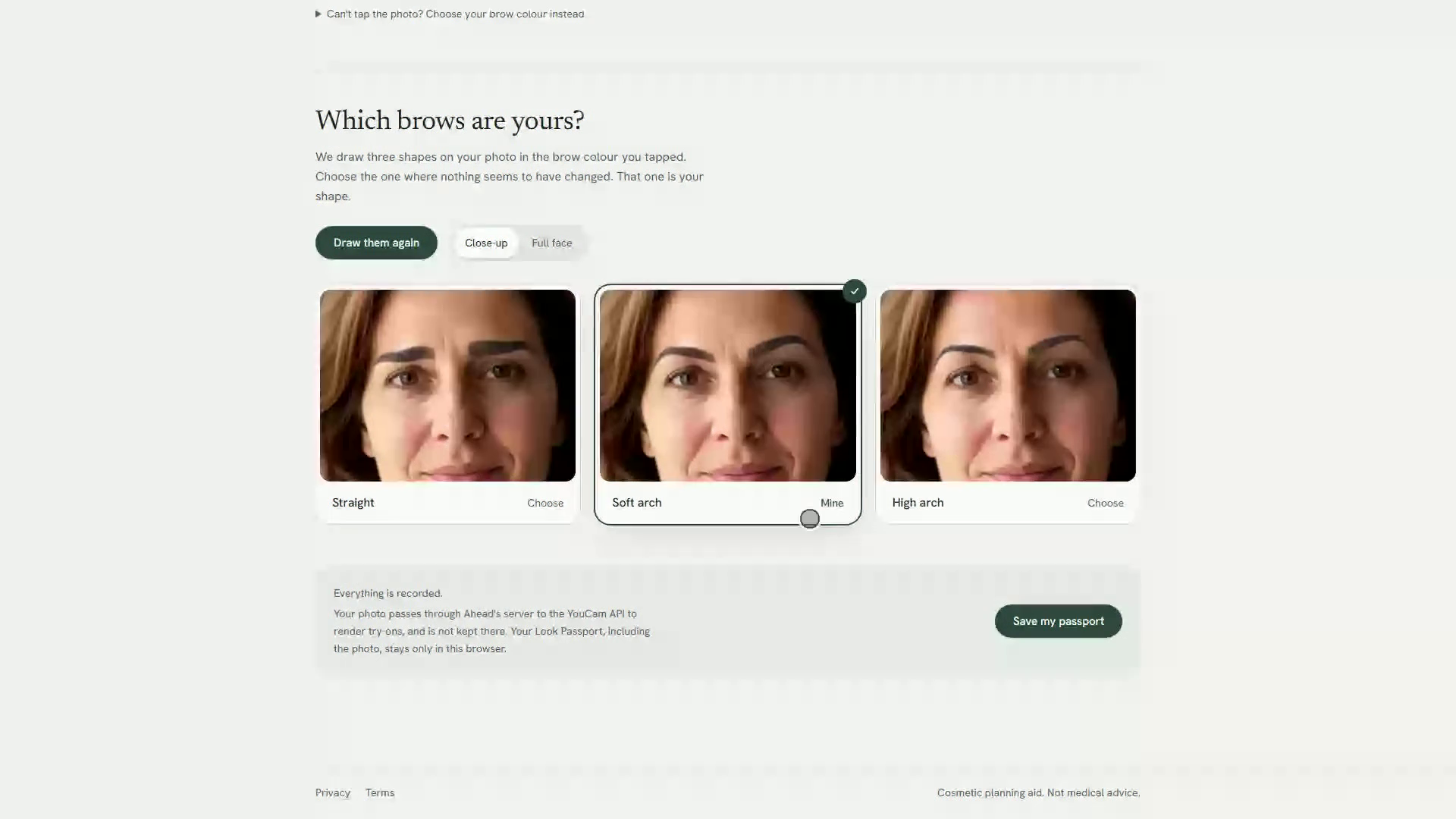
- Look Passport. You tap your hair and your brow on the photo. The brow tap records a colour. The hair tap suggests a shade on Ahead's colour ring, and you confirm the shade yourself. You choose short, shoulder or long. Then Ahead draws three brow shapes on your face in your brow colour, and you pick the one that looks unchanged. The passport is saved in your browser and can be downloaded as JSON.
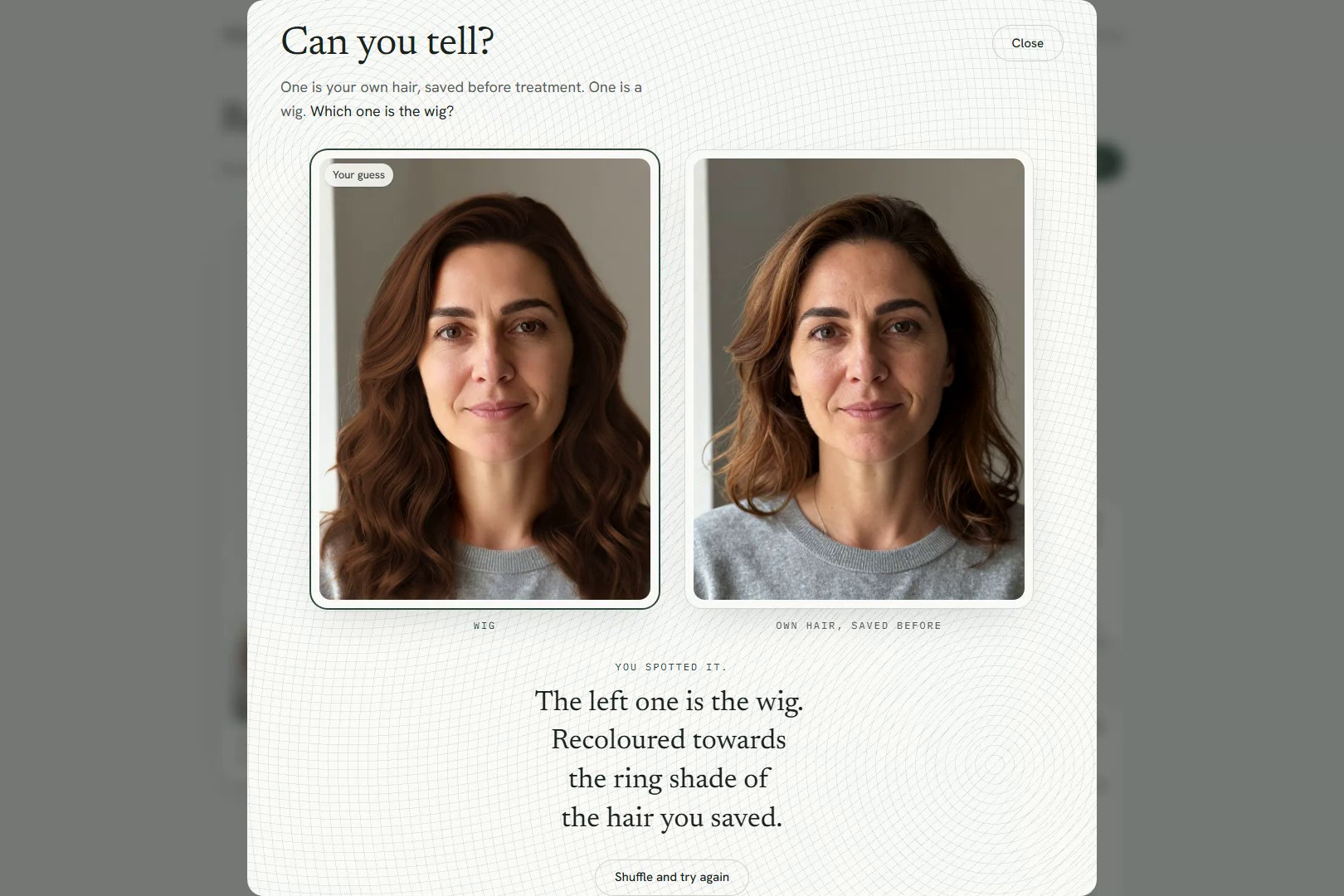
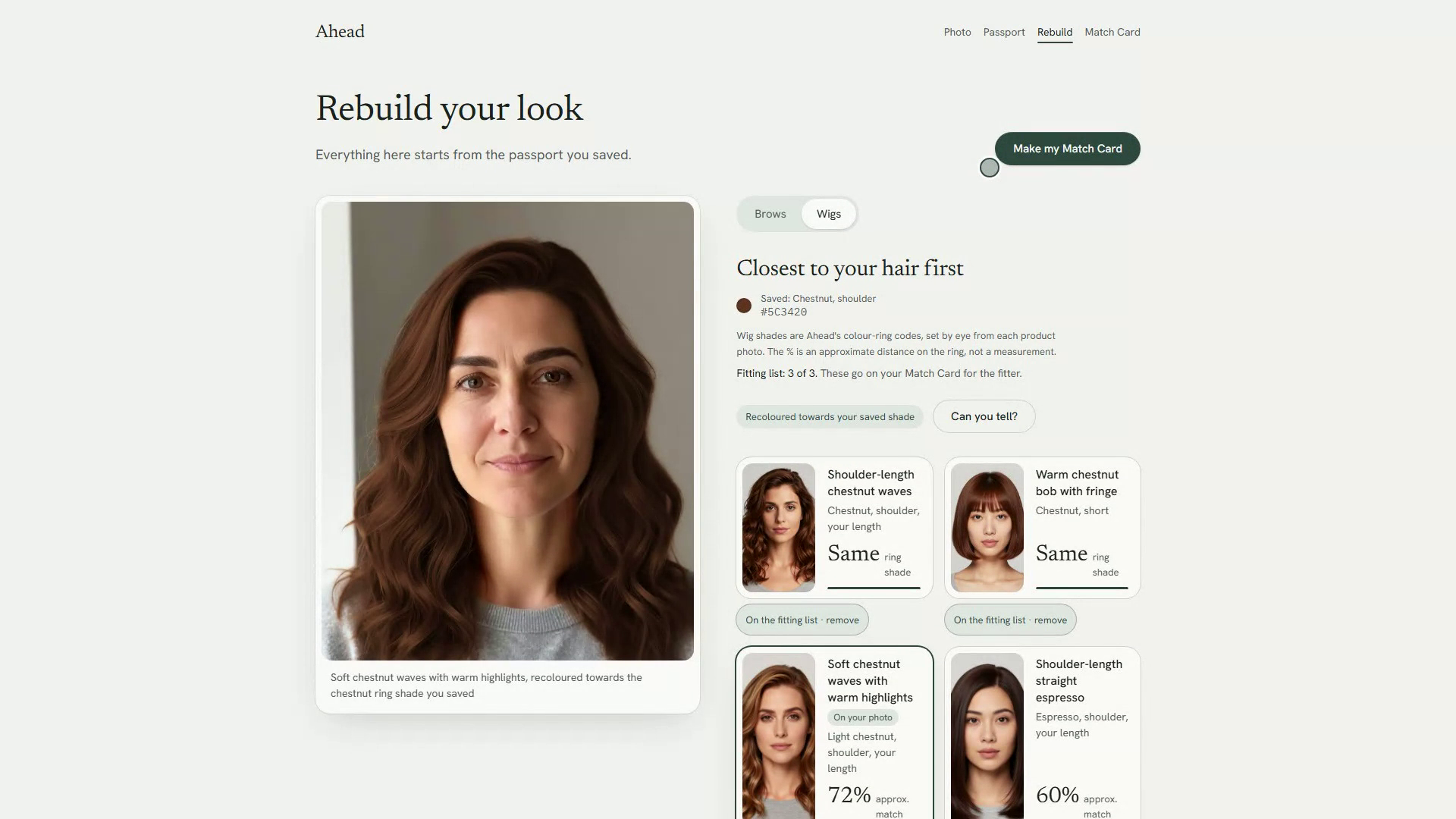
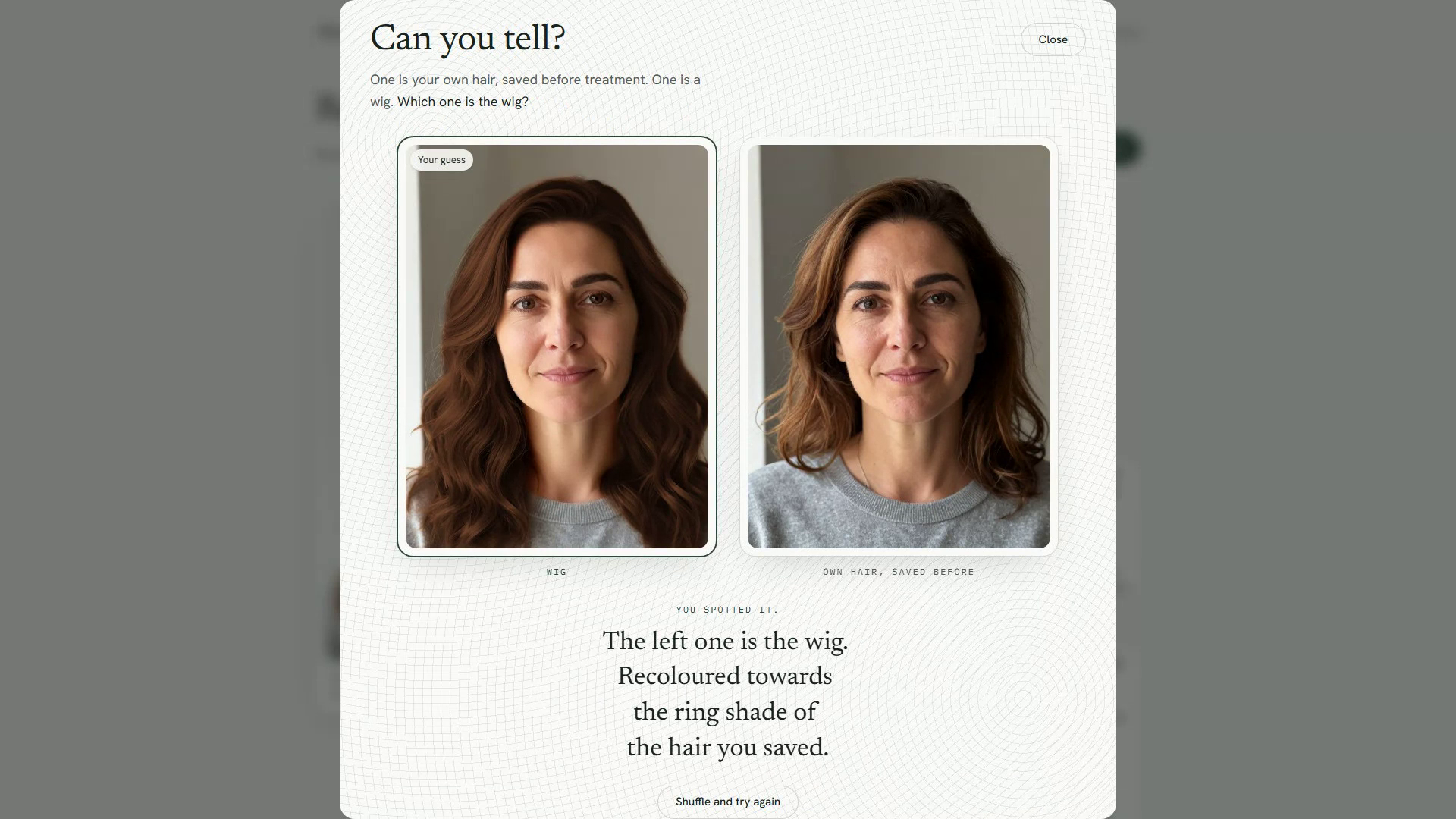
- Rebuild. Later, the Brows tab redraws your saved brow recipe on your photo, or on top of a wig you are trying. The Wigs tab ranks the catalogue by colour distance from the shade you saved, shows a match percentage on every card, and renders the wig you tap on your own face. "See it in my saved shade" recolours that wig to your ring shade with YouCam Hair Color. You can shortlist up to three wigs on a fitting list. A "Can you tell?" view puts your original photo and the wig render side by side before revealing which is which.
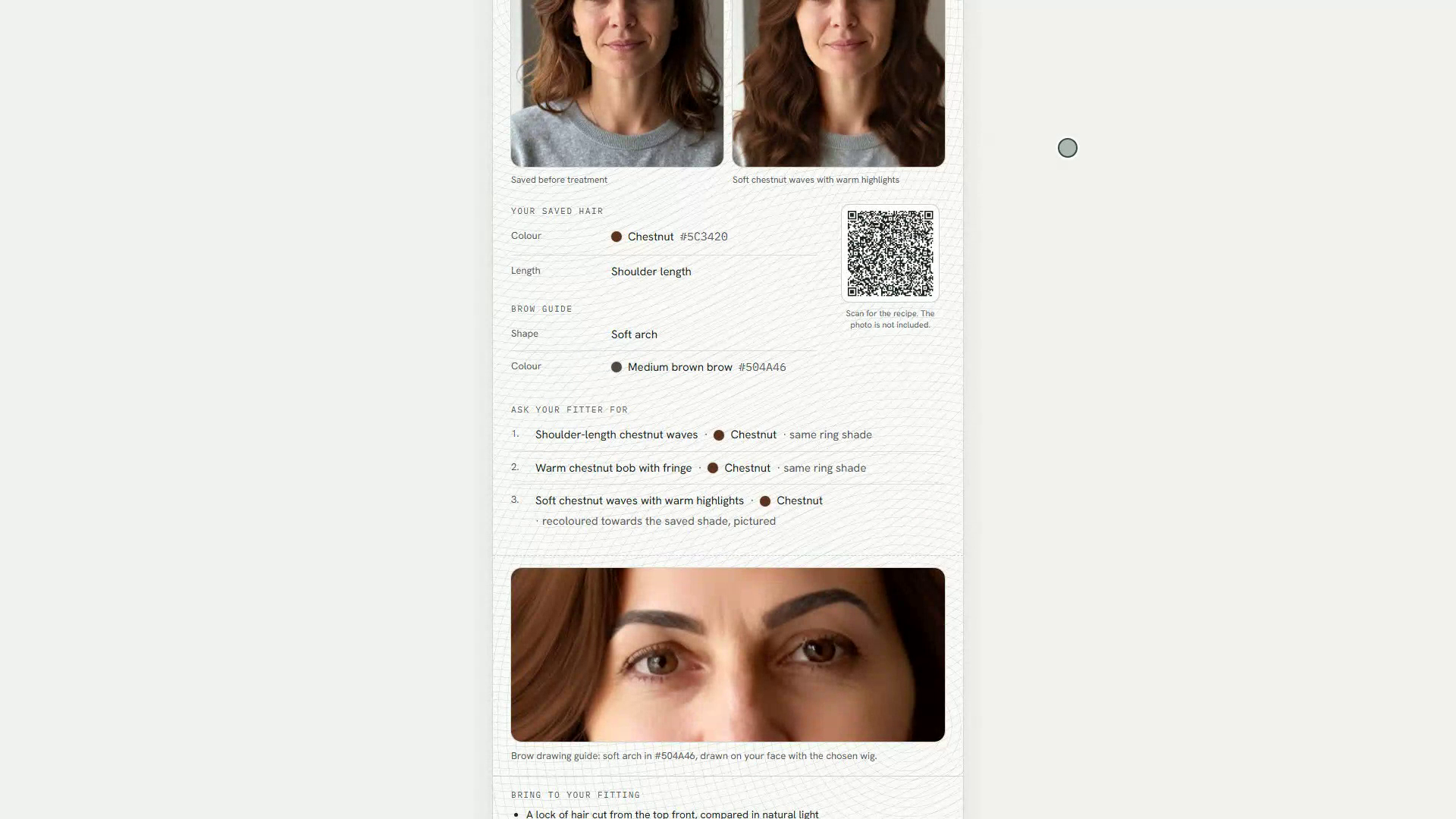
- Match Card. A printable card with your photo, the chosen wig render, your hair shade, length and match percentage, an "Ask your fitter for" list of your shortlisted wigs in ring-match order, your brow shape and colour as a drawing guide, and a QR code holding the passport recipe and the shortlist (without the photo). A "Bring to your fitting" box repeats the American Cancer Society's advice: a lock of hair cut from the top front, compared in natural light; photos of your current hairstyle; and asking your doctor for a "cranial prosthesis" prescription, which some insurers cover. You hand it to a wig fitter or brow artist.
Consumer and eCommerce value. The intended value is a wig shop that starts from a record of the shopper's own hair, not from memory. Wigs are sorted by how close they are to the saved shade, so the shopper sees likely matches first and tries them on her own face. The fitting list is a brand-neutral shopping list: shade, length and style in ranked order, which any fitter can map to their own stock. The Match Card gives the fitter that list, the shade, length and brow recipe in one place. Ahead shows no prices: its wigs are AI-generated references, and price and stock belong to the fitter. The goal is fewer mismatched wig purchases. We have not measured that outcome. In the US, insurance may also help with the cost: ACS advises asking whether your plan covers "cranial prostheses for medical hair loss."
How we built it
Ahead is a Next.js 16 App Router app with React 19, Tailwind v4 and TypeScript, deployed on Vercel. It uses three YouCam APIs and the File API.
- File API (
POST /s2s/v2.0/fileplus a presigned PUT). The selfie is uploaded once, and its file id is reused for every try-on in the session. If the id has expired, the client uploads again once before asking the person for a new photo. - Makeup VTO, eyebrows category (
POST /s2s/v2.0/task/makeup-vto). It draws three brow presets (straight, soft arch, high arch) in the tapped brow colour, and later redraws the saved recipe. - AI Hairstyle VTO, hair transfer (
POST /s2s/v2.1/task/hair-transfer). It renders each wig reference image on the person's face. - AI Hair Color, full mode (
POST /s2s/v2.0/task/hair-color). It recolours the chosen wig render to the ring shade the person saved. Most wigs are sold in several shades, so this shows the style in her own colour.
Render chaining. Each result URL is passed as src_file_url to the next try-on: wig, then Hair Color, then eyebrows, so brows are drawn on the full look. The server accepts a chained source only when it is a YouCam result URL on YouCam's result host, so nobody can push their own images through our API key.
Colour ring. Ahead has a 12-shade digital colour ring, ordered dark to light, then reds, then greys. Each of the 9 wigs has a ring shade assigned by eye, the way a retailer gives a colour code. Ranking uses CIE76 ΔE between the shade the person confirmed and each wig's shade, shown as a match percentage.
Spend caps and safeguards. The render route has a sliding 24-hour limit per client (8) and a global limit (12), sized so our remaining API units last through judging. Requests a client makes past its own limit don't count against the global one. When a cap trips, the app offers Maya's pre-rendered demo. Uploads are checked by magic bytes, not the MIME type the client sends, and decoded pixels are capped so a small file can't exhaust memory.
Privacy. Photos pass through Ahead's server to the YouCam API and are not stored there. The Look Passport lives only in the browser's localStorage. There are no accounts and no database.
Vitest covers the colour maths, the ring, passport parsing and the render client.
Challenges we ran into
A photo can't measure hair colour. We first matched wigs to the hex of the tapped pixels. In testing, two taps on the same wig photo read #5C391F and #C79766. One side-lit head ranked as ash blonde or soft black depending on where it was tapped. So we built the colour ring. A tap now only suggests a ring shade, the person confirms it, and matching runs from ring shade to ring shade.
File ids are base64. YouCam file ids are standard base64, so + and / are common. Our first validator only allowed word characters and rejected 6 of 8 real uploads in QA. We widened the pattern.
We cut hats. We planned headwear try-on as a third tab. The hat API returned a generated full-body fashion scene rather than a hat on the person's own head, which does not fit a tool about your own face. We removed it.
The demo had to be honest. Judges should be able to try Ahead without spending our API units. "See Maya's demo" runs the same UI on results we rendered beforehand with the real YouCam APIs, stored as static files. It is labelled "Pre-rendered demo · no live API calls" and makes no API calls.
Accomplishments that we're proud of
- Three YouCam APIs working as one look: the chosen wig recoloured to her saved shade, then her brows drawn on top.
- A matching method that admits what a photo can and can't tell you, then gives the person the final say on her shade.
- A Look Passport that reads like a real document page, and a Match Card that prints.
- Nothing in the app shows or simulates hair loss.
What we learned
Colour sampled from a phone photo moves with the lighting, more than we expected. ACS's own method for matching a wig is a physical lock of hair checked in daylight, so the colour Ahead saves is a starting point for the fitter, not a final answer. We also learned to check what an API returns before designing around it, which is how the hat tab ended.
What's next
- Replace by-eye ring shades with shades from a real retailer's colour codes, if a retailer will share them. A shop plugs in by swapping
lib/catalog.tsfor its stock, with its own price and SKU on each entry. - Test the flow with people preparing for treatment and with wig fitters. We have not done this yet.
Try it
Live app: https://ahead-beta.vercel.app
Demo video (2:55): https://youtu.be/6Oc-adC5VNA (also on Vimeo: https://vimeo.com/1241859352)
See Maya's demo makes no API calls. It runs the whole flow from pre-rendered results, so start there. Live try-on with your own photo is capped daily to keep it available until judging ends.
Limits and honesty
- Maya is an AI-generated persona, not a patient. Every face and wig image in the project is AI-generated.
- Wig ring shades are set by eye from product photos.
- Colour read from a photo is approximate. Bring a real lock of hair to the fitting.
- Ahead is a cosmetic planning aid. It is not medical advice.
Sources
- ACS, choosing and wearing a wig: https://www.cancer.org/cancer/managing-cancer/side-effects/hair-skin-nails/hair-loss/choosing-and-wearing-wig.html
- ACS, coping with hair loss: https://www.cancer.org/cancer/managing-cancer/side-effects/hair-skin-nails/hair-loss/coping-with-hair-loss.html
- Alopecia review: https://pubmed.ncbi.nlm.nih.gov/26594010/
- Eyebrow and eyelash loss, Mayo Breast Disease Registry: https://pubmed.ncbi.nlm.nih.gov/39366882/
- Perfect Corp and NAO-ART: https://www.perfectcorp.com/business/news/nao-art-partnership-perfect-corp
Built With
- hair-color
- hair-transfer
- makeup-vto
- nextjs
- perfect-corp
- qrcode
- react
- sharp
- tailwindcss
- typescript
- vercel
- vitest
- youcam-api

Log in or sign up for Devpost to join the conversation.